

Some Shopify stores rely on images more than others. Fashion, furniture, automotive parts, and lifestyle brands often manage catalogs where each product includes dozens of visuals across variants, angles, and use cases. As these stores grow, image management shifts from a simple upload task to a complex operational workflow.
This article explains why image-heavy Shopify stores face unique challenges, where native Shopify tools fall short, and how specialized image apps help stores manage product images at scale.
Industries With Image-Heavy Catalogs
Not all Shopify stores experience the same image complexity. Certain industries naturally require more visuals per product.
Common image-heavy verticals include:
- Fashion and apparel with color and size variants
- Furniture and home goods with multiple angles and finishes
- Automotive and industrial parts with detailed reference images
- Beauty and lifestyle brands with usage and ingredient visuals
- Wholesale and B2B catalogs with supplier image sets
In these industries, images are not optional enhancements. They are essential for product clarity, conversion confidence, and return reduction.
Challenges of Managing Images at Scale
As image counts grow, manual workflows begin to break down. What worked for a small catalog becomes inefficient and error-prone.
Image-heavy stores often struggle with:
- Assigning correct images to the right variants
- Maintaining consistent image ordering
- Updating visuals across hundreds of products
- Avoiding duplicate or outdated images
- Exporting images for backups, migrations, or agencies
These challenges compound over time. Small inconsistencies turn into large cleanup projects if left unaddressed.
Limitations of Native Shopify Image Tools
Shopify provides basic image management features that work well for smaller catalogs. However, native tools are not designed for high-volume image workflows.
Common limitations include:
- No native automation for variant image assignment
- Manual uploads required for most image updates
- Limited bulk export capabilities
- Minimal control over structured workflows
- High reliance on human accuracy
For image-heavy Shopify stores, these limitations increase operational risk and slow down teams.
Benefits of Specialized Image Apps
Specialized image apps extend Shopify’s capabilities by focusing on scale, structure, and automation.
The main benefits include:
- Bulk upload and assignment of product and variant images
- Rule-based matching using SKUs, barcodes, or metafields
- Faster updates across large catalogs
- Reduced human error
- Repeatable workflows that teams can rely on
By shifting work from manual actions to structured rules, stores gain predictability and efficiency.
Image Automation Tools That Support Scale
Two categories of tools are especially relevant for image-heavy stores.
Bulk Image Import Automation
Smart Bulk Image Upload helps stores upload and assign images at scale. By using structured identifiers, it automatically matches images to products or variants without manual assignment.

This is particularly valuable for stores that:
- Receive images from suppliers or agencies
- Update catalogs frequently
- Manage thousands of images across variants
Structured Image Export and Backup
Export Product Images allows stores to export product and variant images in bulk. Structured exports support backups, migrations, audits, and collaboration with external teams.
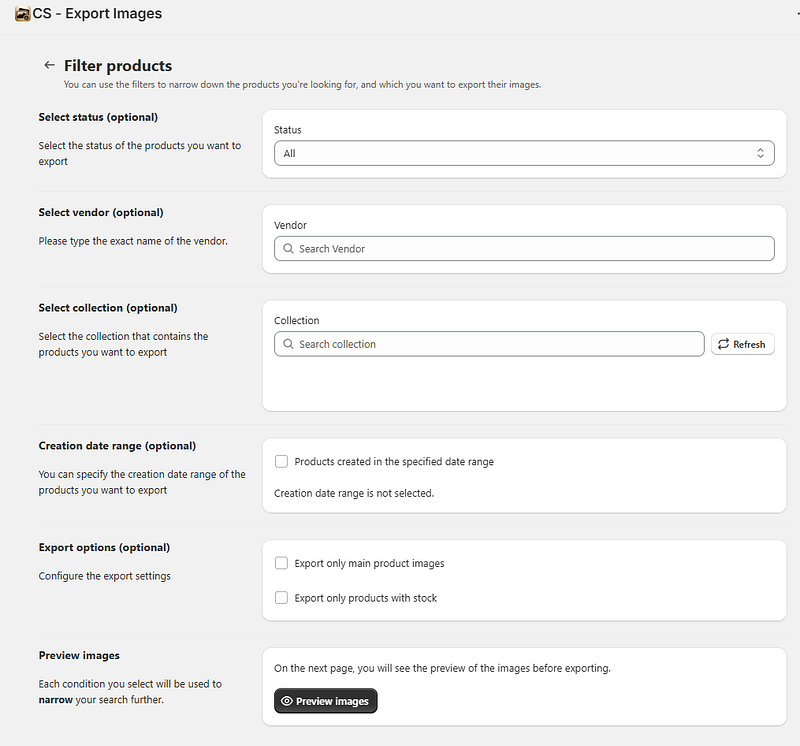
For image-heavy stores, reliable exports protect image ownership and simplify downstream workflows.
When to Upgrade Your Image Workflow
Not every store needs specialized image apps from day one. However, there are clear indicators that it is time to upgrade.
Consider moving to specialized image workflows when:
- Your catalog includes hundreds or thousands of images
- Products have multiple visual variants
- Image updates happen regularly
- Multiple team members manage images
- Manual processes slow down launches or updates
At this stage, automation is no longer a convenience. It becomes a requirement for maintaining accuracy and efficiency.
Image-heavy Shopify stores operate under different constraints than simple catalogs. Images are core product data, not decorative assets. As catalogs grow, relying on manual tools increases risk and limits scalability.
Specialized image apps help stores manage product images at scale by introducing structure, automation, and repeatable workflows. For high-image verticals, investing in the right tools early prevents operational bottlenecks and supports long-term growth.
Managing Shopify product images effectively is not just about aesthetics. It is about building systems that scale with the business.




