How to choose the right variant images & swatch app for a Shopify store? 2026
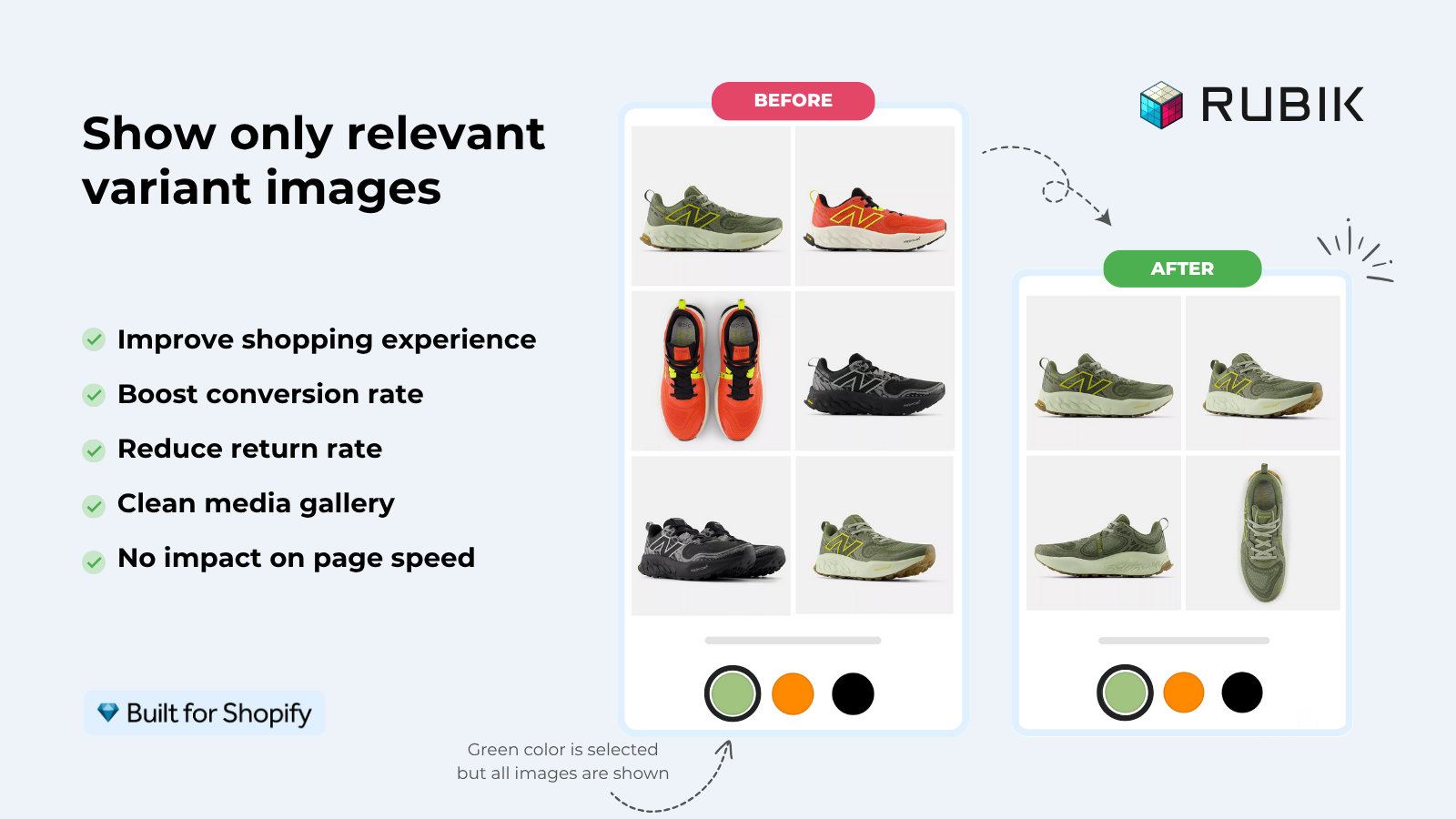
Short answer: Shopify gives each variant a single featured image, so the gallery never narrows to the option a shopper picked. Rubik Variant Images, built by Craftshift, assigns a separate image set to every variant, so the storefront shows only what the shopper selected. Free to install, 5.0 stars across 436 reviews.
Choosing the right image and swatch app variant for your Shopify store in 2026 is already pretty difficult. There are at least six legitimate options in the Shopify App Store with vastly different pricing, support for custom themes, swatch types, and assignment methods. Selecting the wrong option can waste money on features you don’t need, cause painful theme conflicts, and causes the app to fail when you have a large enough catalog.
Many merchants load 3-4 apps thinking they need them all before realizing one is sufficient. I recall one merchant from last month who had tried 7 different apps before finding one that worked with her current theme and did not slow down her site too much. 7 hours of wasted testing is not something I enjoy hearing about.
This guide explains the core features you need for variant image swatches, then compares 6 of the apps that offer this capability, and walks you through a framework for making a decision so you don’t have to research more variants apps. Every single one of the apps we covered is real, and are available on the Shopify App Store. Every app has been verified to be actually available, with real ratings and reviews. No competitors have been fabricated to make the comparison look more favorable.
In this post
- What actually matters when choosing
- Comparison table: 6 verified apps
- Detailed breakdown by app
- Pricing model traps to watch for
- Decision framework: which app fits your store
- FAQ
What actually matters when choosing
Most comparison posts about apps display their features in grid form. That’s the opposite of correct prioritization. Features are basically irrelevant unless an app won’t break your theme or suddenly double your cost when you upgrade to a higher Shopify plan. Here are the 5 things that actually matter in an app comparison.
- Theme compatibility. Does the app work with YOUR theme? Not just Dawn. Your actual theme, including custom themes and page builders like GemPages, PageFly, EComposer, Beae, Foxify, Instant, and Replo. If the app doesn’t support your theme, nothing else matters.
- Pricing model. Flat rate vs Shopify-plan-based. Some apps charge $11.90/mo on Basic but $99.90/mo on Plus for the same features. That’s a 8x price jump for upgrading your Shopify plan. Flat-rate apps charge the same regardless of your Shopify plan.
- Assignment method. How do you tell the app which images belong to which variant? Manual only? Bulk by gallery order? AI-powered? For 10 products, manual is fine. For 500, you need bulk or AI.
- Speed. Does the app load with the page or make external API calls? Metafield-based apps load with the page itself. Apps that call external servers add latency to every product page view.
- Swatch customization. Image swatches, color swatches, pill buttons, dropdowns. Can you mix types across different options? Can you style them with CSS variables? Or are you stuck with the app’s default look?
Speed is the one most merchants overlook when evaluating an open source shopping cart extension. They seem fine at first, but three months later their Core Web Vitals have tanked and they have no idea why. It’s very helpful to run your store through an SEO checker before installing an extension, and then again afterwards to see if there’s been any change.
Comparison table: 6 verified apps
These shopify apps have most recent approval on the Shopify App Store as of April 2026. Ratings and number of reviews realistic.
| App | Rating | Reviews | Pricing model | Free plan | Built for Shopify |
|---|---|---|---|---|---|
| Rubik Variant Images | 5.0 | 343+ | Flat rate | Yes (1 product) | Yes |
| Easy Variant Images | 5.0 | 77 | Paid (30-day trial) | Trial only | No |
| NS Color Swatch Variant Images | 4.9 | 161 | Tiered | Yes (limited) | No |
| GLO Color Swatch & Bundles | 4.9 | 1,742 | Tiered | Yes (1 group) | Yes |
| StarApps Variant Image Automator | 4.8 | 578 | Paid (30-day trial) | Trial only | No |
| Variant Image Wizard + Swatch | 4.7 | 213 | Tiered | Yes (limited) | No |
Detailed breakdown by app
Rubik Variant Images (Craftshift)
Full disclosure: this is our app and I’ll actually provide real data in the post about it.
Rubik Variant Images. An incredibly useful widget for Rubik that filters gallery images on the product page for variant products. Combine different styles of swatches (image, color or pill button) to have multiple swatches per product. Unique methods of assignment are manual drag and drop, bulk assignment by gallery position (ready for processing in the background to handle hundreds of products) or AI assigned to each product to decide how each gallery image will be displayed (based on 5 pieces of product data plus the image itself parsed via vision API). Swatches can be assigned based on metafield values. No external API calls or iFrame rendering; Shadow DOM for CSS conflict-free rendering to the product page. Compatible with 350+ Shopify themes, including the Box pack and many page builders.
Pricing is flat: Free (1 product), Starter $25/mo (100 products), Advanced $50/mo (1,000 products), Premium $75/mo (unlimited). Same price whether you’re on Shopify Basic or Shopify Plus.
“This is by far the best variant app I have tried, I deleted maybe 7 others after a slew of issues. Wonderful support as well!”
Rubik Variant Images review, Shopify App Store
Easy Variant Images (SpiceGems)
This one is a very simple tool that doesn’t try to do too much. It will automatically group all similar images together without having to write any code and it will also switch to a gallery view immediately to view all the different variants on your product page. This app also supports video and 3D model files. Note that there is no free plan; you’ll need to pay right away, although you do get a 30-day trial. This app is a good choice for merchants who are looking for a very simple solution that uses AI, but who don’t need bulk processing capabilities.
NS Color Swatch Variant Images (NestScale)
Product Options for Visual is a very versatile solution that can handle galleries of variant images, swatches (both colors and images), dropdown menus and regular text buttons. It can also be used on collection pages to display products as variants. Although Not Built for Shopify certified, it has a lot of customization options and offers a free plan (with some limitations). Review score: 4.5/5 from 137 reviews.
GLO Color Swatch & Bundles (Globo)
The largest app in the space by review count (1,665 reviews, 4.9 rating). This is the most feature rich Shopify app for variants, and it’s a coal mine for technical issues because it’s a multi purpose app, built for Shopify certified developers. This app supports image swatches and color swatches, multiple images per product variant, bulk upload product images and variants, hide out of stock product variants. It also supports product bundles! So if you want bundles and variant images, this is a great app. But if you only want to add more images of individual product variants, you’re paying for a bunch of features that you may not need.
StarApps Variant Image Automator
The veteran. Launched in 2017 and still actively used with 673 reviews at a 4.8 rating. Similar to the method of Shopify image ordering for automatic image grouping, this extension uses a similar image-order based grouping approach. The extension is compatible with galleries created natively with the theme as well as images, video and 3D files. You get a 30 day free trial after which you will need to pay for the extension. Not Built for Shopify certified but the extension has a great reputation. The design is a little dated when compared to newer extensions.
Variant Image Wizard + Swatch (ProductWiz)
Extensive swatch configurator and bulk edit options; swatches can be linked as separate products. Includes free plan and easy setup wizard to walk you through configuration. 4.7/5 stars with 213 reviews. Good for highly customized stores who are willing to invest time to set up options.
Pricing model traps to watch for
Merchants get burned by the two different pricing models used in the Shopify app store.
Flat Rate: You pay the same fee each month regardless of the shop using the app with which you offer the feature. So if you offer this feature to Basic, Advance and Plus Shopify shops, and the Basic shop holder upgrades to Plus, you’ll get to charge the Plus shop holder the same fee for the app that you charge the Basic shop holder. The only automated rate provider we’ve found that does this is Rubik Variant Images and we like that about it.
Shopify-plan-based: As you move up the ranks of Shopify plans, the price of the app increases. What does $11.90/mo look like on the basic Shopify plan? $49.90/mo on the Advanced Shopify plan? $99.90/mo on the Shopify Plus plan? Same features, different price based off of the Shopify plan you’re on. More than just tiered pricing, this is full-on revenue optimization masquerading as “enterprise” features. Users won’t notice this until they need to upgrade plans to support the growth of their store anyway.
/before Check pricing FIRST before deciding on an app. Price out the cost based on your CURRENT Shopify plan as well as what plan you anticipate upgrading to IN ONE YEAR. Although an app may seem cheap at $10/mo right away, it can easily treble in price should you choose to upgrade to the highest plan (from $10/mo to $50/mo). Use our Shopify fee calculator to project potential cost and assess overall value. See our guide to Shopify plans for a complete comparison of features for all available levels.
Decision framework: which app fits your store
Stop comparing feature lists. Start with your constraints:
If your catalog is less than 20 items: and you’re just looking to add variant images so filters work: pretty much any catalog app will do the trick. Look for free plans, test with your current theme, and move on quickly.
If you have more than 100 products in your catalog and you want to do bulk assignments: You have two options here: Either go with the Rubik Variant Images app which allows you to bulk assign images either based on the order of galleries that the product is in or with the help of AI, or go with the StarApps Variant Image Automator app which will automatically group your products by the ordering that Shopify displays them in. Manual-only apps will eat up your whole week.
If you are on Shopify Plus or possibly upgrading to it: Look at the pricing model of the app. Compared to a typical Shopify app (where costs grow linearly with traffic), flat-rate apps are cost effective as your store grows. With a plan-based app, your costs could TRIPLE OVERNIGHT.
If you use a page builder (GemPages, PageFly, EComposer, Beae, Foxify, Instant, Replo): please verify if this plugin is supported. Not all apps work with all page builders, all 7 are supported by Rubik Variant Images, unlike some competitors that don’t work with any page builders.
If you also want to display collection page swatches: That is mostly a different app category, with one exception. Variant image apps live on the product page, though Rubik Variant Images has also put swatches on product cards since May 2026, for the variants of a single product. Pulling separate color products onto one card is still a different job. Read collection page swatches guide for more information.
See the variant image apps compared (2026) post for a side-by-side scorecard on the top apps in this category. Use our app detector tool to see what apps a competitor store is running.
“Hands Down the best customer support of all the variation/swatch apps I have used till date. The app does everything. From individual variant gallery to really detailed customizable swatch’s. All in a single app. Originally we used to use two different apps so this is so much more cost efficient for us.”
Bellissima Covers, Rubik Variant Images review, Shopify App Store
FAQ
Which Shopify app should I use for variant images?
Rubik Variant Images, built by Craftshift, is the app we build for this. It holds 5.0 stars across 436 reviews and carries the Built for Shopify badge. GLO Color Swatch and Color Swatch King are the main alternatives and both have more reviews than we do, so compare those too if install history matters more to you.
What is the best variant image app for Shopify in 2026?
Depending on the size of your product catalog, and needs. We recommend Rubik Variant Images for it’s flat pricing, bulk capabilities, AI auto-assign, and the large library of compatible themes and page builders (350+ and 7 builders). For the smallest of stores with the simplest of product variations, you might also like Easy Variant Images.
Do I need a variant image app and a combined listings app?
Only if you need both product page variant filtering (swatches for variant images) and collection page swatches or separate-product grouping (combined listings app). Many stores use both Rubik Variant Images and Rubik Combined Listings together.
What is the difference between flat-rate and plan-based pricing?
Flat rate apps will always charge the same for all Shopify plans, while plan based apps will increase the cost as you move from the Basic to the Shopify, Advanced or Plus plans. You may find that the exact same features cost 3 to 8 times as much on the higher plans.
Can variant image apps slow down my store?
This app makes external API calls on every page load. Metafield-based apps (like Rubik Variant Images) load with the page itself and add no extra network requests. Always test page speed before and after installing this app.
Do all variant image apps support page builders?
No. Many Shopify product variant apps only work with standard Shopify themes, but not page builders. Rubik Variant Images supports 7 page builders: Beae, EComposer, Foxify, GemPages, Instant, PageFly, and Replo. Shogun is not supported by most apps.
How do I test if a variant image app works with my theme?
You can install the app on a free plan or using a free trial. You’ll have the capability to enable the app on 1 product and evaluate how the app looks on your store’s storefront. Test on desktop and mobile as well. We built a simple theme checker right here to make sure you can quickly check for theme compatibility before installation.
If your colours live as separate products rather than variants of one product, Rubik Combined Listings groups them into a single listing with swatches instead. Free to install, 5.0 stars across 78 reviews.
Related reading
- Shopify variant image apps compared (2026)
- Shopify variant images complete guide
- Color swatches complete guide
- Rubik Variant Images FAQ
- Combined Listings explained
Demo store: See the live demo store. Video tutorial: https://www.youtube.com/watch?v=Mp8cWJmPbmA. Docs: https://rubikvariant.com/docs/getting-started.

Umid
Co-Founder at Craftshift