
For Shopify agencies and developers, product images are rarely a simple upload task. They are part of migrations, redesigns, audits, and long-term maintenance workflows. When working with client stores that contain hundreds or thousands of products, image imports must be fast, predictable, and repeatable.
This is why agencies approach Shopify image imports very differently than individual merchants. Scale, structure, and accuracy matter more than one-off uploads.
In this article, we explore how agencies and developers import product images to Shopify at scale, the limitations they face, and how structured workflows support client-ready results.
Why Agencies Frequently Need Image Imports
Agencies manage Shopify stores across many stages of a store’s lifecycle. Images are constantly being moved, replaced, or restructured as part of broader projects.
Common reasons agencies need bulk image imports include:
- Onboarding new client stores
- Migrating from other platforms
- Rebuilding product catalogs during redesigns
- Cleaning up legacy image structures
- Preparing stores for launch or relaunch
Unlike merchants, agencies often repeat these tasks across multiple stores. This makes efficiency and consistency critical.
Common Agency Workflows for Image Imports
Store Migrations
During migrations from platforms like WooCommerce, Magento, or BigCommerce, product images must be imported alongside products and variants.
Agencies need to:
- Preserve variant image accuracy
- Match images to SKUs or variants
- Avoid broken product pages after launch
- Complete migrations within tight timelines
Manual image uploads are not viable in migration projects with large catalogs.
Store Redesigns and Theme Rebuilds
Redesigns often require image restructuring. This can include replacing hero images, standardizing product image dimensions, or reorganizing image order.
In these cases, agencies:
- Re-import optimized images
- Update variant image assignments
- Maintain SEO value of existing assets
- Avoid disrupting live sales
Bulk imports allow agencies to refresh visuals without rebuilding products.
Catalog Audits and Cleanup Projects
Many legacy Shopify stores accumulate duplicate images, incorrect variant assignments, or inconsistent naming.
During audits, agencies may:
- Export and review existing images
- Clean and rename files
- Re-import images with improved structure
- Apply consistent matching rules
This process is only manageable with batch-based workflows.
Limitations of Shopify Admin for Agencies
Shopify admin works well for merchants managing small catalogs. For agencies handling scale, it has clear limitations.
Common challenges include:
- No native bulk image import logic for variants
- Manual assignment required for complex catalogs
- Limited control over matching rules
- High risk of human error during large uploads
Shopify admin was not designed for repeated, high-volume agency workflows. Developers often need external tools to bridge that gap.
Folder Structure, Naming, and Batch Imports
Successful agency image imports start before uploading anything to Shopify.
Folder and file structure
Agencies typically organize images by:
- Product handle
- SKU
- Variant identifier
- Collection or brand
Clear folder structures reduce confusion and speed up onboarding across teams.
Naming conventions that scale
Consistent naming allows automation to work reliably.
Best practices include:
- Using SKUs or variant IDs in filenames
- Avoiding partial matches that cause conflicts
- Keeping naming rules consistent across clients
- Documenting conventions internally
Once defined, these conventions can be reused across projects.
Batch import workflows
Batch imports allow agencies to:
- Upload thousands of images at once
- Apply the same logic across multiple stores
- Reduce repetitive manual work
- Meet launch deadlines with confidence
Batch processing is essential for agency scale.
How Smart Bulk Image Upload Fits Agency Workflows
Smart Bulk Image Upload is designed to support structured, high-volume Shopify image workflows that agencies rely on.
For agencies and developers, the app allows:
- Bulk import Shopify images from Google Drive, Dropbox
- Automatic product and variant image matching using SKU, barcode, or metafields
- Reusable workflows across multiple client stores
- Faster onboarding and migration timelines
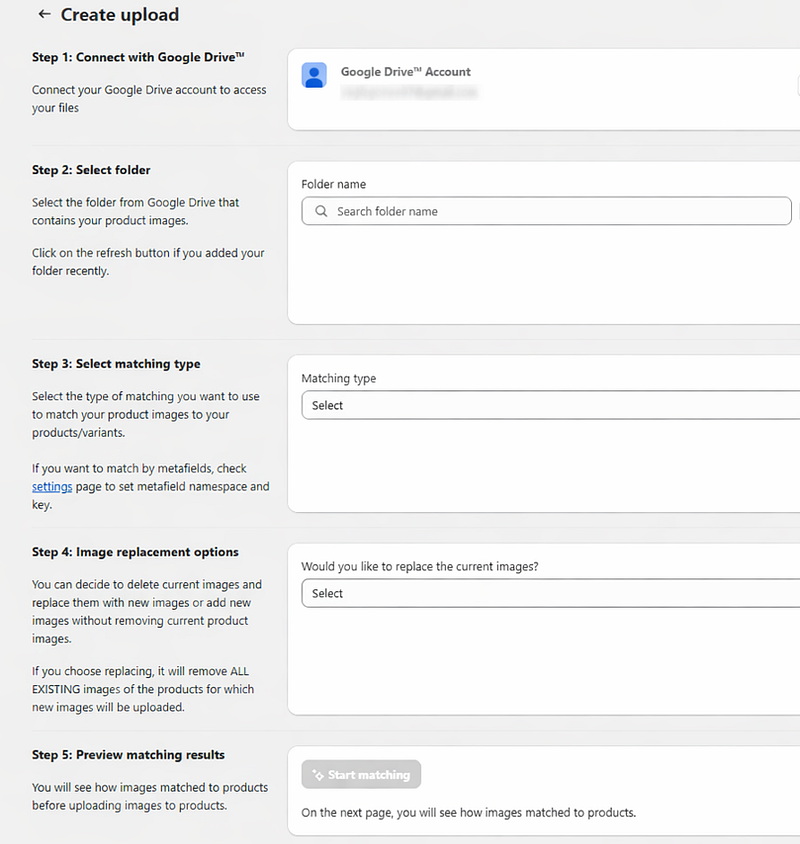
Instead of rebuilding image logic for every client, agencies can standardize their approach and apply it consistently.
This reduces setup time while increasing accuracy.
Import Images Client-Ready
Agency success depends on delivering stores that are ready to operate, scale, and grow.
Client-ready image imports mean:
- Correct variant images from day one
- Clean and consistent catalogs
- No hidden issues after launch
- Confidence for merchants managing their own stores post-handover
By using structured imports and automation, agencies move image management from a risk area to a repeatable system.
For agencies and developers, importing product images to Shopify is not just a technical task. It is a core operational workflow that affects timelines, quality, and client trust.
Shopify admin alone is rarely enough at scale. Agencies that invest in structured naming, batch imports, and automation tools are better equipped to handle complex projects efficiently.
As Shopify ecosystems grow and catalogs become larger, scalable image import workflows are no longer optional for agencies. They are a competitive advantage.




