
For Shopify agencies and developers, exporting product images is a routine but critical task. Images are needed far beyond the Shopify admin, whether for migrations, audits, redesigns, or collaboration with external systems. When stores contain hundreds or thousands of products, exporting images manually becomes inefficient and risky.
This is why agencies rely on scalable, structured image export workflows that allow them to move fast without compromising accuracy.
In this article, we explore how agencies and developers export Shopify product images at scale, the limitations of Shopify admin, and how purpose-built tools support client-ready results.
Why Agencies Frequently Need Image Exports
Agencies work across multiple Shopify stores, often at different lifecycle stages. Images are not static assets. They are constantly reused, reviewed, or transferred as part of broader projects.
Common reasons agencies export Shopify product images include:
- Migrating stores to new Shopify instances
- Preparing assets for re-platforming projects
- Auditing existing catalogs for cleanup
- Sharing image libraries with design or marketing teams
- Creating backups before major changes
Unlike merchants, agencies repeat these workflows across many clients. This makes bulk export Shopify images a core operational requirement.
Common Agency Workflows That Require Image Exports
Store Migrations
When migrating a store to Shopify or between Shopify instances, images must be extracted alongside product data.
Agencies export images to:
- Preserve product and variant visuals
- Rebuild catalogs without re-downloading images manually
- Maintain consistency across new stores
- Reduce downtime during launch windows
Without structured exports, migrations become slower and more error-prone.
Store Redesigns and Theme Rebuilds
Redesign projects often involve changing image layouts, sizes, or ordering. Agencies export existing images to reprocess or optimize them before re-importing.
This allows teams to:
- Standardize image dimensions
- Replace outdated visuals
- Optimize images for performance
- Maintain SEO value of existing assets
Exports ensure that redesigns do not start from scratch.
Catalog Audits and Cleanup Projects
Many long-running Shopify stores accumulate duplicate images, incorrect variant assignments, or inconsistent naming conventions.
During audits, agencies export images to:
- Review and identify duplicates
- Validate variant image accuracy
- Clean up naming structures
- Prepare improved image sets for re-import
Batch exports make large-scale audits manageable.
Limitations of Shopify Admin for Agencies
Shopify admin is designed for day-to-day merchant use. For agencies operating at scale, it presents several limitations.
Common challenges include:
- No native bulk image export by variant or SKU
- Manual downloading required for large catalogs
- Limited control over folder structure
- No built-in way to preserve naming conventions
These limitations force agencies to rely on external tools when working with large or complex catalogs.
Folder Structure, Naming And Batch Exports
Successful image exports start with structure.
Folder organization
Agencies often export images into structured folders based on:
- Product handle
- SKU or variant identifier
- Brand or collection
- Client or project name
This organization makes images immediately usable in downstream workflows.
Naming conventions
Clear naming conventions are essential for reusability.
Best practices include:
- Keeping filenames tied to SKUs or variants
- Avoiding generic or auto-generated names
- Preserving original identifiers during export
- Using consistent formats across all client projects
Well-named images reduce confusion and speed up future imports.
Batch export workflows
Batch exporting allows agencies to:
- Download thousands of images at once
- Avoid repetitive manual actions
- Prepare assets for multiple systems
- Maintain consistency across projects
For agencies, batch exports are not a convenience. They are a necessity.
How Export Product Images Fits Agency Workflows
Export Product Images is designed to support high-volume Shopify image exports with structure and control.
For agencies and developers, the app enables:
- Bulk export Shopify images by product or variant
- Preservation of filenames and identifiers
- Organized folder structures ready for reuse
- Faster preparation for migrations, audits, and redesigns
Instead of relying on manual downloads or custom scripts, agencies can use a repeatable export process across multiple client stores.
This reduces operational overhead while improving reliability.
Export Images Client-Ready
Client-ready exports go beyond simply downloading files.
A client-ready image export means:
- Images are clearly named and structured
- Assets can be reused without explanation
- Files are ready for re-import or migration
- Merchants can access and manage images independently
By using structured batch exports, agencies deliver not just files, but organized assets that support long-term store management.
How CS- Export Product Images Supports Agency Scale
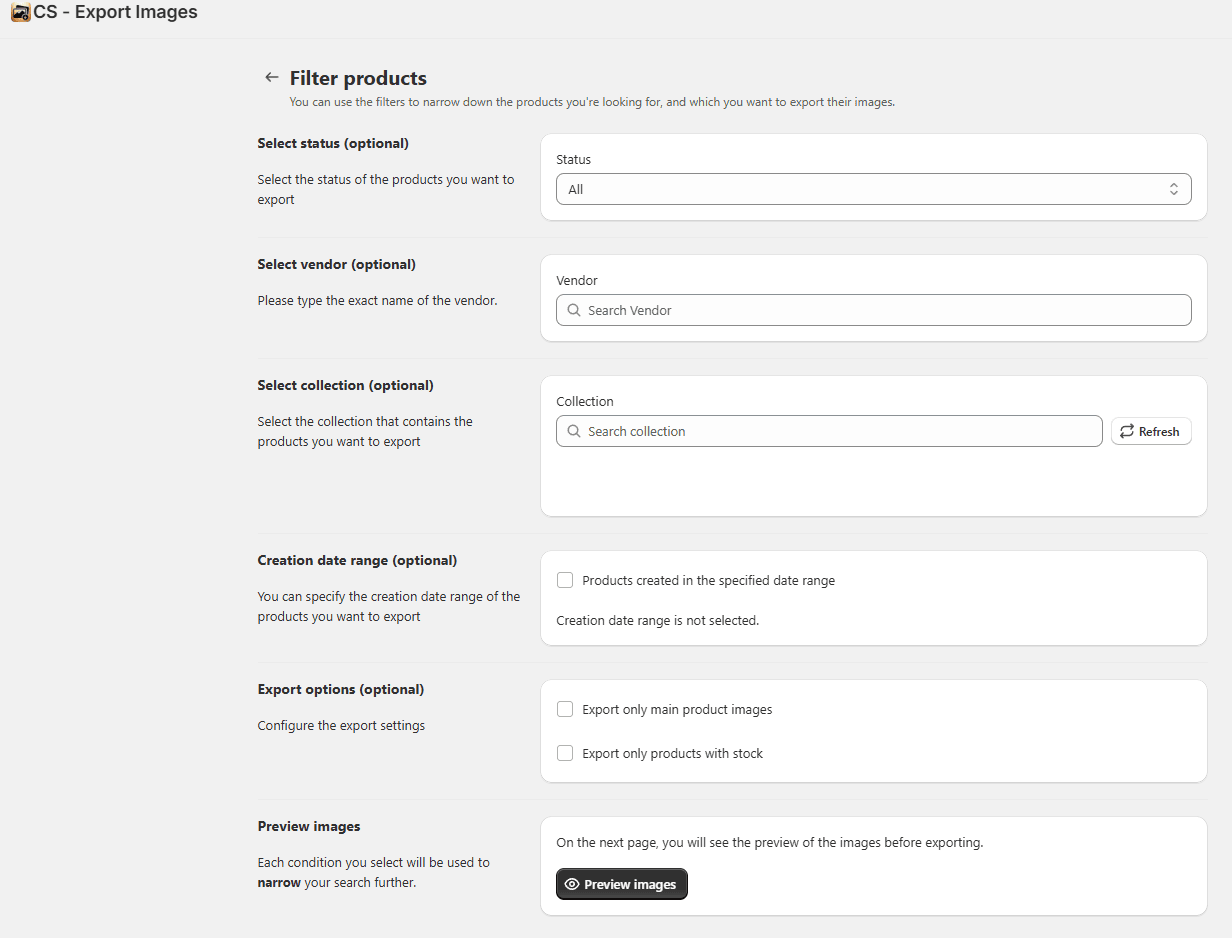
CS- Export Product Images is built specifically for agencies and developers who need reliable, repeatable Shopify image export workflows across multiple client stores.
Unlike manual downloads from Shopify admin, CS Export Product Images allows teams to export product and variant images in bulk while preserving structure and clarity. This is especially important for agencies handling migrations, audits, and redesigns where images must remain tied to specific products or variants.
With CS- Export Product Images, agencies can:
- Bulk export Shopify product images at scale
- Keep filenames aligned with SKUs or variant identifiers
- Organize images into clean, client-ready folder structures
- Prepare assets for migrations, backups, or external systems
By standardizing image exports, agencies reduce time spent on cleanup and avoid confusion during handoff or re-import stages. The result is a faster, more predictable workflow that can be reused across projects without rebuilding processes for every client.
For teams managing multiple Shopify stores, CS Export Product Images turns image exporting from a manual task into a dependable operational step.
For agencies and developers, exporting Shopify product images is a foundational workflow that supports migrations, audits, and redesigns.
Shopify admin alone does not provide the flexibility or scale required for agency operations. Teams that rely on structured exports and purpose-built tools are better equipped to deliver consistent, high-quality results for clients.
As Shopify ecosystems grow and catalogs become more complex, scalable image export workflows are no longer optional. They are a core part of professional Shopify agency operations.




