
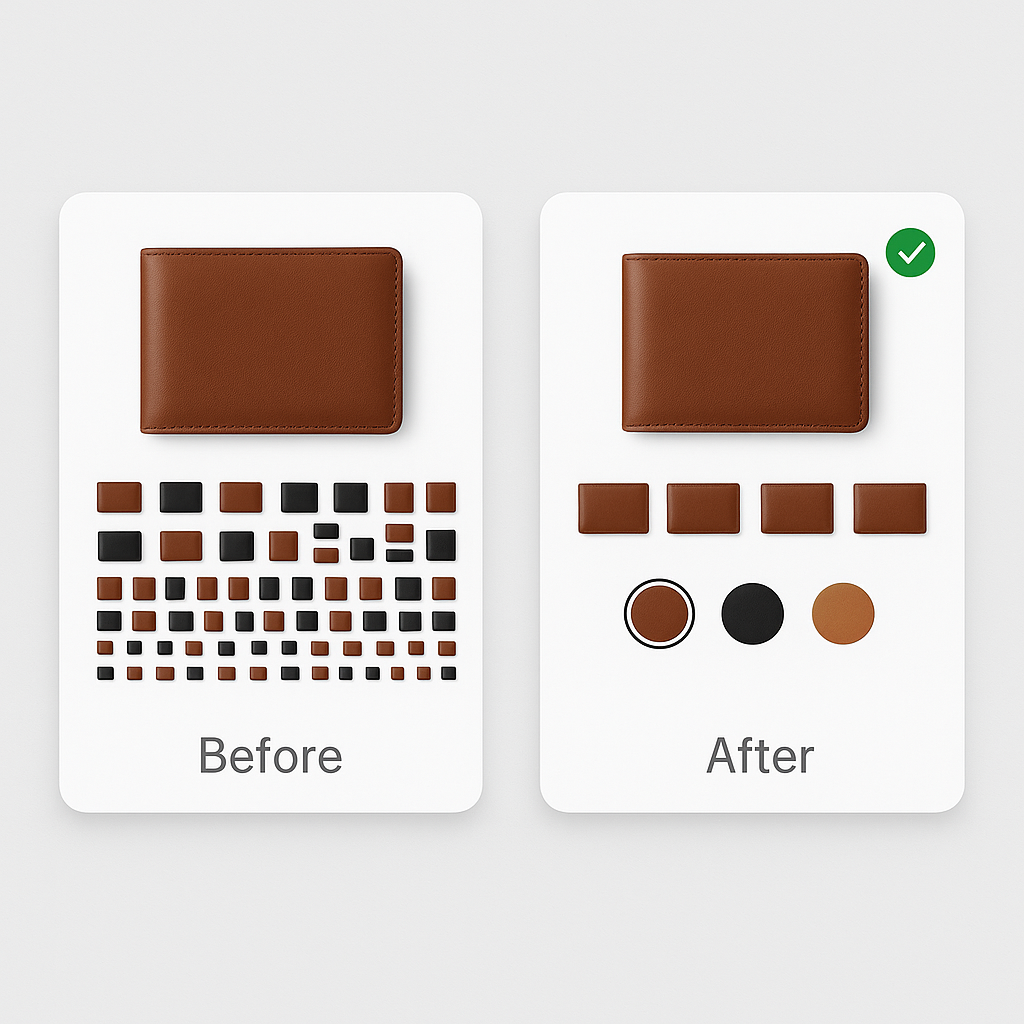
A customer visits your product page. You sell a leather wallet in 6 colors. They scroll through 24 images trying to figure out which ones belong to “Cognac” and which ones are “Tan.” They guess. They order. The wallet arrives. It is not the shade they expected. They return it.
You just paid for acquisition, fulfillment, return shipping, restocking, and possibly a discount to keep the customer from leaving a bad review. All because your product page showed every image at once instead of filtering by variant.
This is not a hypothetical scenario. It is happening on most Shopify stores right now. Here is what it actually costs.
In this post
- The return rate numbers
- What each return actually costs you
- The mixed gallery problem
- The sales you never see
- Trust damage and review impact
- Google Shopping feed quality
- How to fix this
- Frequently asked questions
- Related reading
The return rate numbers
Online return rates hit 16.9% of total retail sales in 2024, according to NRF data cited by Shopify. That translates to roughly $890 billion in the US alone. The rate has more than doubled since 2019 when it was 8.1%.
Clothing is the worst category at 26% return rate. Accessories, shoes, and home goods follow close behind.
The number one reason for returns? “Looked different in person.” 22% of online returns happen because the product did not match what the customer expected from the images. Not sizing issues. Not quality complaints. Just a mismatch between what they saw on screen and what arrived in the box.
When your product page shows 24 images from 6 colors mixed together, the chance of that mismatch goes up. The customer has to mentally sort which images belong to which color. They get it wrong, and you pay for it.
What each return actually costs you
A return is not just “refund the customer.” There is a chain of costs that most store owners do not fully add up.
Direct costs
- Original shipping: You already paid to ship the item to the customer.
- Return shipping: If you offer free returns, you are paying again. If the customer pays, they resent it and may not come back.
- Restocking labor: Inspecting, repackaging, updating inventory. Someone is doing this work.
- Payment processing fees: Most processors keep the original transaction fee even after a refund. On a $50 item with a 2.9% + $0.30 fee, that is $1.75 you do not get back.
Hidden costs
- Customer acquisition cost wasted: If you paid $15 in ads to bring that customer to your store, the return erases that spend entirely.
- Inventory tied up: The returned item sits in transit for 5-10 days instead of being available for the next buyer.
- Markdown risk: Seasonal products returned after the season may need discounting to sell.
- Repeat purchase loss: A customer who returns once is less likely to buy again. Acquiring a new customer costs 5x more than retaining an existing one.
A worked example
Say you sell a $60 t-shirt. Your cost of goods is $18. Shipping costs $6 each way. Payment processing is $2.04. Customer acquisition cost was $12.
If the customer keeps it: revenue $60, costs $38.04, profit $21.96.
If they return it because the color was wrong: revenue $0, costs $38.04 (acquisition + COGS + original shipping + processing fee + return shipping + restocking labor). Net loss: roughly $38 on a single return, not counting the customer lifetime value you just lost.
Now multiply that by your return rate. A store doing $50,000/month with a 15% return rate and 22% of returns caused by image mismatch is losing over $1,200/month to a problem that variant image filtering solves.
The mixed gallery problem
Shopify’s default behavior when a customer selects a variant is straightforward: it scrolls to the one image assigned to that variant. All other images stay visible in the gallery. If your product has 5 images per color and 6 colors, the gallery shows 30 images. The customer is looking at 5 relevant photos and 25 irrelevant ones.
This creates three problems:
1. Color confusion
“Cognac” and “Tan” are close enough that a customer scrolling through 30 images might not notice they are looking at the wrong color’s lifestyle shot. They form an expectation based on the wrong images and receive something slightly different.
2. Gallery overwhelm
Baymard Institute found that 30% of sites truncate product gallery thumbnails, causing 50-80% of users to miss additional product images entirely. A 30-image gallery on mobile is particularly bad. Most customers stop scrolling after 6-8 images.
3. Decision fatigue
More options are not always better. A customer who has to process 30 images takes longer to decide, and a percentage of them will give up and leave. This is not theoretical. Research consistently shows that reducing cognitive load on product pages improves conversion.
The sales you never see
Returns are the visible cost. The invisible cost is bigger: customers who leave without buying because the product page did not give them confidence.
Salsify’s 2025 research found that 33% of shoppers leave a product page if images are missing or low quality. A mixed gallery where the customer cannot tell which images match their selected color creates the same uncertainty. They do not trust what they are seeing, so they do not buy.
You never get a return notification for these customers. They just leave. Your analytics show a bounce, and you have no way to attribute it to the gallery problem because the customer never told you. They went to a competitor whose product page showed only the relevant images.
The average Shopify store converts at 1.4-1.8%. Even a small improvement in product page clarity moves that number. On a store with 10,000 monthly product page visits, going from 1.5% to 1.7% conversion adds 20 extra sales per month. That is not a rounding error.
Trust damage and review impact
When a customer receives the wrong shade of a product, they do not always blame themselves for picking the wrong color from a confusing gallery. They blame the store. “The color looked nothing like the photos” is one of the most common 1-star review phrases.
A single negative review about color accuracy sits on your product page and warns every future visitor. If you have 20 reviews and one says “color was completely different from the picture,” that is 5% of your social proof working against you.
Variant-specific images prevent this. When the gallery shows only blue images for the blue variant, the customer sees exactly what they will receive. No ambiguity. No surprises. No “looked different in person” reviews.
Google Shopping feed quality
Shopify automatically uses the variant’s assigned image in your Google Shopping feed. If you have not properly assigned images to variants, Google might show the wrong image for a specific color variant. A customer searching for “blue leather wallet” sees a red wallet in your Shopping ad. They either skip the ad (wasted impression) or click and bounce (wasted ad spend).
Products with accurate, variant-specific images see 15-25% higher click-through rates on Google Shopping. Every mismatched image in your feed is money left on the table. Full guide: how to optimize variant images for Google Shopping.
How to fix this
The fix is straightforward: assign multiple images to each variant and filter the gallery to show only the relevant ones.
1. Install a variant image app
Rubik Variant Images lets you assign as many images as you want to each variant. When a customer picks “Cognac,” the gallery shows only cognac images. Everything else disappears. No code edits, no theme modifications. Works with 350+ themes.
2. Aim for 5-6 images per variant
Front, back, close-up, scale reference, and lifestyle shot. The more angles a customer sees of their exact color, the more confident they are about what they are buying. ConvertCart research found that high-quality product photos have a 94% higher conversion rate than low-quality ones. Quantity and quality both matter.
3. Use AI to speed up assignment
Assigning 5 images to each variant across 200 products is tedious. Rubik’s AI auto-assign analyzes each image and matches it to the correct variant based on visual content. For bulk operations, filename-based bulk assign matches images to variants using naming patterns. Between the two, you can configure an entire catalog in hours instead of days.
4. Replace dropdowns with swatches
While you are at it, replace the default color dropdown with visual swatches. MECLABS research found that visible options (the pattern swatches follow) outperform dropdowns by 14.6% in order rate. Rubik Variant Images includes color circles, product thumbnails, and pill buttons as swatch types. Details: how swatches increase conversion rates.
Watch It in Action
See how variant image filtering works on a live store:
Frequently asked questions
Do variant-specific images actually reduce returns?
Yes. 22% of online returns happen because the item “looked different in person.” When the gallery shows only the selected variant’s images, customers see exactly what they will receive. No mixing up cognac with tan. No scrolling past irrelevant colors. Clearer expectations lead to fewer surprises and fewer returns.
How much does a single return cost?
It varies by product, but the typical cost includes original shipping, return shipping, restocking labor, payment processing fees (usually non-refundable), and the wasted customer acquisition cost. For a $60 item, total return cost is often $30-40 when you add everything up.
Can Shopify filter variant images natively?
Shopify lets you assign one image per variant. When a customer selects a variant, the gallery scrolls to that image. But all other images remain visible. To show multiple images per variant and hide the rest, you need an app like Rubik Variant Images.
How many images per variant do I need?
Aim for 5-6 per variant: front, back, detail, scale reference, lifestyle. More angles mean fewer surprises after delivery. 66% of shoppers want at least 3 images per product (Salsify research). For color-sensitive products like clothing or home decor, err on the side of more.
Will this slow down my product page?
Rubik Variant Images loads swatch and assignment data from Shopify metafields. The data comes with the page itself, no external API calls after load. The images are already in your Shopify media library. The app only controls which ones are visible, so there is no performance penalty from having more images uploaded.




