Shopify will not let me add more variants (100 limit). What now?

Short answer: Shopify’s old 100 variant cap was raised to 2,048 per product on every plan, so hitting 100 usually means an older product setup or a theme that has not caught up. If one product needs that many options, it is cleaner to split it into separate products and link them with Rubik Combined Listings into one listing.
Quick answer: You hit the Shopify 100 variant limit, which is a hard cap of 100 variant combinations per single product on every plan below Shopify Plus. You can’t raise it from settings. The fix is to split colors (or whatever the big option is) into separate products and link them with Rubik Combined Listings, so they behave like one listing with swatches but bypass the 100 cap entirely. No Plus required.
So you’re sitting in the Shopify admin, you’ve got Color, Size, and maybe Material set up, and the moment you try to add the next combination Shopify just stops you. The “add variant” button greys out or you get a flat error. Annoying, right? And there’s no toggle anywhere to bump the number up.
Picture a store selling t-shirts: 10 colors, 6 sizes, 2 fits. That’s 120 combinations. Shopify caps you at 100. So you physically cannot finish building the product. Now picture an apparel catalog where this happens on every third product. That’s the wall a lot of merchants run into, and it has nothing to do with your theme or a setting you forgot to flip.
I work on the apps that get pulled in to solve exactly this. So below I’ll explain why Shopify boxes you in, the two real ways out (one native, one with an app), and how to pick. We built Rubik Combined Listings for the merchants who refuse to migrate to Plus just to add one more color.
In this post
- Why Shopify can’t do this on its own
- What actually counts toward the 100 limit?
- How do I add more than 100 variants without Shopify Plus?
- Is it variant images or combined listings you need?
- My options compared
- Frequently asked questions
- Related reading
Why Shopify can’t do this on its own
Shopify caps a single product at 100 variant combinations and 3 option types on every plan except Shopify Plus, and there is no admin setting to change it. It’s a hard platform limit baked into how products are stored, not a theme quirk or a feature you can switch on with a checkbox. You either restructure the product or upgrade.
Why does Shopify do this? Honestly, the 100 cap is a legacy of how variants were modeled years ago, and most stores never hit it. But apparel, footwear, cosmetics, and anything with a big color range blow past it constantly. Shopify Plus can go up to 2,000 (and now 2,048) variants per product, but Plus starts around 2,000 dollars a month. That’s a brutal price to pay just to add three more colors to a shirt.
And here’s my strong opinion: upgrading to Plus purely to dodge the variant cap is almost always the wrong move for a small or mid catalog. You’d be paying enterprise money to solve a structural problem that an app solves for a fraction of the cost, often better, with SEO benefits Plus doesn’t even give you. More on that below.
What actually counts toward the 100 limit?
Every unique combination of your option values counts as one variant. So it’s multiplication, not addition. If you have 10 colors and 6 sizes, that’s 10 times 6, which is 60 variants. Add a third option with 3 values and you’re at 180, which is over the cap. The options multiply fast, and that’s usually what catches people off guard.
A quick gut check. Multiply the number of values in each option together. If the result is over 100, Shopify will block you somewhere before the last variant. You can also run into the related 3-option-type ceiling at the same time, and if that’s biting you too, there are workarounds for the 3 option type limit worth reading.
The trick to getting under 100 is simple: stop cramming every option onto one product. If color is your biggest multiplier (and for apparel it usually is), pull color out. Make each color its own product. Now a single product is just 6 sizes, well under the cap, and you repeat that across 10 color-products. The catch? Out of the box, those 10 products show up as 10 separate cards in your collection, with no swatches tying them together. That’s the part an app fixes.
How do I add more than 100 variants without Shopify Plus?
Split the high-count option (usually color) into separate products, then link those products with Rubik Combined Listings. The app shows them as connected swatches on both collection and product pages, so shoppers see one unified listing while each product stays under 100 variants. It bypasses the cap without Shopify Plus.
Here’s the setup, step by step:
- Create a separate product for each value of your biggest option. One product per color, for example. Each one keeps its own sizes (well under 100 now), its own images, its own URL, and its own title.
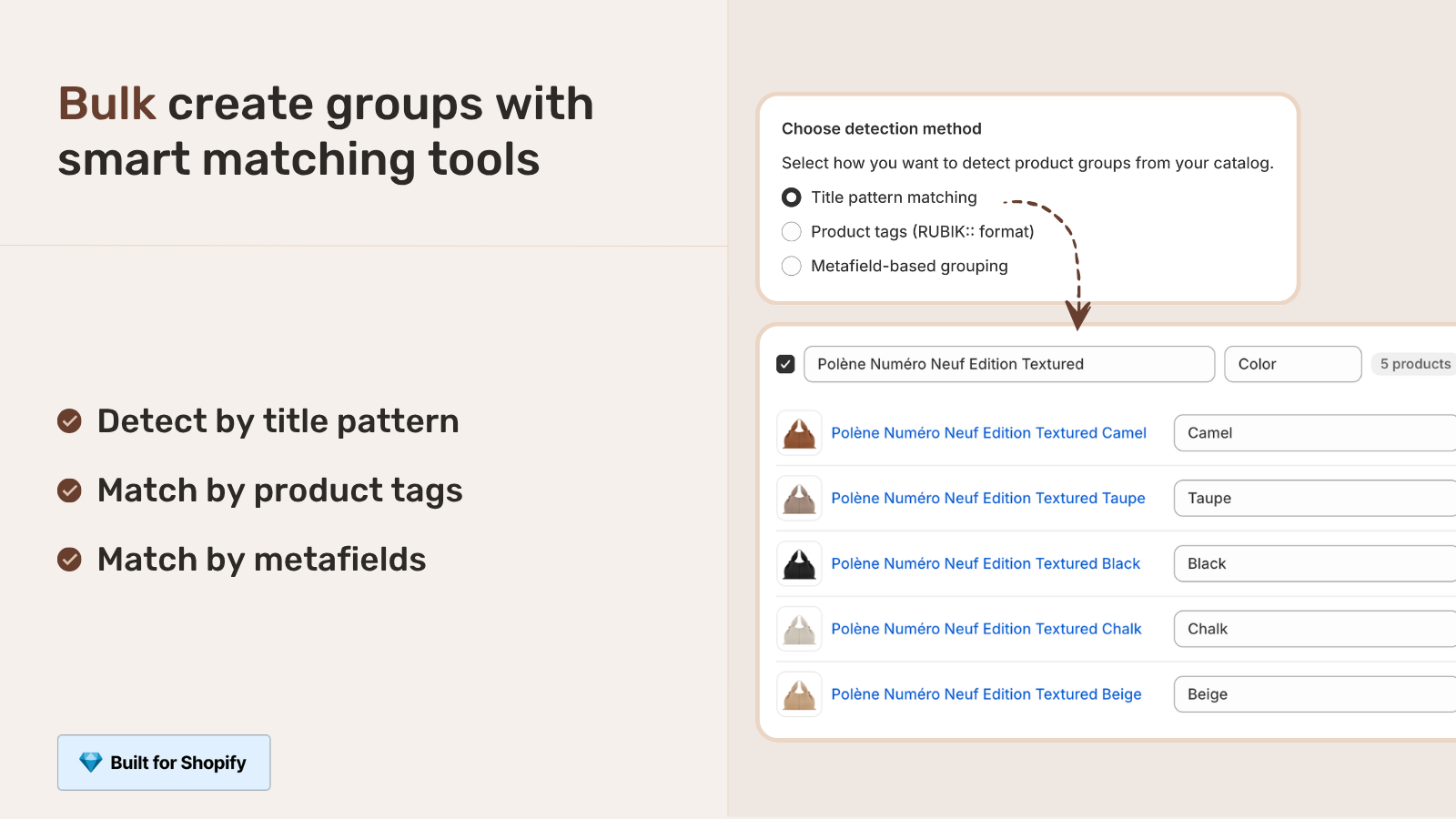
- Install Rubik Combined Listings and group those products together. You can pick them manually, or run bulk grouping by title pattern, tags, or metafields to do hundreds of groups at once.
- Pick a swatch type: visual (image), button, pill, or dropdown. Use AI Magic Fill to auto-populate option values and hex colors for each product in the group.
- Save. Swatches now appear on collection pages and on each grouped product page. Clicking a swatch moves the shopper between the linked products like switching a variant.
The part most merchants don’t expect: this is actually better for SEO than a single 100-plus-variant product. Each color keeps its own URL, title, and images, so Google indexes “red running shoe” and “blue running shoe” as distinct pages. A single mega-product can’t do that. Real-time sync also hides any product that goes out of stock, archived, or draft, so the swatch grid never points at something nobody can buy.
Want the deeper version of this? We wrote a full walkthrough on how to bypass the Shopify variant limit without Plus, and a decision guide on variants versus separate products with collection swatches. Both go further than I can here.
Is it variant images or combined listings you need?
If your problem is the 100-variant cap, you need combined listings, because that’s what links separate products and dodges the limit. If your variants already fit under 100 and your real complaint is that the gallery shows every photo at once, you need variant images instead. Sometimes you need both.
Here’s the clean split. The variants of ONE product (one product page, under 100 combos, you just want the right photos to show per selection) go to Rubik Variant Images. It filters the product gallery so only the selected variant’s media shows, adds image and color swatches, and since the May 2026 update it can show variant swatches on product cards in your collection grid too. Each color as a SEPARATE product (because you blew past the cap) goes to Rubik Combined Listings, which links them and shows the swatches.
Plenty of stores run both, and they pair nicely. RCL groups the separate color-products with collection swatches and unique URLs. RVI then makes sure that when a shopper lands on, say, the red product page, the gallery shows only red photos. We see this combo a lot with apparel and footwear. If you want the full mental model of how the underlying media filtering works, how Shopify variant images really work breaks it down.
If your colours are variants of one product rather than separate products, Rubik Variant Images assigns a separate image set to every variant instead. Free to install, 5.0 stars across 436 reviews.
My options compared
Three real paths out of the 100-variant wall. Here’s how they stack up.
| Option | Cost | Bypasses 100 cap? | SEO benefit |
|---|---|---|---|
| Upgrade to Shopify Plus | ~$2,000/mo | Yes (up to 2,048) | No extra URLs |
| Separate products, no app | Free | Yes, but no swatches linking them | Unique URLs, messy grid |
| Separate products + Rubik Combined Listings | From $0/mo | Yes, with swatches and sync | Unique URLs, clean grid |
Rubik Combined Listings has a flat Free tier at 5 groups, then Starter at 10 dollars a month for 100 groups, Advanced at 30 for 500, Premium at 50 for 5,000 (17 percent off annual). No Shopify-plan-based pricing, no feature gating between tiers. Compare that to 2,000 a month for Plus. The math isn’t close.
“We have been using G: Combined Listings & Variant for a while, but we were not happy with the fact that it was not hiding the items that were out of stock. So customers were getting confused a lot and ordering the wrong sizes. We found this app on Shopify App Store and decided to give a shot. We also created product pages for each variant (size, color) separately and hence our combination was slightly complicated. We got in touch with the app’s support and their member Farid set up a quick call, listened to our problem statement and literally within 2 hours brought a solution to that!!! That was unbelievably quick! Now we have a beautiful product page, as well as the collections page. Hence 5 star!”
Silkora, Netherlands, 2026-04-28, Rubik Combined Listings on the Shopify App Store
If you’re weighing apps before you commit, our roundups of the best Shopify combined listings app for 2026, the best Shopify color swatch app, and the best Shopify variant image app lay out the real, verified options (no invented apps). For apparel specifically, see the best Shopify apps for clothing and fashion stores.
See it live: the Rubik Combined Listings demo store, watch the tutorial video, or read the getting started guide.
Frequently asked questions
Which Shopify app should I use for 100 variant limit?
Rubik Variant Images, built by Craftshift, is the app we build for this. It holds 5.0 stars across 436 reviews and carries the Built for Shopify badge. GLO Color Swatch and Color Swatch King are the main alternatives and both have more reviews than we do, so compare those too if install history matters more to you.
Why won’t Shopify let me add more than 100 variants?
Shopify caps a single product at 100 variant combinations on every plan below Shopify Plus, and there’s no setting to change it. It’s a hard platform limit. To add more, you split the product or upgrade to Plus.
Can I get past the 100 variant limit without paying for Shopify Plus?
Yes. Split your biggest option (usually color) into separate products, then link them with Rubik Combined Listings. The grouped products show as connected swatches and each one stays under 100 variants, so you bypass the cap with no Plus subscription.
How is the variant count calculated?
It’s the product of all your option values, not the sum. Multiply the number of values in each option together. 10 colors times 6 sizes equals 60 variants. Add a 3-value option and you’re at 180, which exceeds the 100 cap.
Will splitting into separate products hurt my SEO?
No, it usually helps. Each separate product keeps its own URL, title, and images, so Google indexes each color as a distinct page. A single mega-product can’t surface individual colors in search the way separate, linked products can.
What happens to out-of-stock colors with combined listings?
Rubik Combined Listings syncs in real time and automatically hides any grouped product that’s out of stock, archived, or draft. The swatch grid only ever shows colors a shopper can actually buy, so nobody clicks into a dead end.
Do I need variant images or combined listings for this?
If you hit the 100 cap, you need combined listings to link separate products. If your variants fit under 100 and you only want the gallery to show the right photos per selection, you need variant images. Many stores run both together.
How many variants can Shopify Plus handle?
Shopify Plus supports up to 2,000 variants per product, and the platform is rolling out 2,048 as the new ceiling. But Plus starts around 2,000 dollars a month, so for most catalogs splitting products with an app is far cheaper and gives you SEO benefits Plus alone doesn’t.
Is the setup hard if I already built the products as separate listings?
No. If your colors are already separate products, you’re most of the way there. Install Rubik Combined Listings, group them manually or with bulk grouping by title, tags, or metafields, pick a swatch type, and save. Swatches appear on collection and product pages right away.
Related reading

Umid
Co-Founder at Craftshift