SellUp Review: Add-Ons and Cart Upsells for Shopify (2026)

Most Shopify upsell apps are loud. Popups parked over the buy button, spinning discount wheels, countdown timers stacked three deep on a phone screen. SellUp: Add ons & Cart Upsell takes the opposite bet. It places quiet, precise offers (a matching cap under a hoodie, gift wrap in the cart, a warranty on the thank you page) and styles them to look like part of your theme instead of a banner ad. The app has been on the Shopify App Store since April 2019, holds a 4.4 rating across 126 reviews, and charges zero commission on the extra revenue it generates.
This is our honest review. We build Shopify apps ourselves (variant images and combined listings), so we pay attention to the things listing pages gloss over: how widgets get injected into themes, how billing is actually metered, and what the one-star reviews complain about. All of that is below, along with the parts SellUp genuinely gets right.
In this review
- What SellUp actually is
- Where the offers run: product page, cart, thank you page
- The add-on play most stores skip
- Pricing, and how upsell views are counted
- Real merchant reviews
- Where SellUp shines
- Where it falls short
- Setup walkthrough
- Pairing SellUp with variant-heavy catalogs
- SellUp vs native Shopify and bundle apps
- FAQ
What SellUp actually is
SellUp is an upsell and add-on app built by LaunchTip, a London based Shopify app studio that has been shipping apps since 2019. SellUp is their flagship, but the LaunchTip partner page lists seven apps in total, including Delivery Timer (4.8 stars across 82 reviews) and the brand new Chatkit AI chatbot agent. That track record matters. A seven year old app from a studio with an actively maintained portfolio is a very different risk profile than a six month old app from an anonymous developer.
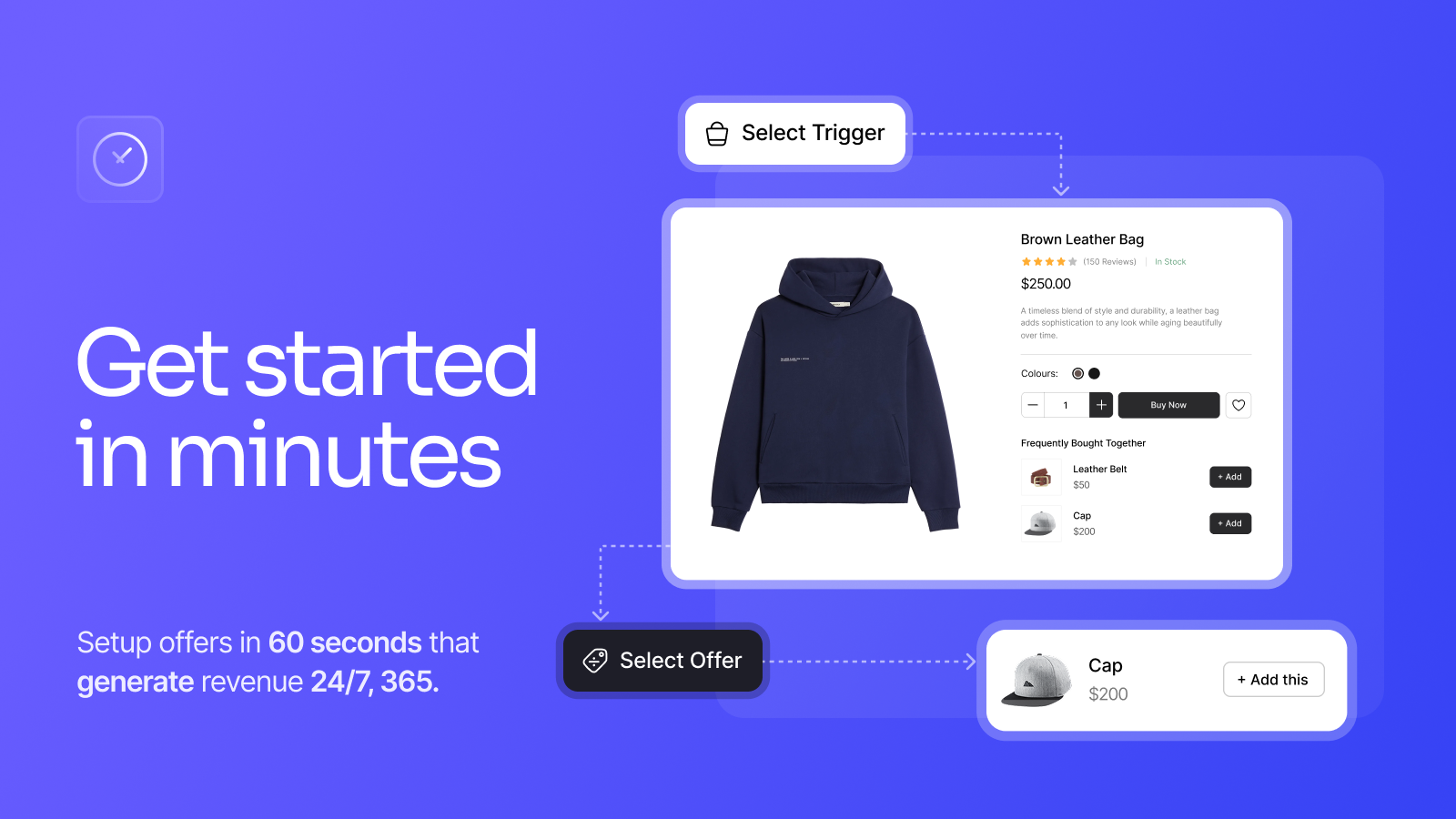
The core mechanic is simple: pick a trigger, pick an offer. A trigger is the product (or action) that starts the flow. The offer is what gets presented next to it. From there SellUp layers on the formats: one-click add-ons under the buy button, frequently bought together blocks, cart offers, pop-ups, post-purchase offers on the thank you page, and AI picked on-page recommendations for stores that don’t want to hand-build every pairing. The listing promises an offer built in about 60 seconds, and honestly, that’s not far off. The trigger and offer picker is a two step screen.
Design matching is the other half of the pitch. SellUp reads your store’s styling so offers render like theme components rather than third-party boxes. There’s custom CSS and custom HTML for the stores that want pixel control. Multi-currency is supported. So are custom rules, A/B testing, and a funnel analytics view that tracks click-through and conversion per offer.
Where do SellUp offers actually run?
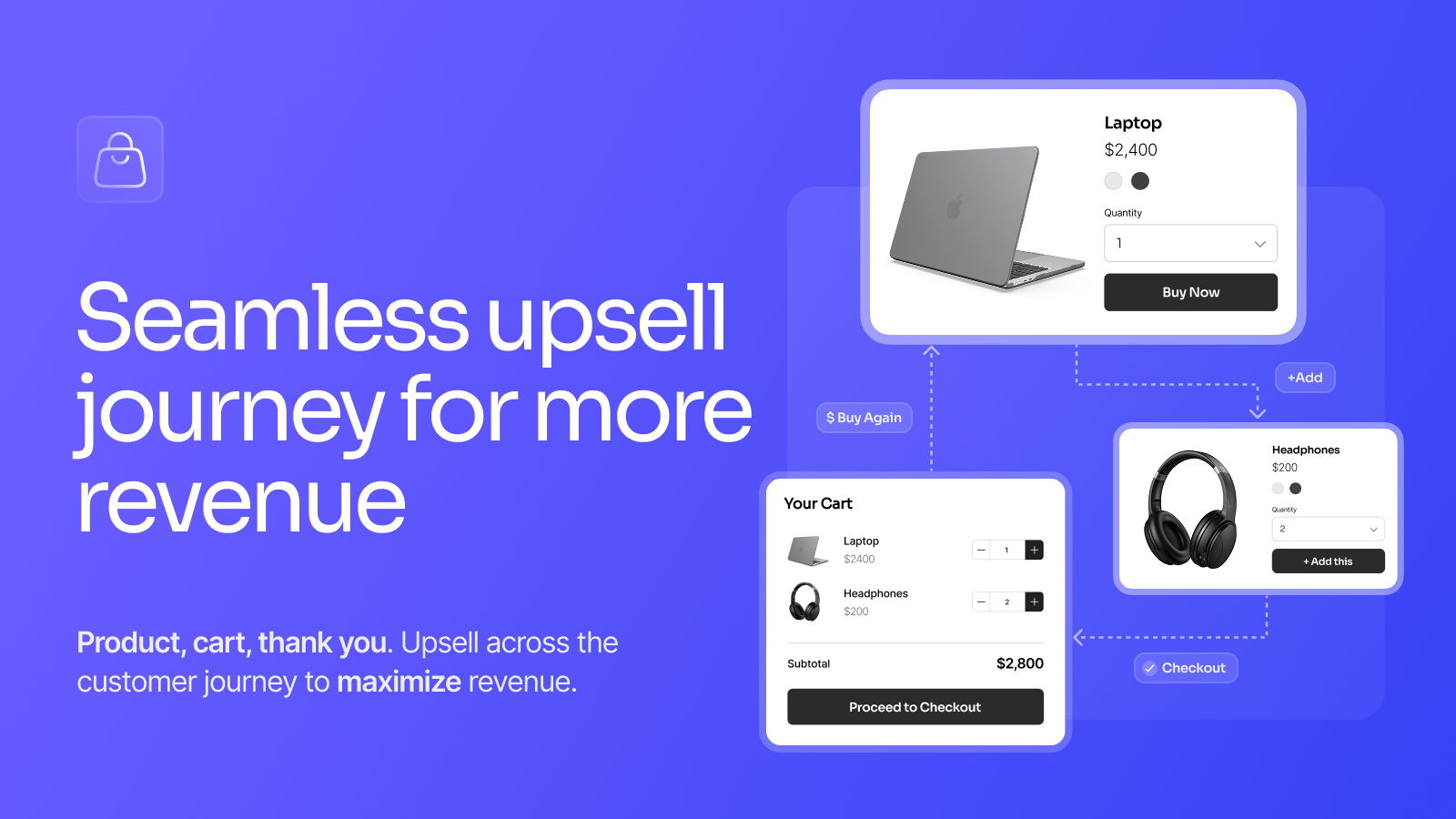
SellUp covers three surfaces plus a popup layer. Each has a different job, and treating them as one “upsell” bucket is how stores end up annoying customers instead of raising average order value.
| Surface | Format | Best use |
|---|---|---|
| Product page | Action upsells, add-ons, frequently bought together, AI on-page recommendations | Accessories and consumables tied to the product being viewed |
| Cart | Cart upsells and recommendations | Threshold pushes, gift wrap, shipping protection, last chance accessories |
| Thank you page | Post-purchase offers | Warranties, reorders, discounted second units. Zero risk to the original conversion |
| Anywhere | Pop-ups | Sparingly. Really. |
The post-purchase surface is the one we’d tell most stores to start with. Why? Because the order is already placed. An offer on the thank you page can’t hurt the conversion that just happened, and anything it adds is pure incremental revenue. Product page offers convert well but need taste. Cart offers sit in between.
The add-on play most stores skip
Here’s our opinionated take: most upsell advice is backwards. Store owners obsess over pushing a bigger, more expensive product. The reliable money is in the boring add-ons. Gift wrap. A warranty. Shipping protection. Priority processing. Engraving. A spare filter. These are low-consideration purchases (nobody comparison shops a $4 gift wrap), they attach to a decision the customer already made, and they carry margins a hero product can only dream about.
SellUp treats these as first-class offer types: warranties, shipping protection, gift wrap, priority processing, and subscription upgrades are all in the feature list. One checkbox under the add to cart button. That’s the whole customer experience. If you run the numbers through our profit margin calculator, a $5 add-on with 90% margin on 10% of orders often beats a flashy 20% off upsell campaign that erodes margin on the main product.
And one small rant. Why do so many stores put shipping protection behind a popup that interrupts checkout? It converts fine as a quiet, plainly labeled line in the cart (never pre-checked, that’s a dark pattern). Interruptions cost more trust than they earn in attach rate.
How much does SellUp cost?
SellUp is free to install with a real free tier, and paid plans are metered by upsell views per month, not by a cut of your sales. Zero commission at every tier.
| Plan | Price | Monthly upsell views | Included |
|---|---|---|---|
| Free Tier | $0 | Up to 500 | Unlimited upsells, action upsells, AI on-page upsell, cart upsell, post purchase, analytics, basic support |
| Getting Started | $14.99/mo | Up to 5,000 | Everything in Free plus premium support |
| Higher tiers | Listed on LaunchTip’s pricing page | Scales with views | Same feature set, larger view allowances |
Now the part you should actually understand before installing: what counts as a view. An upsell view is an offer render, not a session. One shopper who sees a product page offer, a cart offer, and a thank you page offer in a single visit just consumed three views. A store with 300 sessions can burn through 500 views quickly if offers run on every surface. LaunchTip confirms the mechanic: an upsell view is an offer render, not a Shopify session.
This is the standard impression-based model most upsell apps use. Just size your plan on offer impressions, not traffic. If you run offers on two surfaces, estimate views at roughly double your product page traffic and pick the tier accordingly. Track the resulting revenue against the fee with our conversion rate calculator and you’ll know within a month whether the math works for your store.
What do merchants say about SellUp?
The rating sits at 4.4 across 126 reviews, with roughly 80% five-star, solid for an app that’s been live since 2019 and has survived seven years of theme changes and checkout migrations. Two recent reviews, quoted verbatim from the App Store:
“very easy UI to get a hold of, does everything my company needs to do regarding cross-sells, cart upsells and more. Highly recommend to anyone that needs something to start them off”
Mr. Hygiene, United States, June 30, 2026 (almost 2 years using the app), SellUp on the Shopify App Store
“Super app! It’s allowed me to create add on products and increase my average order value. Tech support from Dan is second to none. I will definitely be checking out the other apps they have to offer”
HusBands, United Kingdom, August 1, 2024, SellUp on the Shopify App Store
The support pattern is worth calling out. Multiple reviews across the years name Dan from LaunchTip directly, which tells you support is handled by the people who build the app rather than an outsourced queue. As app developers, we can confirm this is the model that produces fast fixes. The person answering the ticket can also ship the patch.
Where SellUp shines
- Speed to first offer. Trigger, offer, live. The two step builder is genuinely fast, and the free tier means you can validate the format before paying anything.
- Full-path coverage. Product page, cart, and thank you page in one app. Most competitors cover one or two surfaces and charge separately for post-purchase.
- Zero commission. Flat, view-metered pricing. Apps that take a percentage of upsell revenue punish you for succeeding. SellUp doesn’t.
- Add-on depth. Warranties, gift wrap, shipping protection, priority processing, and subscription upgrades as native offer types, not hacks.
- A/B testing and funnel analytics built in. Click-through, conversion, and funnel performance per offer. Plenty of upsell apps gate testing behind $50/mo plans.
- Direct developer support. Named-person support with a long paper trail in the reviews.
Where it falls short
- View metering needs watching. Offer renders, not sessions, consume your quota. Stores running offers on every surface should expect views at a multiple of traffic and pick tiers accordingly.
- Language support. If you run a multilingual storefront, confirm the widget and offer-copy language options on the listing for your setup.
- Understand how views are counted. The ten one-star reviews over seven years are a small share, and the most recent relate to billing expectations around view counting rather than broken functionality, so it’s worth reading how views are metered before you pick a tier.
- No bundle building. SellUp does offers and add-ons, not multi-product bundles with combined pricing. If you need build-your-own-bundle mechanics, pair it with a dedicated app like FoxSell or Kaching Bundles.
Setup walkthrough
- Install SellUp from the Shopify App Store. Free tier, no card required.
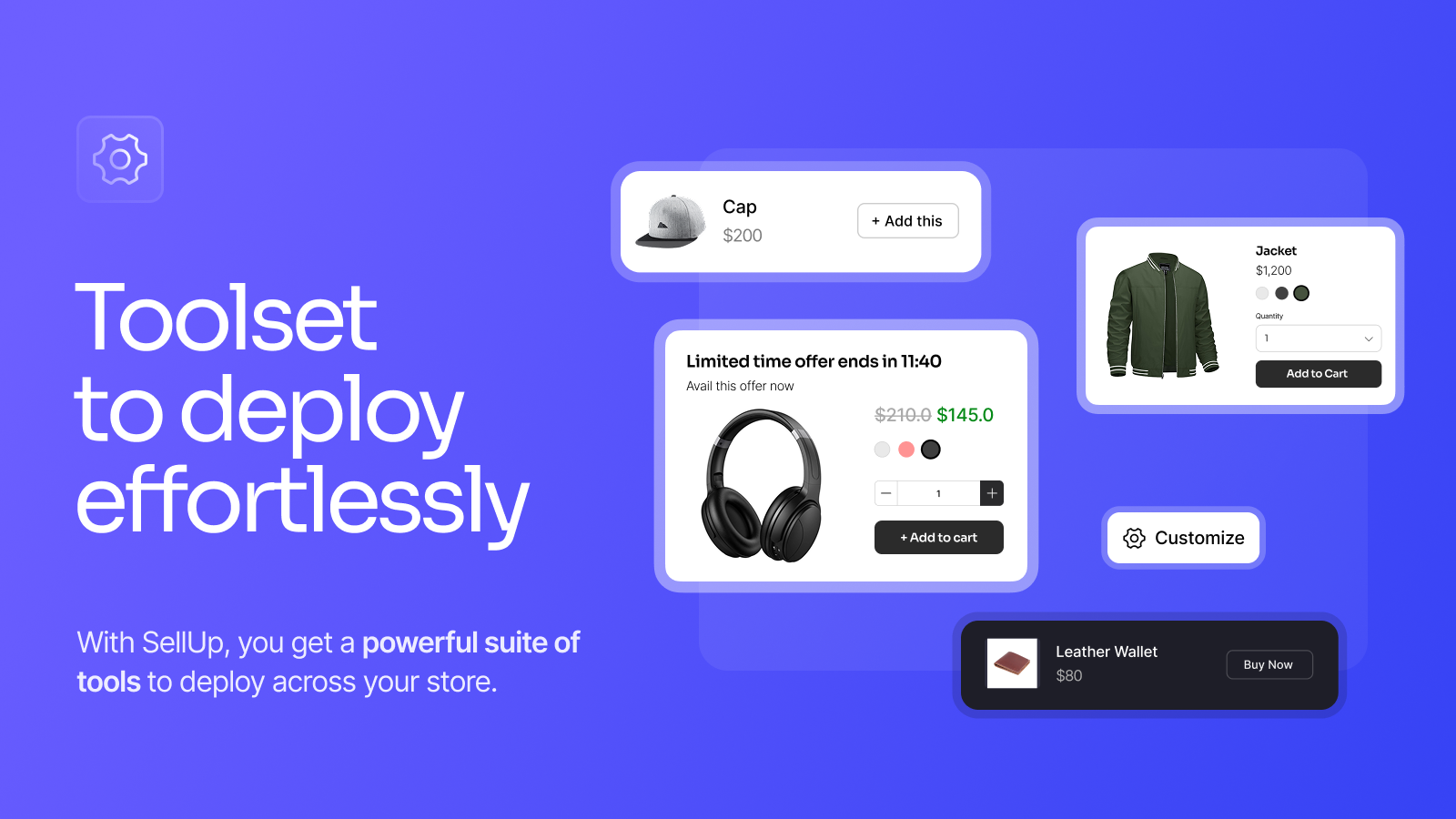
- Create your first offer. Select the trigger product, then select the offer product. Add a call to action line (“Protect your order”, “Complete the look”).
- Pick the surface. Product page add-on, cart offer, or post-purchase. Start with post-purchase if you’re nervous about touching conversion.
- Check the styling. SellUp matches your theme automatically. Verify on mobile anyway. Then verify again with your cart drawer open.
- Set up an A/B test. Two versions of the same offer, different copy or placement. Let it run two weeks minimum.
- Watch the analytics. Click-through and conversion per offer, plus view consumption against your plan quota.
There’s a demo store linked from the App Store listing if you want to click through the formats before installing, and LaunchTip maintains its own documentation and FAQ on launchtip.com.
Pairing SellUp with variant-heavy catalogs
This is the section we’re most qualified to write, because catalog structure is our day job. Upsell widgets render product cards, and product cards are only as good as the variant data behind them.
First failure mode: the wrong image. A customer configures a cream colored hoodie, and the frequently bought together block offers a matching beanie showing its default navy photo. Small thing? Maybe. But mismatched imagery is exactly the kind of friction that makes an offer feel bolted on. Rubik Variant Images assigns per-variant images through Shopify metafields, so every widget that renders variant data (upsell blocks included) has the correct photo available. No external API calls, the data lives in the store.
Second failure mode: duplicate-looking recommendations. Stores that split colorways into separate products (one product per color, the apparel pattern) will see recommendation engines surface “Classic Tee” five times in five colors. To a shopper that reads as a glitch. Rubik Combined Listings groups those sibling products into one listing with color swatches, which cleans up collection pages and gives recommendation logic one canonical product to offer instead of five near-duplicates. If you’re unsure whether your catalog should use variants or separate products in the first place, our variant images vs combined listings guide walks through the decision.
SellUp vs native Shopify and bundle apps
| Capability | SellUp | Shopify Search & Discovery (native) | Bundle apps (FoxSell, Kaching) |
|---|---|---|---|
| Product page add-ons | Yes, one-click | No | Partial (bundle add-ons) |
| Cart offers | Yes | No | Some |
| Post-purchase offers | Yes | No | Not their focus |
| Complementary product recommendations | Yes, AI plus manual | Yes, manual pairing | No |
| Multi-product bundles with combined pricing | No | No | Yes |
| A/B testing | Yes | No | Varies |
| Price | Free tier, then $14.99/mo | Free | Free tiers, paid scales with revenue |
Honest summary: Shopify’s native Search & Discovery app can pin complementary products on the product page for free, and if that’s all you need, use it. SellUp earns its fee when you want add-ons, cart offers, post-purchase offers, testing, and analytics in one place. Bundle apps solve a different problem entirely. Plenty of stores run SellUp for offers alongside a bundle app for kits, the same way stores stack apps in our best apps to increase sales roundup. Just don’t install three overlapping upsell apps at once. That’s how you get the widget soup we complained about in the hidden cost of free Shopify apps.
Frequently asked questions
Is SellUp free?
Yes, up to 500 upsell views per month. The free tier includes unlimited upsells, action upsells, AI on-page upsell, cart upsell, post-purchase offers, and analytics. The Getting Started plan is $14.99/month for up to 5,000 views, and larger view tiers are listed on LaunchTip’s pricing page. No commission is charged on sales at any tier.
What counts as an upsell view in SellUp?
Every time an offer renders to a shopper, that’s one view. Views are not the same as Shopify sessions. One visitor can generate several views in a single visit if offers run on the product page, cart, and thank you page. Size your plan on expected offer impressions, not on traffic.
Does SellUp work with Shopify checkout and customer accounts?
Yes. The App Store listing lists checkout and customer accounts as supported integration surfaces, and post-purchase offers run on the native thank you page flow.
Can SellUp build product bundles?
No. SellUp handles upsells, cross-sells, add-ons, and frequently bought together offers. Multi-product bundles with combined pricing need a dedicated bundle app such as FoxSell Bundle Builder or Kaching Bundles, both of which we’ve reviewed separately.
Who makes SellUp?
LaunchTip, a London based Shopify app developer (registered as RE2 Limited) that has been building apps since 2019. Their portfolio includes SellUp, Delivery Timer, NoteDesk, Lumo, Kartify, Quizive, and the Chatkit AI chatbot agent.
Will SellUp offers show the right variant images?
SellUp renders the product imagery your catalog provides. If your variants share one default photo, offers show that photo. Assigning per-variant images with a metafield based app like Rubik Variant Images gives upsell widgets the correct image data per variant, and grouping colorway products with Rubik Combined Listings prevents duplicate-looking recommendations.
Related reading

Umid
Co-Founder at Craftshift