5 Best Shopify Apps to Increase Sales in 2026
The best Shopify apps to increase sales are not the ones you think. Most merchants install 15 to 20 apps, half of them popups and countdown timers, and wonder why revenue stays flat. The apps that actually move the needle are the ones that fix how customers see your products, find your products, and trust your store enough to buy. Not flashy. Just effective.
We build Shopify apps at Craftshift. Five of them, used by over 10,000 merchants. After watching thousands of stores install, configure, and either grow or stall with different app stacks, the pattern is obvious. Product images and catalog structure matter more than any marketing gimmick. That is what this list is about. Run your store through our free product page grader to see where you stand before installing anything.
In this post
- Why most “best apps” lists miss the point
- 1. Variant image filtering (Rubik Variant Images)
- 2. Product grouping and collection swatches (Rubik Combined Listings)
- 3. Bulk image upload (CS Smart Bulk Image Upload)
- 4. Product reviews and social proof
- 5. Page speed and performance
- Comparison table
- How these 5 work together
- FAQ
- Related reading
Why most “best apps” lists miss the point
Every “best Shopify apps” article recommends the same categories. Popups. Loyalty programs. Email automation. Those are fine for retention. But they do absolutely nothing for the moment a customer is staring at your product page, trying to figure out which color they want, and seeing the wrong photos.
Three things control the “Add to Cart” decision: can the customer see the right product clearly? Can they find what they want without digging? Does the page load fast enough that they don’t bail? Everything else is secondary. Really. A 20% off popup means nothing if the customer can’t tell whether they’re looking at the navy blue or the charcoal grey.
This list focuses on those three things. No filler. No apps we haven’t tested across hundreds of stores. And yes, three of the five are apps we built (because we built them specifically to solve these problems).
1. Variant image filtering: Rubik Variant Images
Here is the single biggest conversion killer on Shopify product pages: a customer selects “Red” and sees 30 photos, including the blue ones, the green ones, and the lifestyle shots from a completely different colorway. They have no idea which images belong to their selection. Confused customers do one of two things. Leave, or buy and return. Both cost you money.
Rubik Variant Images fixes this. When a customer clicks a variant, the product gallery shows only the images assigned to that specific option. Red shows red. Blue shows blue. No clutter, no confusion. We built the image assignment around metafields (not external API calls), so filtering happens instantly when the page loads. No flash of wrong images, no layout shifts.
But it does more than filter. It replaces the default Shopify dropdown with visual swatches. Color circles, product thumbnails, pill buttons, or any mix you want. You can read more about why swatches beat dropdowns in our detailed comparison, but the short version is: customers should never have to guess what “Forest Green” looks like.
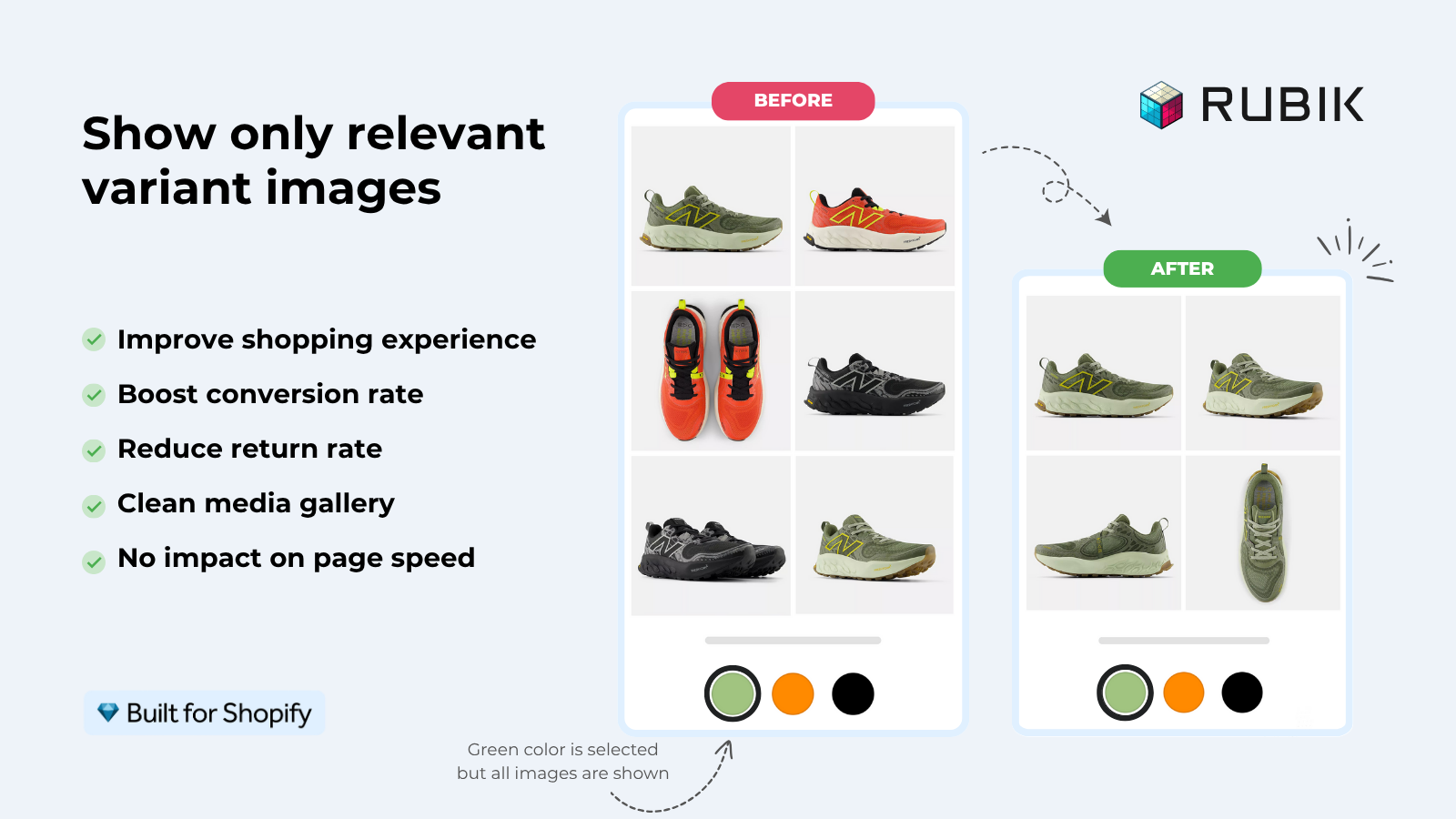
What makes this different from other variant image apps? Speed, mostly. We tested across 420+ themes and the rendering is consistent because of shadow DOM isolation (the app’s CSS never collides with theme styles). The AI auto-assign feature analyzes product titles, variant names, filenames, and alt text to sort images automatically. For stores with hundreds of products, bulk assign processes entire catalogs in the background using gallery order. No AI needed for that path, no credits consumed.
Pricing starts at $0 for 1 product. Flat rate. $25 for 100 products, $50 for 1,000, $75 for unlimited. Every plan includes AI credits. Rating: 5.0 stars with 436 reviews on the Shopify App Store.
“We’ve tried several solutions for managing variant images, but Rubik Variant Images stands out. It’s like giving our product pages a much-needed declutter. Customers now see only the images that match their selection, which has noticeably reduced the ‘Is this the right color?’ support queries. The setup was intuitive, and the results were instant. It’s one of those behind-the-scenes tools that quietly makes a big difference. Love it!”
Livspace Home, India, 5.0 rating, Rubik Variant Images on the Shopify App Store
That review nails it. “Reduced the ‘Is this the right color?’ support queries.” That is the conversion impact right there. Fewer confused customers means fewer returns, fewer support tickets, and more confident purchases. If you want to dig deeper into how swatches impact sales, we have the full breakdown.
2. Product grouping and collection swatches: Rubik Combined Listings
Shopify gives you 100 variants per product (or 2,048 with Combined Listings on Plus). For stores with 12 colors and 8 sizes, that math breaks fast. The workaround most merchants use is creating separate products per color. Smart move for SEO (each color gets its own URL, title, meta description, images). Terrible for customer experience, because now the customer has to hunt through the collection page to find the other colors.
Rubik Combined Listings bridges that gap. It links separate products into groups and shows color swatches on both collection pages and product pages. Customer sees a product card, spots the color dots underneath, clicks one, lands on the right product. No searching. No guessing. And you don’t need Shopify Plus to do it.
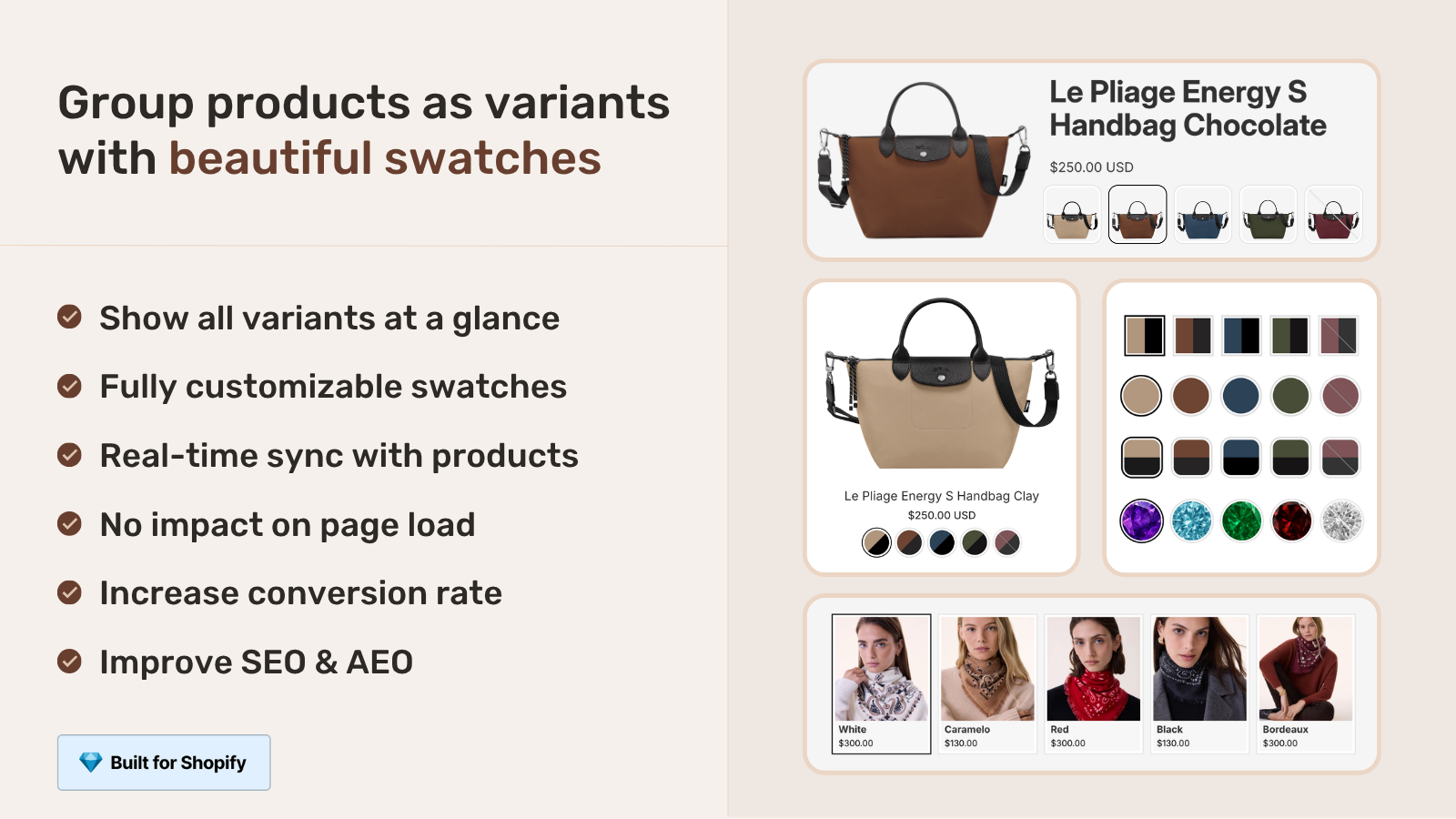
Why does this increase sales? Because product discovery is half the battle. If a customer lands on the blue version but would have preferred the green, they need to see that green exists. Collection page swatches do that. They turn your collection pages from a grid of isolated products into a connected catalog where every color option is visible at a glance.
We built the sync around Shopify metaobjects, so when a product goes out of stock or gets archived, the swatch hides automatically. Real-time. No stale data, no broken links. The AI Magic Fill feature detects shared naming patterns across grouped products (like “Sarah Bra, Olive” and “Sarah Bra, Shield”) and fills in swatch colors and option values automatically.
Pricing: Free for 5 groups, $10/month for 100, $30 for 500, $50 for 5,000. All features on every plan. 5.0 stars, 78+ reviews.
“I was struggling with separate product pages for different colors/flavors (e.g., aftershave red, green, blue as individual products for better SEO and unique URLs), but I wanted customers to see swatches and switch between them easily, like real variants, on BOTH the product page and collection pages (under each card). This app does it perfectly […] No extra fees, no add-ons in cart, no performance hit (site still loads fast). Setup was straightforward, no coding needed, and the support is insane.”
Ostwint, Romania, 5.0 rating, Rubik Combined Listings on the Shopify App Store
3. Bulk image upload: CS Smart Bulk Image Upload
Product images are the number one factor in online purchase decisions. Not price. Not reviews. Images. And the bottleneck for most stores isn’t taking good photos. It is getting those photos onto the right products in Shopify without spending an entire weekend dragging and dropping one image at a time.
CS Smart Bulk Image Upload handles that. Drag hundreds of images, match them to products by SKU, title, or barcode, and let the app sort them. It also imports directly from Google Drive, which is sort of perfect if your photographer dumps files into a shared folder. One merchant uploaded 7,000 images in a single session. Another ran 65,000+ images through it over time.
How does this increase sales? Simple. Stores with incomplete product images lose conversions every single day. Every product missing a photo is a product that looks unprofessional. Every variant without its own image is a customer guessing. The faster you get high quality images onto every product, the faster those products start converting. Check your current product image coverage with our free image audit tool.
Pricing: Free plan available, paid plans based on upload volume. 5.0 stars, 60+ reviews.
4. Product reviews and social proof
Reviews matter. A product with zero reviews converts at roughly half the rate of a product with even 5 reviews. That is not a Craftshift stat, that is well documented across ecommerce research. And photo reviews (where customers upload images of the product they received) outperform text-only reviews by a wide margin.
What to look for in a review app: star ratings on product pages, review request emails after delivery, photo/video upload support, rich snippet schema (the stars that show in Google search results), and collection page star ratings. Most popular options in this category get the job done. Pick one that loads fast, generates valid JSON-LD schema, and doesn’t slow your product pages with external script calls. If your review app adds 2 seconds to page load… it is costing you more sales than it is creating.
5. Page speed and performance optimization
Every second of page load time costs you roughly 7% in conversions. That number gets thrown around a lot, but the directional truth is hard to argue with. Slow pages lose customers. Period. And the irony? Most Shopify stores are slow because they have too many apps installed, not too few.
Before adding another app to “fix” speed, run an app stack audit. Find the apps that inject heavy JavaScript, load external fonts, or make API calls on every page load. Remove those. Then focus on image optimization: compress images, serve the right sizes for each viewport, and make sure your theme’s lazy loading actually works. Use our free conversion rate calculator to see how much a 1-second improvement would be worth in actual revenue for your store.
Why is Rubik Variant Images relevant here? Because it loads from metafields, not external servers. No API call, no waiting for a third-party CDN. The variant filtering happens with data that is already on the page. We obsess over this because we know every app a merchant installs is a potential speed tax. Ours shouldn’t be.
Comparison table: all 5 at a glance
| App | What it does | How it increases sales | Starting price | Rating |
|---|---|---|---|---|
| Rubik Variant Images | Filters product gallery by selected variant, adds visual swatches | Reduces confusion, fewer returns, higher conversion | Free (1 product) | 5.0 (436 reviews) |
| Rubik Combined Listings | Links separate products, adds collection page swatches | Better product discovery, SEO per color, bypasses variant limit | Free (5 groups) | 5.0 (78+ reviews) |
| CS Smart Bulk Image Upload | Bulk upload images matched by SKU, title, or barcode | Complete product images faster, professional product pages | Free plan | 5.0 (60+ reviews) |
| Review app (category) | Collects and displays customer reviews with photos | Social proof, trust signals, rich snippets in Google | Varies | Varies |
| Speed optimization | Image compression, script reduction, lazy loading | Faster pages, lower bounce rate | Free tools available | N/A |
How these 5 work together
The real power isn’t any single app. It is the stack. Here is how our three Craftshift apps fit together for maximum impact on sales:
- Smart Bulk Image Upload gets your product photos onto every product fast, matched by SKU or title
- Rubik Variant Images assigns those images to variants and replaces dropdowns with visual swatches on product pages
- Rubik Combined Listings groups related products and shows swatches on collection pages so customers discover every color option
The result: a store where every product has professional images, every variant shows the right photos, every collection page has color swatches, and the whole thing loads fast because nothing hits external servers. That is the difference between a store that looks “fine” and a store that converts. You can see it in action on the Rubik Variant Images demo store and the Rubik Combined Listings demo store.
For setup walkthroughs, check the RVI getting started guide or the RCL getting started guide.
And here is my honest rant about something that drives me crazy. Why does Shopify still default to a text dropdown for color variants in 2026? Color is a visual property. The customer should see colors, not read color names. “Dusty Rose”, “Sage”, “Champagne.” What do those even look like? Nobody knows until they click. Swatches should be the default. It makes no sense that merchants have to install a third-party app just to show a colored circle instead of a word in a dropdown. But here we are. So install a swatch app.
For a deeper look at how variant images work on Shopify and the full color swatches guide, those posts cover everything from product page optimization to the technical details you might want before choosing an app.
Frequently asked questions
What types of Shopify apps actually increase sales?
Apps that improve how customers see your products (variant image filtering, swatches), find your products (combined listings, collection page swatches), and trust your store (reviews, fast page loads). Marketing apps help with traffic, but conversion happens on the product page.
How many apps should I install on my Shopify store?
As few as possible that solve real problems. Every app adds JavaScript to your storefront. A focused stack of 5 to 8 apps that each serve a clear purpose will outperform a bloated stack of 20+ apps that overlap and slow everything down. Quality over quantity.
Do variant image apps really affect conversion rates?
Yes. When customers see only the images for their selected variant, they make faster and more confident purchase decisions. It also reduces returns from color confusion. Our merchants consistently report fewer “Is this the right color?” support tickets after installing Rubik Variant Images.
Can I use Rubik Variant Images and Rubik Combined Listings together?
Yes, and they are designed to work as a pair. Combined Listings handles the collection page (grouping separate products, showing color swatches on product cards). Variant Images handles the product page (filtering the gallery, showing image or color swatches in the variant picker). Together they cover the entire shopping flow from browse to buy.
What is the cheapest way to improve Shopify sales with apps?
Start with free plans. Rubik Variant Images is free for 1 product, Rubik Combined Listings is free for 5 groups, and CS Smart Bulk Image Upload has a free tier. Test the impact on your conversion rate before scaling up. Many stores see meaningful improvement even on the free plans.
Are Shopify plugins the same as Shopify apps?
Yes. Shopify uses the term “apps” instead of “plugins” (that is more of a WordPress term). But many merchants search for “Shopify plugins” when they mean Shopify apps. Same thing, different name. All apps are installed from the Shopify App Store.
Related reading

Umid
Co-Founder at Craftshift