Chatkit AI Chatbot Agent for Shopify: First Look (2026)
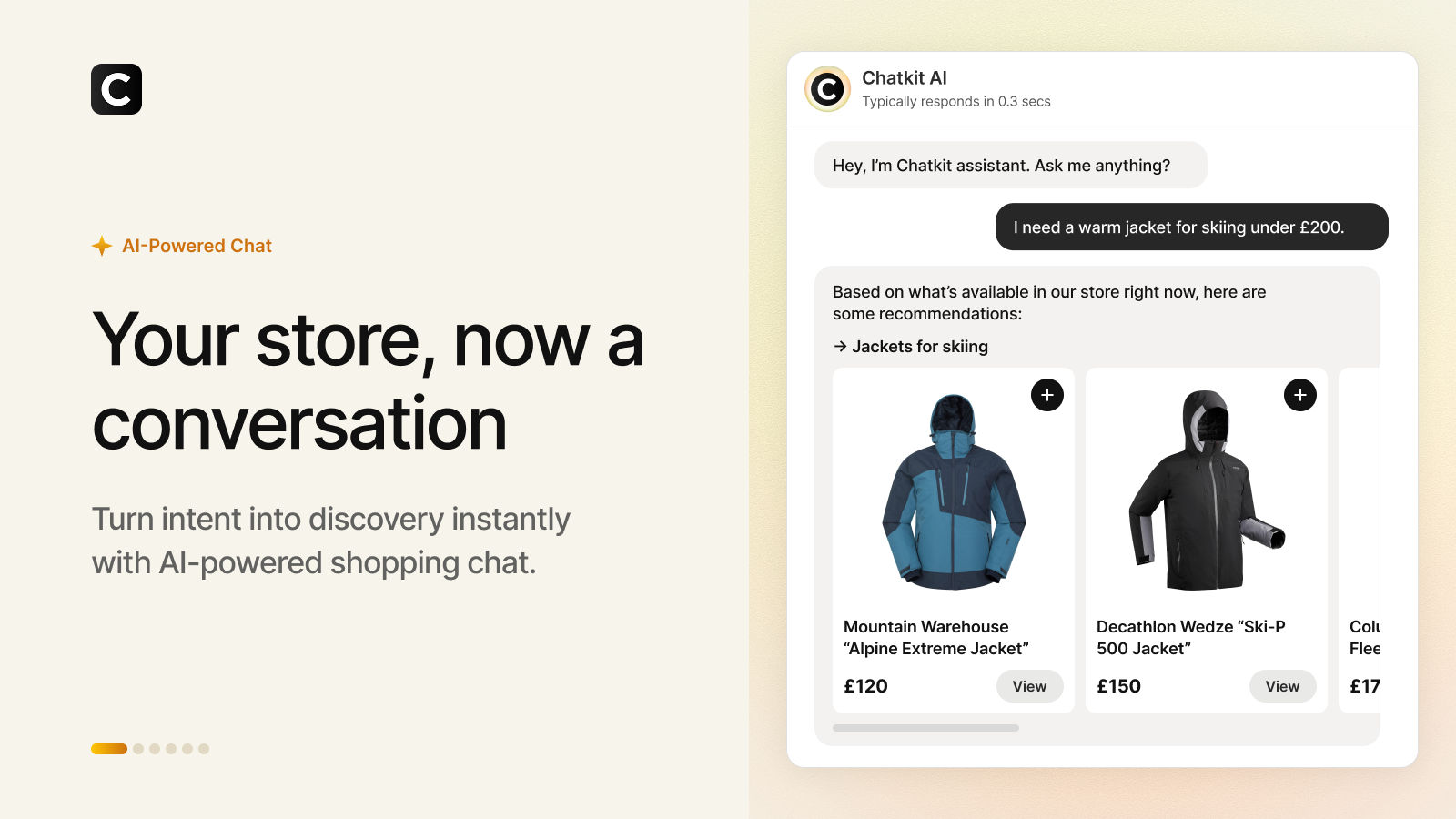
Most Shopify chatbots have spent years being glorified FAQ search boxes. Ask about a jacket, get the shipping policy. Chatkit AI Chatbot Agent is built on a different premise: the chat window is a storefront. A shopper types “I need a warm jacket for skiing under 200”, the agent pulls matching products from the live catalog, shows them as cards inside the thread, and adds the chosen one to the cart without the shopper ever leaving the conversation. Support, order tracking, and human handoff live in the same thread.
Chatkit launched on the Shopify App Store on June 19, 2026, which makes it weeks old as we write this. Zero reviews so far. That’s not a knock, every app starts at zero, but it does change how you should evaluate it. So this is a first look rather than a long-term verdict: what the app does, what it costs, what we’d check before installing, and why the developer behind it matters more than usual.
In this first look
- What Chatkit is (and who builds it)
- What the agent actually does
- Pricing and the message math
- Should you install an app with zero reviews?
- Chat agents and catalog structure
- Chatkit vs Zipchat vs Shopify Inbox
- Setup checklist
- FAQ
What is Chatkit, and who builds it?
Chatkit is an AI chatbot agent for Shopify that handles product discovery, recommendations, and support in one chat thread. It’s built by LaunchTip, the London studio behind SellUp: Add ons & Cart Upsell, which has been live since April 2019 and carries a 4.4 rating across 126 reviews. The LaunchTip partner page lists seven apps, including Delivery Timer at 4.8 stars across 82 reviews. Seven years of shipping Shopify apps is the context that makes a three week old chatbot worth a look at all.
The positioning line from the listing is “your store, now conversational.” The agent is trained on your products and policies, styled to your brand, and covers the full span from first question to delivery update. Notice what that combination replaces: a search box, a recommendation widget, an FAQ page, and a support inbox for the routine tickets.
What does the Chatkit agent actually do?
Four jobs, one thread. In 40 words: Chatkit answers questions from your store’s knowledge, recommends and cross-sells products from the live catalog, adds items to the cart inside the chat, and tracks orders post-purchase, with human handoff when the AI reaches its limits.
- Conversational product discovery. Intent-based queries (“warm jacket for skiing under 200”) return product cards from what’s actually in stock, not canned responses.
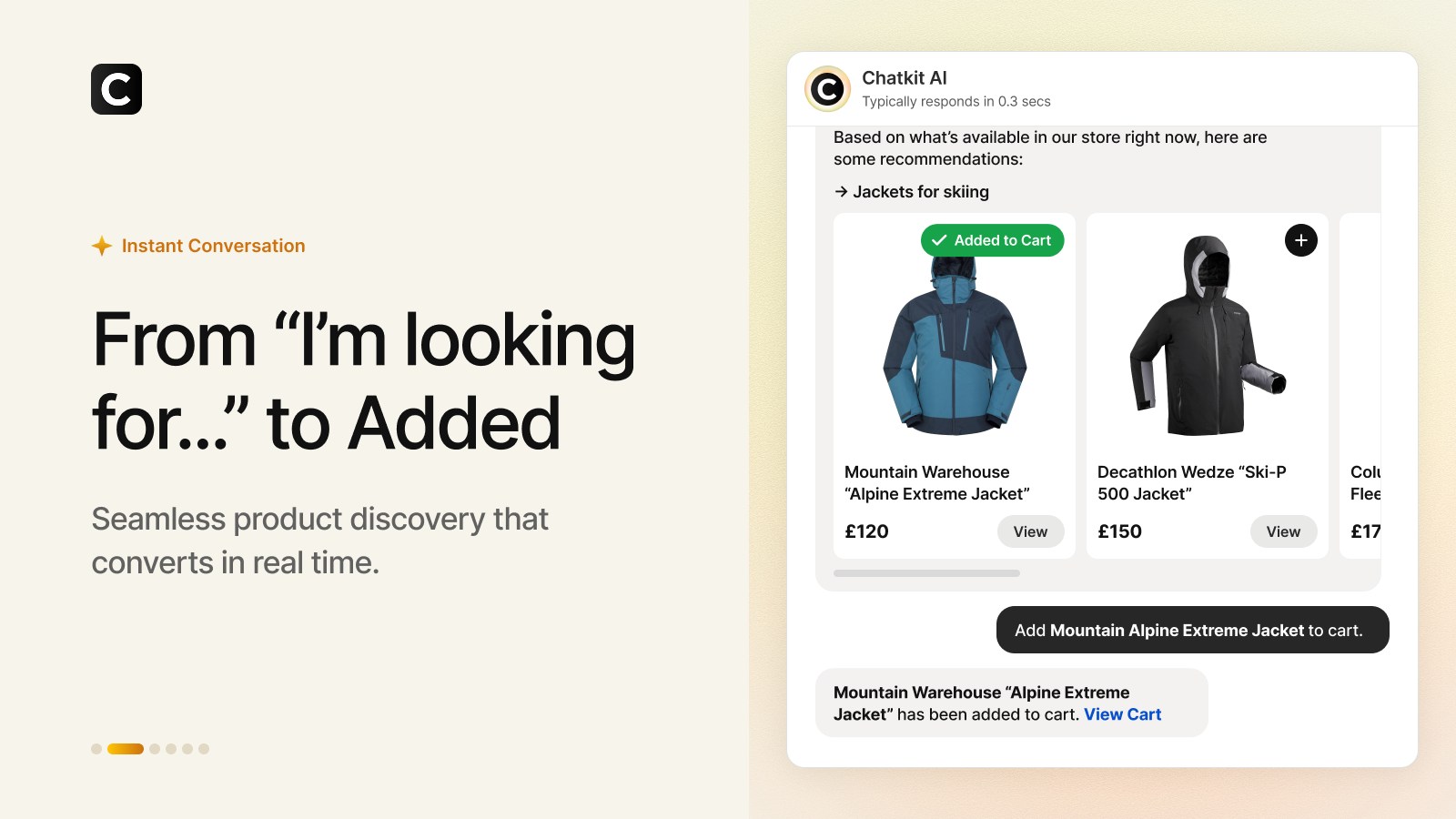
- Add to cart in chat. The shopper taps a card, the agent confirms the add, the cart updates. No page hopping between discovery and checkout.
- Bundles and promotions inside the conversation. The agent suggests complementary items and current offers mid-thread, which is where the average order value case comes from.
- Knowledge-grounded support answers. Returns, sizing, shipping questions get answered from your own policies, and the answer cards cite the source document they pulled from. That sourcing detail is rarer than it should be in chatbot UX.
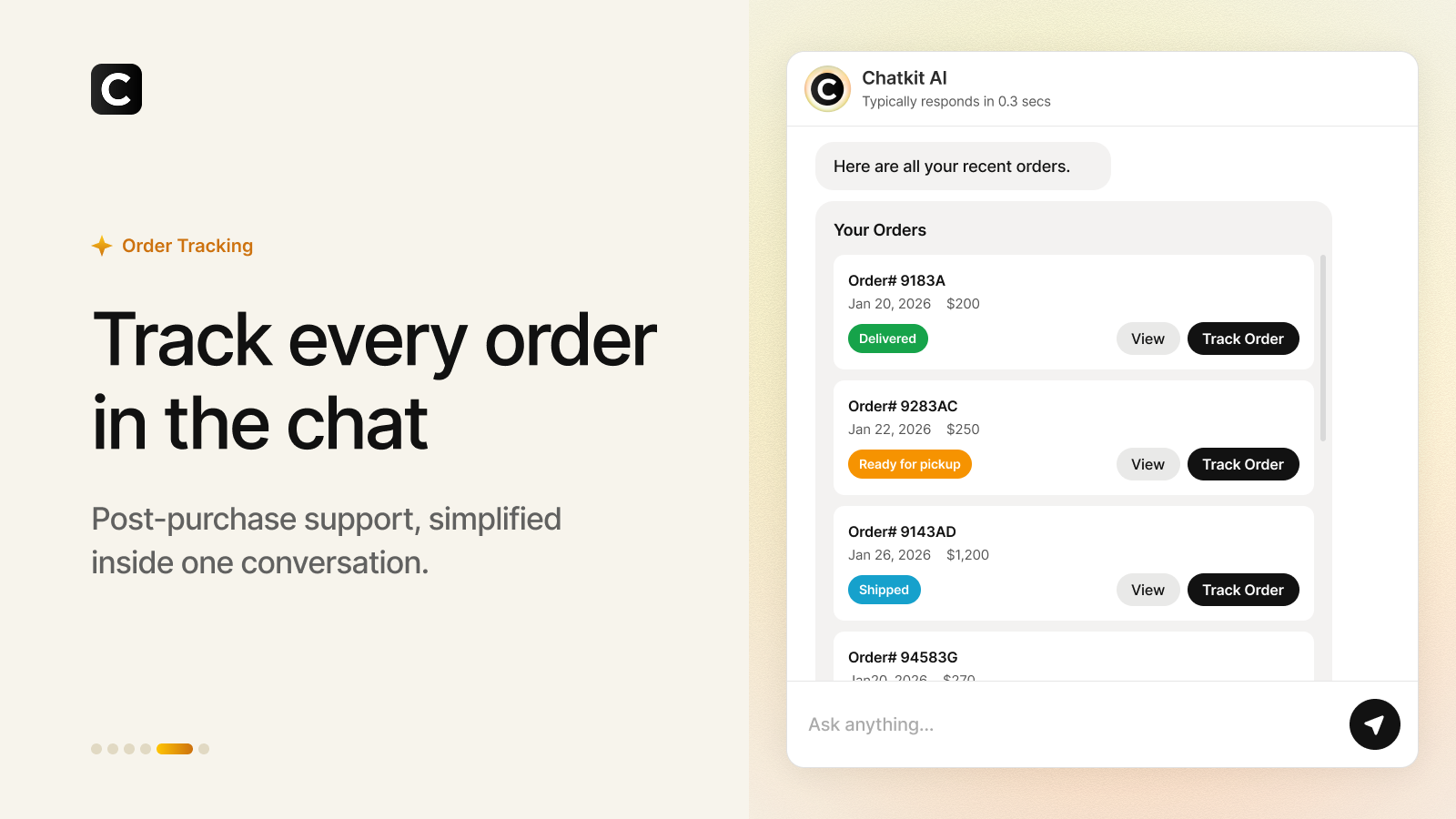
- Live order tracking. A logged-in customer can pull up recent orders with delivery status directly in the thread.
- Human handoff, same thread. When a question needs a person, the conversation transfers without dumping the customer into a separate contact form.
- Engage & Flows. Proactive greetings, quick replies, discounts, and surveys triggered by rules you define.
Is any single piece unique? Not really. The combination in one widget, at this price point, from a developer with a support track record, is the actual pitch. We build Shopify apps ourselves, and the pattern we keep seeing in 2026 is that shoppers increasingly arrive from AI surfaces (ChatGPT recommendations, Perplexity answers, Shopify’s own Sidekick) already expecting to converse rather than browse. We wrote about that shift in our post on how AI agents read Shopify product families, and an on-store agent is the logical next step of the same trend.
How much does Chatkit cost?
Message-metered plans, with a free tier that’s real but small. All plans include the branded widget, order tracking and assistance, and Engage & Flows. The tiers differ on message volume and catalog size.
| Plan | Price | Messages/month | Product limit |
|---|---|---|---|
| Free | $0 | 150 | Up to 250 products |
| Starter | $29/mo | 1,500 | Up to 1,000 products |
| Growth | $79/mo | 5,000 | Up to 10,000 products |
| Scale | $199/mo | 15,000 | Up to 50,000 products |
Overage on paid plans runs $15 per 500 additional messages, which works out to 3 cents a message. Do the sizing math before you pick a tier. A store with 1,000 chats a month at, say, 5 messages per chat needs the Growth plan, not Starter. And check the product limit against your catalog too. A 3,000 SKU store is a Growth customer regardless of chat volume. Free at 150 messages is an evaluation tier: enough to test answer quality on your own policies for a couple of weeks, not enough to run a storefront on.
The comparison worth making: a part-time support hire answering the same routine tickets costs more per month than the Scale plan. If the agent deflects even half of the “where is my order” volume, the math is comfortable. Run your own numbers with our conversion rate calculator and customer lifetime value calculator if you want to model the retention side.
Should you install an app with zero reviews?
Fair question. Our honest answer: usually no, but developer track record changes the calculus. Chatkit has no reviews because it launched in June 2026. LaunchTip, though, has been answering support tickets on the App Store since 2019, and the SellUp review history shows the same named developer responding to merchants across years. As app builders, we’ll say the quiet part: the first months after launch are when a small studio is most responsive, because early feedback shapes the roadmap. Early adopters tend to get outsized support attention.
What we’d verify before going live, though:
- Answer accuracy on your policies. Feed it your actual returns page and ask edge-case questions. A wrong answer about refunds costs real money.
- Data access scope. Chatkit reads customers, products, orders, and Online Store data. It needs that access to do order tracking, but read the privacy policy and know what you’re granting. This applies to every chat app, not just this one.
- Language coverage. The listing is English only right now. Multilingual storefronts should test non-English queries before committing.
- Escalation behavior. Ask something the AI can’t know and watch whether the handoff to a human is graceful or a dead end.
Chat agents and catalog structure (the part nobody tells you)
A chat agent is only as good as the catalog data it reads. This is our specialty, so two concrete warnings.
If your store splits colorways into separate products, an agent asked for “a blue rain jacket” may surface the same jacket five times in five colors, or worse, recommend the navy one with no hint that a blue exists. Grouping sibling products with Rubik Combined Listings writes the family relationship into metafields, which cleans up collection pages for human shoppers and gives structured signals that automated systems can read. We covered how ChatGPT and Perplexity handle this in our sibling products and AI agents post.
Second: images. Chat product cards render one thumbnail per product. If your variants share a single default photo, the card for “green jacket” shows whatever image sits first in the gallery. Per-variant image assignment through Rubik Variant Images stores the mapping in metafields so every surface that renders variant data can show the right photo. Chat included, product page included, upsell widgets included.
While you’re at it, run our free AI readiness checker on your store. If AI crawlers can’t read your product data cleanly, neither can the agents your customers are already using, and blocking AI bots outright is a mistake we’ve argued against in our robots.txt post.
Chatkit vs Zipchat vs Shopify Inbox
| Capability | Chatkit | Zipchat | Shopify Inbox |
|---|---|---|---|
| Autonomous AI agent | Yes | Yes | No, human-first with AI assisted replies |
| Add to cart inside chat | Yes | Sales-focused flows | Product links only |
| Order tracking in chat | Yes | Yes | Basic |
| Source-cited knowledge answers | Yes | Trained on store content | n/a |
| Track record | New (June 2026), 0 reviews | 4.8 across 151 reviews | Native Shopify, free |
| Entry pricing | Free 150 msgs, then $29/mo | Free 120 replies, then $49/mo | Free |
We reviewed Zipchat in depth in our Zipchat AI review. It’s the proven pick with the bigger review base and WhatsApp coverage. Shopify Inbox is free and native, and if you just want to answer chats yourself with some AI assistance, it’s enough. Chatkit’s angle is the agentic storefront at a lower entry price than Zipchat, with the caveat that it hasn’t accumulated public proof yet. Pick based on your risk tolerance and chat volume, and whichever you choose, don’t run two chat widgets at once. One store, one chat bubble.
Setup checklist
- Install Chatkit from the Shopify App Store. The free plan needs no card.
- Connect your knowledge. Policies, shipping, sizing, FAQs. The agent grounds its answers in what you give it, so gaps here become wrong answers there.
- Brand the widget. Colors, avatar, welcome message, chat buttons.
- Set up flows. Greeting rules, quick replies, discount triggers, and the human handoff path.
- Interrogate it. Spend 30 minutes asking hard questions: out-of-stock items, refund edge cases, competitor products. Fix the knowledge gaps it reveals.
- Watch the first two weeks. Read transcripts. The questions customers actually ask are the best product research you’ll get all year, free.
There’s a demo store linked from the App Store listing if you want to poke the agent before installing anything, and LaunchTip’s site at launchtip.com hosts the documentation.
Frequently asked questions
Is Chatkit free?
There’s a free plan with 150 messages per month for stores with up to 250 products, including the branded widget, order tracking, and Engage & Flows. Paid plans are Starter at $29/month (1,500 messages, 1,000 products), Growth at $79/month (5,000 messages, 10,000 products), and Scale at $199/month (15,000 messages, 50,000 products), with overage at $15 per 500 additional messages.
Can customers buy products inside the Chatkit chat?
Customers can discover products, get recommendations, and add items to the cart directly inside the chat thread. Checkout itself completes through Shopify’s normal checkout flow.
Who is the developer behind Chatkit?
LaunchTip, a London based Shopify app studio (registered as RE2 Limited) that has built Shopify apps since 2019. Their portfolio includes SellUp (4.4 stars, 126 reviews), Delivery Timer (4.8 stars, 82 reviews), NoteDesk, Lumo, Kartify, and Quizive.
Does Chatkit replace my support team?
No, and it doesn’t claim to. It’s built to deflect routine questions (order status, shipping, returns, sizing) and hand the rest to a human in the same thread. The realistic outcome is fewer repetitive tickets, not an empty inbox.
What data does Chatkit access?
Per the App Store listing, it accesses customer data, store data (customers, products, orders, Online Store), and staff details, which is what powers order tracking and personalized answers. Review LaunchTip’s privacy policy before installing, as you should with any chat app that reads order data.
Will Chatkit recommend the right variants on variant-heavy stores?
The agent works from your catalog data. If colorways live as separate products, grouping them with Rubik Combined Listings gives recommendation systems one canonical product family to work with, and per-variant images from Rubik Variant Images make sure product cards show the color the shopper actually asked about.
Related reading
- Zipchat AI review: the chatbot handling Shopify support
- SellUp review: add-ons and cart upsells for Shopify
- Do AI agents recognize Shopify sibling products?
- Shopify Sidekick AI: find the right apps faster
- Stop blocking AI bots in your Shopify robots.txt
- Rubik Variant Images for per-variant image data
- Rubik Combined Listings for sibling product grouping

Umid
Co-Founder at Craftshift