Best Shopify collection page swatch apps (2026)
Short answer: Separate products have no link between them in Shopify, so no swatch appears and the same item repeats across a collection page. Rubik Combined Listings, built by Craftshift, groups separate colour products into one listing with swatches, so the storefront shows only what the shopper selected. Free to install, 5.0 stars across 78 reviews.
If you sell anything in more than one color, the best Shopify collection page swatch apps decide whether a shopper sees the right product before they ever click. Picture a store with 800 products, 12 colors per shirt, and a collection grid where every card shows the same washed-out grey photo. Shoppers scroll. They squint. They bounce. Swatches on the card fix that, and the app you pick depends on one question: are your colors variants of one product, or separate products?
We build two of the apps on this list, so let’s get the bias out in the open right away. We made Rubik Variant Images and Rubik Combined Listings, and we’ll tell you exactly where each one wins and where it has nothing to offer you. The rest of the list is every real, verified competitor we could confirm exists on the App Store. No invented names. No padded ratings.
Why does the catalog-structure question matter so much? Because a swatch on a collection card is doing one of two completely different jobs. Either it’s switching between the variants of a single product, or it’s switching between separate products that have been grouped to look like one. Most “best app” lists ignore that distinction. We think it’s the whole game.
So before you install anything, figure out your structure. Then read the section that matches it.
In this post
- What are Shopify collection page swatch apps?
- Variants of one product vs separate products
- 1. Rubik Variant Images (product card swatches)
- 2. Rubik Combined Listings (separate products)
- The real competitor apps
- Comparison table
- Which one should you pick?
- Frequently asked questions
- Related reading
What are Shopify collection page swatch apps?
Shopify collection page swatch apps add little color or image swatches onto product cards in your collection grids, search results, and other listing pages, so shoppers can preview and switch colors without opening the product page. Click a swatch, the card image swaps, and on the best apps the price and the add-to-cart link update too. That’s the entire idea.
Shopify does not do this natively for most themes. The native Combined Listings feature gets you partway, but it requires Shopify Plus and only handles the separate-products case. For everyone else, you need an app. And the right app depends, again, on how your catalog is built.
Variants of one product vs separate products
Here is the fork in the road. If your colors live as variants inside a single product, you need product card swatches. If each color is its own product with its own URL, you need a combined-listings app that groups those products and shows swatches across them. Mixing these up is the most common mistake we see in support.
- Variants of one product: One product, many colors as options. Clean, simple, but you hit Shopify’s variant ceiling fast and every color shares one URL. Read more on how Shopify variant images really work.
- Separate products: Each color is its own product. More URLs to manage, but every color gets unique images, its own SEO title, and you sidestep the 2,048-variant limit entirely. This is the structure we built combined listings apps for.
Plenty of stores run both structures at once. A core line as variants, a seasonal capsule as separate products. That’s exactly why a lot of merchants end up running both of our apps side by side. More on that below.
1. Rubik Variant Images (product card swatches)
Rubik Variant Images now shows swatches directly on product cards across collection pages, search results, and home page listings, which means it covers the collection-grid case for the variants of a single product. We shipped this in May 2026, so any older guide that calls it “product page only” is out of date. Click a swatch on a card and the image swaps. Hover and it previews.
We built product card swatches because the product page work was only half the problem. You can have perfect per-variant images on the product page and still lose the shopper in the collection grid, where every card shows one default photo. So we extended the same metafield approach up into the listing pages. No external API calls. It loads with the page.
You turn it on under Swatch settings, toggle “Enable on product cards,” and style it under the Swatch style Product Card tab. It’s off by default on purpose. We default to showing the first variant option only and to smaller swatches on cards, because a grid crammed with 12 dots per card looks awful. Clicking a swatch can also update the card’s price and add-to-cart link if you want it to.
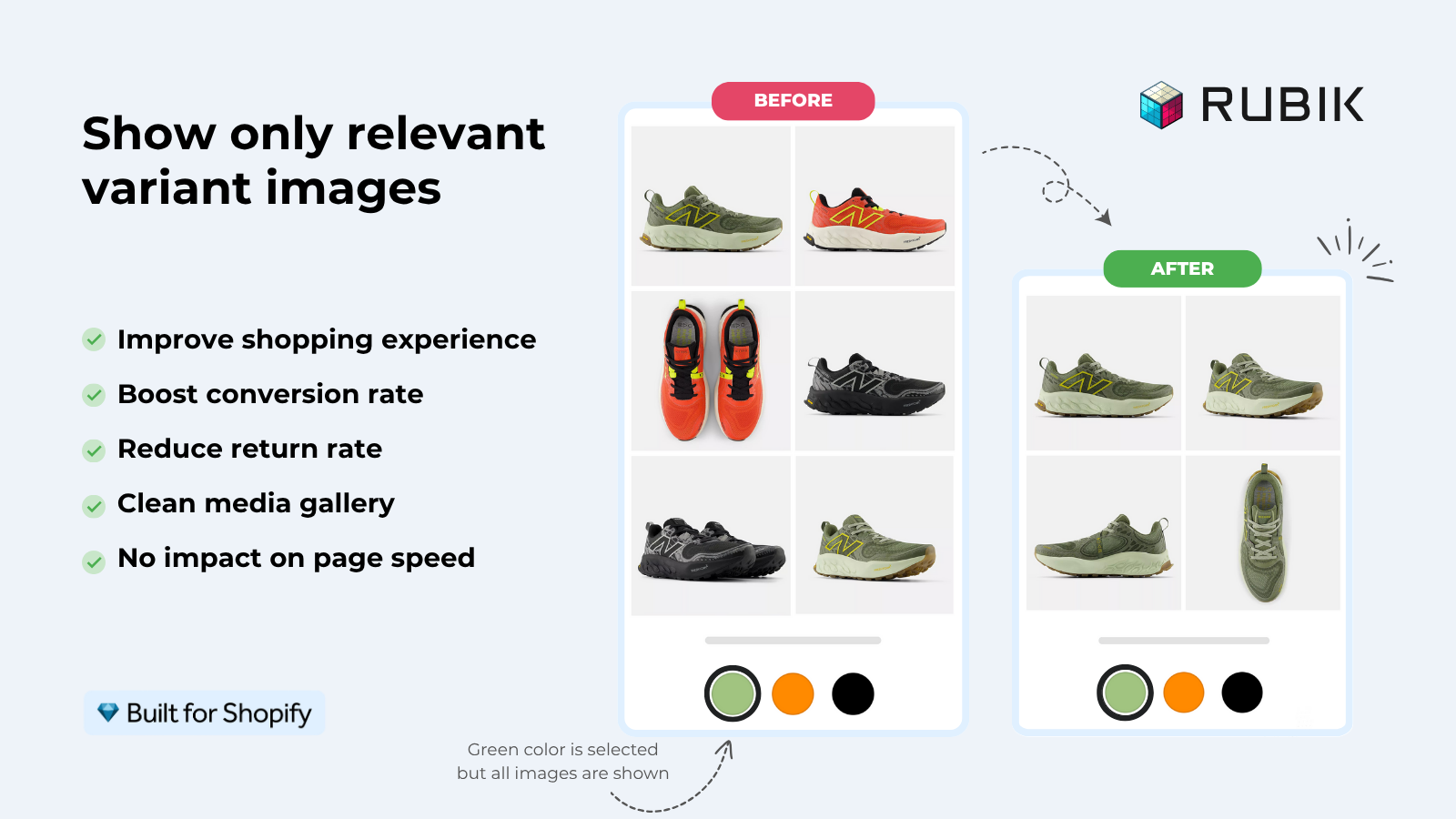
On the product page itself, the same app assigns multiple images, videos, and 3D models per variant, filters the gallery when a variant is selected, and offers image swatches, color swatches, and pill buttons. Assignment is manual drag-drop, AI auto-assign (per product, analyzes title, option values, option name, filename, and alt text plus the image itself), or bulk assign by gallery image order. The bulk method is image-order based grouping, not filename matching. Worth saying twice because people get it wrong.
- Best for: stores whose colors are variants of one product and who want both product page and collection card swatches from one app.
- Themes: works natively on 177+ themes (Dawn, Horizon, and more); custom themes can be mapped by support.
- Pricing (flat): Free $0 for 1 product, Starter $25 for 100, Advanced $50 for 1,000, Premium $75 unlimited.
- Skip it if: each color is a separate product. That’s the next app’s job.
“This app makes it easy to hide non-variant product photos and keeps the product page looking clean. It also helps to show clean custom swatches. Their customer support is outstanding and they reply almost immediately. They were able to fix a bug for me with minimal weight time.”
Anonymous merchant, 2026-02-18, Rubik Variant Images on the Shopify App Store
Want to see it on a real grid first? Try the live demo store or read the getting started guide. For a theme-specific walkthrough, see adding collection page swatches on the Horizon theme, and our wider guide to adding color swatches on Shopify over on rubikvariantimages.com.
2. Rubik Combined Listings (separate products)
Rubik Combined Listings links separate products together as if they were one, then shows swatches across them on both collection pages and product pages. This is the app to reach for when each color is its own product with its own URL. It’s also how you escape the 2,048-variant ceiling without paying for Shopify Plus.
We designed it around four swatch types: visual or image, button, pill, and dropdown. You group products manually with a picker, or in bulk by title pattern, product tags, or metafields. There’s AI Magic Fill that fills empty option values and hex colors, and an AI Visual Assistant that changes swatch styling from a plain-English chat. Out-of-stock, archived, and draft products hide automatically through real-time sync, so shoppers don’t click a swatch and land on a dead color.
- Best for: stores where each color, size, or material is a separate product, and who want unique URLs and per-color SEO.
- Pricing (flat): Free $0 for 5 groups, Starter $10 for 100, Advanced $30 for 500, Premium $50 for 5,000. Annual billing saves 17%.
- Multilingual: works through Shopify Translate and Adapt (not Shopify Markets; neither app touches Markets).
- Skip it if: your colors are variants of one product. Use Rubik Variant Images instead.
“I use Rubik Combined Listings Along with Rubik Swatch. I went through, no exaggerating, 50 apps before I found what I needed. Theses guys are the real deal, and they will jump on chat and fix your problems ASAP. Definately reccomend.”
Parks Nerd, US, 2026-03-18, Rubik Combined Listings on the Shopify App Store
See it live on the combined listings demo store or read the RCL getting started docs. For the concept itself, this combined listings explainer on rubikify.com goes deeper.
The real competitor apps
These are the verified apps in this space that also touch collection-page or product-card swatches. We’re listing only apps we can confirm exist. We won’t pretend to know exact ratings or render speeds we haven’t measured, so we’ll describe what each one focuses on instead of inventing numbers.
- G: Combined Listings and Variant (Grouptify): a combined-listings app for linking separate products and showing swatches across them. The separate-products approach, same category as RCL.
- OP Color Swatch Variant Images: color swatch and variant image app that works in the swatch-on-card space.
- Platmart Color Swatches: focuses on color swatch display for variants.
- NS Color Swatch Variant Images: a swatch and variant image app from the variant-image category.
- SA Variants (StarApps): a combined-listings style app for grouping separate products as variants.
- GLO Color Swatch and Bundles: color swatches plus bundling features; spans both swatch and grouping use cases.
And one option that costs nothing extra: Shopify’s native Combined Listings. It handles the separate-products case at the platform level, but it requires Shopify Plus, which prices out most small and mid-market stores. If you’re already on Plus, try it before paying for anything. If you’re not, that’s the gap the third-party apps fill.
Comparison table
Honest columns only. Where we can’t verify a competitor detail, the cell says so rather than guessing. We’ve filled in only what we can stand behind for our own apps.
| App | Primary use case | Collection card swatches | Free tier |
|---|---|---|---|
| Rubik Variant Images (ours) | Variants of one product | Yes (product card swatches, 2026) | $0 / 1 product |
| Rubik Combined Listings (ours) | Separate products grouped | Yes (collection + product page) | $0 / 5 groups |
| G: Combined Listings (Grouptify) | Separate products grouped | Yes (combined listings) | Check listing |
| SA Variants (StarApps) | Separate products grouped | Yes (combined listings) | Check listing |
| OP Color Swatch Variant Images | Color swatches + variant images | Check listing | Check listing |
| Platmart Color Swatches | Color swatch display | Check listing | Check listing |
| NS Color Swatch Variant Images | Color swatches + variant images | Check listing | Check listing |
| GLO Color Swatch and Bundles | Swatches + bundles | Check listing | Check listing |
| Shopify native Combined Listings | Separate products grouped | Yes (Plus only) | Included on Plus |
Notice the pattern? Half of these solve the separate-products case and half solve the variants-of-one-product case. There is no single best app for everyone, because there is no single catalog structure. Anyone who tells you otherwise is selling something. (We are too, so check the demos yourself.)
Which one should you pick?
Pick based on structure, not brand. If your colors are variants of one product, use a product-card-swatch app like Rubik Variant Images. If each color is a separate product, use a combined-listings app like Rubik Combined Listings. If you run both structures, run both apps. They were designed to work together.
Here’s the honest version of how those two fit together. RCL puts swatches on the collection grid and groups your separate products, then on the product page RVI shows the correct per-variant images and filters the gallery. One handles the catalog structure, the other handles the on-page media. Together they cover the whole flow from grid to cart. We have plenty of stores running exactly this combo.
Apparel and fashion stores feel this most, since they live and die on color choice. If that’s you, our apps for apparel stores and clothing and fashion picks go further. For the broader category breakdowns, see the best color swatch app, the best variant image app, and the best variant and combined listing apps roundups.
One more thing while we’re being blunt: don’t pay for a swatch app before you’ve checked whether your theme already supports native variant swatches on cards. Some 2024-and-later themes do a basic version for free. The apps earn their keep when you need real control over which option shows, how it styles, and whether the card price updates. Test the free tiers. Both of ours start at zero.
Want to compare on real storefronts? Open the Rubik Variant Images demo and the Rubik Combined Listings demo, watch the tutorial video, then read the RCL docs or RVI docs.
Frequently asked questions
Which Shopify app should I use for variant images?
Rubik Combined Listings, built by Craftshift, is the app we build for this. It holds 5.0 stars across 78 reviews and carries the Built for Shopify badge. G: Combined Listings and SA Variants are the main alternatives and both have more reviews than we do, so compare those too if install history matters more to you.
Does Shopify show variant swatches on collection pages by default?
Not for most stores. A few newer themes show a basic version, and Shopify’s native Combined Listings can show swatches across grouped products, but that feature requires Shopify Plus. For everything else you need a collection page swatch app to add and control swatches on product cards.
Can I add collection page swatches if my colors are variants of one product?
Yes. Rubik Variant Images added product card swatches in 2026, so it shows swatches for the variants of a single product on collection cards, search results, and home page listings. Clicking a swatch swaps the card image and can update the price and add-to-cart link.
How do I show swatches when each color is a separate product?
Use a combined-listings app like Rubik Combined Listings. It links separate products into one group and shows swatches across them on both collection pages and product pages. It also hides out-of-stock and draft products automatically, and it does not require Shopify Plus.
Do these swatch apps slow down my collection pages?
Both Rubik apps are metafield-based with no external API calls, so the swatch data loads with the page rather than waiting on a third-party server. Always test any app on your own theme, since collection grids vary, but a metafield approach avoids the extra network round trip that some apps add.
Can I use Rubik Variant Images and Rubik Combined Listings together?
Yes, and many stores do. Rubik Combined Listings groups separate products and shows collection swatches, while Rubik Variant Images handles per-variant images and filtering on the product page. One covers catalog structure, the other covers on-page media. Both have free tiers, so you can test the combination at no cost.
Related reading

Umid
Co-Founder at Craftshift