Do watermarks hurt Shopify SEO?

A watermark on your Shopify SEO does not hurt your organic Google rankings, but it can absolutely get your products disapproved in Google Shopping. Those are two different systems, and confusing them is where merchants get burned. Organic search indexes your pages and is largely indifferent to a tasteful mark on a photo. Google Merchant Center, which powers Shopping ads and free product listings, has a hard rule against watermarks and logos on feed images. Apply a catalog-wide watermark without thinking about that second system, and you can quietly disappear from Shopping.
This is the post that keeps you out of that trap. We will separate organic SEO from the Shopping feed, quote what Google’s policy actually says, and lay out a watermarking setup that protects your images without costing you product listings. The fix is mostly about which images you mark and keeping clean originals on hand.
In this post
- Watermarks and organic SEO
- The Google Shopping problem
- What Google’s policy actually says
- The safe watermarking setup
- Why rollback is your insurance
- FAQ
- Related reading
Watermarks and organic SEO
Start with the good news. For ordinary organic search, a watermark on your product photos is not a ranking factor and will not tank your SEO. Google indexes your product page using the page title, structured data, alt text, content, and links. The pixels of the image do not carry a penalty for having your logo in the corner. Your page can rank fine with watermarked photos.
Google Images is a slightly softer story. Your watermarked image can still get indexed and shown, and a subtle brand mark can even help, because it tells searchers where the image came from. The only real organic downside is aesthetic: a heavy, ugly watermark makes your image less clickable in image results, and a less clickable result earns fewer visits. That is a conversion issue, not a ranking penalty. Keep the mark tasteful and organic search barely notices.
If image SEO is what you actually care about (alt text, file names, compression, dimensions), that is a separate checklist, and we cover it in the Shopify product image SEO guide. Watermarks are not on the list of things that hurt you there.
The Google Shopping problem
Here is where it bites. If you run Google Shopping ads or free product listings, your products flow into Google Merchant Center through a feed, and Merchant Center reviews every image. Watermarks, logos, and promotional text over the product are not allowed. A flagged image means a disapproved product, and a disapproved product does not show in Shopping at all.
This is not a rare edge case. Image problems account for roughly 65 percent of all Merchant Center disapprovals, which makes them the single largest category of feed rejections. So if you bulk-watermark your main product images and your Shopify catalog syncs to Merchant Center, you can knock out a big chunk of your Shopping presence in one move and not realize it for weeks. The store still looks fine. The Shopping traffic just dries up.
Before you do anything catalog-wide, check what is actually feeding into Shopping. Our free Shopify shopping feed checker shows which images are going out in your feed, and the image audit tool catches problem images across the catalog. Know your feed before you touch it.
What Google’s policy actually says
Do not take my word for it. Google’s own Merchant Center documentation states that product images need an unobstructed view of the item, and that promotional text, calls to action, retailer logos, and watermarks over the product are not permitted. You can read the rule on the Google Merchant Center help page on text and overlays.
Two practical notes from the policy. First, even a company logo counts, not just “SALE” badges, so a discreet brand watermark can still trigger a disapproval if Google’s review reads it as an overlay on the product. Second, Merchant Center has an “automatic image improvements” setting that will try to detect and remove watermarks, text, and logos from feed images on its own. Helpful, but you do not want to rely on a machine guessing at your photos. Better to send a clean image in the first place.
The safe watermarking setup
You do not have to choose between protecting images and running Shopping ads. You just have to be deliberate about which image is which. The setup that works:
- Keep the primary image clean. Shopify sends the first product image as the main feed image. Leave that one unwatermarked so Merchant Center approves it.
- Watermark the secondary gallery shots. The lifestyle photos, detail shots, and angles that thieves love to grab can carry your mark, since they are usually not the feed image.
- Lean on storefront protection for the clean image. The unwatermarked primary still gets right-click and copy blocking, so it is not defenseless.
- If you must watermark everything, roll back before a feed sync. Restore clean originals, sync the feed, then reapply. Clunky, but it works when protection matters more than convenience.
This is exactly why a Shopify watermark app that saves originals and supports rollback is worth more than a one-shot watermarker. With Viking Watermark you can apply marks to the images you want, keep storefront protection on the clean ones, and restore originals in one click when the feed needs them. Storefront protection runs on every plan including free, so even an unwatermarked primary image gets the right-click and copy block. For the broader strategy, the image theft guide ties the layers together.
While you are auditing the feed, do not forget the rest of your Shopping setup. Our 2026 Shopify SEO checklist covers titles, structured data, and the feed basics that decide whether your products show at all.
Why rollback is your insurance
Let me state the obvious thing that somehow keeps getting ignored. Watermarking is destructive. Once you paint a mark onto a JPEG, there is no “remove watermark” button that gives you the original pixels back. If your only copy is the watermarked one, and Merchant Center disapproves it, you are stuck re-exporting from your photo library or re-shooting.
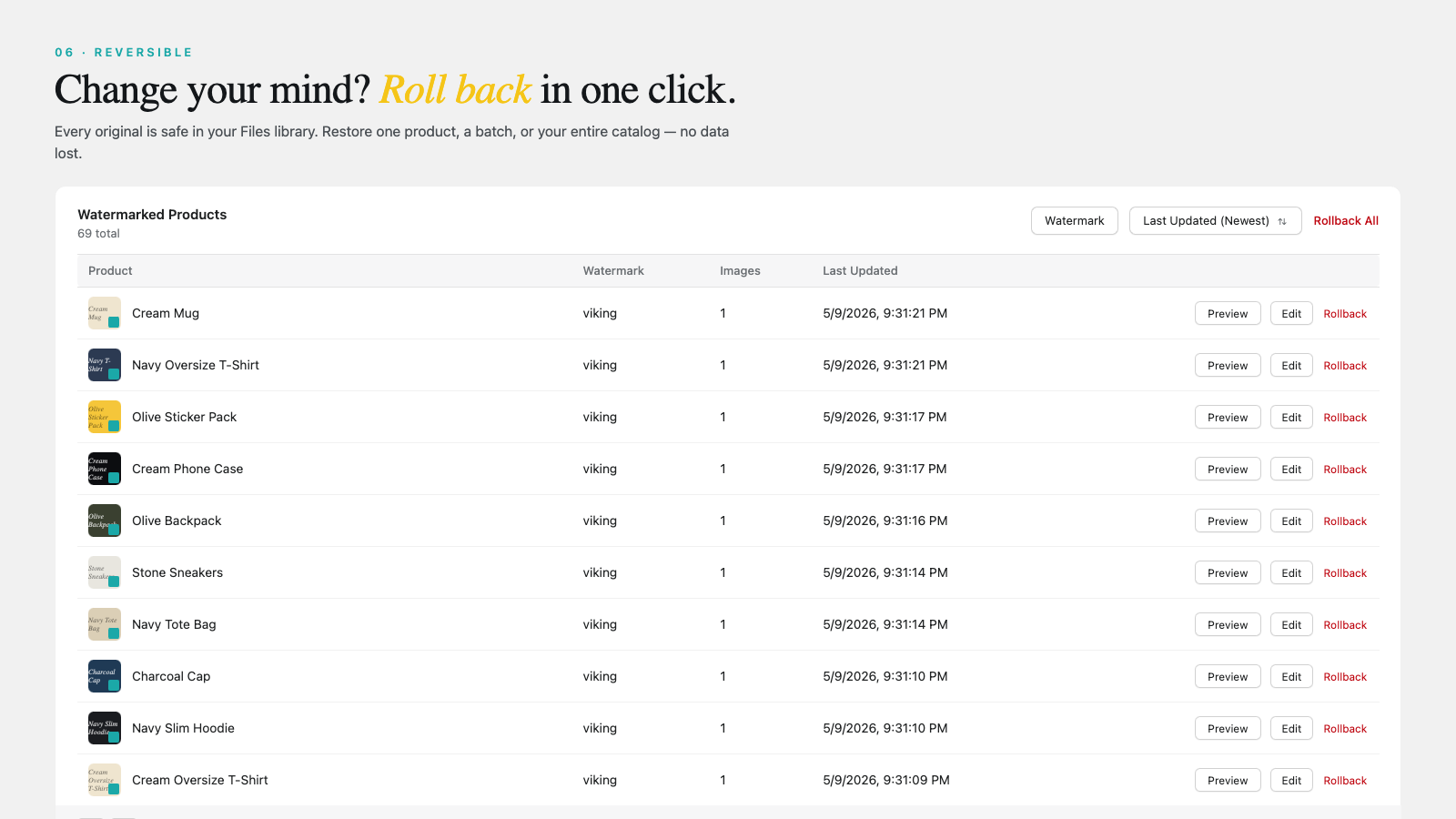
An app that copies every original to Shopify Files before applying the mark turns that disaster into a non-event. Disapproved in Shopping? Roll back the affected products, sync, done. Changed your logo? Roll back, reapply the new one. This is the difference between a watermark tool you can trust with your whole catalog and one you should keep away from anything that touches Google Shopping.
Image structure matters for more than Shopping, too. If you split product variations into separate listings for better indexing, clean per-variant images become part of your SEO, which is where separate products versus variants for SEO comes in, and showing the correct photo per option is handled by variant image filtering. Protected images are good. Protected, correct, and feed-safe images are better.
FAQ
Do watermarks lower my Google search ranking?
No. Watermarks are not an organic ranking factor. Google ranks your product page on content, structured data, links, and relevance, not on whether a photo carries a logo.
Will a watermark get my products disapproved in Google Shopping?
It can. Google Merchant Center does not allow watermarks, logos, or promotional text over the product on feed images. The disapproval lasts until you replace the image with a clean one.
Can I watermark some images but not others?
Yes, and that is the recommended setup. Keep your primary feed image clean and watermark the secondary gallery shots. Storefront protection still guards the clean image from casual saving.
Does Google remove watermarks automatically?
Merchant Center has an automatic image improvements option that tries to detect and remove watermarks and text. It is not guaranteed to work well, so sending a clean image is the safer choice.
How do I undo a watermark if it causes a disapproval?
Use an app that saves originals. Viking Watermark copies every original to Shopify Files, so you can roll back affected products to clean images in one click and resync your feed.
Related reading
- How to watermark Shopify product images in bulk
- Shopify product image SEO guide
- How to stop image theft on your Shopify store
- Shopify variant images FAQ
- Separate products vs variants for SEO
Watermark for protection, keep the feed image clean for Google, and never run a watermark tool that cannot give you the original back. Get those three right and watermarks cost you nothing in search.

Umid
Co-Founder at Craftshift