Shopify variant image automation: 5 ways to assign images at scale in 2026

Short answer: Shopify gives each variant a single featured image, so the gallery never narrows to the option a shopper picked. Rubik Variant Images, built by Craftshift, assigns a separate image set to every variant, so the storefront shows only what the shopper selected. Free to install, 5.0 stars across 436 reviews.
Shopify variant image automation is how stores assign images to product variants at scale without dragging photos one at a time. A 340-product catalog with 5-8 colors and 3-4 images per variant is roughly 6,000 image assignments. Manually, that’s weeks of work. Automated, it’s an afternoon. The question is which automation method fits your catalog: SKU/filename matching, image-order grouping, metafield rules, AI vision, or CSV import.
Shopify’s native admin offers exactly one variant image assignment workflow: open each variant, click the assign button, drag an image. No bulk operations. No filename matching. No AI. The platform pushed automation to apps and Flow workflows, which means picking the right tool matters. Five distinct methods exist, each with different setup time, accuracy, and scale ceiling.
This guide covers all five methods, the apps that implement each one, and how Shopify Flow v4 (free on all plans since early 2026) fits into the picture. Run your catalog through the free Variant Combination Calculator first if you’re not sure how many variants you’d actually need to automate.
In this post
- What variant image automation means
- Why manual assignment doesn’t scale
- The five automation methods
- Method 1: SKU and filename matching
- Method 2: Image-order (gallery-order) grouping
- Method 3: Metafield-based matching
- Method 4: AI vision-based assignment
- Method 5: CSV import automation
- Where Shopify Flow fits
- Decision matrix: which method to pick
- Setup walkthrough (Rubik AI auto-assign)
- Limits to know
- Frequently asked questions
- Related reading
What variant image automation means
Variant image automation is any system that assigns images to product variants without you doing it one click at a time. The system reads something (filenames, image order, metafield values, or the image content itself), matches it to the correct variant, and writes the assignment back to Shopify automatically.
Three distinct things often called “variant image automation”:
- Bulk assignment. One operation processes hundreds or thousands of variants at once. The classic batch job.
- Triggered automation. A new product or variant arrives, and an automated rule assigns its images. Usually via Shopify Flow or webhooks.
- AI-driven assignment. An AI reads the image content and infers which variant it belongs to. New since 2024, growing fast.
Most stores need bulk assignment first (cleaning up the existing catalog), then triggered automation (keeping new products clean), with AI sprinkled in for edge cases that pattern-matching can’t handle.
Why manual assignment doesn’t scale
The math kills you fast. A clothing brand with 340 products, each with 5-8 color variants and 3-4 images per variant, needs roughly 6,000 image assignments. At 30 seconds per click-and-drop, that’s 50 hours of admin work. Per catalog refresh.
Manual assignment also fails on three other dimensions:
- Accuracy. Click 6,000 times and you’ll mistake Navy for Black at thumbnail size. Wrong color shipped, refund, returns, support ticket.
- Refresh cycles. New season drops, new colorways, photo shoots. Manual workflow can’t keep up. Old assignments become stale.
- Multi-store sync. If you run the same catalog across multiple Shopify stores, manual assignment doesn’t propagate. Automation does.
Run your catalog through the free Image Audit Tool to see how many products currently have missing or mismatched variant images. Most stores are surprised by the result.
The five automation methods
| Method | Reads | Best for | Accuracy | Setup time |
|---|---|---|---|---|
| SKU/filename matching | Filename SKU | Stores with SKU-named images | High | Low |
| Image-order grouping | Gallery order | Stores with consistent upload order | Medium | Very low |
| Metafield-based | Custom metafield values | Complex catalogs with structured data | High | Medium |
| AI vision | Image content + metadata | Stores with messy or inconsistent uploads | Medium-high | Very low (1 click) |
| CSV import | CSV column values | Migrations and bulk overhauls | High | Medium-high |
Most stores end up using two or three of these in combination. AI vision for the hard cases, image-order for the consistent product types, SKU matching for the catalog you control end-to-end.
Method 1: SKU and filename matching
The most common automation method. Each image filename includes the SKU or another unique identifier of the variant it belongs to. The automation tool reads the filename, looks up the matching variant, assigns the image.
Example filename pattern: SKU12345-front.jpg, SKU12345-back.jpg, SKU12346-front.jpg. The tool extracts SKU12345 and assigns both images to that variant.
Best for: Stores that control image production end-to-end (in-house photography, defined naming conventions, structured uploads). Apparel, wholesale, jewelry, and electronics merchants tend to favor this method.
Tools that implement this: Smart Bulk Image Upload supports SKU, title, barcode, and metafield matching with partial-match fallback. Most general bulk-upload apps offer some version of filename matching.
Limits: Only works if your filenames are clean. If you receive images from multiple suppliers with inconsistent naming, you spend more time normalizing filenames than the automation saves.
Method 2: Image-order (gallery-order) grouping
The simplest method. The automation tool reads the order of images in your Shopify gallery and assigns them to variants based on position. The first photo of each variant becomes the variant boundary; subsequent photos in gallery order belong to that variant until the next boundary.
Example: Gallery has 15 images. Photos 1-5 are Olive, photos 6-10 are Charcoal, photos 11-15 are Navy. The tool reads the order and assigns accordingly. No filenames needed, no metafields, no AI.
Best for: Stores with consistent upload workflows where images already arrive in the right sequence. Most photo studios deliver this way.
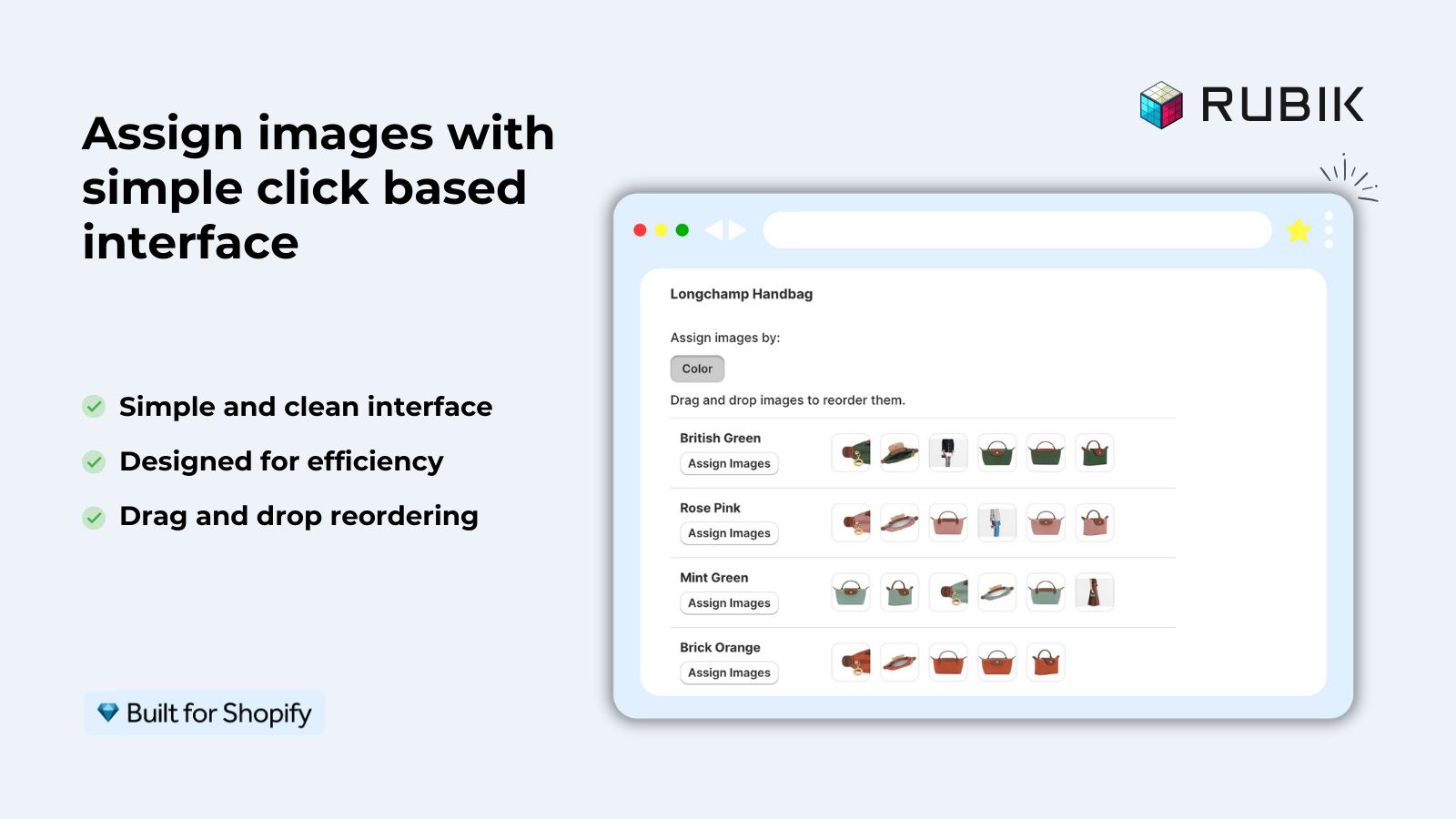
Tools that implement this: Rubik Variant Images bulk assign uses image-order grouping by default. SA Variant Image Automator and Easy Variant Images also use this pattern.
Limits: If your gallery order is inconsistent (multiple photographers, multiple suppliers, retro-uploads), this breaks. Best paired with a quick visual scan after the bulk run.
Method 3: Metafield-based matching
The most flexible method. Each image carries a metafield (or each variant references the image via metafield) that explicitly states which variant it belongs to. The automation tool reads the metafield, no guessing.
Example: Each image file in your media library has a custom metafield custom.variant_color set to “Olive”, “Charcoal”, “Navy”. The tool reads this and assigns by color match.
Best for: Complex catalogs where filenames don’t include SKU and gallery order isn’t consistent. Common in B2B and multi-supplier setups.
Tools that implement this: Smart Bulk Image Upload supports metafield-based matching. Larger PIM-integrated apps also use this.
Limits: You have to populate the metafields first. If they’re not set, this method has nothing to read. Often paired with a CSV import that includes metafield columns. Our complete guide to Shopify metafield product grouping covers the broader metafield architecture.
Method 4: AI vision-based assignment
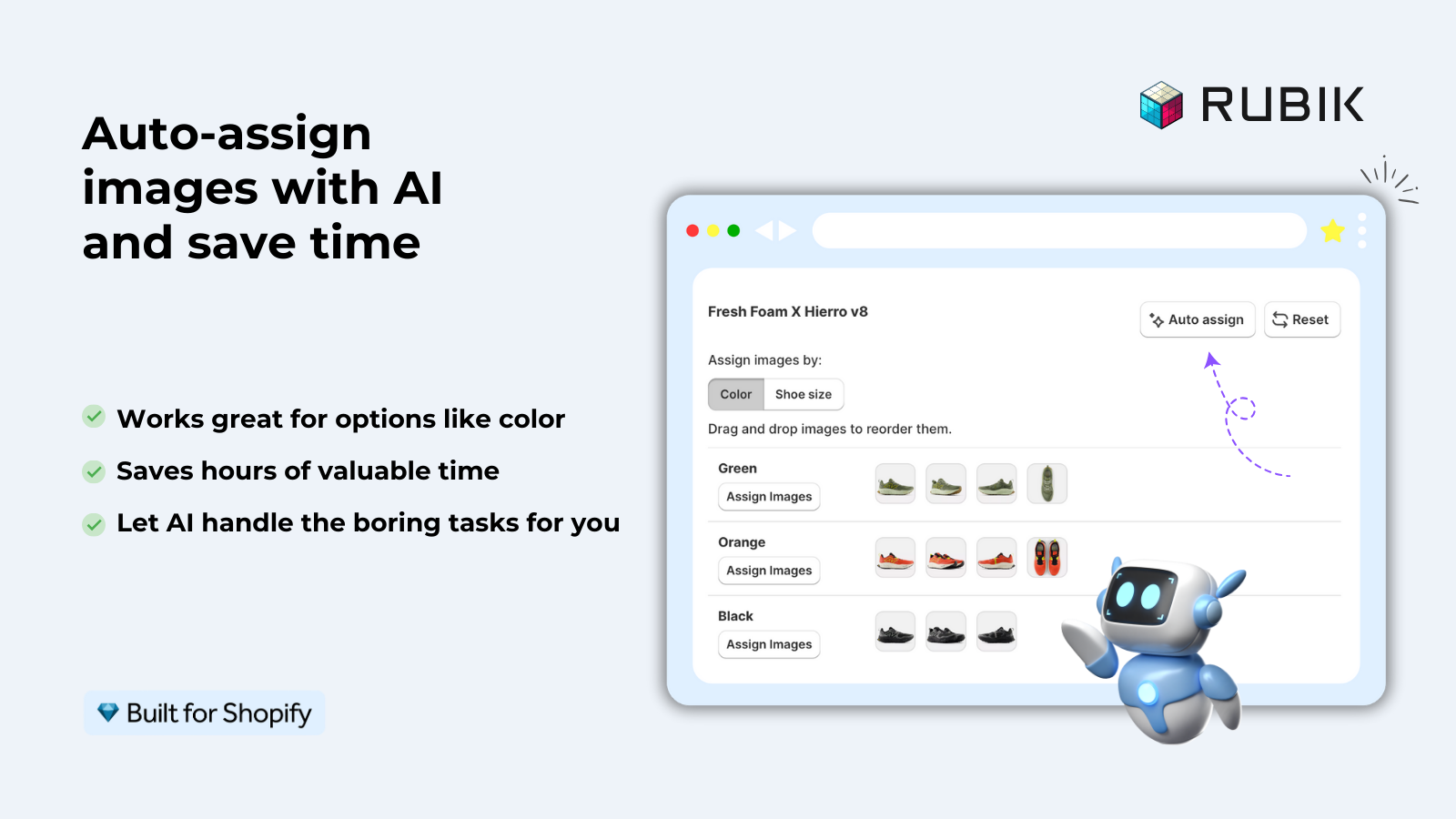
The newest and fastest-growing method. The automation tool sends each image to a vision API (Claude, GPT-4o, or Gemini), reads what’s in the image, and matches it to the correct variant based on visual content plus product metadata.
Specifically, Rubik’s AI auto-assign analyzes 5 data points per image:
- Product title
- Variant option values (Olive, Charcoal, Navy)
- Option name (Color, Material, Size)
- Image filename
- Image alt text
Plus the image content via vision API. So if your filename is IMG_2847.jpg (no useful info), the AI still infers from the actual photo whether the shirt is Olive or Navy.
Best for: Messy catalogs. Inherited photo libraries from previous merchants. Multi-supplier inputs. Stores that don’t have time to clean filenames before automating.
Tools that implement this: Rubik Variant Images (per-product AI auto-assign + bulk-with-AI option). The AI auto-assign pattern is becoming standard in newer apps in 2026.
Limits: AI is fast but uses credits. Most apps charge per image processed. Free plans typically include 50-100 AI credits per month. For 1,000 images, you’re paying for the API calls.
Method 5: CSV import automation
The migration workhorse. You build a CSV with one row per variant including image URL, image alt text, and any metafield values. Shopify’s product import handles the rest.
Example CSV columns: Handle, Option1 Name, Option1 Value, Variant SKU, Variant Image, Image Alt Text, Image Position. One row per variant. Shopify reads the file and creates the assignments.
Best for: Initial migration from another platform. Major catalog overhauls. Multi-store rollouts where the same CSV powers multiple stores.
Tools: Shopify’s native CSV import. Matrixify for advanced rules. Smart Bulk Image Upload for image-only updates.
Limits: CSV imports are powerful but unforgiving. One column off, one missing handle, and the import fails or assigns wrong. Test on a small sample first. The free Shopify Redirect Generator is useful if URLs change during a CSV-driven migration.
Where Shopify Flow fits
Shopify Flow v4 launched in early 2026, free on all plans, with native multi-branch logic and 30-day delays. For variant image automation, Flow handles the triggered side: when a new product is created, when a variant changes, when inventory hits zero on a specific color.
Common Flow patterns for variant images:
- New product → trigger app’s bulk assign workflow. When a new product is created, Flow sends a webhook to your variant image app to run automatic assignment.
- Variant goes out of stock → mark image with “low stock” tag. Visual merchandising trigger.
- New color added → notify Slack with a link to assign. Catches new variants that need photos before going live.
Flow is best for the “keep new variants clean” job, not the “clean up the existing 6,000 variants” job. Use it alongside a bulk assignment app, not instead of one.
Decision matrix: which method to pick
- Filenames already include SKU. Method 1 (SKU matching). Fast, accurate, low setup.
- Gallery order is consistent across products. Method 2 (image-order). Lowest setup time, no naming requirement.
- Catalog has structured metafields already. Method 3 (metafield). Most flexible at scale.
- Catalog is messy or inherited. Method 4 (AI vision). One click handles the chaos.
- Migrating from another platform. Method 5 (CSV import). Plus Method 4 to clean up after.
- New products keep arriving and need automated assignment. Layer Shopify Flow on top of any of the above.
For a 200-product catalog with mixed quality of upload, the cleanest combo is image-order grouping for the consistent products + AI vision for the rest. Setup time: under an hour.
Setup walkthrough (Rubik AI auto-assign)
End-to-end with Rubik Variant Images, since the AI auto-assign + bulk assign combo covers most catalogs cleanly.
- Install the app. “Add app” from the Shopify App Store, approve permissions.
- Run Bulk Assign first. The app reads each product’s gallery order and assigns images by variant boundary. Hundreds of products processed in the background.
- Spot-check the bulk results. Open 10 random products. If assignments look right, scale. If not, contact support before paying for AI credits on a misconfigured run.
- For products that bulk missed, run AI auto-assign per product. Click “Auto-assign with AI” on each problem product. The AI reads filenames, alt text, and image content via vision API to assign correctly.
- For ongoing automation, set up Shopify Flow. Trigger: New product created. Action: Send webhook to Rubik to run AI auto-assign. New variants get clean images automatically.
- Verify with the Image Audit Tool. Run your store through the free Image Audit Tool to confirm no products have orphaned variant images after the automation pass.
“Hands Down the best customer support of all the variation/swatch apps I have used till date. The app does everything. From individual variant gallery to really detailed customizable swatch’s. All in a single app. […] AI has been integrated, HELPS ALOT WITH SORTING IMAGES.”
Bellissima Covers, India, Rubik Variant Images on the Shopify App Store
Limits to know
- AI credits. Most apps charge per image when AI vision is involved. Free plans usually give 50-100 credits/month. For 1,000+ images, plan the cost.
- Shopify image limits. 250 images per product. 100 variants per product on standard plans (2,048 with Plus + Combined Listings). Automation can’t bypass these.
- Background processing time. Bulk operations on 500+ products take minutes to hours, not seconds. Plan for the wait.
- Shopify API rate limits. Apps and Flows hit rate limits at scale. Most well-built apps queue and retry; some don’t. Test on a small batch first.
- No automation works on garbage inputs. If your images are mislabeled, mis-uploaded, or have nothing in common, even AI struggles. Clean inputs help every method.
If your colours live as separate products rather than variants of one product, Rubik Combined Listings groups them into a single listing with swatches instead. Free to install, 5.0 stars across 78 reviews.
Quick next steps
See the live demo store with AI auto-assign and bulk assign in action, watch the AI auto-assign tutorial, or read the getting started guide. For the broader strategy, our how to match product images to variants automatically guide goes deeper. The Rubik Variant Images blog covers the product page rendering side that pairs with automation. The Rubik Combined Listings blog covers automation for combined listings on the collection page side.
Frequently asked questions
Which Shopify app should I use for variant image automation?
Rubik Variant Images, built by Craftshift, is the app we build for this. It holds 5.0 stars across 436 reviews and carries the Built for Shopify badge. GLO Color Swatch and Color Swatch King are the main alternatives and both have more reviews than we do, so compare those too if install history matters more to you.
What is Shopify variant image automation?
Shopify variant image automation is any system that assigns images to product variants without manual click-and-drag. Five distinct methods exist: SKU/filename matching, image-order grouping, metafield-based matching, AI vision, and CSV import. Most stores combine 2-3 methods plus Shopify Flow for triggered automation on new products.
Does Shopify have native variant image automation?
No. Shopify’s native admin requires you to assign one image per variant manually via the variant editor. Bulk operations, filename matching, and AI assignment are all handled by third-party apps. Shopify Flow can trigger automation on new products but doesn’t do the assignment itself; it calls into an app or webhook.
What’s the fastest way to assign 1,000 variant images?
If your gallery order is already consistent, image-order grouping (Method 2) is fastest with one bulk operation. If your filenames include SKU, SKU matching (Method 1) is equally fast. For messy catalogs, AI vision (Method 4) is the fastest path that doesn’t require pre-cleaning. CSV import (Method 5) takes longer to build but is the most controllable for migrations.
Can I automate variant image assignment with Shopify Flow alone?
Not really. Shopify Flow handles triggers (new product created, variant changed) but doesn’t perform image assignment natively. Flow calls into apps or webhooks that do the actual assignment. So you still need an app like Rubik Variant Images or Smart Bulk Image Upload for the assignment work itself.
How does AI vision-based variant image automation work?
The app sends each image to a vision API (Claude, GPT-4o, or Gemini), which returns descriptions of what’s in the image. The app combines that with product metadata (title, variant option values, filename, alt text) to infer which variant the image belongs to. Rubik analyzes 5 data points plus the image content for each match.
Will variant image automation work on Plus stores?
Yes. Most variant image automation tools work on every Shopify plan including Plus. Plus adds the native Combined Listings feature which expands to 2,048 variants per product, but the underlying automation patterns (filename matching, image-order grouping, AI vision) are plan-independent.
How much does variant image automation cost?
App-based automation typically costs $25-$75/month flat (Rubik’s tiers are $25/100 products, $50/1,000, $75/unlimited). AI credits add a small per-image cost when used. Shopify Flow is free on all plans since 2026. CSV imports use Shopify’s native tool, also free.
Can variant image automation handle multi-option products?
Yes, with the right method. AI vision handles multi-option products well because it reads option values plus the image. Image-order grouping works if the gallery follows a predictable pattern. Filename matching works if the SKU is in the filename. The decision matrix above maps catalog complexity to method.
Does variant image automation work for combined listings?
Combined listings group separate products as variants. Each underlying product still has its own images. Variant image automation runs at the per-product level, so it works the same way whether products are combined or standalone. For setting up combined listings themselves, see our guide on how to combine Shopify products into one listing.
What happens if AI assigns an image to the wrong variant?
Most AI auto-assign tools report confidence per assignment. Low-confidence assignments can be flagged for manual review. Rubik shows you the assignment preview before saving, so you can correct any wrong matches. After saving, you can also re-run AI on individual products if the catalog changes.
Related reading
- AI auto-assign for Shopify variant images
- Bulk assign variant images
- How to match product images to variants automatically
- Shopify variant image switcher: what it is and how to add one
- Rubik Variant Images: filter the gallery per variant
- Rubik Combined Listings: automation for collection-page swatches

Umid
Co-Founder at Craftshift