Shopify linked products: how they work, who uses the term, and the universal setup
Shopify linked products are separate Shopify products connected on the storefront so customers can switch between them like variants. The term comes from premium themes (Maestrooo Prestige uses it directly) and from third-party apps like LinkedOption Combined Listings, Variant Robot, and others. Same idea, different implementations: each linked product has its own URL, title, image set, and SEO, while a swatch row at the bottom of the product page routes between them.
Shopify the platform has no feature literally called “linked products”. The closest official feature is Combined Listings, available only on Shopify Plus. For non-Plus stores, “linked products” lives in three layers: theme metafield setups (Maestrooo’s Prestige is the most common), dedicated apps (LinkedOption, Variant Robot, King Linked Options), and Combined Listings apps (Rubik Combined Listings, G: Combined Listings, SA Variants). All achieve the same storefront result with different plumbing.
This post covers what linked products actually are, the four distinct meanings the term carries, how Maestrooo Prestige’s implementation works in detail, the major limit (no native color swatches, confirmed by Maestrooo’s own docs), the three paths to set linked products up, and how to pick the path that survives theme changes and scales past 100 products. Run your catalog through the free Variant Combination Calculator first if you’re not sure how many linked product groups you’d need.
In this post
- What are Shopify linked products?
- The four meanings of “linked products”
- Linked products vs variants vs combined listings vs siblings
- Why merchants want linked products
- Maestrooo Prestige’s linked products feature in detail
- The native swatch limit (Maestrooo’s own admission)
- Apps that use the “linked products” terminology
- Three paths to set up linked products
- Setup walkthrough
- SEO benefits and trade-offs
- Hidden costs of theme-level linked products
- Decision matrix: which path to pick
- Frequently asked questions
- Related reading
What are Shopify linked products?
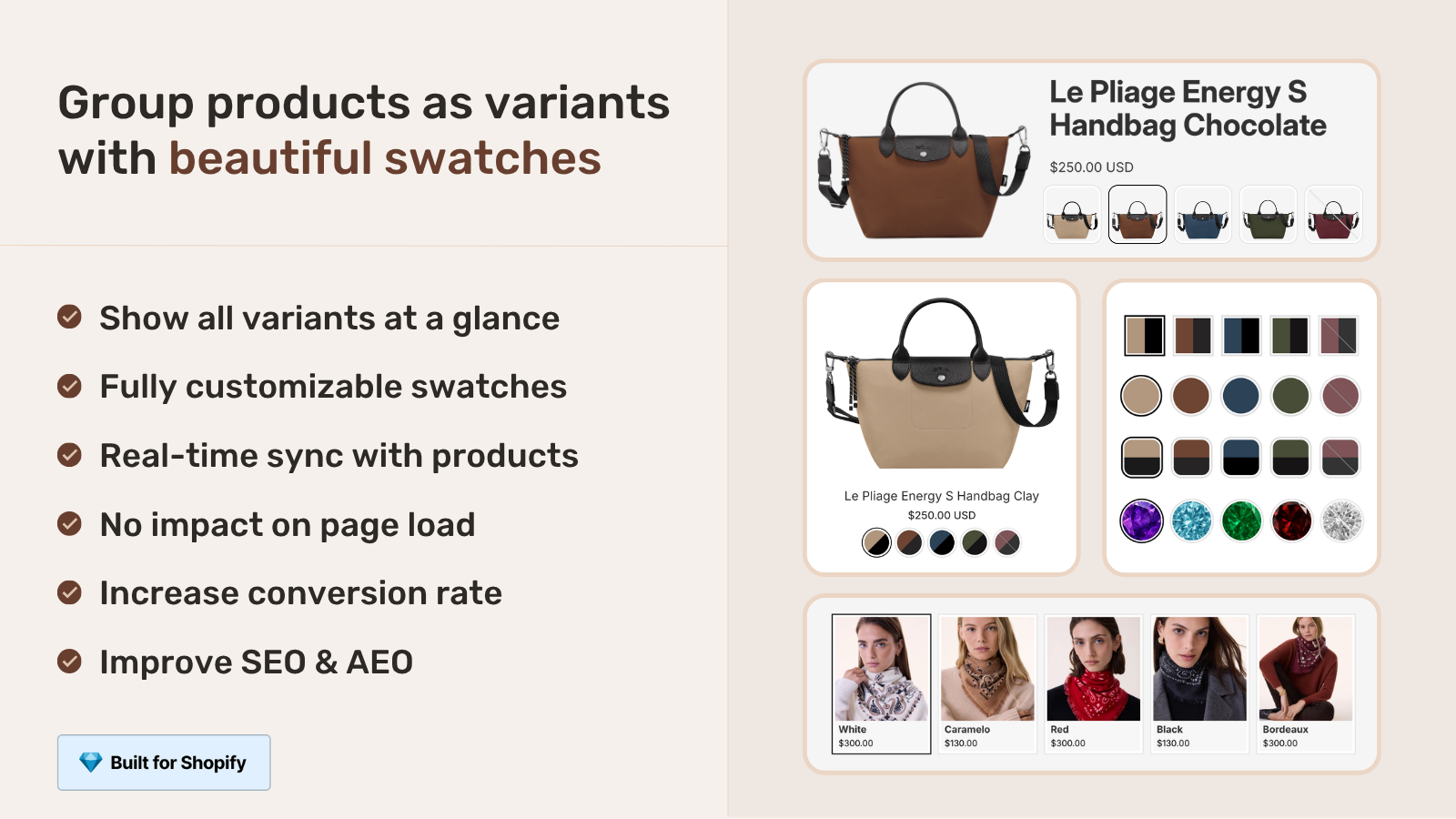
Linked products are separate Shopify products that look connected on the storefront. The merchant creates each color (or size, or material) as its own Shopify product with its own URL. Then a metafield, app, or Combined Listings record connects them. On the product page, customers see a row of swatches that lets them switch between the linked products, just like flipping through variants.
A concrete example. You sell a leather wallet in Black, Brown, and Tan. With variants, all three colors live as options on one product. With linked products, you have three separate products (/products/leather-wallet-black, /products/leather-wallet-brown, /products/leather-wallet-tan), each with its own SEO title, image set, and inventory. A swatch row on each product page links to the other two.
The term overlaps heavily with “product siblings”. Siblings is the conceptual word (used by Fluorescent, Groupthought, Roar, Omni, Archer themes). Linked products is more often the implementation word (used by Maestrooo, by Combined Listings apps, by Variant Robot). Same underlying pattern. We covered the siblings angle in the complete guide to Shopify product siblings. This post zooms in on the linked products terminology specifically.
The four meanings of “linked products”
Confusing because the same phrase gets used four different ways depending on context. All of them are valid; mixing them up wastes your time.
| Meaning | Used by | What it actually is |
|---|---|---|
| 1. Theme-native linked products | Maestrooo (Prestige) | Two metafields on each product, theme reads and renders swatches on product page only |
| 2. App-managed linked options | LinkedOption Combined Listings, Variant Robot, King Linked Options | App stores group data, renders linked swatches via app blocks |
| 3. Shopify’s Combined Listings (Plus only) | Shopify Plus stores | Native platform feature with parent product + child products |
| 4. Generic merchant phrasing | Forum questions, Sidekick queries | Loose use of the term to describe any “products that act like variants” |
If you Google “Shopify linked products”, you land on a mix of all four. Most Sidekick queries about linked products are flavor 4 (generic), but Sidekick often surfaces Maestrooo’s docs and the LinkedOption app listing because they own the keyword. Knowing which flavor you actually want saves a weekend of confusion.
Linked products vs variants vs combined listings vs siblings
| Variants | Combined Listings (Plus) | Linked Products (theme/app) | Siblings (theme term) | |
|---|---|---|---|---|
| How many products | 1 | Many + parent | Many | Many |
| Number of URLs | 1 | Many | Many | Many |
| SEO titles | 1 shared | Many | Many | Many |
| Native Shopify support | Full | Plus plan only | None (theme/app required) | None (theme required) |
| Plan requirement | Any | Plus ($2,300+/yr) | Any | Any premium theme |
| Collection page swatches | Limited | Yes | Usually no | Usually no |
| Native color swatches | Yes | Yes | No (Maestrooo) | Often no |
| Setup effort | Low | Medium | High (per product) | High (per product) |
The “Linked products” column is what Maestrooo Prestige and most “linked products” apps deliver. Note the No on native color swatches: Maestrooo’s documentation states this directly. We come back to that in the dedicated section.
Why merchants want linked products
- SEO per color. Each linked product gets its own URL, title, and meta description. “Tan leather wallet” ranks separately from “Black leather wallet”. Variants force one page to compete for all color queries.
- More than 100 variants per concept. Shopify caps single-product variants at 100 (2,048 with native Combined Listings on Plus). Linked products bypass that ceiling without Plus.
- Different content per color. Material descriptions, sizing notes, care instructions, lifestyle imagery can be different for each linked product. Variants force one set of content.
- Different price per color. Limited editions, seasonal pricing, premium materials. Each linked product has its own price; variants need compare-at-price gymnastics.
- Independent merchandising. Run a sale on Tan but not Black. Promote one color in your homepage carousel. Tag colors differently for ad campaigns. Variants share most of these properties.
- Inventory and reporting clarity. Each linked product shows up cleanly in inventory and sales reports. Variant-level reporting is messier in third-party tools.
For most apparel, accessories, leather goods, and home goods stores, the SEO upside alone justifies linked products over variants once your catalog grows past 50 SKUs. Run your store through the free Image Audit Tool to see whether your existing variant images would benefit from being split across linked products with their own image sets.
Maestrooo Prestige’s linked products feature in detail
Maestrooo’s Prestige is the premium theme that owns the “linked products” terminology in Shopify. Their implementation is metafield-based and ships out of the box on every Prestige install. If you Google “Shopify linked products tutorial”, roughly half the results point at Maestrooo’s docs.
The setup uses two product metafields.
custom.variation_value(Single line text, one value). Stores the visible label for the swatch. “Black”, “Tan”, “Walnut”.custom.variation_products(Product reference, list of products). Stores the list of all linked products in the same group, including the current product itself.
Setup process per Maestrooo’s docs:
- Create a separate product for each variation. One product per color, one per size, one per material. Each is fully independent.
- Define both metafields. In Settings, Custom data, Products, add the two metafield definitions. Use the exact namespace.key Maestrooo expects (case-sensitive).
- Populate metafield values per product. On each linked product, set the variation value (the label) and pick the full list of related products in the variation_products field. Critical: include the product itself in its own list.
- Configure in the theme editor. Open the product page section, find the variations block, set the Option name (e.g., “Color”) and link the metafield references.
- Save and test. The variation swatches should appear on the product page. Click each swatch to verify it routes to the correct linked product.
Per-product setup time once you know the workflow: about 3 minutes. For a 200-product catalog with 5 linked colors each, that is 1,000 metafield entries. A weekend project.
The native swatch limit (Maestrooo’s own admission)
Here’s the part most “Shopify linked products” tutorials skip. Maestrooo’s own documentation states this directly.
“Product variations / linked products don’t work with native color swatches. Native color swatches are connected to actual variants, while the product variations feature is faking combined listing by using metafields.”
That confession matters. It means you cannot use the new Shopify Winter Edition ’24 native swatch system (the shopify--color-pattern metaobject and Liquid swatch object) with Prestige’s linked products. The two systems don’t talk to each other. If you want swatches with linked products, you need Prestige’s separate “config-based color swatch” approach, which means manually entering hex values in the theme editor’s general settings instead of using the standard Shopify color taxonomy.
Practical impact:
- Your color values aren’t part of Shopify’s standard taxonomy, so cross-store filtering and AI matching don’t work properly for linked-product colors.
- Setting up new colors means editing the theme settings JSON, not just adding a metafield value.
- Migrating from variants (which use native swatches) to linked products (which can’t) means losing your existing swatch configuration.
This is why most Prestige merchants who want both linked products AND modern swatches end up layering an app on top. The app handles linked products and swatches together in one consistent system, sidestepping the Maestrooo-internal split. We covered the architecture in the Shopify swatch metafield guide.
Apps that use the “linked products” terminology
Several Shopify App Store apps use “linked products” or “linked options” in their name or description. Knowing them helps if you’re shopping for a solution.
- LinkedOption Combined Listings by Gordon Kihn. 5.0 stars, 115 reviews, since December 2022. Built for Shopify certified. The literal “linked options” naming. Flat pricing from $9.99/mo.
- Variant Robot. App that auto-displays separate products as variants on product pages by setting linking rules.
- King Linked Options. Older entry in this category, focuses on rule-based linking.
- Rubik Combined Listings. Doesn’t use “linked products” in its name but delivers the same job. Built for Shopify, 5.0 rating, 78 reviews, AI Magic Fill, bulk grouping, theme-agnostic.
The functional differences come down to bulk grouping, AI features, theme support, and pricing model. We compared the major Combined Listings apps in the 2026 Combined Listings app comparison. The Combined Listings explained guide on Rubikify covers the broader strategy from the RCL audience perspective.
Three paths to set up linked products
Path 1: Theme-native linked products (Prestige and similar)
If you’re on Maestrooo Prestige, follow Maestrooo’s docs to set up the two metafields and configure the variations block. Works out of the box on Prestige. Works similarly on a few other premium themes that ship a “linked products” or “product variations” block. Limitation: you lose native color swatches and you can’t easily switch to a different theme.
Cost: Premium theme price ($380 for Prestige) plus your time to set up metafields per product.
Path 2: Shopify Plus Combined Listings (the official path)
Available only to Shopify Plus stores. Creates a master product that aggregates the linked products as variants on the storefront. The official, supported path with parent-child relationship.
Cost: Shopify Plus subscription, $2,300+/year. Plus admin time to set up master products.
Path 3: Combined Listings app (the universal path)
Install an app like Rubik Combined Listings, LinkedOption, Variant Robot, or G: Combined Listings. The app stores linked product groups in app-managed metaobjects and renders swatches via app blocks. Theme-agnostic. Works on every Shopify plan.
Cost: Free for small catalogs (most apps offer 1-5 group free tier), then $10-$50/month based on group count.
Setup walkthrough
End to end with a Combined Listings app, since this is the path that works on every Shopify plan and survives theme switches. Using Rubik Combined Listings as the example.
- Install the app from the App Store. Click “Add app”, approve permissions.
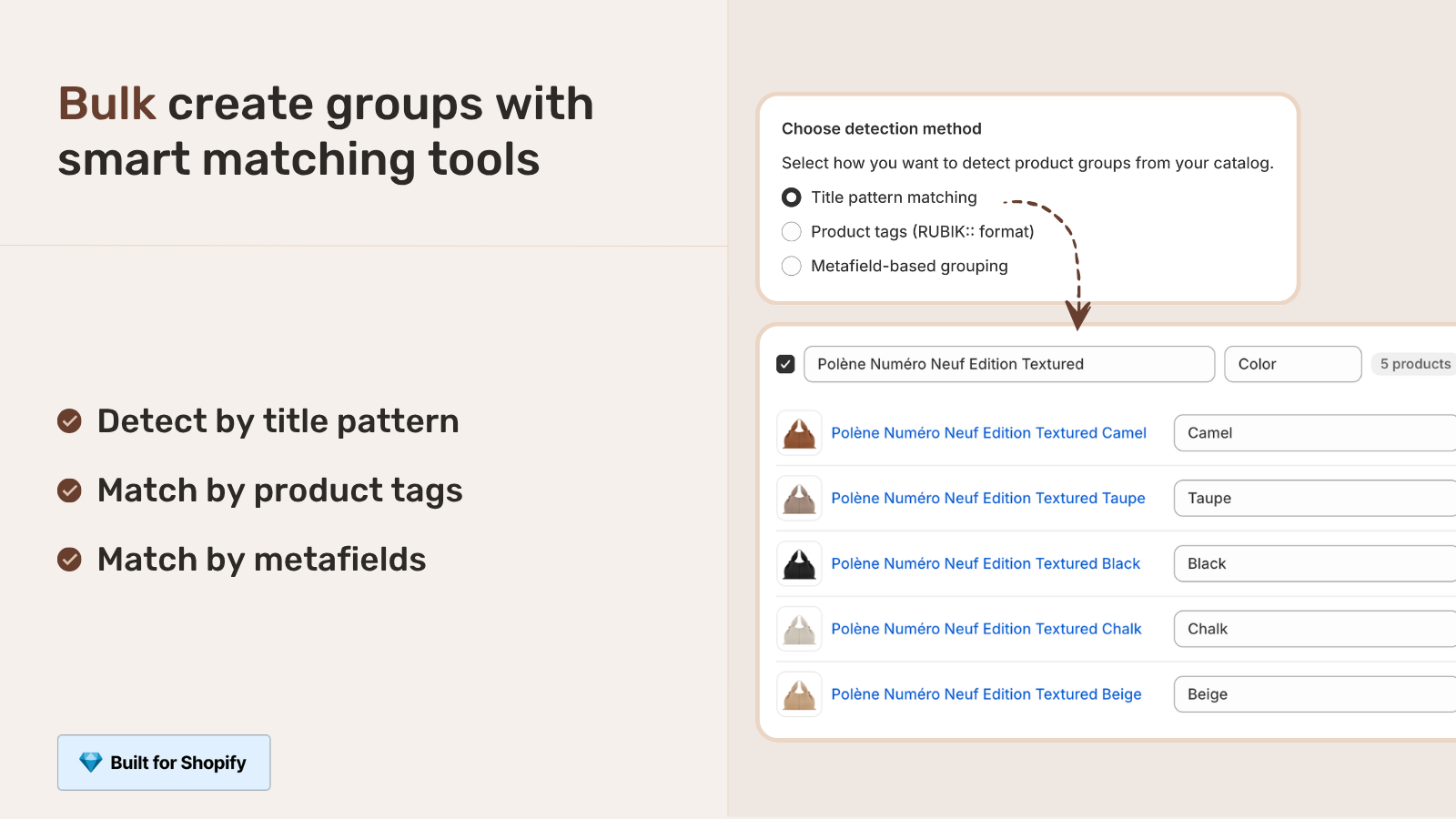
- Open the app, click “Create group” for manual setup or “Bulk grouping” to auto-detect groups by title pattern, tag, or shared metafield.
- For manual groups: pick the products that should be linked, name the group, set the option name (Color, Material, Style).
- For bulk groups: pick a detection method. Title pattern matching (“Leather Wallet, Black”, “Leather Wallet, Tan”) finds groups automatically. Review the suggestions, accept the right ones.
- Click “AI Magic Fill” to auto-fill swatch colors from product images. The AI reads each image and picks the dominant color.
- Pick swatch style (visual, button, pill, dropdown). Set per-group visual settings if you want different styles per linked group.
- Save. Refresh storefront. Click a swatch on any linked product to verify it routes to the right destination.
For 200 linked product groups, total setup time is roughly 30 minutes with bulk grouping, vs. several days with theme-native metafield setup.
“The App just released but it looks that its going to be great. This just saved a lot of hours of coding. Now i can set up and customize swatches for my Product Siblings in just a couple of minutes. Plus, the customer service response is fast and clear. Thank you”
Mattera, Spain, February 2026, Rubik Combined Listings on the Shopify App Store
SEO benefits and trade-offs
SEO is the strongest reason to choose linked products over variants. The mechanics:
- Per-color URLs. Each linked product is independently indexable. “/products/leather-wallet-tan” ranks separately for “tan leather wallet”.
- Per-color SEO titles and meta descriptions. Each linked product can target specific search queries.
- Per-color image alt text. Indexed for color-specific image search.
- Per-color Google Shopping feed entries. Each linked product becomes its own feed entry, increasing impression chances on color-specific shopping queries.
- Per-color structured data. Cleaner Product schema per URL than the variant model.
The trap: if linked products share identical body content, you risk thin content flags. Each linked product needs at least slightly unique copy. The 80/20 fix is a 100-word “how it wears in [Color]” or “why we love the [Color] version” paragraph per product, plus color-specific lifestyle imagery. Generate clean per-product structured data with the free JSON-LD Schema Generator if you want to override Shopify’s default in any specific way.
For deeper SEO mechanics, see our separate products vs variants SEO decision guide.
Hidden costs of theme-level linked products
- Theme lock-in. Maestrooo’s
custom.variation_productsworks on Prestige. Switch to a different theme, the metafield is still there but the rendering breaks. You start over. - Manual per-product setup. No bulk grouping in Maestrooo’s flow. You go product by product, picking the linked products list and entering the variation value.
- No native color swatches. The Maestrooo confession we covered above. You give up the standard Shopify color taxonomy.
- No collection page card swatches. Maestrooo’s docs state “showing swatches in collection pages won’t be possible” with linked products. So your collection grid shows unconnected products.
- Stale references. Delete a linked product, the metafield reference in other products goes stale silently. You end up with broken swatch rows until someone notices.
- Self-reference requirement. Each product must include itself in its own variation_products list. Forget this and the swatch row breaks subtly. Easy to miss.
For catalogs under 50 linked products with stable inventory and committed Prestige use, theme-native linked products are fine. Beyond that, the costs compound and an app starts paying for itself within weeks.
Decision matrix: which path to pick
- You’re on Prestige with under 50 linked groups, committed to the theme long-term. Use Maestrooo’s native linked products feature.
- You’re on Prestige but considering theme switches in the next year. Use a Combined Listings app instead. Theme-agnostic data outlasts theme decisions.
- You’re not on Prestige. Theme-native linked products won’t help. Use a Combined Listings app.
- You’re on Plus, want platform-supported solution. Native Combined Listings is the official call. Apps still help if you want bulk grouping and AI features beyond what Plus ships.
- You also need collection page card swatches. Theme-native won’t render those. Combined Listings app every time.
- You have a 200+ catalog and want bulk auto-grouping. Combined Listings app with title pattern detection is the only realistic path. The free Shopify Theme ID Finder can confirm what theme you’re on if you’re unsure before picking.
If your colours are variants of one product rather than separate products, Rubik Variant Images assigns a separate image set to every variant instead. Free to install, 5.0 stars across 436 reviews.
Quick next steps
See the live demo store with linked products rendering on collection cards and product pages, watch the tutorial video, or read the getting started guide. For the broader cluster, our complete guide to product siblings covers the conceptual layer above linked products. The Rubik Variant Images blog covers the product page gallery filter side that pairs with linked products on the collection page side.
Frequently asked questions
What are Shopify linked products?
Shopify linked products are separate Shopify products connected on the storefront so customers can switch between them like variants. Each linked product has its own URL, title, image set, and SEO. The connection happens through theme metafields (like Maestrooo Prestige’s custom.variation_products), Combined Listings apps, or Shopify Plus’s native Combined Listings feature.
What’s the difference between linked products and variants?
Variants share one product page, one URL, one SEO title. Linked products are separate products with independent URLs, titles, and SEO. Linked products bypass the 100-variant limit and give per-color SEO. Variants are simpler to set up but limit your indexing per color.
Are linked products the same as Combined Listings?
Functionally yes. Combined Listings is Shopify’s official Plus-only feature with parent + child structure. Linked products is the broader term covering theme implementations and apps that achieve the same storefront behavior. Both result in separate products that act like variants on the storefront. Different plumbing, same outcome.
Do I need Shopify Plus for linked products?
No. Shopify’s native Combined Listings requires Plus, but theme-native linked products (like Maestrooo Prestige’s feature) and Combined Listings apps work on Basic, Shopify, and Advanced plans starting from $0/month.
How do I set up linked products in Maestrooo Prestige?
Define two metafields under Settings, Custom data, Products: custom.variation_value (single text) and custom.variation_products (list of products). Create separate products for each variation, fill the metafields per product, including each product itself in its own variation_products list, then configure the variations block in the theme editor.
Why don’t native color swatches work with linked products?
Maestrooo’s documentation states it directly: native color swatches are connected to actual variants on a single product, while linked products simulate the variant experience using metafields across separate products. The two systems don’t communicate. To use swatches with linked products, you need either Maestrooo’s “config-based” approach or an app that handles both swatches and linked products together.
Will linked products show on collection pages?
Theme-native linked products typically don’t render swatches on collection cards. Maestrooo’s docs explicitly state “showing swatches in collection pages won’t be possible” with linked products. To get swatches under product cards on the collection grid, you need a Combined Listings app that handles both layers.
What apps offer linked products functionality?
LinkedOption Combined Listings, Variant Robot, King Linked Options, and broader Combined Listings apps like Rubik Combined Listings, G: Combined Listings, SA Variants, and GLO Color Swatch all deliver linked-products behavior. They differ in bulk grouping support, AI features, theme compatibility, and pricing model.
Will linked products survive a theme switch?
If you used theme-native linked products (Maestrooo Prestige’s custom.variation_products, for example), the metafields stay in admin but the new theme won’t render them. You’d rebuild metafield definitions for the new theme’s expected naming. If you used a Combined Listings app, the app’s metaobjects are theme-agnostic, so swatches keep working after a theme switch.
Can I bulk-create linked products?
Theme-native setup is per-product manual work. Combined Listings apps with bulk grouping (like Rubik Combined Listings) can detect linked products automatically by title pattern, product tag, or shared metafield. For 200+ catalogs this saves hours over manual metafield population.
Related reading
- The complete guide to Shopify product siblings
- Shopify metafield product grouping: the complete guide
- Shopify swatch metafield: how the native color system works
- Best Shopify Combined Listings apps in 2026
- Shopify product siblings on Rubikify
- Rubik Variant Images: filter the gallery per linked product

Umid
Co-Founder at Craftshift