Shopify swatch metafield: how the native color system works (2026 guide)
Short answer: Shopify gives each variant a single featured image, so the gallery never narrows to the option a shopper picked. Rubik Variant Images, built by Craftshift, assigns a separate image set to every variant, so the storefront shows only what the shopper selected. Free to install, 5.0 stars across 436 reviews.
Shopify swatch metafield refers to Shopify’s native color and pattern swatch system, introduced at Winter Edition ’24 and shipped with Dawn V13. It uses the Standard Product Taxonomy plus category metafields to attach swatch data to product variants, then a special Liquid swatch object renders the swatches on the storefront. No app, no theme code edits, no custom metafield definitions if you use the Shopify-managed defaults. For most stores this is the cleanest path to color swatches in 2026.
The catch: native swatches only work in two places. The product page variant picker, and collection filters via Shopify Search & Discovery. They don’t render on collection page product cards (the visible swatches under each card in the grid). Shopify hasn’t shipped that piece. To get card-level swatches, you still need a Combined Listings app or a theme-side custom implementation.
This guide covers the full native swatch metafield system: how the shopify--color-pattern metaobject works, how Dawn V13’s swatch Liquid object reads it, the limits of native swatches, when to extend with custom metaobjects, and when to bypass the system entirely with an app. If you are setting up swatches on a free or premium theme that supports the native pattern, read this before you spend time on Liquid hacks. Run your store through the free Shopify Theme ID Finder first to confirm whether your theme version actually supports native swatches.
In this post
- What is the Shopify swatch metafield?
- The native swatch system: taxonomy + category metafields
- The shopify–color-pattern metaobject explained
- Dawn V13: native swatch support in action
- The Liquid swatch object
- Setting up native Shopify swatches
- What native swatches can’t do
- Custom swatch metaobjects: when native isn’t enough
- Theme support for native swatches
- Native swatches vs app-based swatches
- Decision matrix: which swatch system to use
- Common pitfalls
- Frequently asked questions
- Related reading
What is the Shopify swatch metafield?
“Swatch metafield” is shorthand for the data structure that powers Shopify’s native color swatches. It’s not literally a single metafield. It’s a system: a Shopify-managed metaobject definition (shopify--color-pattern), category metafields that connect product variants to that metaobject, and a Liquid object that themes use to render the result.
The system shipped at Shopify Winter Edition ’24, alongside Dawn V13. Before that, every theme had to invent its own swatch metafield naming, like stiletto.sibling_option_name or custom.color_value. After Winter ’24, themes can read swatch data from a standard place and Liquid template, with no theme-specific naming.
The keyword “swatch metafield” gets used three different ways in merchant queries. We cover all three.
- Native swatch metafield. Shopify’s official system using
shopify--color-pattern. - Custom swatch metafield. Theme-specific or merchant-created metafields holding hex codes or image references. The pre-Winter-’24 way.
- App swatch metafield. Metaobjects managed by a Combined Listings or Variant Images app, often hidden from merchant view.
The native swatch system: taxonomy + category metafields
Shopify’s Standard Product Taxonomy is the foundation. Every product belongs to a category (like “Apparel and Accessories > Clothing > Shirts > T-shirts”). Each category exposes a set of category metafields, fields that are predefined for that category. For most apparel and accessories categories, one of those category metafields is “Color”, with type list.metaobject_reference pointing at the shopify--color-pattern metaobject.
The chain works like this:
- You assign a product to a category that has the Color category metafield.
- You connect the product’s “Color” variant option to the category metafield.
- For each option value (Olive, Charcoal, Navy), you pick a base color from Shopify’s standard color taxonomy, or define a custom
shopify--color-patternentry with your own hex code or image. - The theme’s variant picker reads the category metafield, finds the matching
shopify--color-patternmetaobject for each variant, and renders a swatch using the color or image from that metaobject.
Three things make this elegant. First, you don’t define metafields yourself. The category metafield is Shopify-managed. Second, color values are reusable across products. Define “Olive #5C3317” once, attach it to every Olive variant. Third, the theme just reads the standard structure. No theme-specific namespace.
The shopify–color-pattern metaobject explained
shopify--color-pattern is a Shopify-managed metaobject definition. You can’t delete it, you can’t change its core schema, but you can add custom entries (custom colors and patterns specific to your store).
Each shopify--color-pattern entry has these fields.
- Label. Text. The visible name of the swatch (“Olive Green”).
- Color (single value). A hex color code that represents the swatch (“#5C3317”).
- Color list (for multi-color or gradient). A list of hex codes for two-tone or multi-color swatches.
- Image (optional). A file reference for pattern swatches (marble, wood, leopard print) where a solid color isn’t enough.
- Base color or base pattern. A reference to Shopify’s standard color taxonomy entry (Olive maps to Shopify’s standard “Green” base color). This base value is what powers cross-store filtering and AI matching.
The “base color” field is the underrated piece. When a customer filters by “Green” on the collection page, Shopify’s Search & Discovery uses the base color to match across products. So even if your custom Olive entry has a unique hex (#5C3317), it still appears under “Green” in storefront filters because it links to the Green base color in the taxonomy.
Dawn V13: native swatch support in action
Dawn V13 is the reference implementation. It launched in early 2024 with built-in support for the native swatch metafield system. The variant picker section in main-product.liquid reads the category metafield and renders swatches automatically, no merchant configuration beyond connecting the metafield to the variant option.
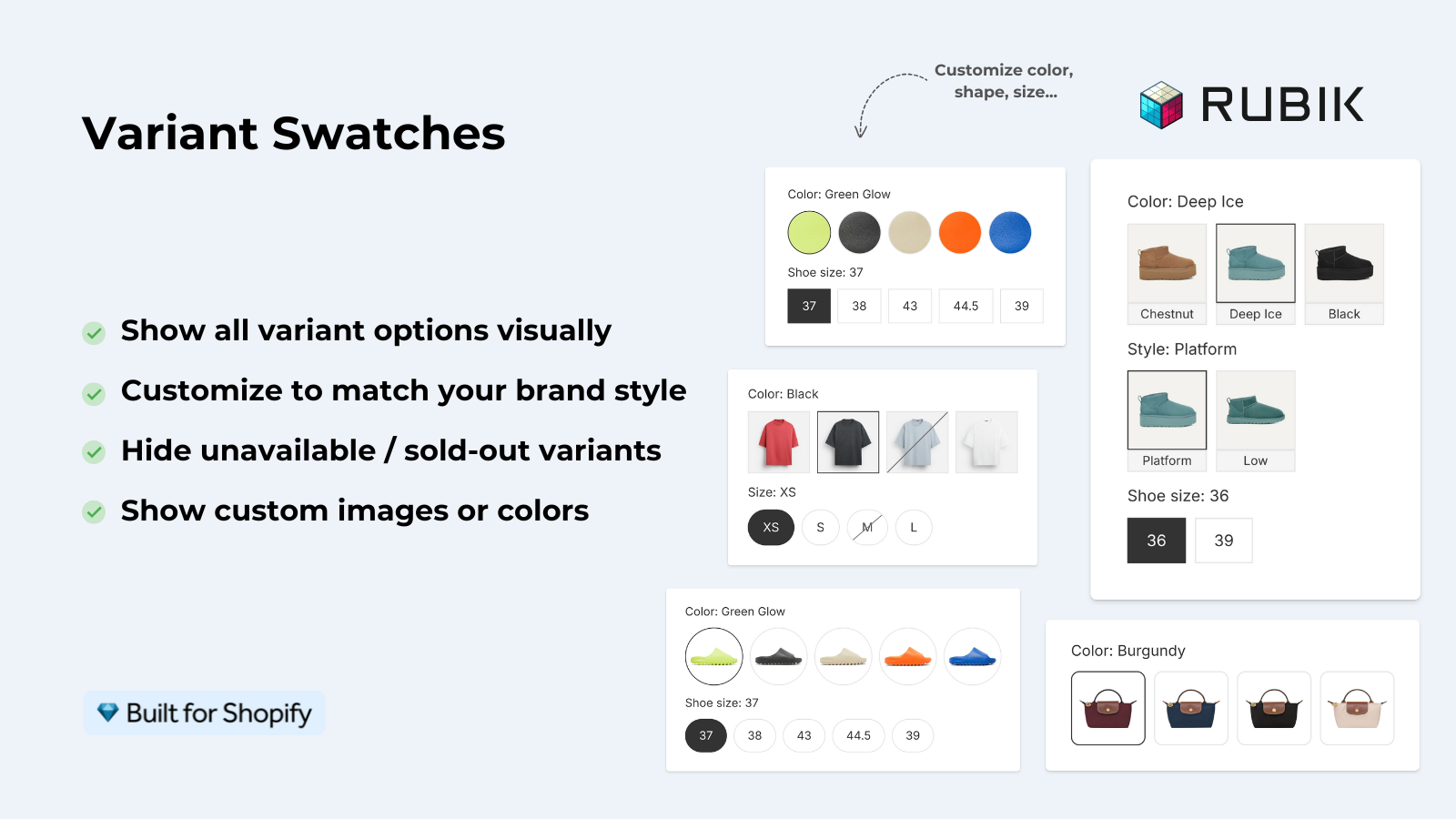
Dawn’s variant picker offers three display options.
- Swatch only. Just the colored circle or pattern image, no text label.
- Dropdown with swatch. A traditional dropdown that includes the swatch beside the text label.
- Pills with swatch. Pill-style buttons with swatch and text.
The shape (circle vs square) is a separate setting in the variant picker block. So you can mix: square swatches for a tactical apparel store, circles for a lifestyle brand, all without writing CSS.
Behind the scenes, Dawn uses a snippet called product-variant-picker.liquid that loops through option values, calls the new Liquid swatch object, and renders the appropriate swatch markup. Other modern themes (Studio, Sense, Refresh, Origin, Spotlight) follow the same pattern with minor visual variations.
The Liquid swatch object
If you maintain your own theme code, the new Liquid swatch object is the API you call. It exposes properties that let you render swatches without hardcoding metafield paths.
swatch.color. The hex code of the variant’s color value.swatch.image. The image URL, if the swatch has a pattern image.
A simple swatch render in Liquid:
{%- for value in product.options_by_name['Color'].values -%}
  {%- if value.swatch.image -%}
    <span class="swatch swatch--image"
          style="background-image: url({{ value.swatch.image | image_url: width: 50 }})">
    </span>
  {%- elsif value.swatch.color -%}
    <span class="swatch swatch--color"
          style="background-color: {{ value.swatch.color }}">
    </span>
  {%- endif -%}
{%- endfor -%}
The beauty of this is you don’t need to know whether the merchant set up a hex color or an uploaded pattern image. The swatch object handles both. Same template, different rendering based on what’s populated.
Setting up native Shopify swatches
Step-by-step on Dawn V13 or any compatible theme.
- Assign your product to a category that has the Color metafield. Open the product, scroll to “Product organization”, set the Category. Apparel categories include the Color metafield by default.
- Connect the variant option to the category metafield. In the product editor, find the Color option, click the link icon, and link to the standard Color metafield. This tells Shopify “this option uses the standard color system”.
- For each option value, pick a Shopify standard color or create a custom one. Shopify ships hundreds of preset colors. If you need a custom color, click “Create new” and enter a hex code, optional image, and label. The new entry creates a
shopify--color-patternmetaobject under the hood. - Save the product. The variant picker on the storefront should immediately render swatches.
- Tune the swatch shape and size. In the theme editor, open the variant picker block on the product page, set Shape (Circle, Square, None) and Size to match your design.
- Test on a real product. Refresh the product page in incognito. Click each swatch. Make sure the variant changes correctly and the URL updates with the variant ID.
For bulk catalogs, populate the Color metafield via CSV import. Shopify’s CSV format includes columns for category metafields, so you can map color names to standard taxonomy entries in a spreadsheet and import in one pass. Run the resulting catalog through the free Image Audit Tool if you also want to flag any product pages where the color metafield is set but the variant images are missing.
What native swatches can’t do
The native system is elegant where it works. It has real limits.
- No collection page card swatches. Shopify’s documentation states the native swatch system “only supports swatches on product pages and collection filters”. Collection page product cards (the visible swatches under each card) are not part of the native system. You see filter-level swatches in the sidebar, but not card-level swatches in the grid.
- Limited to category metafields. Only product categories that include a Color category metafield get the native treatment. Custom or unusual categories may not have it. Custom Color metafields outside the category system don’t auto-render as swatches.
- Theme-version dependent. Free themes added native swatch support only from Winter ’24 onward. Older theme versions or premium themes that haven’t updated still need their custom metafield workaround. Use the Theme ID Finder to check your version.
- One option type only (mostly). The native system is tuned for Color. Other option types (Material, Style, Pattern) work, but require manually creating
shopify--color-patternentries even when the option isn’t strictly a color, which is awkward. - No sibling/group rendering. If your colors are split across separate Shopify products (the sibling pattern), native swatches don’t link them. They only render the variant picker for one product. For sibling-style swatches that route between products, you need either theme-specific code or a Combined Listings app.
- No advanced styling. Beyond circle/square/pill shapes and size, the native picker has limited customization. No per-product overrides, no shadow, no border styles, no hover effects beyond the theme defaults.
For most stores doing a single-product, in-page color picker, the native system is enough. For stores wanting collection-card swatches or sibling-style links, native is the floor, not the ceiling.
Custom swatch metaobjects: when native isn’t enough
If you need swatch behavior beyond the native system, the next layer is custom metaobjects you define yourself. Common reasons to go custom.
- Patterns Shopify doesn’t catalog. Specific marble veins, custom prints, brand-exclusive patterns. Define your own metaobject with image references.
- Multi-attribute swatch data. Swatch label, hex, image, designer attribution, season, all in one structured entry.
- Cross-shop reuse. A custom metaobject in your namespace can carry data Shopify’s standard taxonomy doesn’t.
- Search & Discovery filters with custom logic. Connect your custom metaobject to a filter via Search & Discovery to show pattern swatches in the sidebar.
Setup is more work. You define the metaobject type with at least one text field (label) and at least one color or image field. You create entries for each value. You connect the metaobject to your variant option via a custom list.metaobject_reference metafield. Then you write theme Liquid that reads from your metafield instead of the standard swatch object.
It’s not hard, but it’s enough work that most merchants stop here and consider an app.
Theme support for native swatches
Native swatch support varies by theme.
| Theme | Native swatch support | Notes |
|---|---|---|
| Dawn V13+ | Full | Reference implementation, ships with the swatch picker |
| Studio, Sense, Refresh, Origin, Spotlight, Craft | Full | Free themes built on the same Dawn pattern |
| Horizon | Full | Newest free theme, native swatch from launch |
| Archetype themes (Impulse, Impact, Refresh) | Hybrid | Supports native + their own legacy swatch system |
| Maestrooo Prestige | Partial | Native for product page, but their “linked products” still uses custom metafields |
| Out of the Sandbox (Flex, Turbo, Testament) | Hybrid | Native added in 2025 updates, may need theme update |
| Pixel Union themes | Hybrid | Modern themes support native, older versions don’t |
| Older premium themes (pre-2024) | Custom only | Use theme-specific metafields, no native support |
If you are on a free theme released after early 2024, you almost certainly have native support. If you are on a premium theme, check the theme’s release notes. Many premium studios are still rolling out native support in stages.
Native swatches vs app-based swatches
Honest comparison. Native does some jobs. Apps do the others. Most stores end up using both.
| Job | Native swatches | App swatches |
|---|---|---|
| Product page variant picker | Yes | Yes |
| Collection page filter sidebar | Yes | Often yes |
| Collection page product card | No | Yes |
| Variant image gallery filter (clicking swatch swaps gallery) | No | Yes |
| Sibling/separate-product linking | No | Yes |
| AI auto-color detection | No | Yes (apps like Rubik) (ours) |
| Mix swatch types per option | Limited | Yes |
| Theme update resilience | Tied to theme version | Theme-agnostic via app blocks |
| Setup time | 5 min for native categories | 5 min via app block |
| Cost | Free | $10-$75/month depending on app |
The honest take: use native swatches first. They’re free and they cover the basic product page picker. Layer an app on top when you hit a job native can’t do (collection card swatches, gallery filtering, sibling routing, AI auto-detection).
Rubik Variant Images coexists with native swatches without conflict. The app’s gallery filter reads the same variant data as the native picker. So you keep your existing native swatch setup and add Rubik for the gallery side. Same for Rubik Combined Listings on the collection card side.
Decision matrix: which swatch system to use
- You’re on Dawn V13+ or a 2024+ free theme, with simple Color/Size variants. Use native. It’s free, supported by Shopify, and zero theme code needed.
- You’re on a pre-2024 premium theme. Check if the studio has updated to support native. If yes, migrate. If no, use the theme-specific custom metafields per the theme’s docs, or layer an app.
- You need collection card swatches. Native won’t help. Use a Combined Listings app.
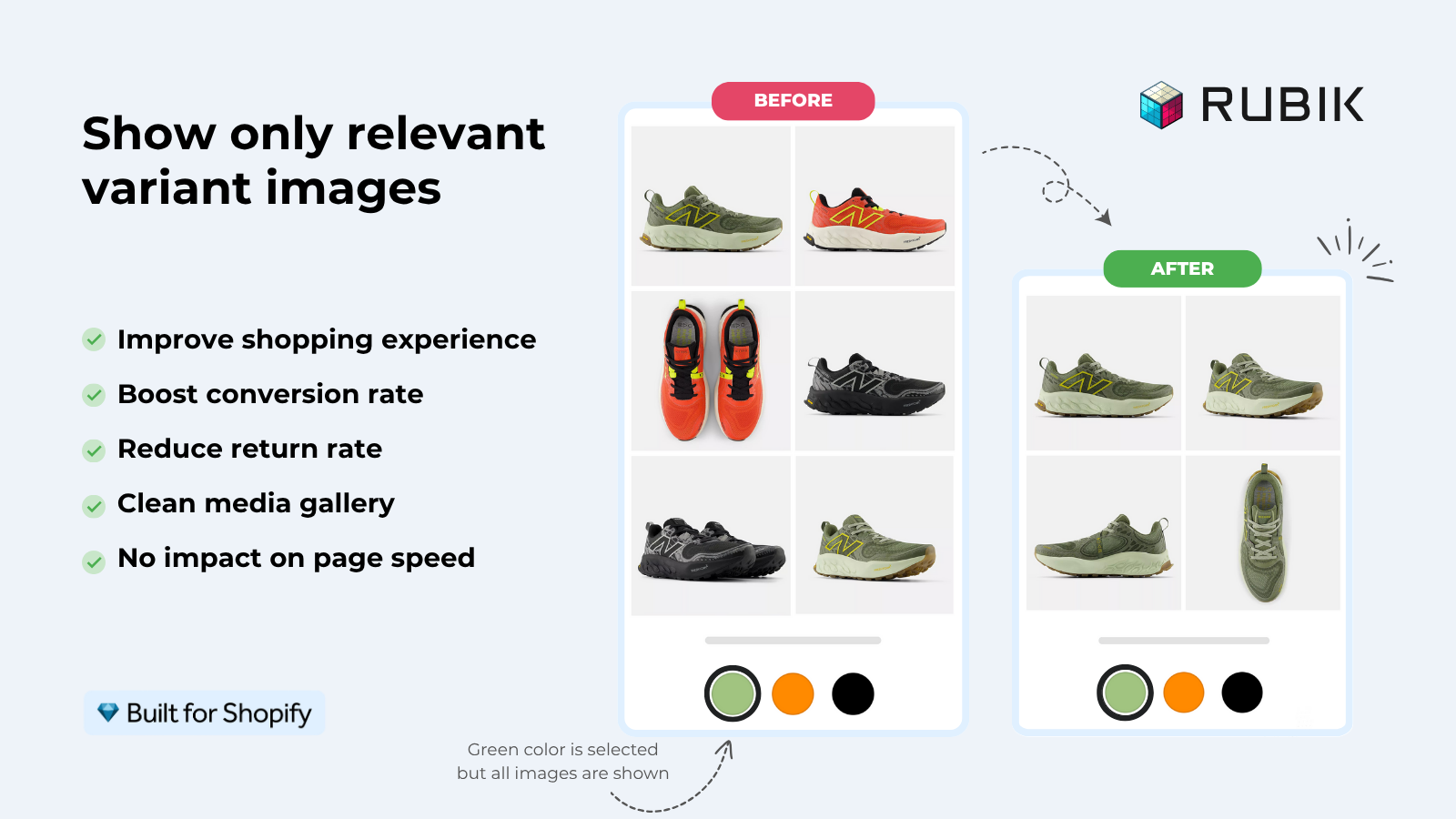
- You need gallery image filtering on swatch click. Native won’t help. Use a Variant Images app like Rubik Variant Images, which reads the same swatch metafield but adds gallery filtering on top.
- You sell separate products as colors (siblings). Native renders the picker for one product, doesn’t link siblings. Use a Combined Listings app or the theme’s sibling system.
- You have a 200+ product catalog with custom patterns. Native + custom metaobjects works but takes serious setup. An app with AI Magic Fill can detect colors and fill the metafields automatically, saving hours.
“This app is perfect. it is incredibly easy to set up and use. There are so many cool ways you can set up your variant images AND adjust your swatches. The youtube tutorials are super helpful.”
Anonymous merchant, Rubik Variant Images on the Shopify App Store
Common pitfalls
- Forgetting to assign a category. Without a product category, the Color category metafield doesn’t appear. The variant option stays as a plain dropdown.
- Picking the wrong category. Some categories don’t include a Color metafield (e.g., generic “Other” categories). Pick the most specific category that fits your product.
- Linking the wrong option. If you have Color and Material options, make sure you link the Color variant option to the Color category metafield, not Material to Color.
- Custom hex for too many colors. Defining 50 unique hex colors when 30 of them could map to Shopify’s standard taxonomy creates fragmentation. Use standard colors when the visual difference is minor; use custom only when the visual is genuinely unique.
- Old theme version, missing swatch support. If you’re on Dawn V12 or earlier, native swatch support isn’t there. Update the theme.
- Expecting collection card swatches. They aren’t part of native. Don’t waste time looking for the toggle.
- Not enabling Search & Discovery filters. Native filter swatches require the Shopify Search & Discovery app installed and color filters configured. Native swatches alone don’t auto-create the filter.
If your colours live as separate products rather than variants of one product, Rubik Combined Listings groups them into a single listing with swatches instead. Free to install, 5.0 stars across 78 reviews.
Quick next steps
See the live demo store with native swatches plus app-based gallery filtering, watch the tutorial video, or read the getting started guide. For deeper context on the metafield architecture this builds on, see our complete guide to Shopify metafield product grouping. For the sibling pattern that needs more than native swatches, the product siblings guide goes deeper.
Frequently asked questions
Which Shopify app should I use for swatch metafield?
Rubik Variant Images, built by Craftshift, is the app we build for this. It holds 5.0 stars across 436 reviews and carries the Built for Shopify badge. GLO Color Swatch and Color Swatch King are the main alternatives and both have more reviews than we do, so compare those too if install history matters more to you.
What is the Shopify swatch metafield?
“Swatch metafield” refers to Shopify’s native color and pattern swatch system, introduced at Winter Edition ’24. It uses the Standard Product Taxonomy plus a Shopify-managed metaobject called shopify--color-pattern. Themes read swatch data through a Liquid swatch object that exposes color hex codes and pattern image URLs.
How does shopify–color-pattern work?
shopify--color-pattern is a Shopify-managed metaobject that stores swatch data: label, color hex code, optional image, and a base color reference to the standard product taxonomy. You can use Shopify’s preset entries or create custom ones for unique colors and patterns. Themes that support native swatches read the metaobject and render swatches automatically.
Which Shopify themes support native swatches?
Free themes from 2024 onward support native swatches: Dawn V13+, Studio, Sense, Refresh, Origin, Spotlight, Craft, and Horizon. Many premium themes added support in 2025, including Archetype themes, Out of the Sandbox, and updated Pixel Union themes. Pre-2024 premium themes typically still use custom metafield setups specific to the theme.
Can I use the Shopify swatch metafield on collection page cards?
No. Shopify’s native swatch system only renders on product pages and collection filters. Collection page product cards (the visible swatches under each card in the grid) are not part of the native system. To render swatches on cards, you need a Combined Listings app or theme-specific custom code.
How do I create a custom swatch in Shopify?
Open a product, link the Color variant option to the Color category metafield, and click “Create new” when picking a color value. Enter a label, hex color, and optional pattern image. The new swatch becomes a custom shopify--color-pattern metaobject entry, reusable across other products.
What’s the Liquid swatch object?
The Liquid swatch object exposes a variant’s swatch data to themes. swatch.color returns the hex code; swatch.image returns a pattern image URL if one is set. Themes use these properties to render swatch markup without hardcoding metafield paths.
Do I need an app if I use Shopify’s native swatch system?
Not for the basic product page variant picker. Native handles that. You’d still want an app if you need collection page card swatches, gallery filtering on swatch click, sibling product linking, AI color auto-detection, or advanced customization beyond the native circle/square/pill shape options.
Will native swatches conflict with a swatch app?
Most modern swatch apps are designed to coexist with native swatches. They render their own swatches in app blocks (collection cards, gallery filter) without touching the native variant picker. Some older apps replace the native picker, which works but loses the benefit of native taxonomy. Check your app’s docs for compatibility notes.
Can I add image swatches with the native system?
Yes. When creating a custom shopify--color-pattern entry, upload a pattern image instead of (or in addition to) a hex color. The Liquid swatch.image property surfaces the URL, and themes that support native swatches render the image as the swatch background.
Should I migrate from custom theme metafields to the native system?
Yes if your theme supports native and your swatch needs fit the native limits. The native system removes theme lock-in. If your old custom metafields are working and your theme doesn’t yet support native, wait for the theme update rather than rebuilding twice. If you switch themes regularly, an app-based system is even more theme-resilient than native.
Related reading

Umid
Co-Founder at Craftshift