Rubik Combined Listings on Underground Themes: Pose, Testament, Vantage & More (2026)
We Are Underground builds nine Shopify themes from Tunbridge Wells, UK, and every single one of them works with Rubik Combined Listings. We know because we tested them. Testament, Vantage, Fashionopolism, Icon, Drop, Foodie, Forge, Mr. Parker, and Pose all run the app without Liquid edits, without code injections, without workaround hacks. OS 2.0 app blocks, Shadow DOM isolation, metafield-based data. Clean.
Underground themes tend to ship with large feature sets (mega menus, countdown timers, age verifiers, swatch filters) and that density sometimes trips up third-party apps. Not here. Rubik Combined Listings renders inside its own Shadow DOM, meaning the 104 CSS variables we expose for swatch styling never collide with Underground’s stylesheet. And all nine themes support Online Store 2.0 app blocks, so installation is drag-and-drop in the theme customizer.
This guide breaks down each Underground theme individually, covers swatch placement specifics, and walks through the setup process that applies across the entire portfolio. If you run one of these themes and want to group separate products with swatches on both collection and product pages, this is the post.
In this post
- About We Are Underground
- Testament
- Vantage
- Fashionopolism
- Icon
- Drop
- Foodie
- Forge
- Mr. Parker
- Pose
- Theme comparison table
- Setup (all Underground themes)
- Pairing with Rubik Variant Images
- FAQ
About We Are Underground
We Are Underground is a Shopify theme studio based in Tunbridge Wells, England. They have been building premium themes for years, and their portfolio currently includes nine themes on the Shopify Theme Store: Testament, Vantage, Fashionopolism, Icon, Drop, Foodie, Forge, Mr. Parker, and Pose. The studio’s focus leans toward fashion, food, and jewelry verticals, though several of their themes (Vantage, Mr. Parker) work well across categories.
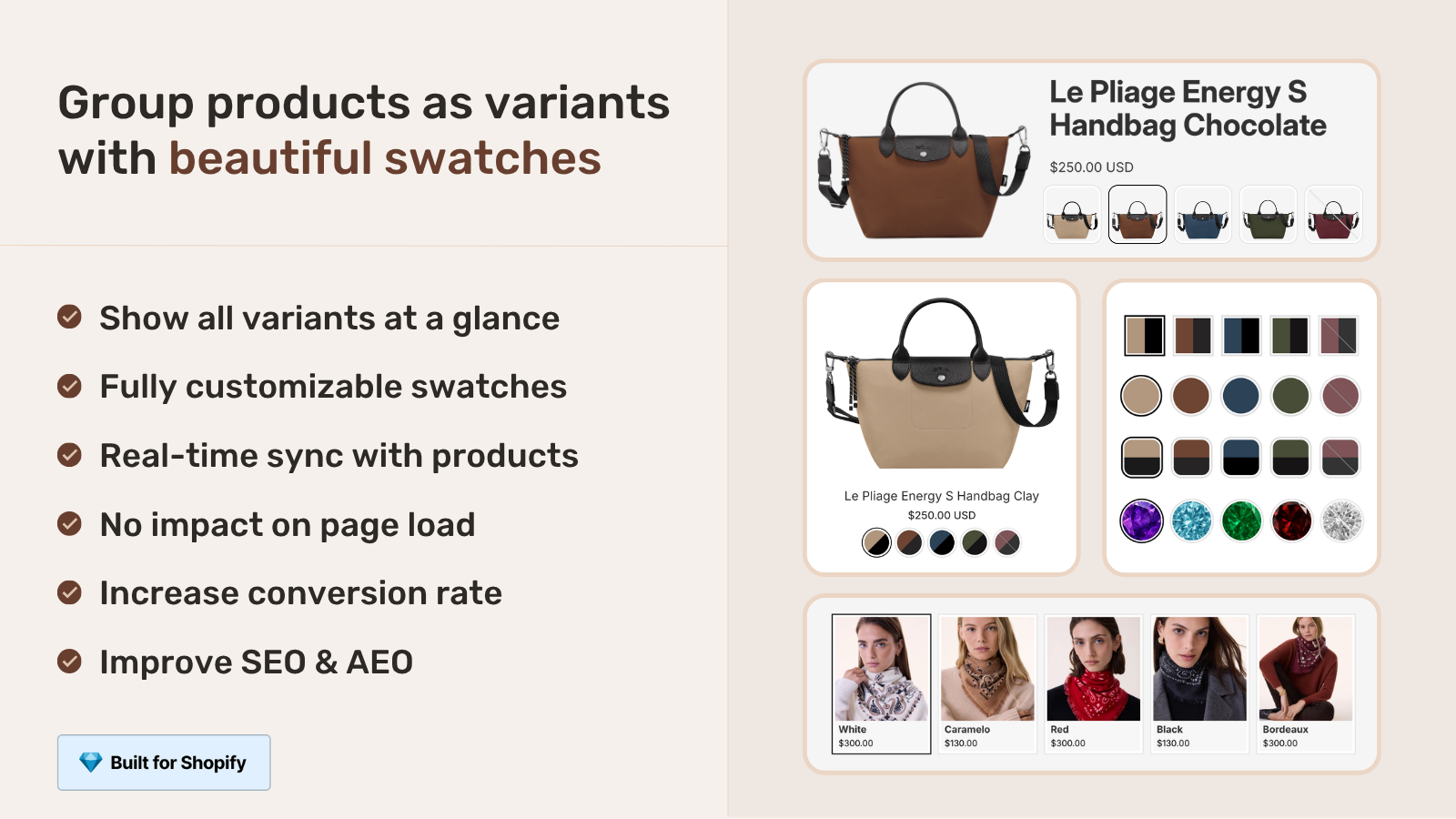
What sets Underground apart from many other theme studios? Feature density. Their themes pack in mega menus, enhanced search, swatch filters, countdown timers, age verifiers, product badges, before/after image sliders, and lookbooks. Most studios pick a lane (minimal vs. feature-rich). Underground consistently picks feature-rich. That matters for combined listings because more built-in features means more potential CSS conflicts with third-party apps. Shadow DOM solves that entirely, but we will get into the technical details later.
All nine Underground themes support EU translations (English, French, Italian, German, Spanish), Online Store 2.0 app blocks, and color swatch rendering for native variants. Around 20 Rubik users currently run Underground themes, split across Vantage, Testament, and the rest of the lineup.
Testament
Testament is Underground’s flagship. $350, 399 reviews, 96% positive rating, currently on version 15.3.0 (last updated April 2026). It ships with four presets: Testament, Exodus, Revelation, and Genesis. Target verticals include jewelry, food and drink, clothing, and beauty.
Why does Testament matter for combined listings? It already has built-in color swatches, product badges, and a before/after image slider. Stores running Testament typically sell products with heavy visual differentiation (jewelry with stone variations, clothing with fabric options, beauty with shade ranges). These are exactly the stores that benefit most from grouping separate products together. A jewelry store with 15 stone colors, each needing its own product page for unique descriptions and SEO, can group them with Rubik and show a swatch row on the collection page instead of 15 separate cards.
Testament uses a standard product information section on its product pages. Combined Listings swatches slot directly into this section as an app block, sitting between the title/price area and the variant picker. On collection pages, swatches render below each product card image. The 30+ sections Testament offers give you plenty of room to position the app block exactly where it fits best.
One thing we noticed when testing Testament: its sticky header can sometimes push content down during scroll transitions. The Combined Listings swatch block handles this fine because it uses fixed positioning relative to its parent container, not the viewport. No jumpiness.
Vantage
Vantage sits at $150, making it Underground’s most affordable current theme. 230 reviews, 93% positive, version 12.2.0 (updated February 2026). Four presets: Vantage, Monza, Portofino, Roma. The preset names hint at its design roots (Italian automotive and coastal aesthetics), and the theme works across jewelry, food, gardening, and general retail.
Vantage packs 30+ high-performing sections and includes swatch filters, image hotspots, and high-resolution image support. For combined listings, Vantage’s product page layout provides a clean two-column view where the swatch block integrates naturally into the right-side details column. Collection pages use a responsive grid, and Rubik swatches appear beneath each card without breaking the grid alignment.
The Monza and Roma presets use darker color schemes. If your store runs one of those darker presets, you will want to adjust the swatch border colors through the app’s visual settings (or just ask the AI Visual Assistant to match your theme’s accent color). Two clicks. Done.
Fashionopolism
The name says it. Fashionopolism is built for fashion, clothing, jewelry, and beauty stores. $350, 252 reviews, 96% positive, version 11.0.1 (updated March 2026). Four presets: Fashionopolism, Salon, Horology, Haute.
Fashionopolism’s Horology preset targets watch brands specifically. Picture a watch store where each model comes in steel, gold, rose gold, and titanium finishes, each with different pricing, different product photography, and different descriptions. That is a textbook combined listings use case. Group the four finish variants, display finish swatches on the collection page, let customers switch between them on the product page. Each finish keeps its own SEO-optimized URL.
Fashionopolism includes quick add-to-cart and quick shop functionality. Combined Listings swatches work alongside these features without interference because the swatch click event triggers a page navigation (to the grouped product’s URL), not a cart action. The quick-shop modal and the swatch block operate in completely separate DOM scopes.
Icon
Icon targets fashion brands. $250, 369 reviews, 94% positive, version 12.2.1 (updated March 2026). Presets: Icon, Dolce, Yves, Louis. Those preset names are not subtle about the audience.
What makes Icon interesting for combined listings is its infinite scroll feature on collection pages. Some apps break when infinite scroll loads new product cards dynamically. Rubik Combined Listings uses a MutationObserver pattern to detect new DOM nodes, so when Icon’s infinite scroll appends fresh product cards, the swatches attach automatically. No manual refresh required. We tested this specifically because infinite scroll is one of the features that catches third-party apps off guard.
Icon also has 20+ customizable sections and supports back-in-stock alerts. If a grouped product goes out of stock, Rubik automatically hides it from the swatch row (or shows it as unavailable, depending on your settings). Pair that with Icon’s back-in-stock alert, and customers can subscribe to be notified when the grouped product returns.
Drop
Drop is Underground’s newest theme. $250, 19 reviews (still early), 95% positive, version 5.2.0 (updated February 2026). Presets: Drop, Unveil, Flash, Reveal. The naming suggests product launches, drops, and reveals, which is fitting for limited-edition stores and hype-driven brands.
Drop is mobile-optimized from the ground up with 20+ customizable sections. It includes countdown timers and product badges, which pair well with combined listings for limited releases. Think of a sneaker brand dropping the same shoe in five colorways simultaneously. Group them, display color swatches on the collection page, add a countdown timer to each product, and the collection page tells the whole story in one card instead of five.
Because Drop is newer (version 5.x vs. Testament at version 15.x), its codebase tends to be cleaner. We found zero quirks during testing. App block integration was smooth, swatch rendering was immediate, no CSS overrides needed.
Foodie
Foodie is purpose-built for food and drink stores. $180, 22 reviews, 100% positive (yes, every single review is positive), version 6.2.0 (updated February 2026). Presets: Foodie, Grind, Grow, Slice.
Why would a food store need combined listings? More often than you would think. A coffee roaster selling the same blend in 250g, 500g, and 1kg bags might want separate products for each size (different packaging photos, different descriptions, different shipping weights) grouped together with swatches. A hot sauce brand with a lineup of five flavors. A tea company with the same tea in loose leaf, pyramid bags, and cold brew sachets. Separate products, grouped with visual swatches.
Foodie includes nutritional information sections and ingredient lists. Combined Listings respects these sections completely. The swatch block sits in the product information area, above or below the variant picker, while Foodie’s specialized food sections remain untouched below.
The Grind preset targets coffee shops specifically. The Slice preset targets pizza and bakery stores. Both use image-heavy layouts where product photography drives the browsing experience. Swatch-based navigation between product variants fits this pattern perfectly.
Forge
Forge focuses on jewelry and accessories. $180, 15 reviews, 100% positive, version 5.2.0 (updated February 2026). Three presets (not four like the others): Forge, Titanium, Iridium.
Three presets instead of four. Why does that matter? It doesn’t, really. But it tells you something about the studio’s approach with Forge. Fewer presets, more focused. Forge is the most niche theme in Underground’s lineup, built specifically for stores selling rings, necklaces, watches, and accessories.
Jewelry stores are some of the heaviest users of combined listings because a single ring design might come in yellow gold, white gold, rose gold, platinum, and sterling silver, each at a wildly different price point. Keeping those as separate products makes inventory management and pricing straightforward. Rubik groups them visually while preserving the product-level independence that jewelry merchants need for their Google Shopping feeds.
Forge’s image zoom feature works independently of Combined Listings. Zoom into a ring detail, switch to a different metal finish via the swatch, and the zoom resets for the new product’s image. Clean handoff.
Mr. Parker
Mr. Parker is a versatile, mid-priced theme. $160, 207 reviews, 95% positive, version 11.2.0 (updated February 2026). Presets: Mr Parker, Arena, Spa, Nest. The preset variety (sports, wellness, homeware) shows this theme’s multi-vertical flexibility.
Mr. Parker’s collection page layout uses compact product cards with minimal whitespace. Combined Listings swatches need to be sized carefully here. We recommend visual swatches at 24-28px on desktop for Mr. Parker, slightly smaller than the 32-36px we suggest for spacious themes like Testament. The variant calculator can help you figure out how many grouped products you will have per card, which determines how compact the swatch row needs to be.
The Spa preset uses soft, muted colors with generous padding. The Arena preset is bolder, more contrast-heavy. Adjust your swatch border and selected-state colors to match whichever preset you are running. All 104 CSS variables are available through the visual settings editor, no code required.
Pose
Pose rounds out the Underground lineup. It targets fashion and lifestyle stores with an editorial, lookbook-style layout. Like the rest of Underground’s portfolio, Pose supports OS 2.0 app blocks, EU translations, and swatch filters natively.
Pose’s editorial approach means product pages often feature large hero images with text overlays and storytelling sections. Combined Listings swatches integrate into the standard product information block, keeping the swatch row separate from the editorial content. The visual weight stays on the product imagery, and the swatches serve as a quiet navigation layer between grouped products.
For stores running Pose with lookbook-style collections, combined listings reduce clutter dramatically. Instead of six separate product cards for the same jacket in six colors, you get one card with six small swatch circles. The lookbook aesthetic stays intact.
Underground themes comparison
Here is every Underground theme side by side. All nine work with Rubik Combined Listings, but they differ in pricing, vertical focus, and feature count.
| Theme | Price | Presets | Reviews | Rating | Version | Primary vertical |
|---|---|---|---|---|---|---|
| Testament | $350 | 4 (Testament, Exodus, Revelation, Genesis) | 399 | 96% | 15.3.0 | Jewelry, food, clothing, beauty |
| Vantage | $150 | 4 (Vantage, Monza, Portofino, Roma) | 230 | 93% | 12.2.0 | Multi-vertical |
| Fashionopolism | $350 | 4 (Fashionopolism, Salon, Horology, Haute) | 252 | 96% | 11.0.1 | Fashion, jewelry, beauty |
| Icon | $250 | 4 (Icon, Dolce, Yves, Louis) | 369 | 94% | 12.2.1 | Fashion |
| Drop | $250 | 4 (Drop, Unveil, Flash, Reveal) | 19 | 95% | 5.2.0 | Product launches |
| Foodie | $180 | 4 (Foodie, Grind, Grow, Slice) | 22 | 100% | 6.2.0 | Food and drink |
| Forge | $180 | 3 (Forge, Titanium, Iridium) | 15 | 100% | 5.2.0 | Jewelry, accessories |
| Mr. Parker | $160 | 4 (Mr Parker, Arena, Spa, Nest) | 207 | 95% | 11.2.0 | Multi-vertical |
| Pose | Varies | Multiple | N/A | N/A | Current | Fashion, lifestyle |
Total across the Underground portfolio: over 1,500 reviews, nine themes, 35 presets. Every single one supports OS 2.0 app blocks, Shadow DOM rendering, and metafield-based data loading. That means Rubik Combined Listings works on all of them with the exact same installation process.
Setting up Rubik Combined Listings on any Underground theme
The process is identical across all nine themes. Underground built their entire portfolio on OS 2.0, so app block integration follows the same pattern everywhere.
- Install Rubik Combined Listings from the Shopify App Store. Free plan includes 5 product groups. Works on all Shopify plans, no Plus required.
- Create your separate products. Each color, material, or flavor as its own product. Own title, own images, own description, own pricing. This is what gives you per-product SEO and independent inventory tracking.
- Create a product group in the app. Add the related products, set the option name (Color, Material, Finish, etc.), and assign swatch values to each product. Use AI Magic Fill to auto-detect colors from product images if you have a large catalog.
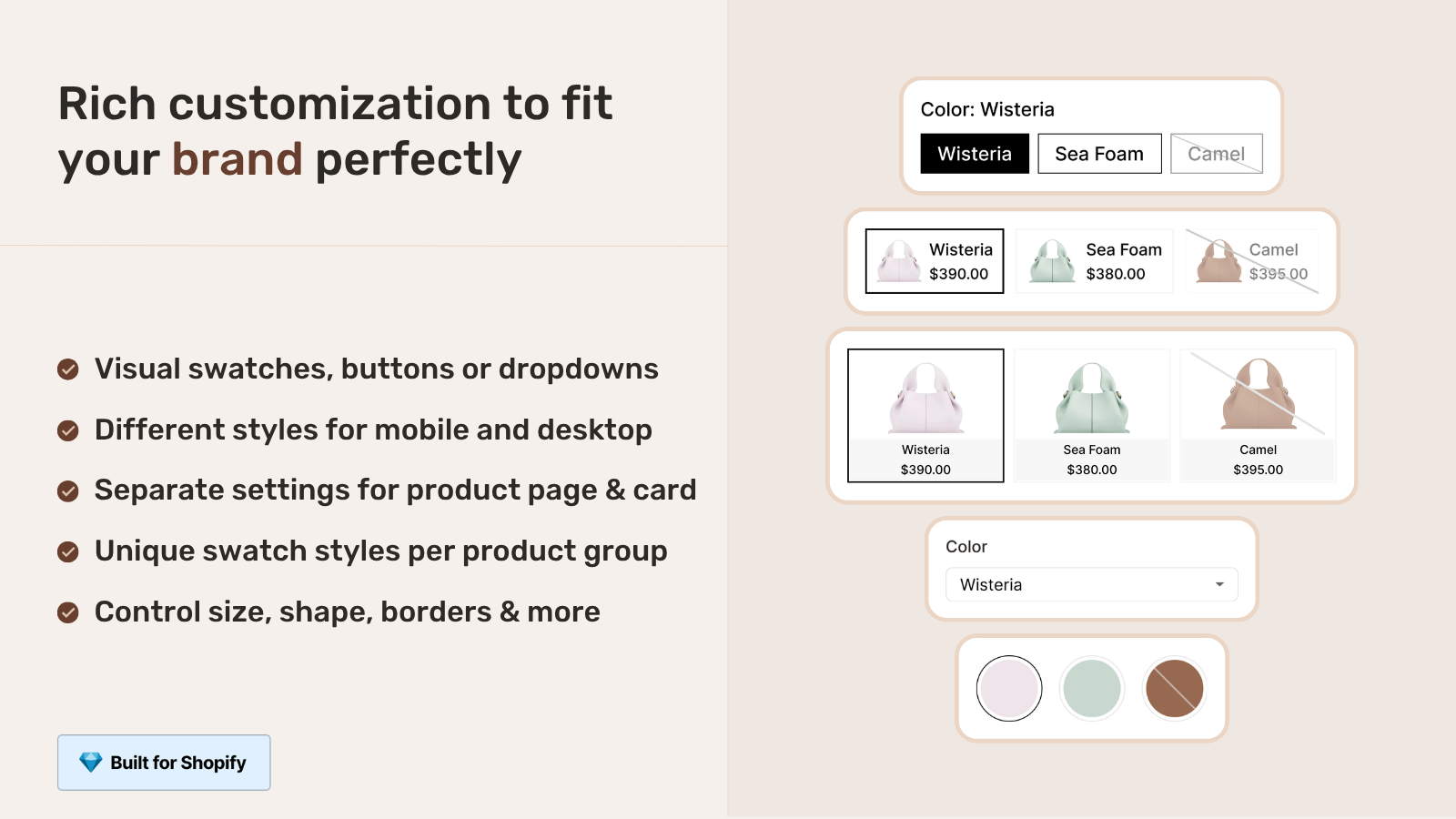
- Choose your swatch type. Four options: visual (color circles or image thumbnails), button (text labels), pill, or dropdown. For Underground themes with their feature-rich layouts, visual swatches tend to look cleanest because they take up minimal horizontal space.
- Add the app block in theme customizer. Go to Online Store, Customize. Open a product page template and add the Rubik Combined Listings block in the product information section. Drag it to your preferred position (typically between price and variant picker).
- Enable collection swatches. In the app settings, turn on collection page swatches. These render automatically below each product card on any collection page where grouped products appear.
That is it. No Liquid code editing, no theme file modifications, no copy-pasting script tags. We built the app to install through Shopify’s native app block system specifically so that theme updates from Underground (or any other studio) never break the integration.
For stores with large catalogs, the bulk grouping feature detects product relationships automatically using title patterns, tags, or metafields. A clothing store with 200 products across 40 styles does not need to create 40 groups manually. Bulk grouping handles it in one pass.
Styling tips for Underground themes
Underground themes are feature-dense with polished visual design. Here is what works best:
- Swatch shape: Rounded squares (6-8px border radius) match Underground’s soft corner aesthetic across most presets. Circle swatches work too, especially for color-only groups.
- Selected state: Underground themes use subtle UI indicators. A thin dark border (1-2px) or slight scale-up (1.1x) on the selected swatch matches better than heavy drop shadows.
- Desktop swatch size: 28-34px. Depends on the specific theme. Compact themes like Mr. Parker lean toward 28px. Spacious themes like Testament can handle 34px.
- Mobile swatch size: 38-42px. Larger for thumb-friendly tapping on Underground’s responsive mobile layouts.
- Gap spacing: 6-8px between swatches. Matches Underground’s general spacing rhythm.
All of these are configurable through the app’s 19 built-in style presets or the 104 CSS variables. Pick a preset that is close, then fine-tune. Or describe what you want to the AI Visual Assistant in plain language (“make the swatches bigger, add a subtle border on hover, match my theme’s accent color”) and it adjusts the variables for you. We built that feature because tweaking 104 variables manually is… well, nobody wants to do that.
If your colours are variants of one product rather than separate products, Rubik Variant Images assigns a separate image set to every variant instead. Free to install, 5.0 stars across 436 reviews.
Pairing with Rubik Variant Images on Underground themes
Two apps, two jobs, zero conflicts. Rubik Variant Images handles the product page: variant image filtering, swatch customization for the variant picker, and per-variant gallery control. Rubik Combined Listings handles product grouping: linking separate products with swatches on both collection and product pages.
On an Underground theme, the flow looks like this. Customer browses a collection page and sees one product card per group with small Combined Listings swatches (say, color circles). They click through to the product page. Combined Listings swatches at the top let them switch between colors (switching between separate products). Variant Images swatches below let them pick a size (switching variants within a single product). The gallery filters to show only images for the selected size. Two swatch rows, two functions, completely independent rendering.
Both apps use Shadow DOM isolation, so their CSS never bleeds into each other or into Underground’s theme styles. And both load via metafields, meaning no external API calls and no render-blocking network requests. The performance impact on any Underground theme is effectively zero. We tested this on Testament and Icon specifically because those two have the most complex stylesheets in the Underground portfolio.
Do you actually need both apps? Not always. If your store uses separate products for color variants but each product only has one set of images (no size-specific photography), Combined Listings alone is enough. But if each product also has size-specific images or material-specific close-ups, adding Variant Images gives your customers the full gallery filtering experience. Most stores running both see lower return rates because customers see exactly what they are buying before checkout. Check the contrast checker to make sure your swatch colors are accessible against your theme’s background.
“Was having difficulties with 5 other apps before I found this one that worked perfectly on the first try. Great for grouping products together, very easy to use. Thank you developers, and thank you Zulf for your assistance.”
BELSKI, Australia, 2026-03-24 – Rubik Combined Listings on the Shopify App Store
“Was having difficulties with 5 other apps before I found this one that worked perfectly on the first try. Great for grouping products together, very easy to use. Thank you developers, and thank you Zulf for your assistance.”
BELSKI, Australia, March 2026, Rubik Combined Listings on the Shopify App Store
See the Combined Listings demo store, watch the tutorial video, or read the getting started guide.
Frequently asked questions
Does Rubik Combined Listings work on all nine Underground themes?
Yes. Testament, Vantage, Fashionopolism, Icon, Drop, Foodie, Forge, Mr. Parker, and Pose are all verified and supported. All nine use OS 2.0 app blocks, so the installation process is identical across the lineup. We maintain compatibility through our themes config, which currently covers 350+ Shopify themes total.
Do I need to edit Liquid code to install the app on an Underground theme?
No. All Underground themes support OS 2.0 app blocks. Installation happens entirely through the Shopify theme customizer. Drag the app block into your product page template, position it where you want it, save. No code, no file edits, no manual script injection.
Will Underground theme updates break the Combined Listings integration?
No. Because the app uses Shopify’s native app block system (not injected Liquid code), theme updates from Underground do not affect the integration. The app block persists through updates automatically. The Shadow DOM rendering also means CSS changes in theme updates cannot break swatch styling.
Can I use both Rubik apps together on an Underground theme?
Yes. Combined Listings and Variant Images are designed to work in tandem. Combined Listings groups separate products with swatches on collection and product pages. Variant Images filters product page galleries per variant. Both use Shadow DOM and metafield-based loading. Zero conflicts on any Underground theme.
How do I match swatch styling to my Underground theme preset?
The app includes 19 built-in style presets and 104 CSS variables. Pick a preset that is close to your Underground theme’s aesthetic, then fine-tune via the visual settings editor. You can also use the AI Visual Assistant to describe what you want in plain language, and it adjusts the CSS variables automatically.
Does Rubik Combined Listings require Shopify Plus?
No. The app works on all Shopify plans including Basic, Shopify, and Advanced. The free plan includes 5 product groups. Paid plans start at $10/month for 100 groups. This is one of the main reasons stores use Rubik instead of Shopify’s native Combined Listings feature, which requires Plus.
How does the app handle Underground themes with infinite scroll?
Icon and several other Underground themes use infinite scroll on collection pages. Rubik Combined Listings detects dynamically loaded product cards and attaches swatches automatically as new cards appear. No manual refresh needed, no scroll position reset, no missing swatches on lazy-loaded content.
Related reading

Umid
Co-Founder at Craftshift