Shopify metafield product grouping: the complete 2026 guide (types, patterns, alternatives)
Shopify metafield product grouping is the practice of linking products together using custom metafields rather than native variants. Used to build product siblings, bundles, related products, complementary items, multi-attribute filters, and combined listings without Shopify Plus. The technique is theme-driven (themes read the metafield and render swatches), app-driven (apps store group data in metaobjects), or merchant-driven (manual setup per product). Each path has different trade-offs.
Most Shopify guides on metafields focus on adding a single field for a product, like burn time on a candle or warranty terms on a furniture piece. Product grouping is different. You are not adding data to one product; you are connecting many products into a relationship. The metafield types you use are different. The patterns you follow are different. The pitfalls are different.
This guide is the technical reference. It covers the four metafield types that actually matter for grouping, when to use each, the difference between metafields and metaobjects for relationship modeling, the five most common grouping patterns, how premium themes implement them, the limits of pure metafield grouping, and when an app-managed metaobject layer is the better answer. If you are about to build a product grouping system on Shopify, read this first. Run your catalog through the free Variant Combination Calculator to see how many groups you would need before you start designing the schema.
In this post
- What is metafield product grouping?
- Metafield anatomy: namespace, key, type
- The four metafield types for grouping
- Metafield vs metaobject for grouping
- Five common grouping patterns
- How premium themes use metafield grouping
- Setting up metafield grouping in Shopify admin
- Reading group metafields in Liquid
- The limits of pure metafield grouping
- App-managed metaobjects: the universal pattern
- When to use metafields vs apps for grouping
- Migrating from metafields to apps (or back)
- Common pitfalls
- Frequently asked questions
- Related reading
What is metafield product grouping?
Metafield product grouping connects two or more Shopify products through a custom data field instead of through Shopify’s built-in variant system. With variants, all the colors of a shirt live as options on one product. With metafield grouping, each color is its own product, and a metafield on each one points to the others.
The technique opens up behavior that variants can’t: each color gets its own URL, its own SEO title, its own image set, its own price. The trade-off is admin overhead and theme dependency. Metafields are inert data on their own. Something has to read them and turn them into a useful storefront experience. That “something” is either your theme, your app, or your storefront API code.
Five problems that metafield product grouping solves cleanly.
- Product siblings (separate products linked as colors)
- Product bundles (list of products sold together)
- Complementary products (“you might also like”)
- Multi-attribute tags (a sweater for both Spring and Summer)
- Combined listings without Plus (the alternative to Shopify’s $2,300+/year native feature)
For a deeper look at the sibling pattern specifically, see our complete guide to Shopify product siblings. This post zooms out to cover the broader metafield grouping landscape.
Metafield anatomy: namespace, key, type
Every Shopify metafield has three parts.
- Namespace. A grouping label that prevents collisions across apps and merchants. Examples:
custom(Shopify’s default for merchants),shopify(Shopify-managed), or app-specific namespaces like$app:rubik_product_groups. - Key. The unique field name within the namespace. Combined as
namespace.key, the pair must be unique per resource type. - Type. Determines what data the metafield holds. Single line text, integer, JSON, file reference, product reference, list of products, metaobject reference, list of metaobjects, and so on.
For grouping, the type is what matters most. The wrong type makes your group fragile or impossible to query efficiently. Understanding the four types that work for grouping is the foundation of every other decision in this guide.
The four metafield types for grouping
| Type | Stores | Best for | Limit |
|---|---|---|---|
product_reference | One product GID | One-to-one parent reference (link to a master product) | Single value only |
list.product_reference | Many product GIDs | Product bundles, complementary lists, sibling groups | Soft limit ~128 entries; group size practical limit |
collection_reference | One collection GID | Theme-style sibling collections (Fluorescent, Omni) | Group membership inferred from collection contents |
list.metaobject_reference | Many metaobject GIDs | App-managed groups with rich attributes (RCL pattern) | Requires metaobject definition |
product_reference
Stores a single product GID (Global ID). Useful when each child product points back to a single parent (“master” product). Some Combined Listings patterns use this. Limited because the relationship is one-directional and you have to maintain a reverse lookup separately.
list.product_reference
Stores a list of product GIDs. The most common type for sibling groups, bundles, and “you might also like” sections. Maestrooo’s Prestige theme uses this for its custom.variation_products sibling field. Each sibling product carries the full list of related siblings, including itself.
collection_reference
Stores a single collection GID. Each sibling product references a hidden collection that contains all the siblings. The theme reads the collection contents at render time. Fluorescent’s Stiletto theme uses this pattern with stiletto.siblings_collection.
list.metaobject_reference
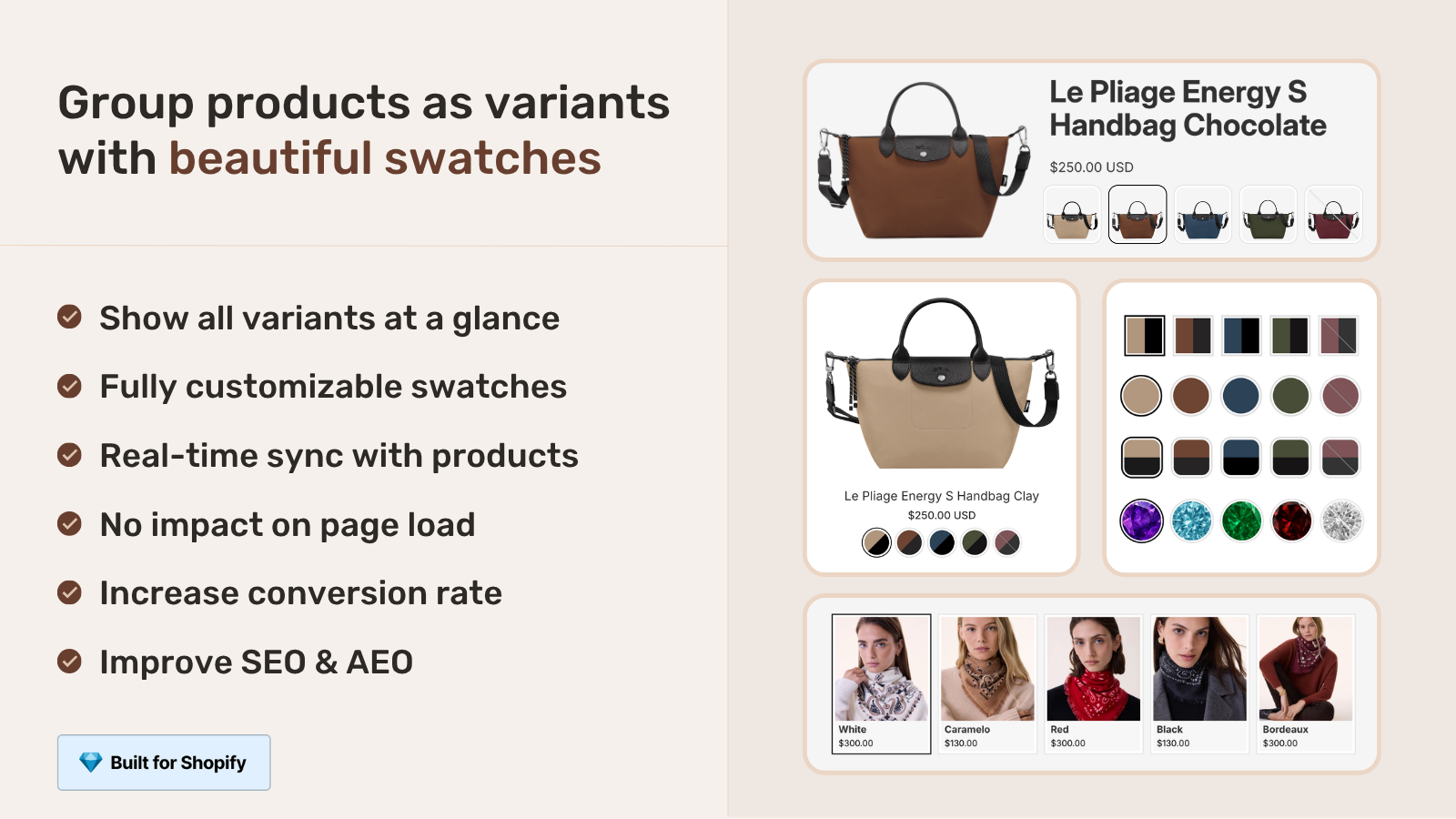
Stores a list of metaobject GIDs. Most powerful for grouping because metaobjects can themselves carry rich data (option names, swatch colors, sort order, visual settings) that you can’t fit into a simple product reference. Most Combined Listings apps, including Rubik Combined Listings, store group membership as list.metaobject_reference on each grouped product. Group details (swatches, settings) live in the metaobjects themselves.
Metafield vs metaobject for grouping
This is the architectural question that decides how scalable your grouping system is. Both can store relationships. They are not interchangeable.
| Metafield | Metaobject | |
|---|---|---|
| Lives on | A specific resource (product, collection, customer) | Standalone, reusable |
| Carries | One typed value | Many typed fields |
| Edit scope | Per-resource | Edit once, applies everywhere |
| Grouping use | Stores reference to other items | Stores group itself with attributes |
| Best for | Simple links between products | Rich groups with shared metadata |
The practical decision rule from Shopify’s own documentation: if the data is shared across multiple products, lean toward metaobject. If each product has its own unique relationship, lean toward metafield.
For sibling grouping, the right architecture is usually metaobjects. Reasons:
- One source of truth. Update the group once, all members reflect the change.
- Rich attributes. Group can carry option name, sort order, visual settings, default selected member.
- Cleaner queries. Storefront API can fetch the group entity directly instead of reconstructing it from each member’s metafields.
- Avoids duplication. A 50-product sibling group with member-side metafields requires 50 list-of-50 entries. With a metaobject, it’s 1 entity plus 50 simple references.
The trade-off: metaobjects require more setup. You define the metaobject type with its fields. You create entries. You connect each grouped product to the entry via list.metaobject_reference. Most merchants don’t want to build this from scratch. Apps build it for them.
Five common grouping patterns
Pattern 1: Product siblings (color/material variations)
Group separate Shopify products as visual variants of one conceptual product. Each sibling has its own URL, title, image set. The product page shows a row of swatches linking to other siblings. Best metafield type: list.product_reference or list.metaobject_reference. Best apps: Combined Listings apps. Full breakdown in our product siblings guide.
Pattern 2: Product bundles
One “bundle” product references many child products that ship together. Best metafield type: list.product_reference. Theme reads the list and renders the included items in the bundle’s product page. Inventory and pricing usually handled by a dedicated bundles app.
Pattern 3: Complementary products
“Customers also bought” or “Pairs well with” sections. Each product carries a metafield listing complementary items. Shopify’s own shopify.complementary-products metafield uses list.product_reference. Themes that read this metafield render a related-products carousel on the product page.
Pattern 4: Cross-sell groups (parent-child)
Products grouped by category for cross-sell logic, often with a parent metaobject describing the category attributes. A camera body, lens, and bag could share a “Photography Starter Kit” metaobject reference. Best for catalogs that want to merchandise around themes rather than product hierarchies.
Pattern 5: Multi-attribute tagging
Products tagged with multiple values for the same attribute, used for storefront filtering. A sweater that fits both Spring and Summer can carry custom.season as a list metafield with both values. Filters then surface the product in either season. Avoids the “one value per attribute” limit of native variants.
How premium themes use metafield grouping
Premium Shopify themes from Fluorescent, Maestrooo, Groupthought, Roar, Omni, Archer, Presidio, and Fuel all build sibling/grouping features on top of metafields. Each studio invented its own namespace and key naming.
| Theme studio | Pattern | Type |
|---|---|---|
| Fluorescent (Stiletto) | stiletto.siblings_collection + stiletto.sibling_option_name | collection_reference + text |
| Maestrooo (Prestige) | custom.variation_products + custom.variation_value | list.product_reference + text |
| Roar (Concept) | sibling.color | text (collection picked in theme block) |
| Omni (Eurus) | custom.sibling_collection_handle + custom.sibling_type | text (collection handle string) + text |
| Archer (Honey 5.0+) | theme.sibling_collection_handle + theme.sibling_option_name + theme.sibling_option_value | 3 text fields |
Three observations stand out.
- No standardization. The Shopify ecosystem has no shared “siblings” metafield namespace. Each theme reinvents the wheel.
- Mixed reference shapes. Some themes use proper Collection references (Fluorescent). Some use plain text “collection handle” strings (Omni, Archer). String references are fragile because they break when the collection handle changes.
- None use metaobjects. All major theme studios still use the older metafield-only pattern. Apps have moved to metaobjects, but themes haven’t caught up. This is partly why theme-native grouping has scaling issues.
Setting up metafield grouping in Shopify admin
Step-by-step for a basic sibling group via metafields. Adapt the namespace and key to whatever your theme expects.
- Define the metafield. Open Settings, Custom data, Products. Click Add definition. Set Name (e.g., “Sibling products”), Namespace and key (e.g.,
custom.sibling_products), and Type (e.g., List of products). - Decide on access. Storefront access on (so themes/apps can read it). Read/write access on (so apps can update it).
- Save the definition. The metafield now appears on every product’s edit page in the Metafields section.
- Populate the metafield per product. Open each sibling, scroll to Metafields, click the new “Sibling products” field, and pick the related products. Most themes require each sibling to include itself in the list.
- Add the theme block. If your theme reads this metafield via a “Sibling products” or “Linked products” section block, drop the block onto the product template.
- Test on the storefront. Open a sibling product page. The swatch row should show all siblings. Click each swatch and verify the route to the right product.
Per-product setup time: 2-3 minutes once you know the workflow. For a 200-product catalog with 5 siblings each, that is 1,000 metafield entries by hand. A weekend, easily.
Reading group metafields in Liquid
If you maintain your own theme code, here is the basic pattern for rendering a sibling group from a list.product_reference metafield.
{%- assign siblings = product.metafields.custom.sibling_products.value -%}
{%- if siblings.size > 0 -%}
  <div class="sibling-swatches">
  {%- for sibling in siblings -%}
    <a href="{{ sibling.url }}"
       class="sibling-swatch {% if sibling.id == product.id %}is-current{% endif %}"
       data-color="{{ sibling.metafields.custom.color_value }}">
      {{ sibling.metafields.custom.color_name }}
    </a>
  {%- endfor -%}
  </div>
{%- endif -%}
Three things to know about this pattern.
- Each sibling product is fully loaded. Shopify dehydrates the metafield reference into the full product object, so you have access to the sibling’s URL, title, images, and its own metafields.
- Performance scales linearly with group size. A 50-sibling group means 50 product objects loaded per page render. Cache aggressively.
- Stale references silently fail. If a sibling is deleted, the metafield reference becomes invalid. The Liquid loop usually skips it without warning. You end up with a swatch row missing items.
The limits of pure metafield grouping
Six real costs of running grouping logic on raw metafields without an app or metaobject layer.
- Per-product manual sync. Add a sibling, you have to update every other sibling’s list to include the new one. Forget one product, the swatch row goes stale.
- No bulk operations. Shopify admin doesn’t offer “add this product to 50 sibling groups” in a single action. CSV imports help but require careful column mapping.
- Theme-coupled. The metafield namespace is dictated by the theme. Switch themes, lose the relationship.
- Stale references. Deleted, archived, or renamed products break the chain silently.
- No collection page rendering. Most theme metafield patterns only work on product pages. Collection cards stay disconnected.
- No analytics. Metafield clicks aren’t tracked. You can’t see which sibling switches lead to conversion.
For catalogs under 50 products with stable inventory and one premium theme, raw metafield grouping is fine. Beyond that, the cost-benefit shifts toward an app or metaobject layer.
App-managed metaobjects: the universal pattern
The pattern that scales is app-managed metaobjects. The app defines a metaobject type for “Product Group” with fields like option name, swatch color, sort order, and visual settings. Each grouped product carries a single list.metaobject_reference metafield pointing at the group’s metaobject entry. The app renders swatches by reading the metaobject directly, no per-product traversal needed.
Why this pattern wins over raw metafield grouping.
- Edit once, applies everywhere. Update the group’s option name, all member products show the new label.
- One source of truth. Group membership lives on the group, not duplicated across members.
- Theme-agnostic. The app injects swatches via app blocks, not via theme metafield reading. Switch themes, swatches keep working.
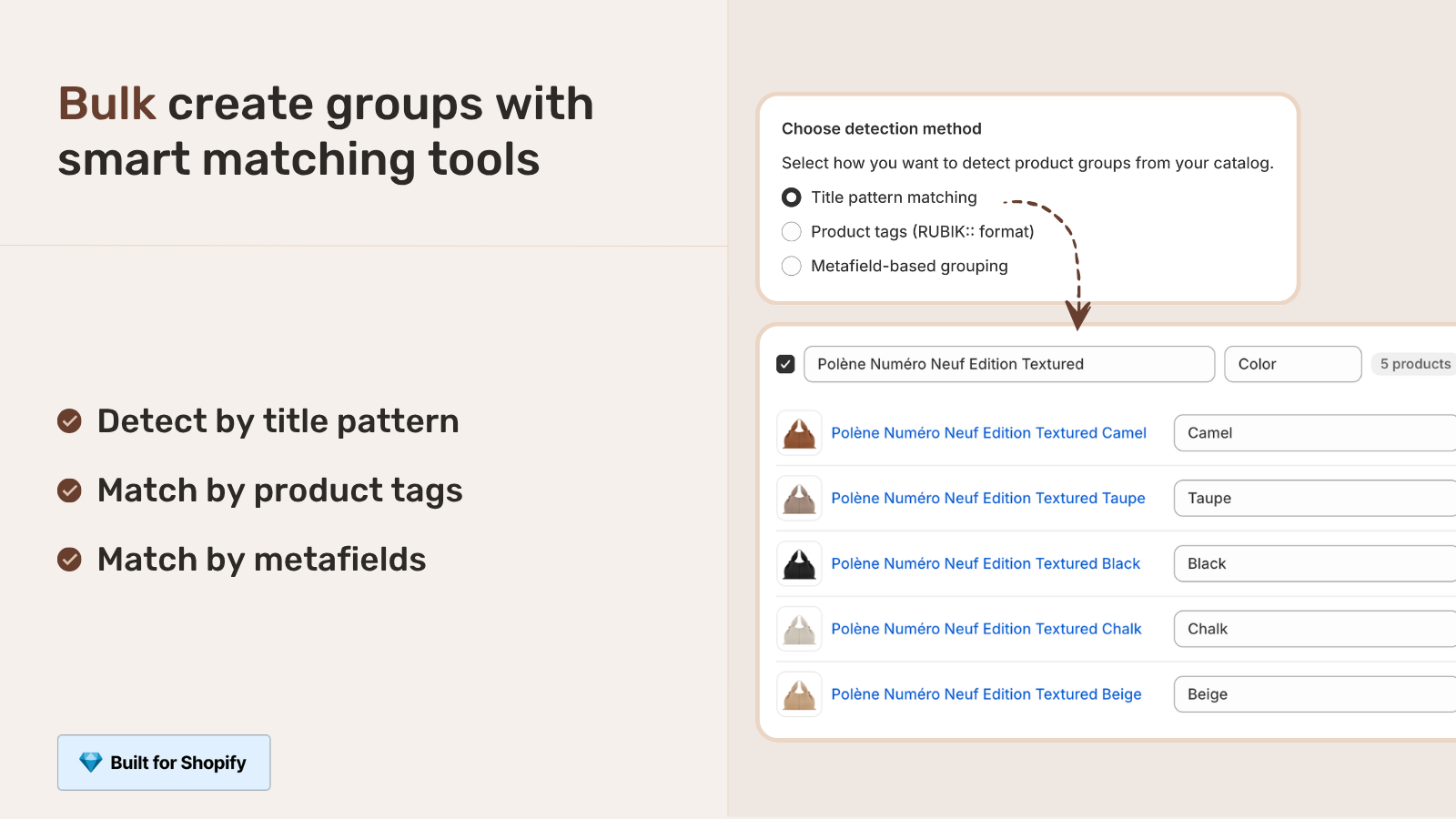
- Bulk operations. Apps ship grouping tools (title pattern matching, AI Magic Fill, tag-based grouping) that admin doesn’t.
- Collection page rendering. Apps inject swatches under product cards on collection pages too, which raw metafields rarely do.
- Real-time sync. Out-of-stock and archived members auto-hide. No manual cleanup.
Rubik Combined Listings uses this exact pattern. Group data lives in metaobjects under the app’s namespace. Members carry list.metaobject_reference pointing at the group entry. Bulk grouping detects siblings by title pattern, tag, or shared metafield. AI Magic Fill reads each product’s image to assign swatch colors. Shadow DOM rendering means no theme CSS conflicts. The same architecture pattern powers Rubik Variant Images on the product page side, so swatches stay consistent from collection card to gallery filter.
“The App just released but it looks that its going to be great. This just saved a lot of hours of coding. Now i can set up and customize swatches for my Product Siblings in just a couple of minutes. Plus, the customer service response is fast and clear. Thank you”
Mattera, Spain, February 2026, Rubik Combined Listings on the Shopify App Store
When to use metafields vs apps for grouping
Five concrete scenarios with the right call.
| Scenario | Right call |
|---|---|
| Under 50 products, one premium theme committed long-term | Theme-native metafield grouping |
| Under 50 products, custom or free theme | App with metaobject grouping |
| 50-500 products, any theme | App every time |
| 500+ products | App, ideally with bulk grouping by tag or pattern |
| Multi-store across themes | App every time, since metafield namespaces don’t transfer |
| You sell only on a Shopify Plus store | Native Combined Listings is also a valid option |
The break-even point in our experience is around 50-100 grouped products. Below that, theme-native is fine. Above that, the time you save with bulk operations and the resilience you gain from theme independence pay back the app subscription within the first month.
Migrating from metafields to apps (or back)
If you currently run theme-native metafield grouping and want to move to app-managed metaobjects, the migration is straightforward.
- Export your existing metafield data. CSV export from Shopify, or a Matrixify-style bulk export. Capture the namespace, key, type, and values per product.
- Install the new app. Confirm it supports your existing data shape (product references vs collection references).
- Run bulk grouping if available. Apps like Rubik Combined Listings can read your existing tags, titles, or metafields and create matching groups automatically.
- Verify a sample of products. Spot-check 10 random groups. If swatches render correctly, scale up.
- Deprecate the old metafields. Don’t delete them immediately. Keep them as backup for a month, then clean up. The free Shopify Redirect Generator is useful if any URLs change during cleanup.
Migration the other direction (from app to raw metafields) is also possible but rarely worth it. You give up bulk operations, real-time sync, collection page rendering, and analytics. The only good reason is if you’re closing the store and want to keep the data accessible without paying app subscriptions.
Common pitfalls
- Wrong type for the job. Single-line text instead of product reference. The data goes in but you can’t actually link to anything.
- Storefront access off. If you forget to enable storefront access on the metafield definition, the theme can’t read it. Swatches don’t render.
- Forgetting reciprocal links. Product A lists Product B as a sibling, but Product B doesn’t list Product A. Users see swatches on A’s page that don’t appear on B’s page.
- Including itself or excluding itself. Different themes have different conventions. Some require each product to include itself in the sibling list, some don’t. Match your theme’s expectation.
- Inconsistent option values. “Olive” vs “olive” vs “OLIVE” trips up matching logic. Standardize the casing.
- Renamed metafield definition. Changing the namespace.key after products are populated breaks the existing data. Set names carefully the first time.
- Hardcoded collection handle in metafields. Some themes (Omni, Archer) store the collection handle as a text string, not a reference. If you rename the collection, the references break silently.
- Trying to grow past 50 groups manually. The admin doesn’t scale. By group 100, the cost of getting bulk operations from an app starts paying for itself in saved time.
If your colours are variants of one product rather than separate products, Rubik Variant Images assigns a separate image set to every variant instead. Free to install, 5.0 stars across 436 reviews.
Quick next steps
See the live demo store with metaobject-based grouping in action, watch the tutorial video, or read the getting started guide. For the full sibling pattern breakdown including theme-by-theme metafield reference, our complete guide to Shopify product siblings goes deeper. For broader catalog SEO strategy, the separate products vs variants SEO post on Rubikify covers the indexing trade-offs.
Frequently asked questions
What is Shopify metafield product grouping?
Metafield product grouping links Shopify products together using custom metafields rather than native variants. Each product carries a metafield that references other related products (siblings, bundles, complementary items). Themes or apps read the metafield and render swatches or related-product widgets on the storefront.
Which metafield type should I use for product grouping?
For most grouping use cases, list.product_reference (a list of product references). For app-managed groups with rich attributes (option names, swatch colors), list.metaobject_reference is more powerful. For theme-style sibling collections, some themes use collection_reference. The right type depends on whether the relationship is product-to-products, product-to-group-entity, or product-to-collection.
What’s the difference between metafields and metaobjects for grouping?
Metafields store one typed value tied to a specific resource (a product). Metaobjects are standalone objects with multiple fields, reusable across products. For grouping, metaobjects scale better because edits propagate to all members of the group, while metafields require updating each member individually.
Can I create product groups without an app?
Yes, using Shopify’s native metafield system. Define a list.product_reference metafield, populate it per product, and have your theme read and render the relationship. Limited compared to apps because there are no bulk operations, no automatic sync, and no collection page rendering for most themes.
How do premium themes use metafields for product grouping?
Premium themes from Fluorescent, Maestrooo, Roar, Omni, Archer, and others ship sibling features that read specific metafields. Each studio uses its own namespace and key naming. Fluorescent expects stiletto.siblings_collection and stiletto.sibling_option_name. Maestrooo expects custom.variation_products and custom.variation_value. The conventions don’t transfer between themes.
Do metafield-based product groups break when I switch themes?
Usually yes. Each theme expects its own metafield namespace. Switching from Stiletto’s stiletto.siblings_collection to Prestige’s custom.variation_products means rebuilding all the metafield definitions and re-populating values. App-managed metaobjects survive theme switches because the data lives in app namespace.
Can I bulk-create product groups via metafields?
Yes via CSV import, but it’s tedious. You build a CSV with product handles and the metafield value (a list of product GIDs or handles), then import. For dozens of groups, this is fine. For hundreds, the friction usually pushes merchants to apps with built-in bulk grouping by title pattern, tag, or shared metafield.
Why don’t metafield-based groups show on collection pages?
Most theme implementations only render group swatches on the product page, not on collection cards. The reason is templating complexity: rendering swatches inside the product card section requires modifying the card template too, which most themes don’t do. Apps with collection page support inject their own block into the card, bypassing the theme’s limit.
What happens to metafield references when a product is deleted?
The reference becomes a broken link silently. The metafield value still contains the deleted product’s GID, but Shopify can’t resolve it to a real product. Themes typically skip broken references in their loop, so the swatch row appears with one fewer item, no error message. Apps usually clean up stale references automatically; raw metafields don’t.
When does metafield grouping become unmanageable manually?
Most stores hit the wall around 50-100 grouped products or 20-30 groups. Below that, manual metafield population and CSV imports work. Above that, the operational cost of keeping references in sync, handling deletions, and onboarding new products outweighs the cost of an app subscription. Bulk operations save real time at scale.
Related reading

Umid
Co-Founder at Craftshift