What Is BFCM? 2026 Dates, Meaning and AI Prep

What is BFCM? It’s short for Black Friday Cyber Monday, the four days from the Friday after US Thanksgiving through the following Monday, and in 2026 it runs from November 27 to November 30. Shopify merchants sold $14.6 billion across it last year. The more interesting number is this one: Adobe measured a 693% jump in traffic from generative AI tools to US retail sites over the 2025 holiday season.
So this year many BFCM shoppers start by asking ChatGPT or Gemini for “a merino base layer under $80,” and the assistant reads your product data, not your banner. We build four Shopify apps at Craftshift for exactly that data: CS – Export Product Images exports every product image, video and 3D model so you can audit what is live, CS – Smart Bulk Image Upload uploads missing or fixed images in bulk and matches them to products by SKU or barcode, Rubik Variant Images shows only the selected variant’s photos on the product page, and Octolift improves each product for how well AI assistants can find and recommend it.
This guide covers the definition and the 2026 calendar first (quick, because you probably half-know them already), then the part most BFCM checklists skip: getting your product images and product data into shape for agentic shopping before the catalog freeze. Six weeks is enough. Barely.
In this post
- What is BFCM?
- When is BFCM 2026?
- How big is BFCM for Shopify stores?
- How AI shopping agents change BFCM 2026
- What an AI agent reads on a Shopify product
- How to prepare product images for BFCM
- How to prepare product data for agentic sales
- A six-week BFCM countdown from today
- BFCM mistakes that hurt you with AI agents
- FAQ
What is BFCM?
BFCM means Black Friday Cyber Monday: the four-day sales weekend that starts on the Friday after US Thanksgiving and ends on the following Monday. Retailers run their deepest discounts of the year across it, and in ecommerce the term usually covers the whole stretch, including Small Business Saturday and the Sunday in between.
The two halves have different histories. “Black Friday” was popularized by Philadelphia police in the 1960s, who used it for the crowds and traffic jams the day after Thanksgiving; the “stores going into the black” explanation came later. “Cyber Monday” is younger. The National Retail Federation’s Shop.org coined it in 2005 to name the Monday when people got back to their office computers and kept shopping.
Today the line between the two days is mostly gone. Most Shopify stores run one offer from Friday to Monday (or start it on November 1), and “BFCM” is what merchants, Shopify itself, and every app dashboard call the whole thing. If you want the longer origin story and a prep checklist built around image uploads, bulkimageupload.com has a full explainer on what BFCM means for Shopify stores.
When is BFCM 2026?
BFCM 2026 runs from Friday, November 27 to Monday, November 30, 2026. US Thanksgiving falls on Thursday, November 26 (it is always the fourth Thursday of November), and Giving Tuesday on December 1 closes out what many retailers call Cyber Week. Plan backwards from those dates, not forwards from today.
| Day | 2026 date | What it means for a Shopify store |
|---|---|---|
| Early Black Friday | From Sunday, November 1 | Many stores open early offers. AI assistants start answering “best Black Friday deal on X” questions. |
| Catalog freeze (suggested) | Week of November 16 | Last safe week for bulk image and product data changes, so the Shopify catalog has time to sync. |
| Thanksgiving | Thursday, November 26 | Pre-sale traffic, plenty of deal research in chat assistants. |
| Black Friday | Friday, November 27 | Peak day. Shopify’s 2025 peak hit $5.1 million in sales per minute. |
| Small Business Saturday | Saturday, November 28 | Good day for smaller brands and “shop small” messaging. |
| Cyber Monday | Monday, November 30 | The biggest US online spending day of 2025, per Adobe. |
| Giving Tuesday | Tuesday, December 1 | End of Cyber Week. |
Need the dates after Cyber Week too (Green Monday, shipping cutoffs, Boxing Day)? They live in our Shopify peak season calendar for 2026 and 2027, with the lead time each one needs.
How big is BFCM for Shopify stores?
Big. Shopify merchants sold a record $14.6 billion over the BFCM 2025 weekend, up 27% on 2024, to more than 81 million shoppers. More than 94,900 merchants had their highest-selling day ever on Shopify, and cross-border orders were 16% of all orders, according to Shopify’s BFCM 2025 report.
The wider US numbers from Adobe’s 2025 holiday season report tell the same story at a bigger scale:
- $257.8 billion spent online in the US from November 1 to December 31, 2025, up 6.8% year over year.
- $14.25 billion on Cyber Monday alone, up 7.1%, the biggest ecommerce day of the year.
- 693% more traffic to US retail sites from generative AI tools than in the 2024 season.
Adobe is careful to say that last one grows from a modest base. Fair. AI referrals are still a small slice of BFCM traffic. But a slice that grows nearly eightfold in a year is the one you prepare for now, while it’s cheap to be early, not in 2028 when every competitor has already cleaned up their catalog.
How are AI shopping agents changing BFCM 2026?
AI shopping agents change BFCM by moving the comparison step out of your store. A shopper asks ChatGPT, Gemini or Microsoft Copilot for the best deal on a specific product, the assistant searches product catalogs, compares specs, prices and photos, and names two or three stores. If yours isn’t named, the shopper never visits.
On Shopify this runs through real plumbing, not guesswork. Shopify keeps a global product catalog that AI agents query, and the Agentic Storefronts sales channel connects your products to assistants like ChatGPT and Copilot (our complete guide to Shopify Agentic Storefronts walks through each channel’s settings). If “agentic” is still a fuzzy word for you, start with what agentic commerce actually is.
What does that mean for a sale weekend? Three things. Agents don’t see your countdown timer. They don’t read your hero banner. And they can’t be charmed by a pop-up… they read structured product fields and look at product media, then move on.
That’s the shift we kept bumping into while building Octolift. Merchants spend October on the parts of the store an agent never touches, and leave thin descriptions, empty category fields and half-photographed variants untouched. Then they wonder why the assistant recommends a competitor with a worse price.
What does an AI agent read on a Shopify product?
An AI agent reads the product title, description, category and category fields, variant options, prices, availability, policies, reviews and media. It doesn’t read theme design. The quickest way to see your own gaps is to export every image, video and 3D model in your sale collection as one SKU-named ZIP and look at it (free for 100 files, 4.7 stars from 32 reviews). Here’s how each signal maps to a BFCM fix, and which of our apps (all four are built by Craftshift, so all four are flagged as ours) handles it:
| What the agent reads | Common BFCM gap | The fix | App that handles it |
|---|---|---|---|
| Product media (images, videos, 3D) | Products with one photo, or none; no idea which ones | Export everything, audit the gaps in a spreadsheet | CS – Export Product Images Free for 100 files per 30 days. |
| Variant images | Colors with no photo of their own | Upload the new shots in bulk, matched to each variant by SKU | CS – Smart Bulk Image Upload Free for 25 images. |
| Image alt text | Blank alt text on hundreds of images | Generate SEO alt text during the upload | CS – Smart Bulk Image Upload |
| The product page a referred shopper lands on | Gallery shows every color at once, so the red variant opens on a blue photo | Show only the selected variant’s images | Rubik Variant Images 5.0 from 489 reviews. |
| Title, description, category fields | 40-word descriptions, missing specs, empty category fields | Score each product, rewrite the weakest with AI, review before saving | Octolift Free for 5 products. |
| Policies, shipping answers | Agent can’t answer “will it arrive by December 5?” | Fill in store policies and FAQ answers | Octolift checks the answers; Shopify admin holds them |
Not sure where your store stands? Run the free AI readiness checker on one product URL first. It takes a minute and tells you which of these rows to start with.
How to prepare product images for BFCM
Start with an export, not a photoshoot. You can’t fix gaps you can’t see, and Shopify admin won’t show you “every product with fewer than three images” in one view. CS – Export Product Images, built by Craftshift, exports product and variant images, videos and 3D models in bulk as a named ZIP, filtered by collection, vendor, status or date. It is rated 4.7 from 32 reviews.
Point it at your BFCM collection only. The export of your sale collection’s photos, videos and 3D models, named by SKU gives you a folder you can sort by product, and the preview step shows file counts per type before you download anything. The free plan covers 100 files per 30 days; Starter is $29 a month for 1,000. One honest limit: YouTube and Vimeo embeds never export, because Shopify stores a link rather than a file. Our guide to bulk exporting Shopify images, videos and 3D models covers every naming option.
Once the folder is on your desktop, the audit is boring and fast. Look for three things:
- Thin products. Anything with one or two images. Aim for at least three per product: a clean main shot, a detail, and one in use.
- Orphan variants. Colors or styles that borrow the parent’s photo. An agent comparing “the sage green one” has nothing to show.
- Heavy files. 6MB phone shots slow the page a referred shopper lands on. Shrink them with the free image compressor, or score a whole page with the image audit tool.
Then push the fixes back. Dragging 600 new photos onto 200 products one at a time is a weekend you won’t get back, which is why Smart Bulk Image Upload matches every new image to the right product or variant by SKU or barcode and uploads the whole folder at once. Free to install for 25 images, 5.0 stars across 111 reviews, paid plans from $69 a month.
It pulls straight from a Google Drive or Dropbox folder, which matters when the photographer delivers there anyway. It can also match by product title or a metafield, resizes anything over Shopify’s 20MB or 20 megapixel limit on the way in, writes SEO alt text, and shows you the matching preview before a single file lands. We built the two apps as a pair on purpose: the export names files by SKU, and the upload matches by SKU, so the same filenames go out, get edited, and come back in. The SKU-matching upload guide has the folder naming rules.

“Best customer service ever! Simple and efficient app. We needed an app to export our images in zip files for flash sales and we just found it. We needed an evolution and in 30 minutes, it was done! Thanks a lot”
Flamingo-prodigy, Portugal, July 2024. CS – Export Product Images on the Shopify App Store
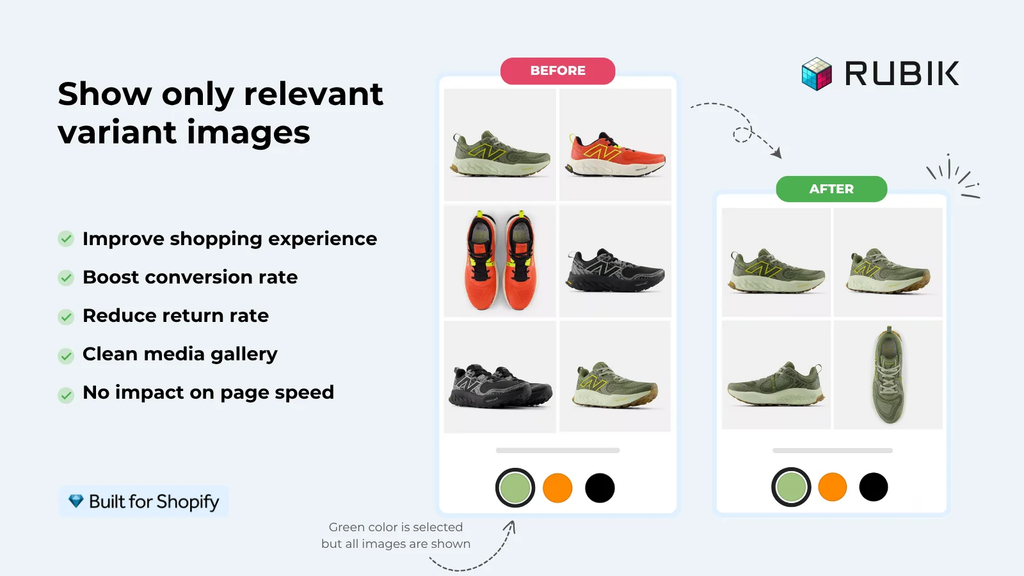
Last piece: the page itself. When an assistant sends a shopper to “the rust-colored version,” the gallery should open on rust. Many themes show every variant’s photos in one long strip, and the shopper has to scroll past navy and olive to find what they were promised. Rubik Variant Images, also by Craftshift, shows only the selected variant’s images when a shopper picks an option, adds image swatches to the variant picker, and can auto-assign images to variants with AI. It’s rated 5.0 from 489 reviews, with a free plan for one product and paid plans from $25 a month.
Want the full image workflow with a 14-week timeline? Our Shopify Black Friday product images guide goes deeper on the export, edit, re-upload loop.
How to prepare product data for agentic sales

Prepare product data for agentic sales by making every spec an agent might compare explicit: materials, sizes, dimensions, compatibility, care. Put them in the description and in Shopify’s category fields, pick the right product category, and make sure shipping and return answers exist. Then measure, because you can’t tell from the admin what an assistant actually sees.
That measurement is what we built Octolift for. It gives each product an AI visibility score from 0 to 100, split into Listing quality (what you wrote) and Agent readiness (what the Shopify catalog returns when an agent queries it). Press Improve with AI and it drafts a better description, shorter titles and values for empty category fields, and it doesn’t add facts that aren’t already in your listing. Nothing changes until you press Save, and applied title and description changes can be undone for 30 days (handy if a BFCM edit goes sideways).
It also checks where you rank for real shopper questions in the Shopify catalog, records whether ChatGPT and Gemini named your store, and reads Shopify’s analytics for orders that AI channels placed or referred. The free plan covers 5 products and 5 shopper questions; Starter is $29 a month for 100 products. The Octolift launch post explains every screen.
Our advice for BFCM specifically? Don’t score your whole catalog. Score your 20 best sellers, the products you’re actually discounting. They already have demand, so they’re where a better listing turns into orders fastest. The companion post on storemediaexporter.com, preparing Shopify products for AI shopping agents before BFCM 2026, has a week-by-week version of this audit, and how to get products recommended by AI covers the writing side in depth.
A six-week BFCM countdown from today
Today is mid-October, which leaves six weeks. That’s tight but workable, if you do the slow things first and the fast things last.
| Week of | Focus | Done when |
|---|---|---|
| October 19 | Pick the BFCM collection. Export its images, videos and 3D models with CS – Export Product Images (ours). Score the top 20 products in Octolift (ours). | You have a gap list: missing photos, orphan variants, weak listings. |
| October 26 | Book or brief the reshoots. Rewrite the five weakest listings. | Shot list sent, five products rescored. |
| November 2 | Upload new photos in bulk with CS – Smart Bulk Image Upload (ours). Set up variant galleries with Rubik Variant Images (ours). | Every discounted variant has its own images. |
| November 9 | Fill category fields, policies and shipping answers. Rescore. | No “Not specified” specs on best sellers. |
| November 16 | Catalog freeze. Final export as a backup of what is live. | Backup ZIP saved. No more bulk edits. |
| November 23 | Discounts, emails, ads. Watch AI-channel orders. | You’re selling, not editing. |
Why freeze on the 16th and not the 25th? Because the Shopify catalog an agent reads can lag behind your admin while it syncs, and because a bulk change that breaks something on Black Friday morning is a nightmare to unwind. Our Shopify code freeze guide lays out which changes are risky and which stay safe during the freeze. Generate your discount codes with the free discount code generator during the last week, when the catalog work is done.
BFCM mistakes that hurt you with AI agents
Most of these come from treating BFCM as a theme project. A few are kinda funny, once they aren’t happening to you.
Stuffing “BLACK FRIDAY SALE 50% OFF” into product titles. This one genuinely annoys us. A product title is the single most important field an agent reads to decide what a product is, and some stores overwrite it with a promo slogan every November, then forget to change it back until February. The agent now thinks your wool coat is called “BLACK FRIDAY SALE.” Put the discount in the price (compare-at price exists for exactly this) and leave the title describing the product. Please.
Putting key specs inside images. A size chart baked into a JPEG is invisible to an agent comparing sizes. Write it out as text too.
Bulk-editing during the sale. Every big change in BFCM week has to sync before agents see it, and every mistake costs you peak traffic. Finish the catalog work early. Then stop.
Skipping the backup. If a bulk replace goes wrong, what do you restore from? A pre-BFCM export of every live image is cheap insurance, and it’s the same export you already ran for the audit.
Measuring only Google. AI referrals often arrive without a clean referrer, so they hide in “direct” traffic. Set up AI search traffic tracking in GA4 before the weekend, not after.
And one opinion that goes against most BFCM checklists: a homepage redesign is the least valuable thing you can do in the last six weeks. Shoppers who come from an ad, a Google Shopping result or an AI assistant land on a product page. Spend the hours there.
FAQ
What does BFCM stand for?
BFCM stands for Black Friday Cyber Monday. It is the four-day sales weekend from the Friday after US Thanksgiving to the following Monday, and the biggest sales event of the year for most Shopify stores.
When is BFCM 2026?
BFCM 2026 runs from Black Friday, November 27, to Cyber Monday, November 30, 2026. Thanksgiving is Thursday, November 26, and Giving Tuesday is December 1. Many stores start early offers on November 1.
Which apps should I use to prepare Shopify product images and data for BFCM?
Use CS – Export Product Images (4.7 stars, 32 reviews, free for 100 files) to export and audit what is live, and CS – Smart Bulk Image Upload (5.0 stars, 111 reviews, free for 25 images) to upload fixes in bulk, matched by SKU or barcode. Add Rubik Variant Images for variant galleries and Octolift to score product data for AI assistants. All four are built by Craftshift.
Do AI shopping assistants matter for Black Friday?
Yes, and more each year. Adobe measured a 693% rise in traffic from generative AI tools to US retail sites over the 2025 holiday season. The base is still small, but assistants now compare products and name stores before a shopper ever visits.
How many images should a product have before BFCM?
At least three: a clean main image, a detail shot and one in use, plus a photo for every color or style variant. Shopify accepts images up to 20MB and 20 megapixels, so compress anything heavier.
When should I stop changing my Shopify catalog before Black Friday?
Aim to finish bulk image and product data changes by the week of November 16, 2026. That gives the Shopify catalog time to sync before agents read it and leaves you a quiet week to fix anything that broke.
Related reading
- The Black Friday game plan for Shopify stores
- Shopify Black Friday product images (2026)
- Shopify code freeze before Black Friday
- What is agentic commerce?
- How AI shopping assistants pick product recommendations
Here’s a question worth asking before November 27: if a shopper asked an assistant for your best seller by name tonight, would it find the right photo, the right price and a description it could actually quote? Fix that first. The banner can wait.

Ozkan Oz
http://craftshift.comCo-Founder @ Craftshift