Introducing Octolift: get your Shopify products recommended by AI
A Shopify AI visibility app should answer one blunt question: when a shopper asks ChatGPT or Gemini for a product like yours, does your store show up? Octolift, the new app we built at Craftshift, answers it product by product. It scores every listing from 0 to 100 for how well AI shopping assistants can find, understand and recommend it, writes the fixes with AI, and then checks where you actually rank.
It’s now live on the Shopify App Store. This post is the launch announcement, sort of, but mostly it’s the manual: what Octolift is for, how it works under the hood, and how to go from install to your first improved listing in about two minutes.
Why build it at all? Because shoppers have started skipping the search box. They type “silk pillowcase for curly hair under 60 dollars” into an assistant and buy from whatever comes back. If your product isn’t in that answer, you never even get the visit. And until now there was no good way for a merchant to see that happening.
In this post
- What is Octolift?
- Why we built a Shopify AI visibility app
- How does Octolift work?
- How to use Octolift, step by step
- What Octolift deliberately does not do
- Plans and pricing
- FAQ
What is Octolift?
Octolift is a Shopify app by Craftshift that measures how ready each of your products is to be recommended by AI shopping assistants. It gives every product an AI visibility score from 0 to 100, explains each missing point, rewrites weak titles and descriptions with AI, and tracks your rank for real shopper questions in ChatGPT, Gemini and the Shopify catalog.
People call this work answer engine optimization (AEO) or generative engine optimization (GEO). We mostly just call it getting recommended. If you want to score your products for AI visibility and fix the weakest listings first, Octolift has a free plan that covers 5 products and 5 shopper questions, with paid plans from $29 a month.
Everything runs inside the Shopify admin. Nothing is installed in your theme, and nothing is written to your products until you press Save on a specific change. It also keeps the history for 30 days, so you can revert back any changes.
Why we built a Shopify AI visibility app
We started where most merchants start: asking ChatGPT about products and squinting at the answers. That gets old fast. The answers change between runs, they change by country, and you can’t tell why a competitor got named and you didn’t.
So we went looking for the part that is actually measurable. It turns out there is one. Shopify maintains a global product catalog that AI agents query through its agentic commerce tools (we covered how it feeds ChatGPT and the other channels in our guide to the Shopify Catalog and AI channels). When an assistant looks for products to recommend, that catalog is what it searches, and the catalog’s copy of your product is what it quotes.
That changed how we designed the whole app. Two things decide whether you get recommended:
- What you write. Title, description, category, category fields, variant attributes. If the catalog can’t extract a spec from your listing, an assistant can’t compare it.
- What the catalog returns. Whether your product is found at all, and whether the version an agent reads carries prices, policies, availability, media and reviews.
A perfect listing the catalog can’t see is still invisible. A visible listing with a 40-word description is visible and useless. Octolift scores both halves, because fixing one without the other is how stores end up confused about why nothing moved.
If you’re new to the bigger picture, what agentic commerce actually is is a good primer before you read on.
How does Octolift work?
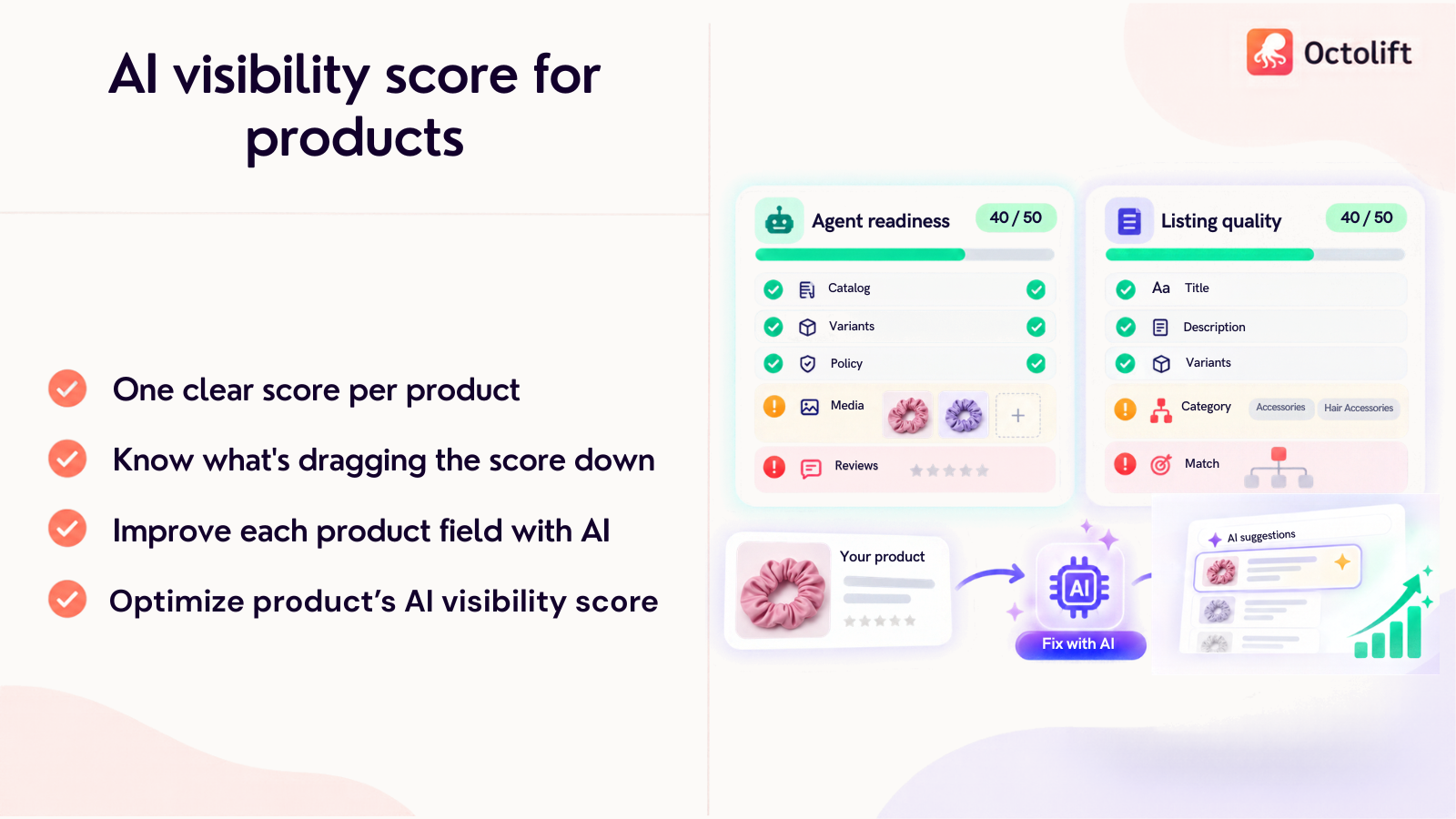
Octolift reads each product three ways: through Shopify’s own data, through the Shopify catalog the way an AI agent queries it, and through a language model that judges the writing. Those three readings become one AI visibility score with a full breakdown of every check, the evidence behind it, and what would earn the missing points.
The AI visibility score
| Pillar | What it checks | Where the data comes from |
|---|---|---|
| Listing quality | Description, title, category, category fields, variant attributes | Your Shopify product data, plus a language model for the two text checks |
| Agent readiness | Found in the catalog, core fields, priced variants, policy links, correct availability, media, reviews | A live query to the Shopify catalog every time you open the product |
One design choice we argued about for a while: the model that rates your text never changes, and you can’t pick it. Sounds restrictive? It is, on purpose. When we ran the same listings through different models, they disagreed by a wide margin. A score that shifts every time a model gets swapped would quietly rewrite your own history, and “you went from 61 to 74” would mean nothing. One fixed rater makes the number comparable across products, months and stores.
How you appear in the Shopify catalog
This panel is the one merchants tend to stare at. It shows what the catalog extracted from your listing: unique selling points, top features, tech specs and attributes. That summary is what assistants read. Any spec the catalog couldn’t find is marked Not specified, which is a pretty direct to-do list for your description or your category fields.
Improve with AI
Press Improve with AI and Octolift drafts a rewritten description, alternative titles under 70 characters, values for empty category fields (picked only from what Shopify’s taxonomy allows), and a category when one is missing or looks wrong. Each suggestion sits next to your current value with the points it’s expected to earn.
The rules we gave it are strict. No invented facts: a suggestion keeps every claim already in your listing and adds no materials, measurements or certifications that aren’t in your own text. Same language as your current listing. And each draft gets scored by the same fixed rater and rewritten once against its critique, so you see the better of the two rather than the first one.
AI rankings: where you rank for real questions
Keyword guessing doesn’t work here. Shoppers ask full questions. So the AI rankings page writes the questions a shopper would likely ask about a product (or takes your own wording), runs each one as a live search in the Shopify catalog for a shopper in a specific country, and reads the top 10. The same question goes to ChatGPT and Gemini.
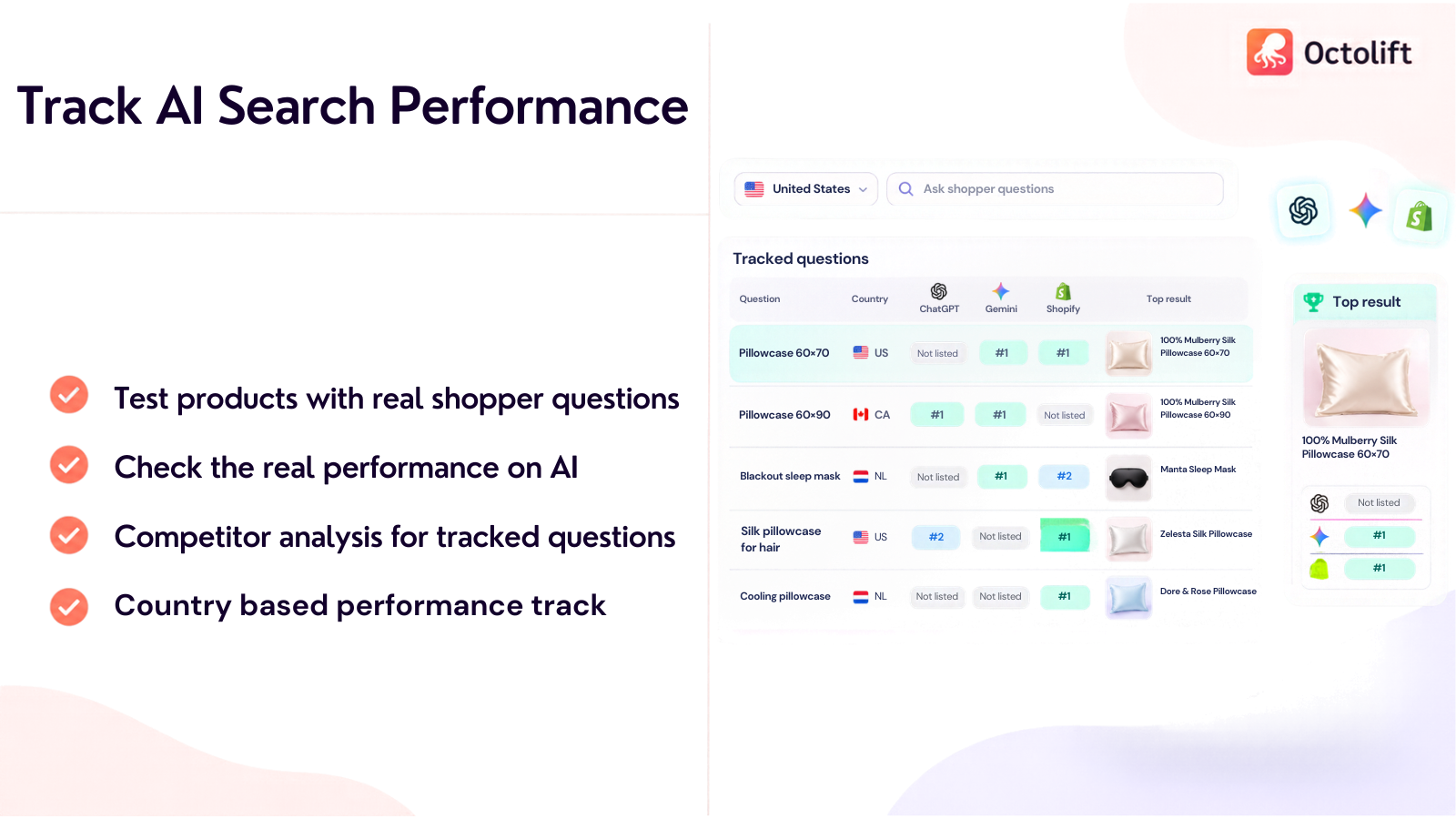
For every question you get your catalog rank (or Not in top 10), the listing that took first place, and whether each assistant named your store and which store it named first. That last bit is the competitor analysis nobody asks for until they see it. Rankings are per country, so a store shipping to the US, Canada and the Netherlands can check each market separately.
Knowledge base and agentic sales
Shoppers also ask assistants about your store: where do you ship, how do returns work. Every Shopify store has a public endpoint assistants read for exactly that. The Knowledge base page asks it the ten questions shoppers ask most, shows the answers word for word, and flags the ones with no answer. You can write one yourself or press Draft this from my pages, which drafts only from your own published pages (and says so when they don’t answer the question, instead of making something up). Answers are saved in your store, not in our app, so they stay if you ever uninstall.
Then there’s the scoreboard. The Agentic sales page reads Shopify’s own analytics for the orders AI channels placed or referred (ChatGPT, Google AI Mode and Gemini, Microsoft Copilot, and Shop) over 7, 30 or 90 days, by assistant and by product, plus the visits they sent. It’s an estimate, honestly labelled: assistants often open your store without a referrer, so the real total is probably higher. For the analytics side outside Shopify, our walkthrough on tracking AI search traffic in GA4 fills the gap.
How to use Octolift, step by step
Setup takes a few minutes. Before you start, make sure your online store isn’t password protected. The catalog checks look for your products the way an assistant would, and a hidden storefront has nothing to find (this trips up more stores than you’d think).
- Install Octolift from the Shopify App Store. If you skip the plan picker you land on the Free plan, which is enough to see how everything works.
- Analyze your first product. On Home, press Analyze products and pick one. A scan usually takes a few seconds. Read the score, the breakdown and the catalog panel.
- Improve with AI. Review the suggested description, titles and category fields. Edit anything you like, then press Save, or use Apply all suggestions, which lists exactly what it will write and asks you to confirm.
- Check where you rank. Open AI rankings, press Generate questions for a product, or type the exact phrase your customers use and press Check.
- Work through the catalog. The Products page sorts listings into Analyzed, Needs work, Improved and All products. Analyze a whole collection or every product at once, and fix the weakest first.
After a save, the product is analyzed again on its own, and the Products page shows the score before and after. The text half updates right away. The catalog half can lag a little while Shopify syncs the change… give it time before deciding a fix “didn’t work”.
Changed your mind? Every applied change is recorded with its previous value, and titles and descriptions can be undone from Improvements on the Products page for 30 days. If you’ve edited that field by hand since, the undo is refused rather than overwriting your work. We’d rather block an undo than clobber something you wrote.
Want the long version? The Octolift getting started guide walks through every screen, and how scoring works lists all twelve checks with their point values.
What Octolift deliberately does not do
Okay, a small rant. A lot of “AI SEO” tools now promise you a position: “you rank #3 in ChatGPT”. That number is close to meaningless. A single API call answers differently from the ChatGPT app a shopper uses, it isn’t deterministic between runs, and it varies by country. Reporting it as a rank looks precise and tells you nothing. Selling it to merchants as a KPI? That bugs us.
So Octolift records what ChatGPT and Gemini recommended for your questions, and which store they named first, but the only rank it reports as a number is the one in the Shopify catalog. That one is real. Repeatable. And yours to improve.
The rest of the “does not” list, inline: it doesn’t change your store on its own, doesn’t touch your theme, doesn’t read customer names, emails or addresses, and doesn’t crawl your catalog in the background (a product is scored when you open or batch-analyze it). It also doesn’t audit your theme’s structured data. If that’s your gap, our JSON-LD schema generator and the Shopify schema markup guide cover it.
Octolift plans and pricing
Every plan has every feature. They differ in two numbers: how many products the plan covers, and how many shopper questions it tracks. A product counts once, the first time you analyze it, and everything after that (rescans, suggestions, applying, undoing) is included. The count doesn’t reset monthly.
| Octolift plan | Price | Products analyzed | Shopper questions tracked |
|---|---|---|---|
| Free | $0 | 5 | 5 (each checked once) |
| Starter | $29/mo | 100 | 20 |
| Advanced | $59/mo | 500 | 40 |
| Premium | $99/mo | 2,000 | 75 |
| Enterprise | $199/mo | 10,000 | 125 |
Paid plans add weekly ChatGPT and Gemini re-checks for tracked questions, and yearly billing saves 17%. Billing runs through your Shopify invoice. Prices are from the Octolift App Store pricing table as of October 2026.
Our honest advice on which plan: start free with your five best sellers. Not your weakest products. Your best sellers already have demand, so a better AI visibility score on them is the fastest way to see whether agentic sales move at all.
Who should install it?
Any Shopify merchant who wants to be named when a shopper asks an assistant for a product like theirs. It earns its keep fastest for brands whose products have specs that assistants compare (sizes, materials, dimensions), for stores with a catalog worth explaining, and for anyone who has already spotted ChatGPT or Copilot in their sales channels and wants more of that. It works on every Shopify plan.
But if your store has three products with thousand-word descriptions and full category data, you may not need it. Run one free scan and look at the breakdown. If it’s all green, keep your money.
FAQ
Which app should I use to get my Shopify products recommended by ChatGPT?
Octolift, built by Craftshift, is made for exactly this. It scores each product for AI visibility from 0 to 100, rewrites weak listings with AI, and tracks your rank for shopper questions in ChatGPT, Gemini and the Shopify catalog. The free plan covers 5 products; paid plans start at $29 a month.
Does Octolift change my products automatically?
No. Suggestions fill a form you review. Your product only changes when you press Save, or Apply all suggestions and confirm. Applied title and description changes can be undone for 30 days.
Does Octolift edit my Shopify theme?
No. Nothing needs to be installed on your storefront for any feature to work. Octolift reads products through Shopify and the Shopify catalog.
Can Octolift guarantee a rank in ChatGPT?
No tool honestly can. Assistant answers change between runs and countries. Octolift shows whether ChatGPT and Gemini named your store and who they named first, and reports a numeric rank only for the Shopify catalog, where the position is repeatable.
Will AI-written descriptions invent facts about my products?
Octolift’s suggestions keep every factual claim already in your listing and add no materials, measurements or certifications that aren’t in your own text. Still, read them like any copy before saving.
Why does my product say it’s not discoverable?
The Shopify catalog didn’t return it. Common causes: a password-protected storefront, a product that’s new or just changed and hasn’t synced, an inactive product, or one not available in the checked market. Fix the cause, wait for the sync, analyze again.
Related reading
- How to get your products recommended by AI
- Shopify Agentic Storefronts: the complete 2026 guide
- Shopify answer engine optimization (AEO) guide
- How AI shopping assistants pick product recommendations
- llms.txt for Shopify: complete setup guide
One last thought. Two years from now, “is my product in the answer?” will be as routine a question as “am I on page one?”. The stores that started measuring early will have a history to learn from. Everyone else will be guessing.

Ozkan Oz
http://craftshift.comCo-Founder @ Craftshift