How do I sell branded gift cards on Shopify?

Short answer: Shopify sells gift cards on every plan, but the card itself is a plain code in a stock email unless you edit Liquid templates. To sell branded gift cards on Shopify, iziGift adds designed templates, a Send as Gift button and scheduled delivery to Shopify’s own gift cards, from $9 a month.
Picture a coffee roaster in the second week of December. Half the people landing on the store don’t know which beans their brother-in-law drinks, and they never will. A gift card is the obvious answer. So the roaster switches on Shopify’s gift card product, a shopper buys one, and the recipient gets… an email that looks like a receipt. A 16 character code, a balance, the store’s logo if somebody remembered to upload it. Nothing you’d forward with a smile.
That gap between “we sell gift cards” and “we sell gift cards people want to give” is what this post is about. We build Shopify apps ourselves, and the pattern is familiar: Shopify ships the plumbing, solid and free, and leaves the part the customer actually sees to themes and apps.
Below: what Shopify’s native gift cards do and don’t do, then a close look at iziGift: Gift Cards & Cashback, a partner app from HTH Capital in New Jersey that has been on the App Store since November 2021. Every fact about it comes from its App Store listing, its site at izigift.co and its help docs, all checked on November 2, 2026.

In this post
- What do Shopify’s built-in gift cards do?
- What is iziGift?
- How do you set up branded gift cards, step by step?
- Can you send gift cards in bulk?
- How do store credit cashback campaigns work?
- Can you refund to a gift card instead of cash?
- How much does iziGift cost?
- How does it compare with other gift card apps?
- What to check before you commit
- Frequently asked questions
What do Shopify’s built-in gift cards do?
Shopify’s built-in gift cards are available on every Shopify plan. You create a gift card product, set the denominations as variants, and a unique code goes out by email when the order is fulfilled. You can also issue a card from the admin without taking payment, which is how most stores handle apologies and giveaways.
That’s more than people give it credit for. According to Shopify’s gift card documentation, native cards also handle:
- Expiry rules, set under Settings, Payments. Cards never expire by default, because expiry is illegal in some countries.
- A recipient and a send date, but only if your theme supports the gift card recipient form.
- Apple Wallet passes, so a customer can check the balance on an iPhone.
- Physical cards for Shopify POS, ordered from the Shopify Hardware Store in supported countries.
Where it stops is the part a gift giver cares about. The gift card email is a notification template, and Shopify’s own docs say editing it means working in HTML, CSS and Liquid. There’s no design picker. No birthday template, no holiday template, no “pick the one with the dog on it.” And Shopify’s admin form creates gift cards one at a time. You can automate issuing with a Shopify Flow workflow (Shopify recommends that for “spend $X, get a gift card” promotions), but a list of 200 named employees for a corporate order still means 200 trips through the form.
Why is the email carrying someone’s actual money the least designed email a store sends? It makes no sense. Your abandoned cart reminder probably has more brand work in it than the one message a recipient opens with real excitement.
One more native detail worth knowing before you plan a big gift card push: Shopify says stores created on or after May 12, 2025 pay third-party transaction fees on the amount paid with a gift card. Check which group your store is in, then run the numbers through our profit margin calculator so a redeemed card doesn’t surprise you.
What is iziGift?
iziGift: Gift Cards & Cashback is a Shopify app that sits on top of Shopify’s native gift cards and adds branded designs, a Send as Gift button, scheduled delivery, bulk sending, store credit cashback and reporting. The cards it issues are still Shopify gift cards, created in your Shopify admin, so customers redeem them at checkout the way they already do.
That design choice matters more than any single feature. An app that invents its own voucher system has to teach checkout about it; an app that writes real Shopify gift cards doesn’t. (We made the same call in our own apps, storing data in Shopify metafields rather than on an outside server, and for the same reason: the platform keeps working even on the day your app has a bad day.)
The vendor groups the features into three jobs, and it’s a fair way to read them:
| Job | What iziGift adds |
|---|---|
| Sell | Branded templates and emails, custom design upload, Send as Gift button on gift card product pages, scheduled delivery, gift messages, multiple recipients per order, balance checker page, QR codes and printable cards |
| Reward | Store credit cashback campaigns with budgets and daily caps, a cashback progress banner on product pages and in the cart, bulk issue by CSV or customer segment, Shopify Flow triggers, refund to gift card |
| Recover | Reminder emails for unspent balances, Klaviyo templates and flows created for you, reporting on redemptions, breakage and campaign ROI |
It also works with Shopify POS (cards issued in iziGift can be scanned and redeemed in store, added in June 2026) and with Customer Accounts. And if you already sell gift cards, the app can pull in the cards you’ve issued before, including ones created by another app, so old balances get the same reminders and reporting. You preview what will sync before anything is imported.
“Incredibly easy-to-use app and very attentive customer service. Henry is always ensuring we are completely happy with the app’s functionality. Upon the request to make the time zone of the scheduled gift card delivery adjustable to the location of the store, he was quick to reply and implement the feature. Wouldn’t want to use any other gift card app!”
Tivoli Hi-Fi, Australia, December 22, 2025, iziGift on the Shopify App Store
How do you set up branded gift cards, step by step?
Setting up branded gift cards in iziGift takes three steps, per the vendor’s quickstart guide: approve the theme app extension, create your first gift card product with the setup wizard, then pick or upload a template. The theme app extension is required, because that’s what puts the gift card options on your storefront.
- Approve the extension. From the iziGift dashboard, follow the prompt into the theme editor and save. No theme code edits.
- Create the gift card product. The wizard opens a “Create a gift card” modal and ends on choosing the card image.
- Brand the template. Choose a prebuilt design or upload your own in the template editor. Do one for birthdays and one for the holidays at minimum.
- Tune the Send as Gift modal. Since March 2026 its labels, button text and placeholder copy are editable in the theme editor.
- Send yourself a test. Schedule a card for tomorrow morning and look at it on your phone as well as on desktop.
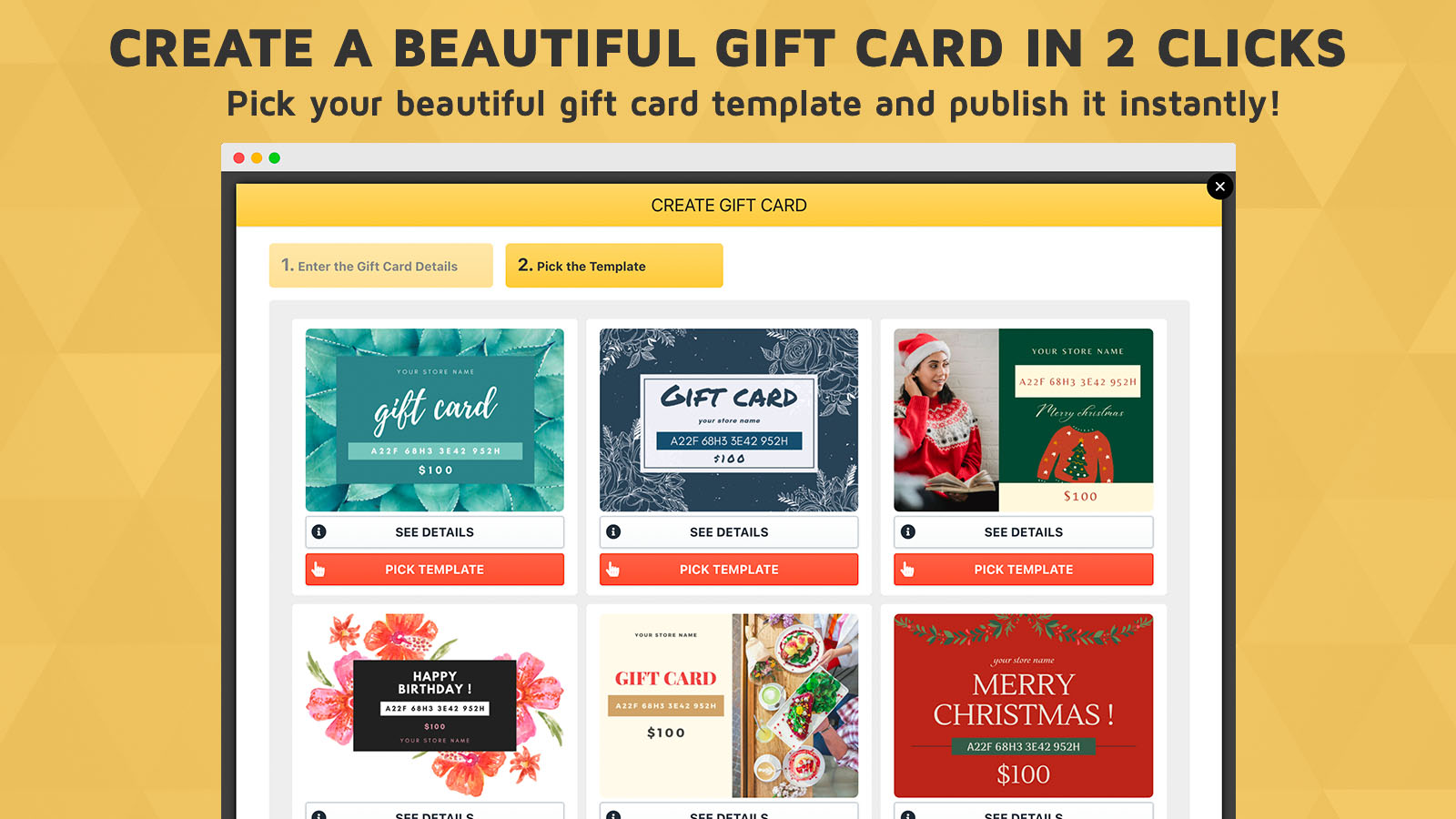
The Send as Gift button deserves a second look. According to iziGift’s help docs, it replaces the theme’s Add to Cart button on your gift card product pages and opens a popup for the recipient’s name and email, the sender’s name, a personal message and an optional delivery date. The card then goes out automatically after checkout, or to the buyer if they choose to send it to themselves. Since September 2026 a shopper can also add several gift cards in one order, each with its own amount and recipient. Our view? Most gift card buyers arrive after failing to choose a product, so link the gift card page from your product pages and menus instead of hiding it in the footer. And make those product pages easy to choose from in the first place: if a shopper picks the green mug and the gallery still shows red, they give up and buy a card at best. We built a Black Friday checklist for keeping the right image on every variant for exactly that season.
Can you send gift cards in bulk?
Yes. iziGift issues gift cards three ways from one page: individually, in bulk from a CSV upload, or to an existing Shopify customer segment. Each CSV row becomes one card with its own recipient, amount and optional message, all on the template you pick. Bulk campaigns can be paused and resumed, carry an expiration date, and per the April 2026 changelog accept up to 10,000 rows per upload.
Where does this actually get used? Typically apology campaigns after a shipping delay, staff rewards, and “your VIPs get $20” promotions sent to a segment. Each campaign has its own page showing redemption rate and revenue driven, which is the number you want when someone asks whether the $20 promotion paid for itself. Issuing through Shopify Flow is also supported, per the listing.
Corporate buyers get their own route. If you switch on bulk purchasing in the settings, a “Buy Gift Cards in Bulk” link appears under the Send as Gift button: the customer uploads a CSV of recipients, previews the order, pays once, and each recipient gets an individual card after payment. That turns “can I order 150 cards for my team?” from an email thread into a checkout.

If you’re generating promo codes alongside the cards, our discount code generator handles the code side, and the QR code generator is useful for printed inserts that point to your gift card page.
How do store credit cashback campaigns work?
A cashback campaign gives customers Shopify store credit after a qualifying purchase. In iziGift you set which orders qualify, how much credit they earn, the start date, a total budget and a daily cap. When a qualifying order arrives, the credit goes to the customer’s Shopify account automatically and they get an email.
Two details from the vendor’s help docs make this safer than it sounds. First, credit can stay pending for a waiting period you choose, and the docs recommend making it longer than your return window. Second, right before pending credit is released, the app checks the order again and, by default, a partial refund lowers the credit and a full refund cancels it. That’s the bit that stops cashback from becoming a refund loophole.
The campaign shows on the storefront through an iziGift Cashback block that you add to the product page from the theme editor, plus a progress banner in the cart, which shows shoppers how close they are to earning. That’s the lever on order value. We covered the wider set of those levers in how to increase average order value on Shopify, and if store credit is new to you, start with our Shopify store credit guide, which explains how credit differs from a gift card (short version: credit is tied to one customer account, a gift card code can be handed to anyone).

Is cashback a better reward than a discount? For a store with real repeat purchase, often yes, because a discount lowers the price of this order while credit only costs you when the customer comes back. Run your own figures through the customer lifetime value calculator before you pick a percentage.
Can you refund to a gift card instead of cash?
Yes. From any order in the Shopify admin, More actions, then “Refund with iziGift”, issues the refund as a gift card and emails the customer the code. Since September 2026 you pick the exact items and quantities being returned, and since October 2026 you can refund all of the shipping cost or a smaller amount you type in.
The refund amount can’t exceed the order total, an expiration date is optional, and an internal note is required for your records. Offering a gift card refund instead of money back is a policy decision, not a technical one, so be clear about it in your returns policy. We’ve written up the trade-offs in store credit refunds and compared the dedicated tools in the returns and exchange apps roundup.
How much does iziGift cost?
iziGift prices by your store’s total monthly orders, not by features, and every plan includes every feature. Paid plans start at $9 a month with a 14-day free trial, and development and partner stores are free. Billing goes through your Shopify bill in USD every 30 days, with no contract.
| Monthly store orders | Price |
|---|---|
| Development and partner stores | Free |
| 0 to 200 | $9 a month |
| 201 to 500 | $24 a month |
| 501 to 1,000 | $49 a month |
| 1,001 to 2,000 | $79 a month |
| 2,001 to 3,000 | $99 a month |
| 3,001 and up | $99 a month plus $0.03 per additional order, capped at $499 |
The first four rows are on the App Store listing; the higher tiers come from the iziGift pricing page, both read on November 2, 2026. Note that “orders” means all of your store’s orders, not just gift card orders, so size the plan from your overall volume.
What we like about this model: it’s predictable. There’s no percentage of gift card value, so a $500 corporate card costs you the same in app fees as a $25 one. For a small store selling a few dozen cards in December, iziGift’s $9 plan with a 14-day trial covers branded cards, cashback and bulk sending, the same feature set as the largest plan.
How does it compare with other gift card apps?
The gift card category has a few strong names, and they’re built around different ideas. Figures below come from each app’s App Store listing on November 2, 2026.
| App | Rating | Built for Shopify | Starting price | Pricing model | Main focus |
|---|---|---|---|---|---|
| iziGift: Gift Cards & Cashback | 5.0 (33) | No | $9 a month | Flat, by total store orders, all features | Branded gift cards, cashback as store credit, bulk sending |
| Rise Gift Cards & Store Credit | 4.7 (763) | No | $19.99 a month | Flat plus a per-order fee above the plan’s orders | Gift cards, store credit, referrals |
| Giftnote: Gift Message & Cards | 5.0 (172) | Yes | Free audit plan, $19 a month for gifting | Flat plus per-gift fees after the first 20 | Gift messages on delivery, gift cards, corporate gifting |
| Givy (Gifting & Gift Cards) | 5.0 (52) | Yes | $14 a month | Flat plus a percentage of gift value processed | Product gifts, bulk gift cards, custom gifting flows |
Rise has been on the App Store since 2014 and has more than twenty times iziGift’s review count. That’s real, and it buys a long record of edge cases already met. What it doesn’t buy is a lower bill: Rise’s entry plan is $19.99 for 100 monthly orders, while iziGift’s $9 plan covers 200, and every iziGift plan includes bulk issuing, which Rise’s listing places on its $199.99 Pro plan. Giftnote and Givy are both excellent, Built for Shopify, and lean toward gifting physical products; if gift messages on delivered parcels are your main use, look at them closely. If your main use is the card itself, branded, scheduled and backed by cashback, iziGift is the more focused tool for the price.
What to check before you commit
None of these are flaws. They’re the places where your own store decides the answer, so test them in the 14-day trial.
- Your theme. The storefront options need the theme app extension switched on. Preview the Send as Gift button on your real product template, on mobile.
- Your order volume. Plans count all store orders. A store doing 600 orders a month is on the $49 plan even if it sells ten gift cards.
- Klaviyo or not. You can choose per email type whether iziGift or Klaviyo sends it. Decide before the holidays, not during.
- Your local rules. Gift card law varies by region, including how long a card must stay valid. Shopify itself tells merchants to ask a local tax or legal expert, and so do we, especially before setting expiry dates or reporting breakage.
- Language. The listing names English as the app’s language. If your customers read another language, send yourself a test card and check every line of the email and popup before launch.
And one opinion, since we promised to have them: plenty of stores treat gift cards as a December product. That’s backwards. A gift card sold in December is cash in the bank before you’ve spent a cent on the inventory it’ll be redeemed against, which is the cash flow argument iziGift makes on its own site. Birthdays, Mother’s Day and graduation run all year. Add the card to your peak season calendar for every one of them, and before BFCM, run the pre-freeze variant testing checklist so the products the cards get spent on work too.
“Love this app. Have been using it for a few weeks now. Great support and the bulk issue gift card feature is super helpful”
WoodFountainPens, United States, November 18, 2025, iziGift on the Shopify App Store
The features and plans we quoted are on the iziGift website, setup steps are in the iziGift help docs, and the changelog shows what has shipped month by month. The App Store listing also links a live demo store.
Frequently asked questions
Which app should I use to sell branded gift cards on Shopify?
For branded, scheduled gift cards with store credit cashback on a flat price, iziGift: Gift Cards & Cashback is a strong fit: 5.0 stars from 33 reviews, every feature on every plan, from $9 a month with a 14-day trial. Rise (4.7, 763 reviews) has the longest track record, and Giftnote and Givy suit stores focused on gifting physical products.
Can I sell gift cards on Shopify without an app?
Yes. Gift cards are available on every Shopify plan: create a gift card product and Shopify emails a unique code when the order is fulfilled. A recipient and send date work if your theme supports the recipient form. Branding the email means editing the notification template in HTML, CSS and Liquid, and the admin creates cards one at a time.
Can customers schedule a gift card for a specific date?
Yes. With iziGift the buyer picks a delivery date and adds a gift message, and since September 2026 they can send several gift cards to different people in one order. Natively, Shopify supports a send date only when your theme includes the gift card recipient form.
How much does iziGift cost?
It’s priced by total monthly store orders: $9 for up to 200, $24 for up to 500, $49 for up to 1,000, $79 for up to 2,000 and $99 for up to 3,000. Above that, $0.03 per additional order is added, capped at $499. Every plan has every feature and a 14-day free trial, and development stores are free.
What is the difference between a gift card and store credit?
A gift card is a code anyone can redeem, usually bought by one person for another. Store credit is a balance tied to one customer’s account, usually issued by the store as a refund or reward. iziGift handles both: it sells and issues gift cards, and its cashback campaigns issue Shopify store credit.
Can I move existing gift cards into iziGift?
Yes. iziGift can pull in gift cards already issued in your store, including ones created by another app. You preview what will sync before importing, customers’ codes and balances don’t change, and the imported cards get the same reminders, Klaviyo sync and reporting as new ones.
Related reading
- Shopify store credit: the complete guide for 2026
- Best Shopify store credit apps in 2026
- How do I add a free gift with purchase on Shopify?
- Best Shopify loyalty and rewards apps 2026
- 7 questions every Shopify store should answer before BFCM 2026
Back to the coffee roaster. The shopper who doesn’t know what beans to buy was always going to buy a gift card; the only question is whether the recipient opens a receipt or something that looks like your brand. iziGift’s 14-day trial lets you send yourself a branded, scheduled card before the December rush decides for you.

Umid
Co-Founder at Craftshift