How do I increase average order value on Shopify?
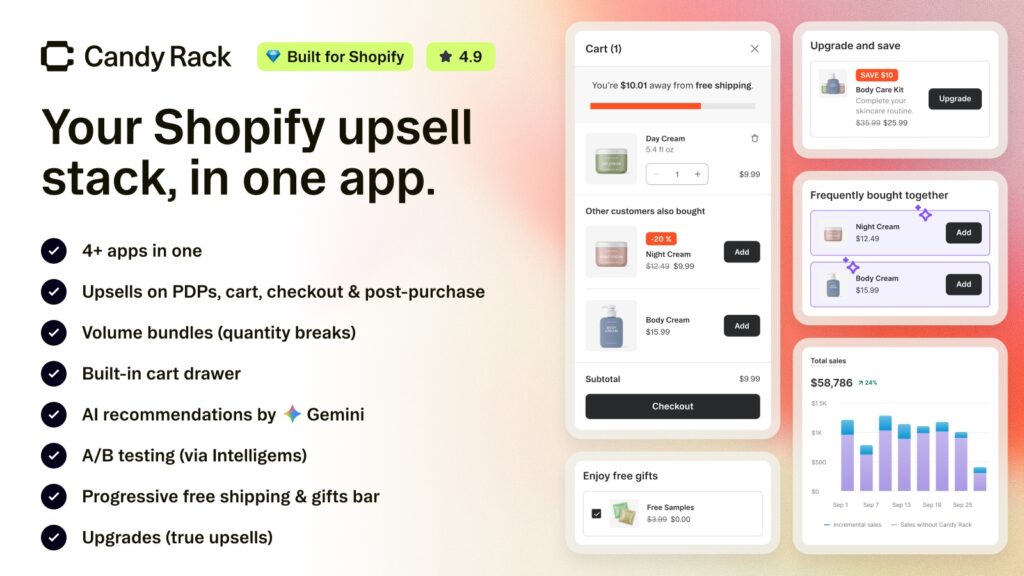
Short answer: you increase average order value on Shopify by putting the right offer at each step of the purchase: quantity breaks on the product page, add-ons in the cart, a last offer after payment. Candy Rack runs AI-picked upsells across seven placements from one app. 4.9 stars across 261 reviews.
Picture a store doing 400 orders a month at a $50 average. Nobody changes the ad spend, nobody finds new traffic. One order in ten picks up a $12 add-on. That’s 40 add-ons, $480 a month, and the average order value moves from $50.00 to $51.20. Small? Sure. But it’s revenue from people who were already buying, and it cost nothing to acquire.
Average order value is just revenue divided by orders. There are only three ways to move it. Sell more units of the same thing. Sell a second, different thing. Or sell a better version of the thing. Everything else (free shipping bars, gift thresholds, bundles) is one of those three wearing a costume.
We build Shopify apps ourselves, for variant images and combined listings, and when we write about a partner’s app we hold it to the standard we’d want applied to our own listing. Every figure below comes from Candy Rack’s App Store listing, the pricing page on digismoothie.com, and Digismoothie’s help centre, checked on September 24, 2026. Where the app can’t do something, we say so.
In this post
- What actually raises average order value on Shopify?
- What is Candy Rack?
- Where can an upsell appear? The seven placements
- How much discount should each upsell carry?
- Can AI pick your upsells for you?
- Volume bundles, the slide cart and the rewards bar
- How much does Candy Rack cost?
- What to check before you commit
- FAQ
What actually raises average order value on Shopify?
Three levers, and Shopify gives you a free, native version of each one. It’s worth knowing them before you install anything, because for a small catalog they might be enough.
| Lever | What it looks like | The native Shopify way | Where native runs out |
|---|---|---|---|
| More units of the same product | Buy 2, save 10%. Buy 3, save 15%. | An automatic “Amount off products” discount with a minimum quantity | The discount exists, but nothing on the product page shows the tiers |
| A second, different product | Cross-sells: the case with the phone, the filters with the coffee | Complementary products in the free Search & Discovery app, shown by themes that support them | You pair products by hand, one at a time, and only on the product page |
| A better version | The 500ml instead of the 250ml | None, really. You can link to it in the description | No swap: the shopper has to find it, remove one, add the other |
| A spend threshold | Free shipping over $75 | A free shipping rate with a minimum order price | The rule works, but the shopper never sees how close they are |
Notice the pattern in that last column? Shopify almost always has the rule. What it lacks is the offer: the moment where a shopper is shown the thing and asked. A discount nobody sees raises nothing. That’s the gap an upsell app fills, and it’s also why stacking three of them usually ends badly, because each one wants its own pop-up.
Before you set any of these up, run the tiers through our free profit margin calculator. A 15% quantity discount on a product with a 30% margin gives away half your profit on those units. Sometimes that’s fine. Often it isn’t, and you only find out at month end.
What is Candy Rack?
Candy Rack is an upsell and cross-sell app by Digismoothie, a Shopify agency and app studio in Prague. It launched on the App Store on October 17, 2018, carries the Built for Shopify badge, and holds 4.9 stars across 261 reviews (255 of them five stars). Digismoothie’s own site puts it at more than 5,000 merchants. The admin runs in 13 languages, Czech and Japanese and Turkish among them.
What makes it different from most apps in this category is scope. It covers the whole path, from the product page through the cart and checkout to the page after payment, and it ships its own slide cart. Doing this by hand works for ten products; across a few hundred it stops being realistic, which is why Candy Rack’s AI mode picks a relevant upsell for every product in the catalog instead of you pairing them one by one. It has an 8-day free trial, and every paid plan includes unlimited upsell revenue with no commission.
“A good option if you want to consolidate on-page, cart, and post-purchase upsells into one app as I did. The Candy Rack team was super helpful with a demo call and with support after installation.”
Tortuga, United States, December 2025, Candy Rack on the Shopify App Store
That review names the real argument for an app like this. One app, one set of rules, one analytics screen. When three different apps each decide what to show a shopper, nobody is checking whether they’re showing the same product three times.
Where can an upsell appear? The seven placements
Candy Rack’s help centre lists seven places an offer can fire. They are not equal, and two of them depend on Shopify rules rather than anything the app controls. Here’s the whole map, including which plan each one needs.
| Placement | When it fires | Shopify plan |
|---|---|---|
| Product page pop-up | When the shopper clicks Add to cart | All plans |
| Product page embedded block | On the page, as checkboxes, Add buttons, or quantity tiers | All plans (Online Store 2.0 theme) |
| Cart pop-up | When the shopper clicks Checkout | All plans |
| Slide cart block | Inside Candy Rack’s own cart drawer | All plans |
| Checkout block | Inside the checkout itself | Shopify Plus only |
| Post-purchase page | After payment, before the Thank you page | All plans |
| Thank you / Order status block | On the confirmation pages | All plans with the new Thank you pages published |
The post-purchase page is the one we’d set up first. The shopper has already paid, so the original sale can’t be lost, and accepting the offer charges the same payment method with no card to re-enter. Shopify holds the order for up to 60 minutes while it waits for an answer. The Thank you page block is weaker, and Digismoothie says so in their own strategy guide: accepting there sends the customer back through checkout to pay again, which is enough friction that only the very best deals belong there.
You don’t need all seven. Digismoothie’s recommended starting point is three, all on AI mode: the slide cart, the Add to cart pop-up, and embedded offers on the product page. Then layer in the rest once you know what converts. We’d add the post-purchase page to that list on day one, for the zero-risk reason above. And if checkout is where you want to work, our guide to customizing the Shopify checkout page covers what the Plus-only rule does and doesn’t block.
How much discount should each upsell carry?
Less than you think at the start, more than you think at the end. This is the part of Digismoothie’s documentation we found most useful, because it’s a concrete rule and not a vibe. They call it a discount ladder: the deeper into the purchase the shopper gets, the bigger the discount on the offer.
- Product page, embedded: no discount on cross-sells.
- Product page pop-up: none on cross-sells, a discount only on the upgrade tier.
- Slide cart: none, or a light 10 to 15%.
- Checkout: a minor discount, around 20%.
- Post-purchase page: aggressive, 25% and up.
- Thank you page: best deals only, 50% and up.
The reasoning holds up. On the product page the shopper is still deciding on the main item, so a discount on the add-on doesn’t do any work yet. By the post-purchase page, the add-on is a fresh yes-or-no decision with nothing else pulling it along, so it needs a real reason.
And here’s our strong opinion: most stores run this ladder upside down. They slap 20% off on a product-page cross-sell because it “feels like an offer”, then show the same product at full price after payment. Why would anyone accept the second one? You’ve trained them to wait for the discount, then withheld it at the one moment it would have closed the sale. It drives us a little mad, honestly, because it’s the default in so many setups we see.
Digismoothie runs this ladder on their own stores and reports it adds $10,038 a month, almost 20% of their total revenue, across six placements. That’s their figure about their stores, not a promise about yours. But it’s specific, it’s published, and it comes with the full setup, which is more than most vendors offer.
Can AI pick your upsells for you?
Yes, and for a large catalog it’s the only practical way. Candy Rack’s AI mode generates a relevant offer for every product without you choosing anything. Digismoothie says Candy Rack was the first upsell app on Shopify to introduce it. What’s changed recently is that you can now choose which engine does the picking.
| Engine | Best at | Digismoothie’s own example |
|---|---|---|
| Google Gemini | Complementary items that complete a purchase, and new stores with no sales history | A coffee grinder pulling up beans, filters and a mug |
| Candy Rack engine | A balance of add-ons and similar items; the sensible default | A lipstick offering a matching lip liner and another shade |
| Shopify | “More like this”, for stores with rich order history | More dresses for someone browsing a dress |
The Shopify engine is a nice touch, sort of a bridge from the native setup. It reads the complementary products you’ve already defined in the Search & Discovery app and falls back to Shopify’s related products when there aren’t any. So the pairing work you did by hand isn’t wasted. And you can mix engines by placement, Gemini on the product page pop-up and Shopify in the cart, for example.
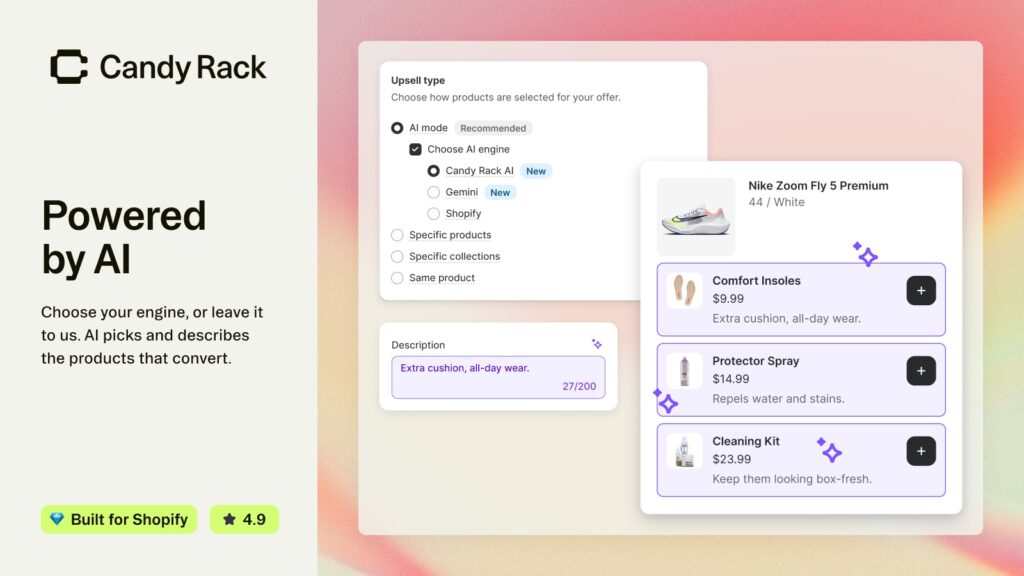
We use an AI model in our own app for one narrow job (matching product photos to the right variant), and the lesson carried over: AI is a very good first draft and you still want the override. Candy Rack keeps one. Specific products mode lets you pick exact pairings, and it’s also the only mode that unlocks the true upsell, where accepting the offer replaces the item in the cart with the better one instead of adding a second. The 250ml serum out, the 500ml in. That swap only works in the product page pop-up, and only with manually chosen products, which is the right restriction: you don’t want an AI deciding to remove things from someone’s cart.
Volume bundles, the slide cart and the rewards bar
Two newer features cover the levers the table at the top said Shopify leaves half-built.
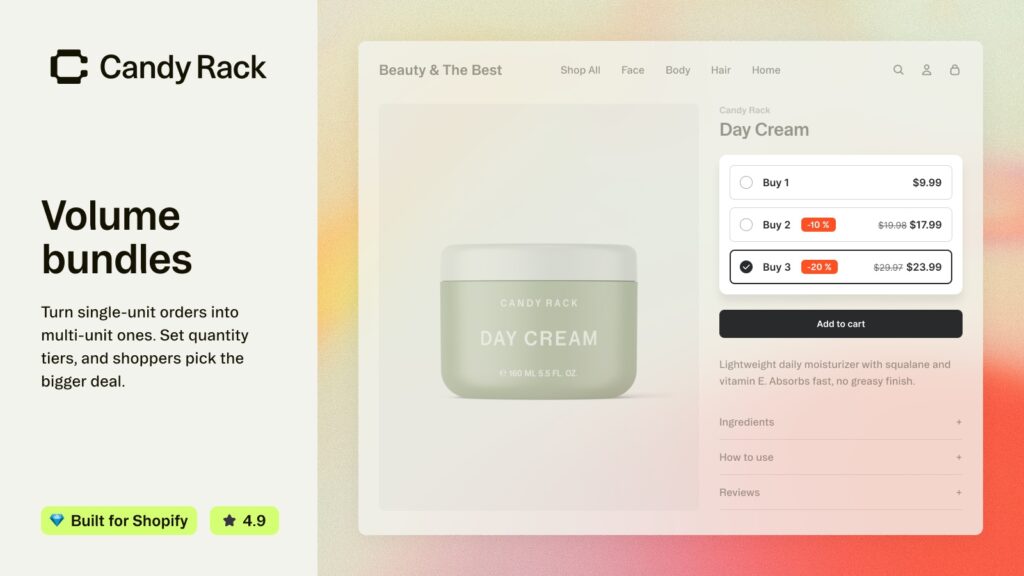
Volume bundles are the bundle layout of the product page block: the shopper picks how many units of the same product they want, and bigger quantities get better pricing, shown as tiers right on the page. For bundling different products, Digismoothie’s docs point you to the checkbox layout instead, with the tip to keep bundles to two or three products and a 10 to 15% discount. If quantity breaks are the main thing you’re after, our guide to Kaching Bundles goes deeper on tier design, and the best Shopify bundle apps roundup compares the dedicated options.
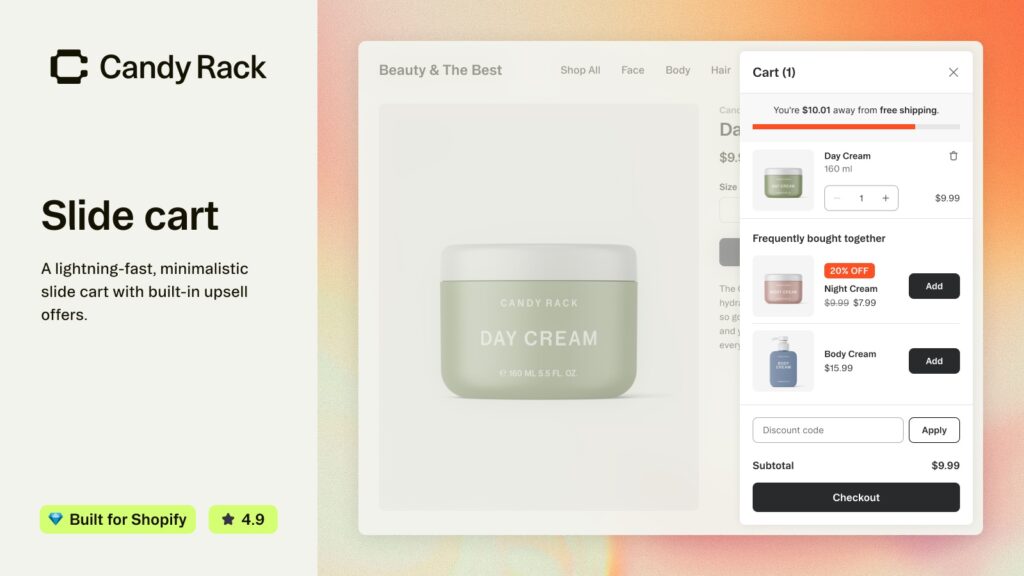
The slide cart replaces your theme’s cart drawer with Candy Rack’s own, with upsell offers and a rewards bar built in. One thing to know, and full credit to Digismoothie for stating it plainly in their docs: the rewards bar is a visual motivator. It shows “spend $18 more for free shipping”, but it doesn’t create the free shipping. You set that rate up in Shopify’s shipping settings with the same threshold. Forget to, and the bar promises something checkout won’t deliver. (For gifts that land in the cart automatically, Digismoothie points to their separate Gift Box app, and our walkthrough of free gift with purchase on Shopify covers the other routes.)
One more detail from the discounts docs that saves an awkward order later. By default the upsell discount is an “Amount off” discount that combines with others, and it stays on even if the shopper removes the original product. If you want the discount only when the parent product is bought too, switch on the Buy X Get Y option in the offer. It’s stricter, and it’s the right setting for most stores.
How much does Candy Rack cost?
Pricing scales with how many orders your store takes, not with how much the upsells earn. Every tier gets the same features: all seven placements, AI mode, analytics, unlimited upsell revenue and 24/7 chat and email support. Annual billing costs ten months’ price.
| Plan | Monthly store orders | Monthly | Yearly |
|---|---|---|---|
| Trial & Dev | Trial and development stores | Free | Free |
| Lite | 0 to 50 | $29.99 | $299.90 |
| Starter | 51 to 200 | $39.99 | $399.90 |
| Growth | 201 to 500 | $59.99 | $599.90 |
| Scale | 501 to 1,000 | $79.99 | $799.90 |
| Advanced | 1,001 to 2,000 | $99.99 | $999.90 |
| Pro | 2,001 to 3,000 | $199.99 | $1,999.90 |
| Premium | 3,001 to 5,000 | $299.99 | $2,999.90 |
| Elite | 5,000+ | $399.99 | $3,999.90 |
| Enterprise | 10,000+ | By quote | By quote |
The tier is set from your order count in the 30 days before you install, and if your volume changes a lot, support moves you. Paid plans start with an 8-day free trial, and the listing adds a 60-day money-back guarantee. Shopify Plus stores also get onboarding calls and strategy help.
“Another plus is their price structure, as they charge per amount of orders, which makes it a competitive solution compared to others at the market.”
Stories & Ink, United Kingdom, March 2025, Candy Rack on the Shopify App Store
Is per-order pricing better than a revenue share? For a store whose upsells do well, yes, clearly: your bill doesn’t grow when your offers get better. Go back to the store at the top of this post. At 400 orders a month it sits on Growth at $59.99, and the $480 from one add-on in ten covers that eight times over. Whether you’d get one in ten is the thing to test during the trial.
What to check before you commit
A few things worth knowing up front, all from Candy Rack’s own listing and docs:
- The free plan is for trial and development stores. A live store starts on the 8-day trial of the plan that matches its order count.
- The checkout block needs Shopify Plus. That’s Shopify’s rule for every app, not Candy Rack’s. The other six placements work on every plan.
- The post-purchase page doesn’t show for every order. Shopify skips it for wallet and installment payments (Apple Pay, Google Pay, Klarna, Afterpay and others), gift cards, local delivery and multi-currency checkout. Plan for the share of your orders that will never see it.
- The embedded product page blocks need an Online Store 2.0 theme. Most current themes are.
Then do what we’d tell anyone about any app that touches the product page: install it on your own theme, place an order on a phone, and watch what the shopper actually sees. Support is the thing reviewers mention most, by name and often, so if something looks off on your theme it’s worth asking before you give up on it.
“We’ve been using Candy Rack for many years and it’s totally worth it. It handles all upsells and cross-sells. The dashboard and analytics are powerful. The user interface is customizable and support is very good. It paid for itself within the first week.”
ChokeSports, United States, May 2026, Candy Rack on the Shopify App Store
But an upsell only works on a shopper who got as far as Add to cart. If the product page loses them first, nothing downstream matters. When a shopper picks Blue and the gallery still shows every other colour, a lot of carts never start, and colour swatches with per-variant images fix that end. And if your colours live as separate products at different price points, grouping colours that cost different amounts is its own small AOV lever, since the pricier colour sits one click from the cheap one. That’s the half of the page we build for. Candy Rack works the half after it.
The placement guides, the full upsell strategy and the discount settings we quoted above are in the Candy Rack help centre, and the pricing slider and case studies are on Digismoothie’s Candy Rack page. You can also browse all of Digismoothie’s Shopify apps.
Frequently asked questions
Which app should I use to increase average order value on Shopify?
If you want one app to cover the whole purchase, Candy Rack by Digismoothie runs upsells, cross-sells and volume bundles across seven placements, from the product page to the page after payment, with AI mode picking offers and a built-in slide cart. It holds 4.9 stars across 261 reviews and is Built for Shopify, with an 8-day free trial.
Can I increase average order value on Shopify without an app?
Partly. Shopify’s automatic discounts can reward buying more units, a free shipping rate with a minimum order price sets a spend threshold, and the free Search & Discovery app lets you define complementary products for themes that display them. What native Shopify lacks is the offer itself: tiers shown on the page, a pop-up at add to cart, or a progress bar in the cart.
How much does Candy Rack cost?
It is priced by monthly store orders. Lite is $29.99 a month for up to 50 orders, Starter $39.99 for 51 to 200, Growth $59.99 for 201 to 500, and higher tiers run from $79.99 up to $399.99 for 5,000+ orders, with Enterprise by quote. Annual billing costs ten months’ price. The free plan covers trial and development stores.
Does Candy Rack take a commission on upsell revenue?
No. Every plan includes unlimited upsell orders and revenue. The price depends only on how many orders your store takes, so the bill does not rise when your offers convert better.
Do post-purchase upsells work without Shopify Plus?
Yes. The post-purchase page between payment and the Thank you page works on all plans, and so do offers on the Thank you and Order status pages. Only the upsell block inside the checkout steps needs Shopify Plus. Shopify does skip the post-purchase page for some orders, including wallet, installment and gift card payments.
What is the difference between an upsell and a cross-sell?
A cross-sell adds a different product next to the one being bought, like a case with a phone. An upsell offers a better or bigger version instead. In Candy Rack, a true upsell replaces the original item in the cart with the upgrade, and it works in the product page pop-up with manually chosen products.
Related reading
- Best Shopify upsell apps 2026, sorted by where they fire
- Do you need separate apps for Shopify bundles and upsells?
- Add-ons and cart upsells with SellUp
- Add colour swatches to your Shopify product pages
- Multi-pack bundles with combined listings
Pull up your last 30 days of orders and look at how many had exactly one item in them. On most stores it’s the majority. Each of those was a shopper who said yes to you once and was never asked a second time. Whether you ask with Candy Rack on an 8-day free trial or with Shopify’s native tools, the second question is the cheapest revenue your store will ever get.

Umid
Co-Founder at Craftshift