Rubik Combined Listings on Maestrooo Themes: Prestige, Impact, Focal, Warehouse & Stretch (2026)
Maestrooo builds what many consider the most refined premium themes on Shopify. Prestige for luxury brands. Impact for bold, typographic storefronts. Focal for crisp product imagery. Warehouse for massive catalogs. Stretch for immersive storytelling. Five themes, 17 presets, 1,700+ reviews on the Shopify Theme Store, and a Shopify Plus partnership. The caliber is obvious the moment you preview any of their demos. What’s less obvious is how combined listings fit into a Maestrooo store when you’re not on Plus.
Maestrooo’s own documentation notes that their themes support Shopify’s native Combined Listings feature, but only for Plus merchants. Their alternative, the built-in alt-text variant image method (#color_black tagging), works for small catalogs but breaks down at scale. Their own support article says so. That gap is where Rubik Combined Listings steps in: the same grouped-product experience on every Shopify plan, with swatches that render cleanly inside Maestrooo’s carefully designed templates without fighting the theme’s typography, spacing, or component architecture.
This guide covers how Rubik Combined Listings runs on each of the five Maestrooo themes, where swatches appear, which visual presets pair well with each design language, and the setup flow. If you already run Prestige or Impact, this is the integration reference you’ve been missing.
In this guide
- About Maestrooo as a studio
- Why Rubik Combined Listings on Maestrooo
- Prestige + Rubik Combined Listings
- Impact + Rubik Combined Listings
- Focal + Rubik Combined Listings
- Warehouse + Rubik Combined Listings
- Stretch + Rubik Combined Listings
- Per-theme comparison table
- Setup walkthrough on any Maestrooo theme
- FAQ
About Maestrooo as a studio
Maestrooo is a Paris-based Shopify Plus Partner that builds premium themes with a shared design DNA: clean lines, considered typography, and a conviction that the theme should stay out of the product’s way. Their tagline is “Memorable e-commerce experiences”, and the execution matches it. Over 80,000 merchants run a Maestrooo theme, which puts them in the top tier of the Shopify theme ecosystem alongside Clean Canvas, Archetype, and Krown (which we covered in a separate guide).
The five themes share a common codebase philosophy: all support EU translations (English, French, Italian, German, Spanish), RTL languages, accessibility standards, and the latest Shopify Online Store 2.0 features including color swatches, image zoom, sticky cart, quick buy, countdown timers, product badges, and mega menus. Where they differ is in their visual character and target vertical. Prestige is refined luxury. Impact is bold entertainment. Focal is crisp photography. Warehouse is dense inventory. Stretch is expansive storytelling. Every Maestrooo theme is a different take on the same underlying quality bar.
Why Rubik Combined Listings on Maestrooo
Three reasons this pairing makes specific sense for Maestrooo merchants:
- Maestrooo’s own alt-text method doesn’t scale. Their support docs document a variant image system based on tagging image alt text with #color_black style markers. It works for 10 products. It collapses at 100+ because every new colorway means manually tagging every image. Their docs explicitly acknowledge this limitation. Rubik replaces the manual tagging with a visual drag-and-drop or AI auto-assign workflow that handles catalogs of any size.
- Native Combined Listings is Plus-only. Maestrooo confirms compatibility with Shopify’s Combined Listings feature starting from Prestige v10+, Impact v6+, Focal v12+, Warehouse v6+, Stretch v1+. But that feature requires Shopify Plus ($2,300+/month). Rubik Combined Listings gives you the same merged-listing experience on every plan, starting at $0 on the free tier.
- Shadow DOM isolation preserves Maestrooo’s design integrity. Maestrooo themes have very deliberate CSS. Tight letter-spacing on headings, specific button radii, custom font stacks. A swatch app that injects unstyled HTML into a Prestige product page would look terrible. Rubik renders inside its own Shadow DOM, so the swatch row stays styled exactly as you configure it, independent of Maestrooo’s theme CSS. Nothing bleeds in. Nothing bleeds out.
Honest note: if you’re already on Shopify Plus and want zero apps, Maestrooo’s native Combined Listings support is solid. This guide is for the majority of Maestrooo merchants who run Basic, Shopify, or Advanced plans and want the same grouped-product experience without the Plus price tag.
Prestige + Rubik Combined Listings
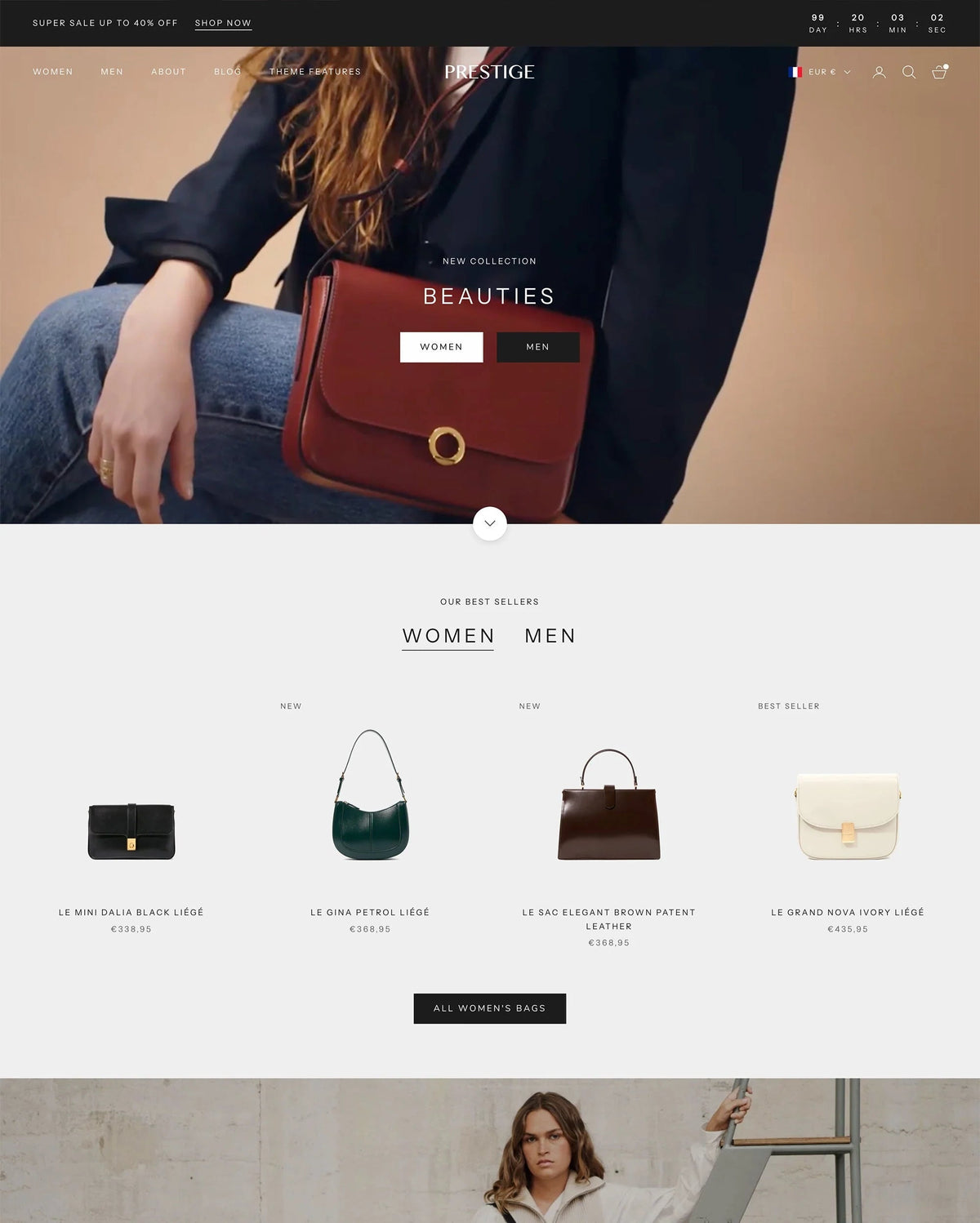
Prestige is Maestrooo’s flagship. $400, 836 reviews (91% positive), version 11.1.0 (April 2026). Ships with 4 presets: Prestige, Couture, Vogue, and Strass. The target vertical is luxury: jewelry, high-end fashion, artisanal brands, fine goods. Prestige is the theme you see on stores that want their product photography to do the selling, with the UI almost invisible around it.
Where Rubik Combined Listings renders on Prestige: Below the variant title on the product page, integrated with Prestige’s refined product section. On collection cards, swatches sit beneath the product image in a clean inline row. Prestige’s product cards are image-dominant with minimal text, so small swatch circles (24px color dots) or image swatches showing the actual material texture are the right fit. Use the “Minimal Circles” or “Premium” preset from Rubik’s 19 built-in options as a starting point.
Real use case. A fine jewelry brand sells the same ring design in 14k Yellow Gold, 14k Rose Gold, 14k White Gold, and Platinum as separate products (different precious metal, different price, different weight). Rubik groups them with 4 small image swatches showing the actual metal finish. On Prestige’s editorial product page, the swatch row sits between the title and the price, giving the customer a visual cue that other metals exist before they scroll further. The collection page shows 4 metal dots under each card. Customer clicks rose gold, gets the rose gold product page with rose gold-specific photography and pricing.
Tip: Prestige’s “Couture” preset uses a side-by-side layout (image left, details right) on desktop. Position the Rubik swatch row above the price in the details column, not below the description. This keeps the swatch visible without scrolling on 1080p screens.
Impact + Rubik Combined Listings
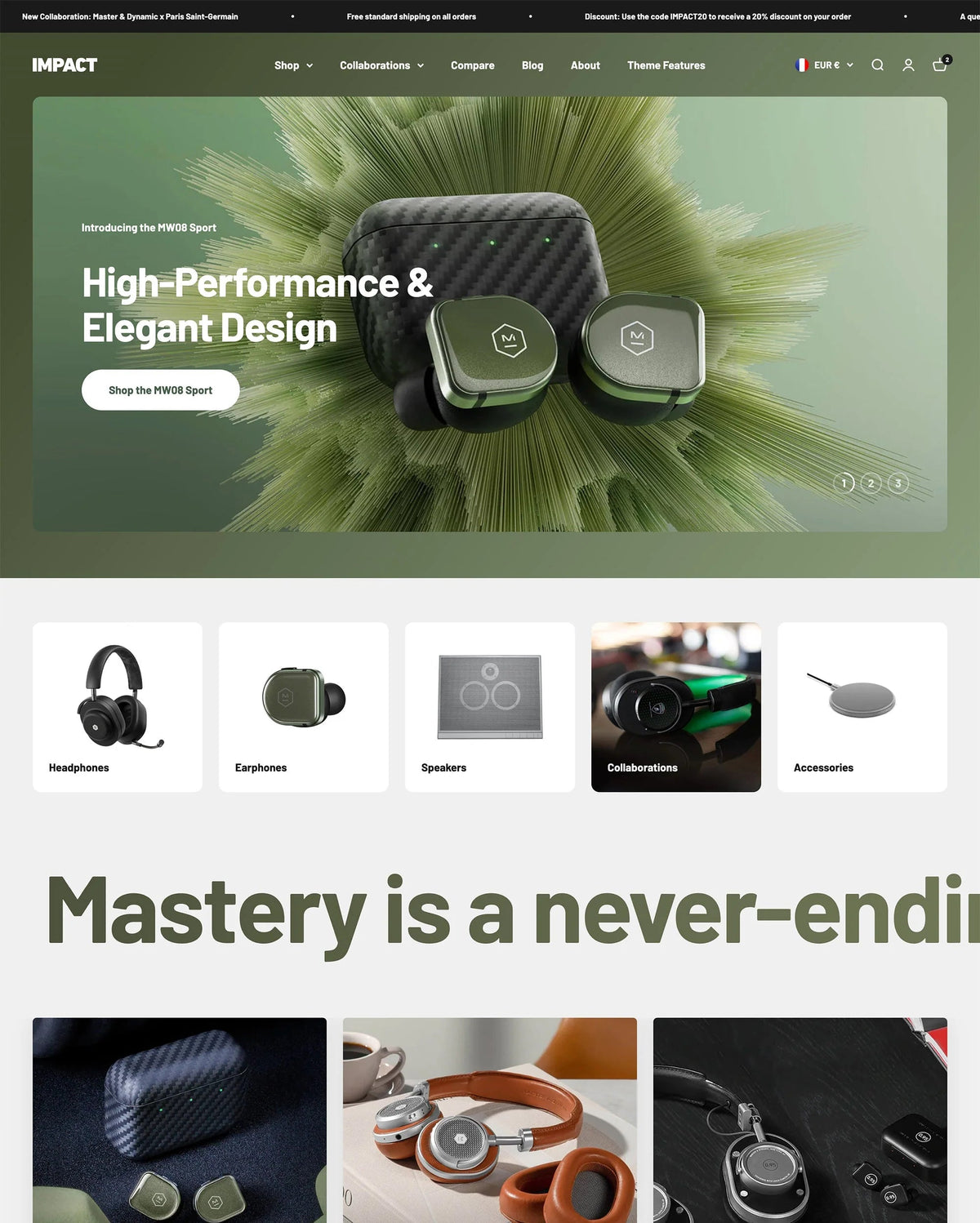
Impact is Maestrooo’s bold, typographic theme. $400, 190 reviews (85% positive), version 7.0.1 (March 2026). Ships with 3 presets: Impact, Cocoon, and Balance. 35+ sections (the most of any Maestrooo theme). Target vertical: entertainment, audio brands, electronics, lifestyle brands that want big headings, gradient backgrounds, and subtle animations.
Where Rubik Combined Listings renders on Impact: Inside the product section, below the variant picker area. Impact uses large, bold typography and generous whitespace, so your swatches need to match the scale. Use larger swatch sizes (32px or 40px) and the “Bold Button” or “Editorial” preset from Rubik. On collection cards, Impact’s grid is spacious enough for medium-sized swatches (not just tiny dots).
Real use case. A headphone brand sells the same model in 5 colorways (Midnight Black, Pearl White, Navy Blue, Crimson Red, Forest Green) as separate products because each color has its own photoshoot, review pool, and launch date. Rubik groups them with labeled button swatches (not just color circles, the buttons show “Midnight Black” text). Impact’s big typography makes text-based swatches feel native. Customer browses the collection, sees one headphone card with 5 labeled options, clicks any color to land on that specific product page.
Tip: Impact’s “Cocoon” preset has a dark color scheme with gradient accents. Configure the Rubik swatch row with a transparent background and light borders so swatches don’t disappear against the dark theme. Use Rubik’s AI Visual Assistant (“make swatches light-bordered on dark background”) to handle this quickly.
Focal + Rubik Combined Listings
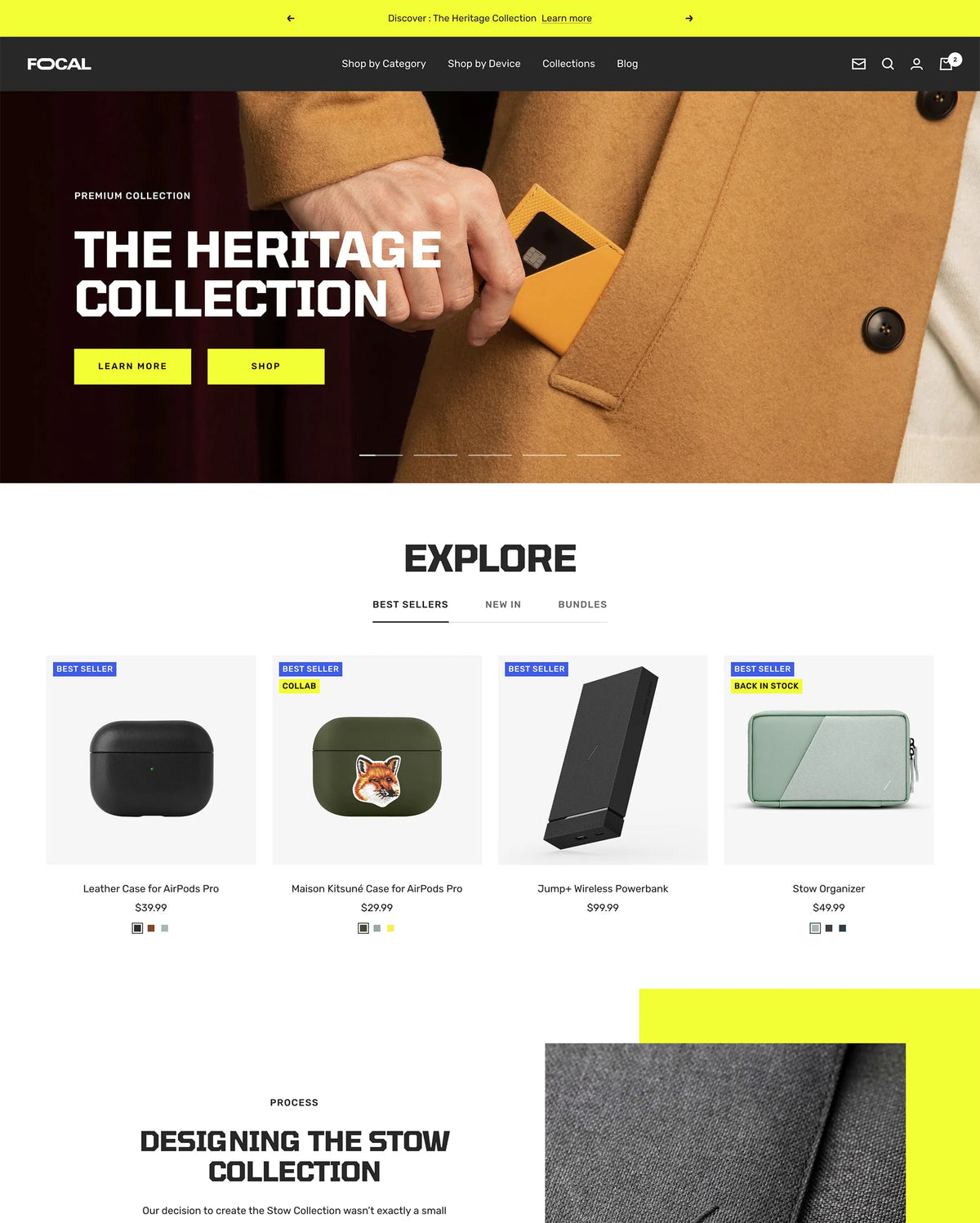
Focal is Maestrooo’s photography-forward theme. $320 (the most affordable), 333 reviews (93% positive, the highest rate in the Maestrooo lineup), version 13.0.0 (March 2026). Ships with 4 presets: Focal, Ivory, Quartz, and Sapphire. Target vertical: brands that rely on crisp product imagery (electronics, jewelry, beauty, watches).
Where Rubik Combined Listings renders on Focal: Integrated with Focal’s product section, which gives the hero image maximum space. Swatches render below the product title on the details side. Focal’s product cards are clean with minimal text, so small image swatches (showing the actual product color shot) work better than abstract color circles. The “Compact” or “Image Swatch” preset is the natural starting point.
Real use case. A watch brand sells the same model with different dial colors and strap materials as separate products (different photography per combo, different price per strap material). Rubik groups them. The collection page shows the watch card with small image swatches of each dial under the image. Customer clicks the blue dial, lands on the blue dial product page with the Focal hero image showing that specific watch face in full resolution. Focal’s photography-forward layout makes every colorway look like it deserves its own product page, because it does.
Warehouse + Rubik Combined Listings
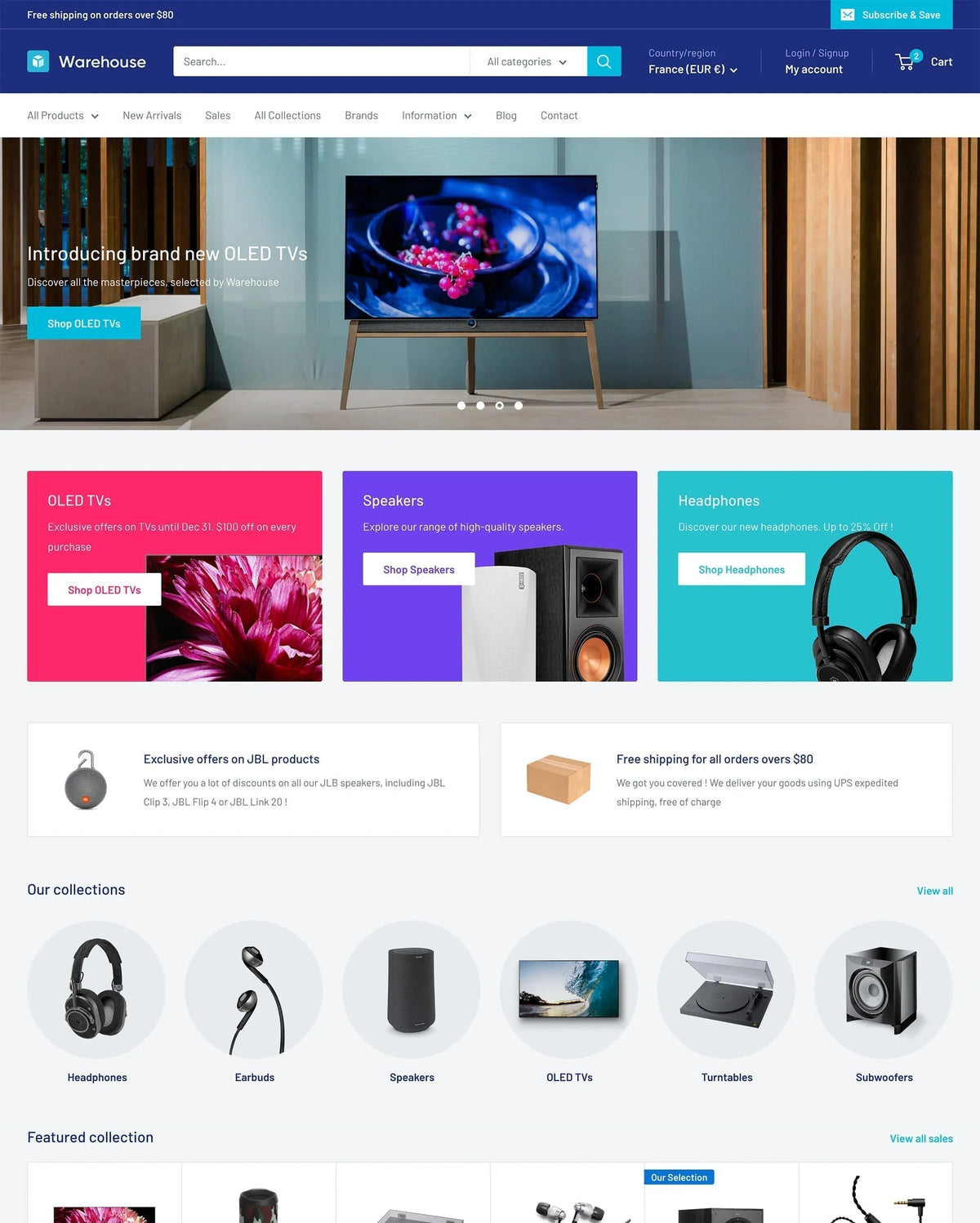
Warehouse is Maestrooo’s catalog workhorse. $320, 322 reviews (84% positive), version 7.0.1 (March 2026). Ships with 3 presets: Warehouse, Wood, and Mesh. Target vertical: stores with thousands of SKUs (electronics, parts, wholesale, large fashion catalogs). Warehouse is the Maestrooo theme that prioritizes density and navigation over editorial storytelling.
Where Rubik Combined Listings renders on Warehouse: Inside the product section and on collection cards. Warehouse’s collection grids are denser than the other Maestrooo themes (more products per row, tighter spacing), so use the “Compact” preset with small dot swatches (20px or 24px) to keep the card height uniform. The product page has more room: standard-sized color circles or pill buttons fit naturally.
Real use case. An electronics distributor sells the same case model in 12 colorways as separate products. With 2,000+ SKUs across the catalog, the alt-text method is a non-starter. Rubik’s bulk grouping (title pattern detection across product names) creates all 12-color groups in one pass. Warehouse’s dense collection grid shows each case with 12 tiny swatch dots. Customers filter by color using Shopify’s native collection filters, then click a swatch to land on the exact colorway’s product page. High-density browsing plus per-color detail pages.
Tip: Warehouse supports gift wrapping and combined listings (Plus only) natively. If you’re on a non-Plus plan using Rubik instead of native Combined Listings, the gift wrapping feature still works independently. The two don’t conflict.
Stretch + Rubik Combined Listings
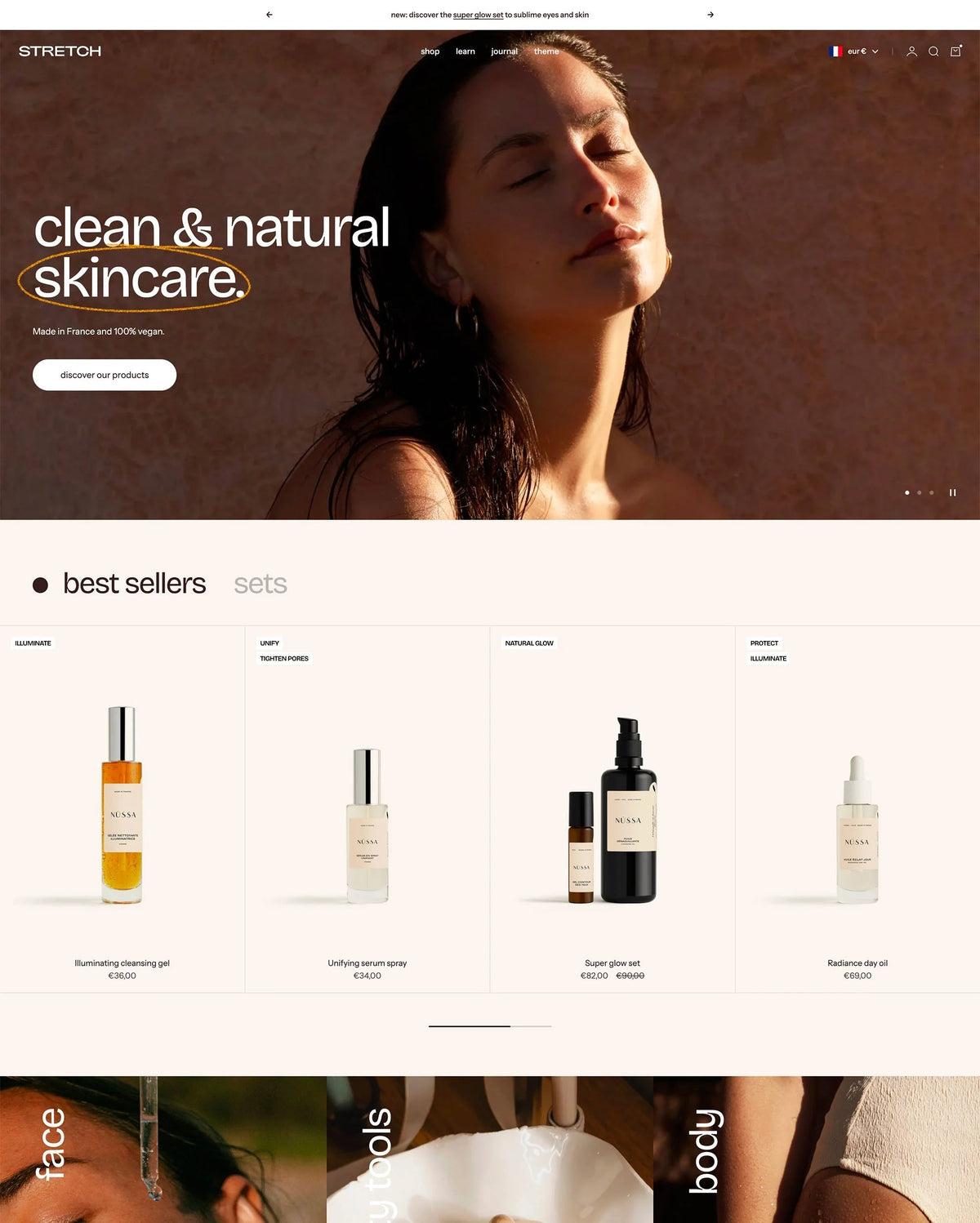
Stretch is Maestrooo’s newest theme. $400, 38 reviews (87% positive), version 2.0.1 (March 2026). Ships with 3 presets: Stretch, Snow, and Diffuse. Target vertical: beauty, jewelry, food and drink, lifestyle brands that want immersive, expansive layouts with storytelling-driven pages. Stretch uses dynamic grid sections and before/after image sliders to create a magazine-like browsing experience.
Where Rubik Combined Listings renders on Stretch: Inside the product section’s variant area, and on collection cards. Stretch’s layout is more spacious than Warehouse, with generous padding and scroll-driven reveals. Medium-sized color circles or image swatches (28px to 36px) pair well. Use the “Premium Pill” or “Standard” preset. On collection cards, swatches sit below the product image in a horizontal row that breathes with Stretch’s spacing.
Real use case. A premium candle brand sells the same jar design in 8 scent families (each scent has unique label art, unique fragrance notes, unique pricing for different wax types) as separate products. Rubik groups them with image swatches showing each label design. Stretch’s immersive product page reveals the scent notes, ingredient list, and mood photography as the customer scrolls, while the swatch row stays accessible at the top of the variant section. Customer clicks a different scent, the entire page reloads with that scent’s unique content. The storytelling changes per product; the swatch row stays consistent.
Per-theme comparison: where Rubik Combined Listings fits
| Maestrooo theme | Price | Presets | Best Rubik preset | Recommended swatch type | Best for |
|---|---|---|---|---|---|
| Prestige | $400 | 4 (Prestige, Couture, Vogue, Strass) | Minimal Circles / Premium | Small image swatch (24px) | Luxury jewelry, fine fashion |
| Impact | $400 | 3 (Impact, Cocoon, Balance) | Bold Button / Editorial | Labeled button (32px+) | Audio, entertainment, electronics |
| Focal | $320 | 4 (Focal, Ivory, Quartz, Sapphire) | Compact / Image Swatch | Small image swatch | Photography-forward brands |
| Warehouse | $320 | 3 (Warehouse, Wood, Mesh) | Compact | Tiny dot swatch (20px) | Large catalogs, wholesale |
| Stretch | $400 | 3 (Stretch, Snow, Diffuse) | Premium Pill / Standard | Medium circle or image (28-36px) | Beauty, candles, storytelling |
These are day-one suggestions. Every preset and swatch size is fully adjustable via Rubik’s visual settings editor (104 unique CSS variables) or the AI Visual Assistant (describe what you want in plain language). Nothing is locked in.
Setup walkthrough on any Maestrooo theme
The setup is identical across all five Maestrooo themes. No theme-specific install steps. Seven steps, about 20 minutes for a small catalog.
- Install Rubik Combined Listings. Free plan covers 5 product groups. No credit card required.
- Add the app block to your Maestrooo theme. Open the theme editor, go to a product page template, find the Rubik Combined Listings app block in the App section, drag it into the variant area. Do the same for your collection template (for collection card swatches).
- Create a group. In the Rubik admin, click “Create group”, select the products (e.g., 8 colorway products of the same hoodie), assign option values per product, set swatch colors or images.
- Use AI Magic Fill for speed. Click the wand icon in the group editor. AI analyzes each product’s image, title, and sibling names to auto-fill option values and swatch hex colors. Handles hundreds of products without manual color picking.
- Pick visual settings. Choose a Rubik preset that matches your Maestrooo theme’s character (see comparison table above). Fine-tune with the visual editor or AI Visual Assistant.
- Preview live. The admin shows a real-time preview using your actual product data. Switch between desktop and mobile, between product page and product card, before publishing.
- Publish. Save the group. Swatches go live immediately. Real-time sync handles out-of-stock, archived, and draft products automatically.
For large catalogs (100+ products to group), skip manual group creation and use bulk grouping. Rubik supports 3 bulk methods: title pattern (auto-detects shared word prefixes/suffixes), product tags (parse RUBIK::GroupName::OptionName::OptionValue::Color), and metafields (group by shared metafield values). Plan your grouping strategy first with our free Shopify variant calculator, then verify swatch colors hold up against your Maestrooo theme’s background using the color contrast checker.
Pairing with Rubik Variant Images on Maestrooo
Stores running combined listings on Maestrooo frequently also use Rubik Variant Images for in-product variant image filtering, replacing Maestrooo’s manual alt-text method entirely. The full stack: Rubik Combined Listings groups separate color products with swatches on collection cards and product pages. Inside each color product, Rubik Variant Images filters the gallery so only that color’s photos show when the customer picks a size. Two apps, both rendering via Shadow DOM, no theme CSS conflict, no manual alt-text tagging. The alt-text method that Maestrooo acknowledges doesn’t scale becomes unnecessary.
“This is by far the best variant app I have tried, I deleted maybe 7 others after a slew of issues. Wonderful support as well!”
5-star reviewer, February 2026, Rubik Variant Images on the Shopify App Store
Ready to set it up
See the live Rubik Combined Listings demo store, watch the setup tutorial, or read the getting started guide.
Frequently asked questions
Does Rubik Combined Listings work on all 5 Maestrooo themes?
Yes. Prestige, Impact, Focal, Warehouse, and Stretch are all supported. Rubik ships with theme app blocks that drop into any Online Store 2.0 theme, and every current Maestrooo theme is fully OS 2.0 compatible. If something doesn’t render perfectly out of the box, our support team will fix the selectors directly in your theme via chat. Same-day, usually within minutes.
Do I need Shopify Plus to use combined listings on Maestrooo?
No. Maestrooo’s own docs confirm their themes support Shopify’s native Combined Listings feature, but that’s Plus-only ($2,300+/month). Rubik Combined Listings replicates the same merged-listing experience on every Shopify plan including Basic. Free plan covers 5 product groups; Starter $10/mo covers 100.
Does Rubik replace Maestrooo’s built-in alt-text variant image method?
Yes, and Maestrooo themselves acknowledge the alt-text method (#color_black tagging) doesn’t scale for large catalogs. It’s manual, single-option only, and doesn’t support multi-language. Rubik Variant Images replaces it with a visual drag-and-drop or AI auto-assign workflow. Rubik Combined Listings adds the grouped-product swatch layer on top. Together they cover what the alt-text method tried to do, but reliably at any catalog size.
Will Rubik slow down my Maestrooo theme?
No measurable impact. Rubik Combined Listings renders from Shopify metafields with no external API calls. The swatch JS loads with the page itself. Maestrooo themes are already performance-optimized, and Rubik doesn’t undo that. We have merchants on Prestige and Impact passing Lighthouse 90+ with Rubik active.
Can I keep separate product URLs for SEO?
Yes. Each product in the group keeps its own URL, title, meta description, images, and structured data. Google indexes each one separately. The grouping is a frontend visual layer only. This is the opposite of Shopify’s native variants, where all colors share one URL, and one of the key reasons fashion and jewelry brands prefer the separate-product approach.
Which Maestrooo theme is best for a high-colorway-count fashion brand?
Prestige for luxury fashion. Its editorial layout handles long swatch rows gracefully, and the “Couture” preset’s side-by-side layout gives swatches maximum visibility. Impact for brands with bold visual identities and larger-than-average swatch labels. Warehouse for stores with 500+ SKUs where density and navigation matter more than storytelling.
Can I customize swatch styling per Maestrooo theme?
Yes, fully. Rubik exposes 104 unique CSS variables and lets you write custom CSS scoped to each product group. The 19 built-in presets cover most aesthetics out of the box, and the AI Visual Assistant lets you tune the rest with natural-language requests. Style differently per group if you want: fine circles for the jewelry collection, labeled buttons for the electronics collection, image swatches for the apparel collection.
Related reading

Umid
Co-Founder at Craftshift