Rubik Combined Listings on Krown Themes: The 2026 Setup & Compatibility Guide
Krown Themes ships some of the most opinionated premium templates on the Shopify Theme Store. Local for food shops. Borders for fashion. Kingdom with that signature sidebar that nobody else has copied yet. Each one is a strong design statement, which is great until you try to bolt on a third-party app that breaks the look. That’s where most app and theme conversations end. Not this one.
This guide walks through how Rubik Combined Listings runs on every Krown theme, where the swatches actually appear on product pages and collection cards, what visual settings to pick per theme, and the small gotchas we’ve seen across the six (Local, Combine, Borders, Highlight, Split, Kingdom). We’ve tested all six in production. We built the app to slip into Krown’s design language without fighting it. Read on if you run a Krown store and you’re thinking about grouping separate products as variants without leaving Shopify Plus territory.
Quick framing for anyone new to the topic. Krown is a Shopify-certified theme studio operating since 2015, with over 30,000 brands using their themes and a 2024 Build Award for Best Theme. Rubik Combined Listings is a Shopify app for grouping separate products into a single visual listing with swatches on product pages, collection cards, search results, and any product card surface. The two pair well. Here’s why and how.
In this guide
- What Rubik Combined Listings actually does
- Why Krown themes pair well with Rubik Combined Listings
- Local theme + Rubik Combined Listings
- Combine theme + Rubik Combined Listings
- Borders theme + Rubik Combined Listings
- Highlight theme + Rubik Combined Listings
- Split theme + Rubik Combined Listings
- Kingdom theme + Rubik Combined Listings
- Per-theme comparison table
- Setup walkthrough on any Krown theme
- AI Magic Fill and AI Visual Assistant on Krown
- FAQ
What Rubik Combined Listings actually does
Rubik Combined Listings lets you link separate Shopify products into one visual group with swatches. Each color, scent, flavor, or material can stay as its own product (its own URL, its own SEO title, its own image set, its own inventory record), but on the storefront they look like one product with selectable variants. This is the “merged listing” pattern that Shopify’s native Combined Listings feature offers only on Plus, except Rubik Combined Listings works on every Shopify plan including Basic.
- Group separate products as variants. Pick the products in the resource picker, hit save, done.
- Swatches everywhere they need to be. Product pages, collection cards, search, related products. Visual swatches, image swatches, button swatches, dropdowns. Mixable per option.
- Real-time sync. Out-of-stock and archived/draft products auto-hide. No background jobs, no stale data.
- 4 surfaces, independent visual settings. Product page desktop, product page mobile, product card desktop, product card mobile. Style each one differently if you want.
- Shadow DOM rendering. The swatches render in an isolated CSS context. Theme styles can’t bleed in and break them. Theme updates can’t bleed in and break them either.
That last point is the one that matters most for Krown. Krown themes have very deliberate typography, spacing, and component design. A swatch app that injects unstyled HTML into your product card grid will look ugly on Borders or Highlight. Rubik Combined Listings renders inside its own Shadow DOM, so what you configure in our visual editor is exactly what shows on the storefront. Nothing leaks in. Nothing leaks out.
Why Krown themes pair well with Rubik Combined Listings
Krown Themes‘s whole design philosophy is “clean code, no third-party app dependencies for the basics.” Their themes ship with built-in features (bundles in Combine, lookbooks in Borders, sidebars in Kingdom) that other theme studios force you to add via apps. So the question is: does it even make sense to add an app to a Krown theme?
For combined listings, yes. None of the Krown themes ship with a native combined-listings system, because that feature requires either Shopify Plus (for Shopify’s own version) or a third-party app. Krown themes do ship with native variant-image filtering and basic swatch rendering inside a single product, but linking multiple separate products together as variants is outside the scope of any theme. That’s an app problem.
Three reasons Rubik Combined Listings is a clean fit on Krown specifically:
- Shadow DOM means zero CSS conflict. Krown’s typography stays Krown’s typography. Our swatches don’t inherit your h2 weights or your button radii unless you explicitly opt in.
- 19 visual presets covering most aesthetics. 11 presets for product page, 8 for product card. There’s a minimal pill style for Borders, a chunky button style for Combine, a small inline circle for Local. You’re not stuck with one default look.
- Per-group visual settings. Different product groups can have different swatch styles. A jewelry collection in Highlight can use small image swatches; a furniture collection in Combine can use large color circles. Group-level config, not store-wide.
And one practical reason: theme support and customer support. We’ve supported customers running on every Krown theme. If something doesn’t render perfectly out of the box (rare), our support team will jump into the chat and fix the selectors directly. We’ve done this dozens of times. It’s not abstract.
Local theme + Rubik Combined Listings
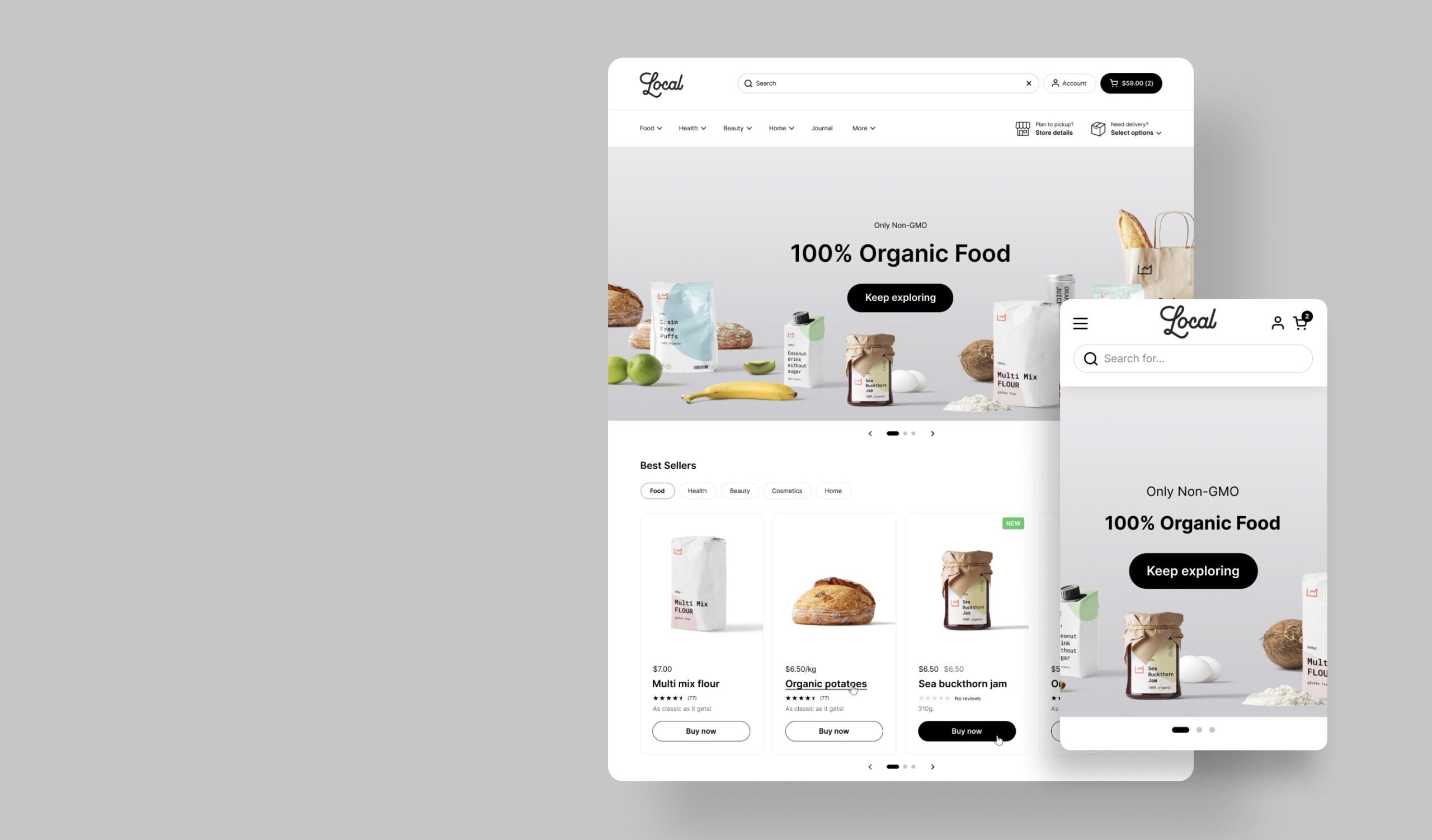
Local is Krown’s premium theme for food and drinks. Bakeries, delis, organic markets, specialty coffee, supplement brands. $380, currently on version 3.2.1 (Feb 2026), with a 98% Shopify performance score and 94 reviews at 98% positive. Supports local pickup, age verification, nutritional facts blocks, allergen labeling, and large product catalogs. The aesthetic is clean, minimal, classic. Often paired with high-contrast typography and lots of white space. Ships with 5 ready-made designs: Local, Soleway, Thrive, Caffeine, and Lively. The Krown product page has the full breakdown if you want to dig deeper.
Where Rubik Combined Listings renders on Local: Below the variant title on the product page (mobile and desktop), and underneath each product card on collection grids. Local has compact product cards by default, which means small swatches work better than large ones. We recommend the “Compact” preset on the product card surface and “Standard” on the product page.
Real use case. A coffee roaster sells the same blend in Whole Bean, Espresso Grind, Filter Grind, and French Press Grind as separate products (different SKUs, different inventory, different barcodes). With Rubik Combined Listings, customers see all four grind options as a swatch row on the product page and a small grind-name swatch under the collection card. Whole Bean’s URL stays clean for SEO. Filter Grind keeps its own product photos. Same with allergen-free variants like a Peanut-Free vs Original cookie pack: keep them as separate products for inventory and ingredient labeling, group them visually with Rubik Combined Listings.
Tip: If you’re using Local’s quick-buy feature on collection cards, place the Rubik Combined Listings swatches above the quick-buy button (configurable in Visual Settings). Otherwise quick-buy fires before the customer can pick a variant. We see this trip up about 1 in 5 first-time setups.
Combine theme + Rubik Combined Listings
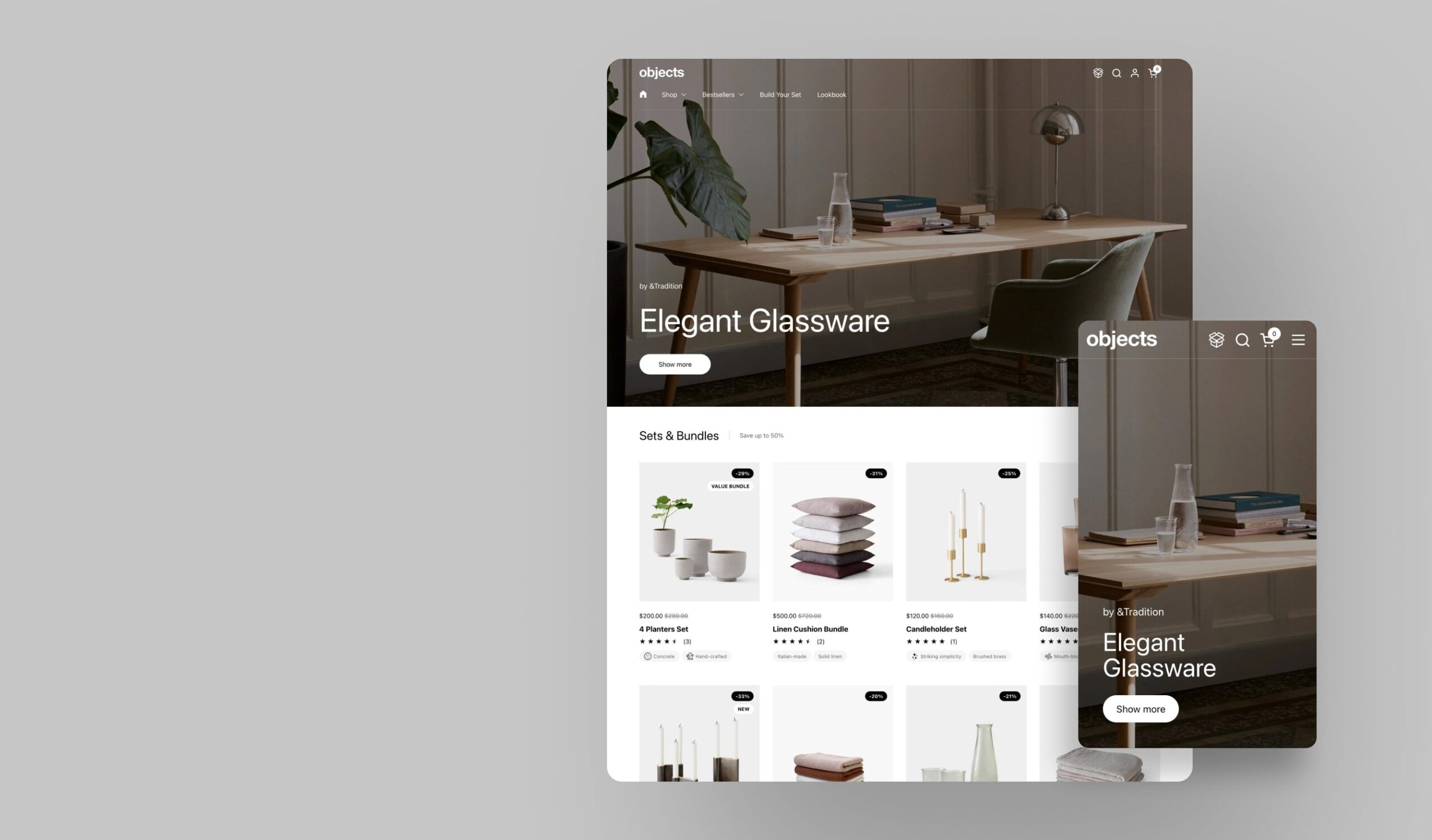
Combine is Krown’s premium theme for home goods and beauty brands. Furniture, candles, skincare, decor. $380, version 3.2.2 (March 2026), 91% positive across 47 reviews. Built around the bundling pattern: bundles, upsells, cross-sells, “Buy X Get Y” deals built into the theme so you don’t need an extra app. 30+ sections, parallax hero slider, designed for high-resolution lifestyle photography. Ships with 5 presets: Combine, Gadget, Blush, Ring, and Bites. Krown’s product page has the rest.
Where Rubik Combined Listings renders on Combine: Right under the product title and price on the product page, and inline below the product card image on collections. Combine’s product cards are larger and more editorial than Local’s, so larger swatches actually look right. Try the “Editorial” preset on product cards and “Premium Pill” on the product page.
Real use case. A candle brand sells the Cedar & Smoke scent in 4oz, 8oz, and 16oz tins. Each size is a separate product (separate weight, separate shipping cost, separate margin). Rubik Combined Listings groups them. The product page shows a “Size: 4oz / 8oz / 16oz” pill row. The collection page card shows tiny dot swatches beneath the image. The customer can switch sizes from the collection grid without ever loading the product page, which is one of the underrated collection-page swatch wins.
Tip: Combine has a section called “Featured product” that lets you pin a single SKU on the homepage. Rubik Combined Listings swatches render inside this section too. We’ve had merchants ask if it works, and yes, it does. Use the same product-card visual settings.
Borders theme + Rubik Combined Listings
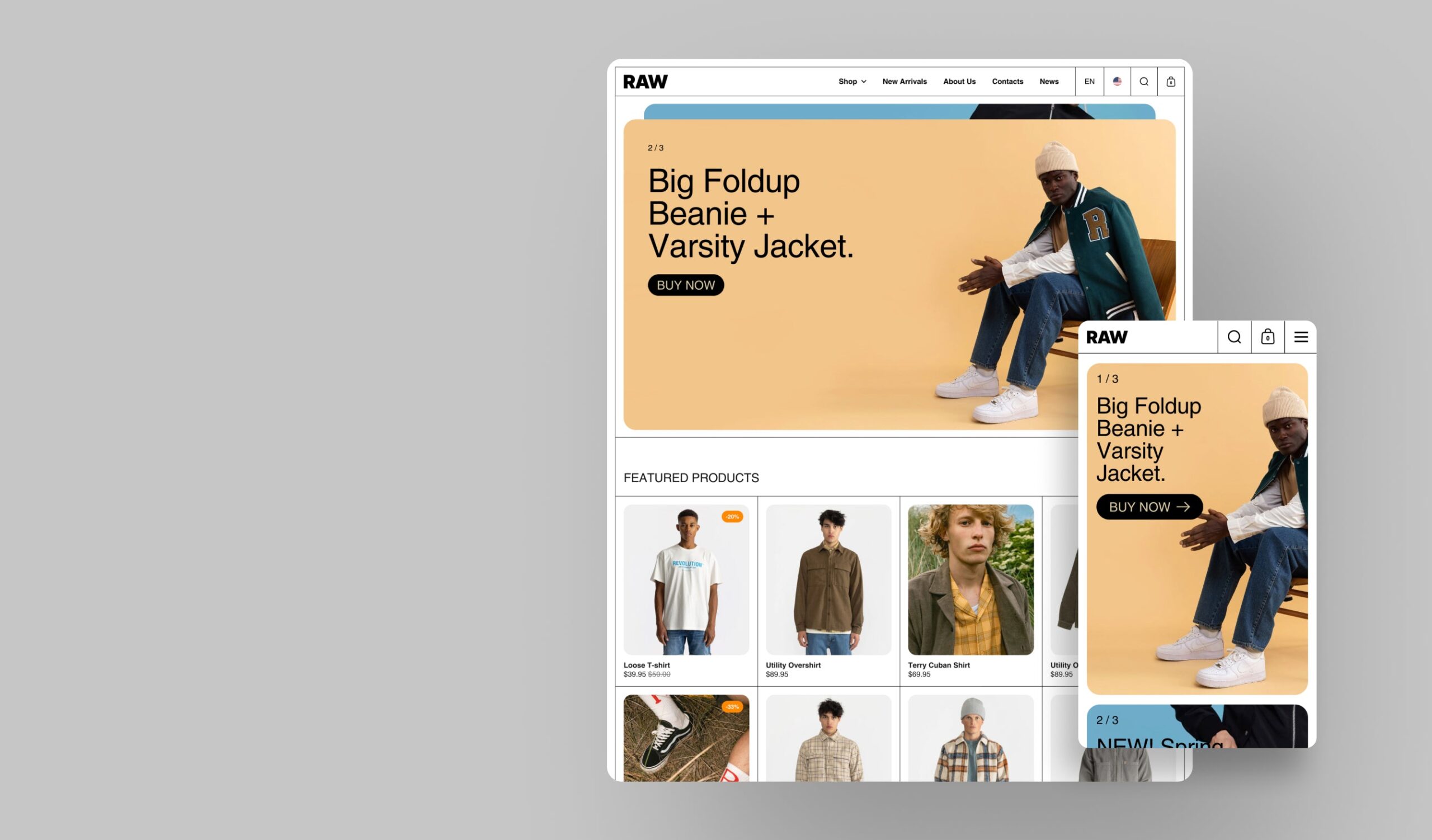
Borders is Krown’s premium theme for fashion brands. Streetwear, contemporary, designer, capsule collections. $380, version 2.2.0 (March 2026), 94% positive review rate. Avant-garde grid-based design, parallax vertical slider, editorial product pages with story-driven layouts, custom portfolio pages for lookbooks. Ships with 5 presets: Raw (the default), Objekts, Readers, Folio, and Mosaic. The Krown product page shows each one.
Borders is the Krown theme where swatch placement matters most. Fashion shoppers expect to see colorways at a glance. Without swatches on the collection grid, a 6-color hoodie that you’ve split into 6 separate products will look like 6 unrelated hoodies (which is bad for both browsing and SEO). With Rubik Combined Listings, those 6 hoodies group into one card with 6 color dots underneath.
Where Rubik Combined Listings renders on Borders: Below the product title on the product page (or above, if you prefer; this is configurable). Beneath the product card image on collection grids and search results. Use “Minimal Circles” preset for high-end fashion brands; “Image Swatches” preset if your colors have visible texture or pattern (think tweed, denim washes, or printed fabrics).
Now here’s a strong opinion: most fashion stores get this completely backwards. They use color names as dropdowns (“Forest Green”, “Burnt Sienna”, “Powder Blue”). Customers don’t know what those names look like, and the bounce rate climbs. Visual swatches beat named dropdowns in literally every conversion test we’ve seen. If you’re on Borders and using dropdowns, switch. Today. (Need to verify swatch colors hold up against your theme background before configuring them? Try the free color contrast checker.)
Real use case. A streetwear label launches a hoodie in 8 colorways. They split each color into its own product because each colorway has its own photoshoot, alt text, and SEO title. Rubik Combined Listings groups all 8 into one combined listing. Collection page shows the hoodie with 8 swatch dots. Customer clicks the cream dot, the card image swaps to cream, the click goes to the cream product page. Done. No code edits, no 2048 variant limit issues, no Shopify Plus required.
Highlight theme + Rubik Combined Listings
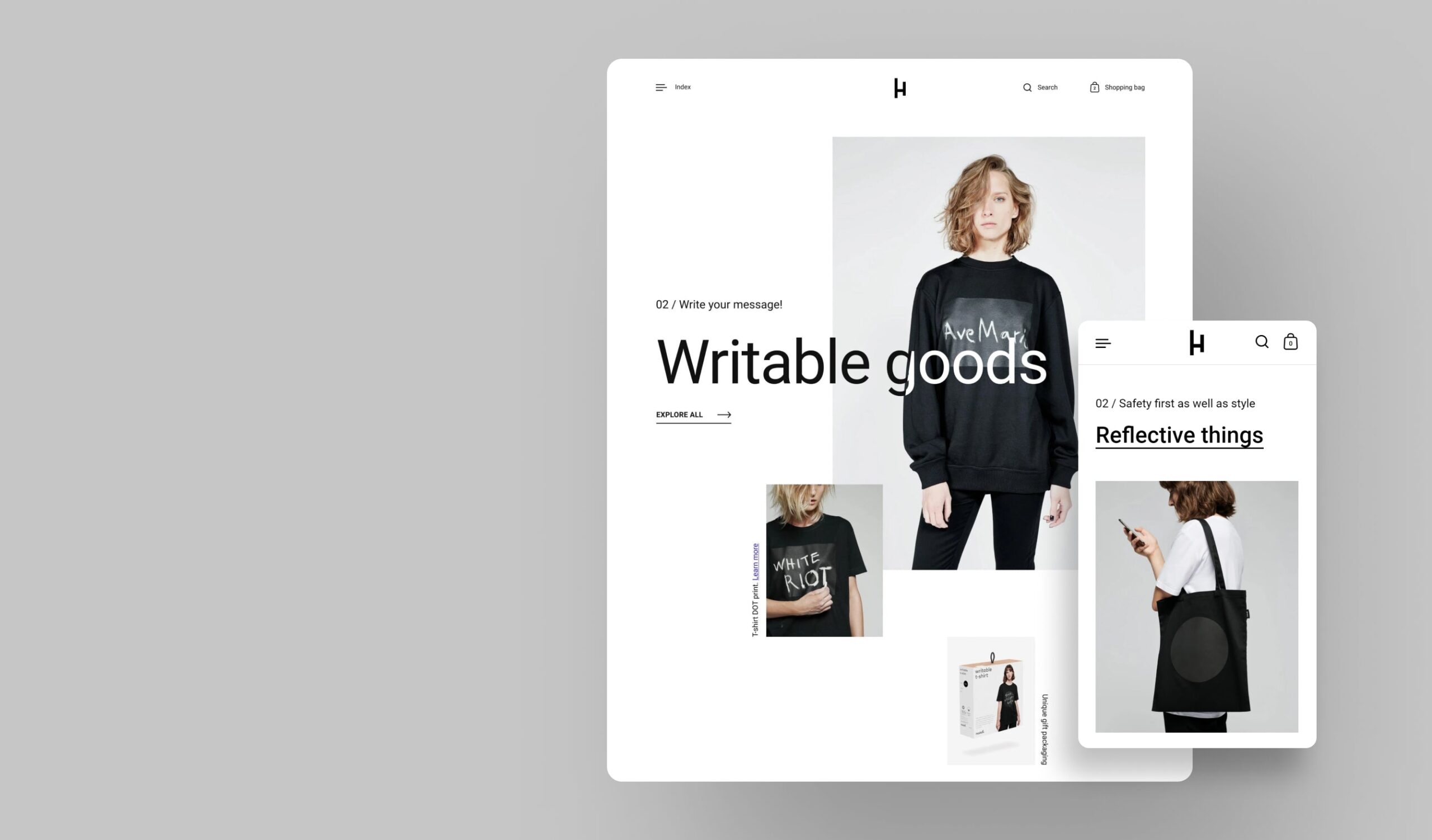
Highlight is Krown’s premium theme for boutique stores, single-product stores, and high-end niche brands. $280, currently version 4.0.1 (March 2026), with a 96% Shopify performance score and 49 reviews at 96% positive. Asymmetrical product grid, scroll-based interactive layout, full-screen imagery and video showcases. Designed to make each product stand out individually rather than blend into a uniform grid. Ships with 3 presets: Highlight, Single, and Brush. The full feature list lives on the Krown product page.
Highlight is interesting because the asymmetric grid means swatches need to scale per card. Some cards are large hero blocks, some are smaller side cards. Rubik Combined Listings handles this through the “Adaptive” preset, which uses CSS container queries to size swatches relative to the parent card. We added container query support specifically because of how Highlight (and a few other layout-creative themes) treat product cards.
Where Rubik Combined Listings renders on Highlight: Below the product card image on collections, with the swatch row’s size adapting to the card width. On product pages, swatches render in the variant area, fully integrated with Highlight’s enriched description block.
Real use case. A jewelry boutique sells the same ring in 14k Yellow Gold, 14k Rose Gold, and 14k White Gold as separate products (different metal markup, different inventory). Rubik Combined Listings groups them with 3 small image swatches showing the actual metal finishes. On Highlight’s asymmetric grid, the swatches sit cleanly under each card without overflowing. Use small image swatches (24px) here, not color circles. Metal finishes need real photos to look right.
Split theme + Rubik Combined Listings
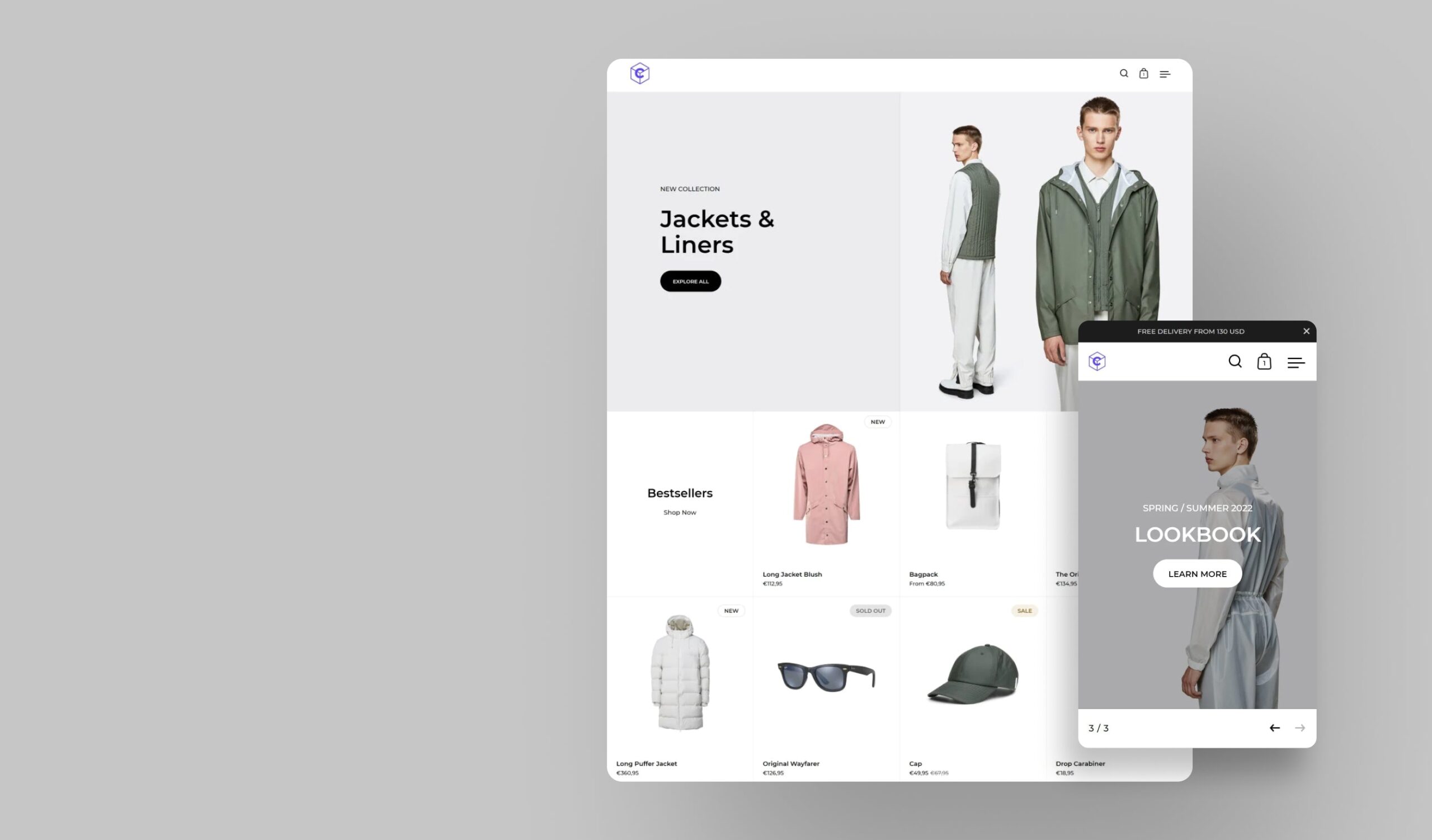
Split is Krown’s premium split-screen theme for visual storytelling brands. Luxury, high-end fashion, design-conscious, avant-garde. $280, version 5.0.1 (March 2026), 98% positive across 243 reviews (the most-reviewed Krown theme on the Theme Store). Beautifully balanced split-screen layout, scroll-driven animations, “Shop the Look” section for bundled products, conversion-focused tools like countdown headers and dynamic cross-selling. Ships with 3 presets: Split (the default), Drawer, and Nomad. Krown’s Split page walks through the rest.
Split’s split-screen layout is the most distinctive in the Krown lineup. Image on one side, content on the other. This affects where Rubik Combined Listings swatches render. On product pages, swatches go on the content side, naturally. On collection cards, swatches sit beneath the card image as usual, but you’ll want to use a horizontal carousel layout for groups with 8+ colors, since vertical card heights are tighter on Split.
Where Rubik Combined Listings renders on Split: Right side of the split product page, integrated with title, price, description, and add-to-cart. Below the product card image on collections (use the carousel layout for long color lists).
Real use case. A leather goods brand sells the same handbag in 6 leather types: Smooth Black, Pebbled Black, Smooth Tan, Pebbled Tan, Smooth Cognac, Pebbled Cognac. They keep each one as a separate product (different leather supplier, different price, different stock). Rubik Combined Listings groups them with image swatches that show the actual leather grain. On Split’s split-screen product page, the customer scrolls through the immersive imagery on the left while the swatches stay sticky on the right. That’s how you sell a $400 handbag.
Kingdom theme + Rubik Combined Listings
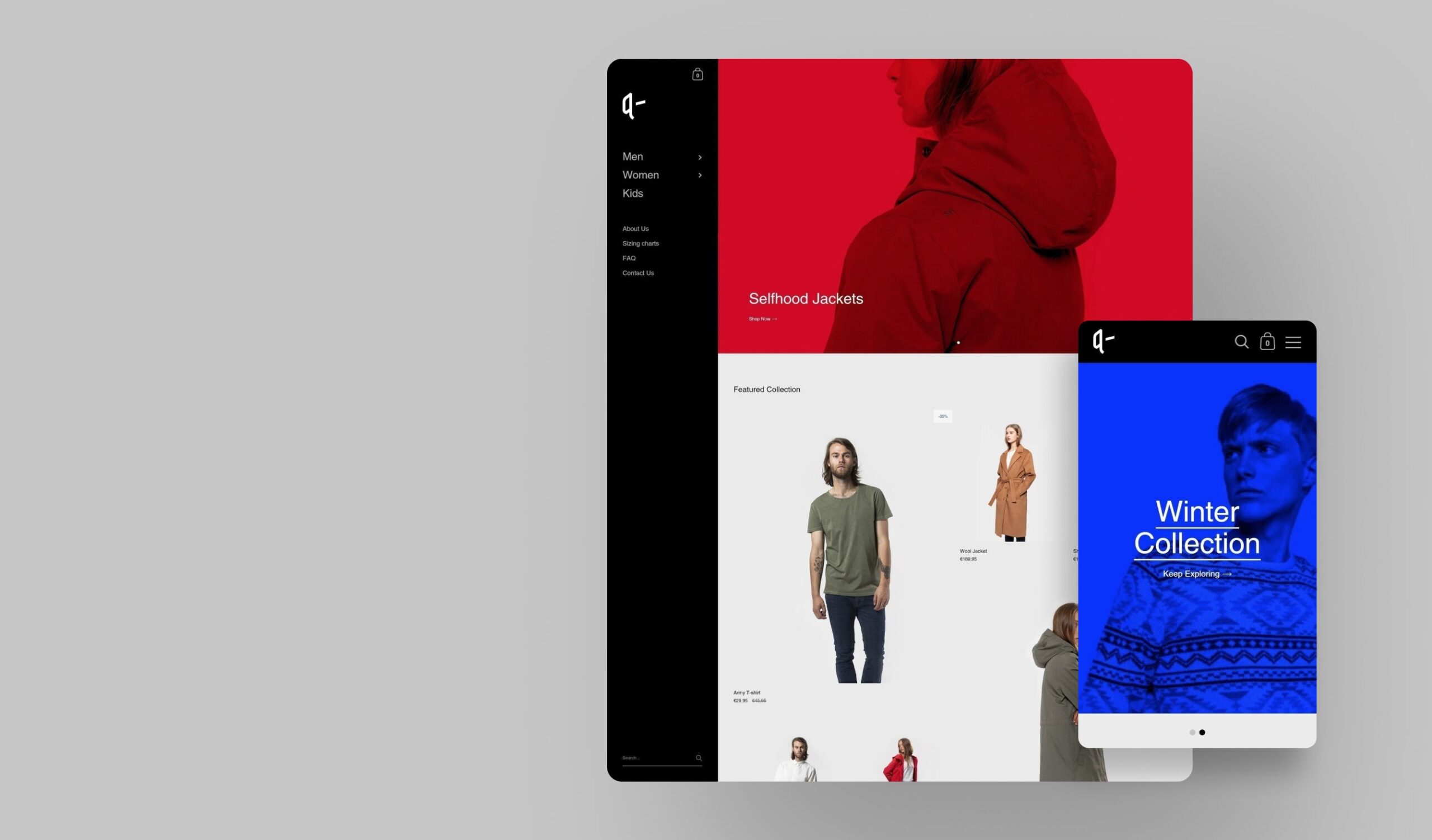
Kingdom is Krown’s premium image-focused theme designed around a stylish signature sidebar. Classic brands, artisanal businesses, premium lifestyle. $280, version 6.1.2 (March 2026), 97% positive across 209 reviews. Sidebar navigation that’s faster to scan than a top nav, vertical slideshow with parallax effects, magazine-style collection grids that emphasize featured products. Ships with 4 presets: King, Kingdom, Queen, and Prince. Krown’s Kingdom page has the deeper feature dive.
Kingdom is the Krown theme that breaks the most layout assumptions. Sidebar always present, content reflowing around it, product grids that highlight featured items in larger blocks. Rubik Combined Listings handles this fine because our swatches don’t care about the page layout, they care about the product card and the product page container. As long as those exist, swatches render correctly.
Where Rubik Combined Listings renders on Kingdom: Inside the magazine-style product card, beneath the image. On product pages, in the variant section to the right of the main image (or below it on mobile, depending on your Kingdom layout choice).
Real use case. A specialty tea brand sells the same loose-leaf tea in 50g, 100g, 250g, and 500g pouches as separate products. Why separate? Different weights have different shipping costs, different price-per-gram, different inventory. Rubik Combined Listings groups them with simple pill swatches showing the weight. Kingdom’s sidebar lets the customer browse the full tea catalog while the magazine grid shows each tea with its weight options under the card. It’s a clean shopping experience without ever leaving the collection page.
Per-theme comparison: where Rubik Combined Listings fits
| Krown theme | Price | Vertical | Best Rubik Combined Listings preset | Recommended swatch type | Card layout |
|---|---|---|---|---|---|
| Local | $380 | Food & drinks | Compact | Small dot or pill | Compact grid |
| Combine | $380 | Home & beauty | Editorial / Premium Pill | Medium circle or pill | Editorial grid |
| Borders | $380 | Fashion | Minimal Circles / Image | Color circle or image | Avant-garde grid |
| Highlight | $280 | Boutique | Adaptive | Small image swatch | Asymmetrical |
| Split | $280 | Visual storytelling | Carousel (long lists) | Image or color circle | Split-screen |
| Kingdom | $280 | Classic brands | Magazine | Pill or small button | Magazine + sidebar |
None of these are hard rules. They’re what we’d pick on day one if we were setting up your store. You can change presets in the Visual Settings editor any time, and you can preview the changes against real product data before publishing. Nothing locks you in.
Setup walkthrough on any Krown theme
The setup is the same for all six Krown themes. There’s no Local-specific install or Borders-specific install. Here’s the flow:
- Install the app. Visit the App Store, hit Install, approve the app permissions. Free plan supports 5 product groups, no time limit.
- Enable the app block in your Krown theme. Open the theme editor, go to a product page template, find the “Rubik Combined Listings” app block, drag it into the variant section. Same for the product card template (if your Krown theme uses card templates) or the collection template.
- Create a group. In the app admin, click “Create group”, pick the products you want to link (resource picker shows your full catalog), set the option name (Color, Size, Material, Scent, whatever), and pick or assign option values per product.
- Set swatch colors or images. Either manually (color picker or image upload) or via AI Magic Fill (more on that below). For Krown themes specifically, image swatches are often the better choice because Krown’s typography is bold enough that color circles can compete with the rest of the design.
- Pick visual settings. Choose a preset from the 19 built-in options, or open the visual editor and tune the settings yourself. There are 104 unique CSS variables exposed for fine control. You can also write custom CSS scoped to that group.
- Preview live. The admin shows a live preview using sample product data and your real product data. Switch between desktop and mobile, between product page and product card, before publishing.
- Publish. Save the group. Swatches go live immediately. Real-time sync handles out-of-stock, archived products, and inventory changes.
For stores with hundreds of products to group, skip the manual flow and use bulk grouping. Rubik Combined Listings has three bulk methods: title pattern (split product titles on a separator like a pipe or slash, or auto-detect shared word prefixes), product tags (parse a tag like RUBIK::Hoodie::Color::Cream::#F5E8D0), and metafields (group by a shared metafield value). The bulk grouping job handles thousands of products in one pass. Useful when migrating from a Shopify Plus combined listings setup or from a competitor app.
Before you commit to a layout, plan how many variants will live in each Rubik group with our free Shopify variant calculator, then verify the swatch colors stay legible against your Krown theme background using the color contrast checker. Both run in the browser, no install needed.

AI Magic Fill and AI Visual Assistant on Krown
Rubik Combined Listings has two separate AI features. They do different things. Most blog posts conflate them. Don’t.
AI Magic Fill (group-level). Runs inside an existing product group. For each product in the group, it auto-fills empty option values, primary swatch hex colors, and secondary swatch hex colors. Reads the product image, the product title, and sibling product titles in the same group. Detects shared naming patterns like “Sarah Bra / Olive” or “Sarah Bra | Shield” to extract the right option value. Never overwrites existing values, only fills empty fields. Uses gpt-4o-mini under the hood. Each plan includes monthly AI credits.
AI Visual Assistant (visual settings). A natural-language chat inside the visual editor. Type “make swatches bigger”, “use pill-shaped buttons”, “split colors diagonally” and the AI changes the visual settings for you. Backed by schema validation so the AI can’t hallucinate non-existent settings. Works across all 4 surfaces (product page desktop/mobile, product card desktop/mobile). Uses the same monthly AI credit pool.
For Krown stores specifically, AI Visual Assistant is the time saver. Instead of manually tuning border-radius, padding, font-weight, hover-state colors, and 100+ other CSS variables, you describe what you want and it gets applied. We’ve seen merchants set up a Borders-themed jewelry store’s swatches in under 2 minutes using this. It’s not magic, it’s just faster than scrolling through a settings panel.

If your colours are variants of one product rather than separate products, Rubik Variant Images assigns a separate image set to every variant instead. Free to install, 5.0 stars across 436 reviews.
Pairing Rubik Combined Listings with Rubik Variant Images on Krown
Quick note for stores running both apps. Rubik Combined Listings handles the cross-product grouping. Rubik Variant Images handles the in-product variant image filtering. They solve different problems and they work together cleanly on every Krown theme.
The combo: a hoodie split into 8 colorway products. Each individual product has 3 sizes (S, M, L). Rubik Combined Listings gives the customer the 8 color swatches across products. RVI filters the gallery so only that color’s photos show when the customer picks a size. The collection page shows 8 dots. The product page shows clean color and size picker with image filtering. Same setup, two apps, no overlap.
“I was struggling with separate product pages for different colors/flavors (e.g., aftershave red, green, blue as individual products for better SEO and unique URLs), but I wanted customers to see swatches and switch between them easily, like real variants on BOTH the product page and collection pages (under each card). This app does it perfectly: Group products into combined listings, Add customizable color/image swatches, Swatches appear on product pages (click redirects smoothly to the other product’s page), Small swatches show up right under the product cards on collections, search, homepage, super clean and intuitive for shoppers, No extra fees, no add-ons in cart, no performance hit (site still loads fast). Setup was straightforward, no coding needed, and the support is insane.”
Ostwint, Romania, March 2026, Rubik Combined Listings on the Shopify App Store
See the live Rubik Combined Listings demo store, watch the Rubik Combined Listings setup tutorial, or read the getting started guide.
Frequently asked questions
Does Rubik Combined Listings work on all 6 Krown themes?
Yes. Local, Combine, Borders, Highlight, Split, and Kingdom are all supported. Rubik Combined Listings ships with theme app blocks that drop into any Online Store 2.0 theme, which all current Krown themes are. If something doesn’t render correctly out of the box, our support team will fix the selectors directly in your theme via chat. Same-day, usually within minutes.
Do I need Shopify Plus to use combined listings on Krown?
No. Shopify’s native Combined Listings feature requires Plus. Rubik Combined Listings works on every Shopify plan, including Basic. That’s the whole point. You get the merged listing pattern (separate products linked as visual variants) without the Plus price tag.
Will Rubik Combined Listings slow down my Krown theme?
No measurable impact in our testing. Rubik Combined Listings renders from Shopify metafields with no external API calls. The swatch JS loads with the page itself. Krown themes are already speed-optimized (it’s one of their selling points), and Rubik Combined Listings doesn’t undo that. We have merchants on Borders and Highlight passing Lighthouse 90+ with Rubik Combined Listings active.
Can I keep separate product URLs for SEO?
Yes, that’s the model. Each product in the group keeps its own URL, title, meta description, images, and structured data. Google indexes each one separately. The grouping is purely a frontend visual layer. This is the opposite of Shopify’s native variants, where all colors share one URL.
Does Rubik Combined Listings handle out-of-stock or draft products automatically?
Yes. Real-time sync via Shopify metaobject references. If a product in a group goes out of stock, gets archived, or moves to draft, the swatch for it is hidden automatically. No background job, no stale data. Restock the product and the swatch reappears.
Which Krown theme is best for a high-color-count fashion brand?
Borders. The avant-garde grid handles long swatch rows naturally, and the editorial product pages give swatches enough room to breathe. Combine is a close second if your brand also leans into bundles. Highlight works for boutique fashion with smaller catalogs.
Can I customize swatch styling per Krown theme?
Yes, fully. Rubik Combined Listings exposes 104 unique CSS variables and lets you write custom CSS scoped to each product group. The 19 built-in presets cover most aesthetics out of the box, and the AI Visual Assistant lets you tune the rest with natural-language requests. Style differently per group if you want.
Related reading

Umid
Co-Founder at Craftshift