Product Photo Finder for Shopify: Branded Product Photos Without a Studio (2026 Review)
A liquor store reseller has 800 SKUs. Four bourbons, twelve tequilas, thirty gins, a hundred wines, and then the long tail of craft bottles nobody else in town stocks. Photographing every bottle against a white backdrop is a full week of studio work. Buying stock photos for every brand runs into the low four figures. Scraping manufacturer sites is a copyright minefield if you do not have reseller rights in writing. And the “just take a phone pic” option turns your product grid into a mess of uneven lighting, shadows on the label, and reflections off the glass. This is the reseller photo problem. It exists in beauty, liquor, shoes, and any other vertical where the store does not own the brand and cannot justify the photo shoot.
Product Photo Finder by Magnuson Ventures (Richmond, CA) is a small, opinionated app that solves one slice of this problem. Type a product title, it returns a clean, white-background photo of the branded product, one click uploads it to the Shopify product, done. Free to install with 10 photos to test. After that, $0.50 per product on the Bodega tier, down to $0.08 per product if you commit to 3,000 photos up front. 5.0 stars across 3 reviews, launched July 2025, so the sample size is tiny. But the product category is real, and the pricing structure is unlike anything else in the Shopify Images and Media category. This post covers what Product Photo Finder does, when it is the right tool, when it is the wrong tool, and how resellers pair it with variant image and combined listings apps to finish the job it starts.
In this guide
- The reseller photo problem, in one paragraph
- What Product Photo Finder actually does
- Pricing: the credit math
- When it works (and when it does not)
- The copyright question resellers keep asking
- Product Photo Finder vs AI image generators
- Setup walkthrough
- Pairing Product Photo Finder with Rubik for multi-variant resellers
- FAQ
The reseller photo problem, in one paragraph
Two kinds of Shopify store exist. One sells products it owns: the brand, the formulation, the packaging, the campaign shoots. A DTC candle brand. A cosmetic line. A denim label. That store has original photography because the brand had to shoot the product to launch it. The other kind resells products other people made: a bottle shop, a beauty supply boutique, a shoe consignment store, a neighborhood pet supply. That store sells Hennessy and Maker’s Mark, Estée Lauder and La Roche-Posay, Nike and Adidas. The photography is not theirs. It was shot for the brand, often years ago, and it lives on the brand’s website, on retailer listings, and in distributor asset libraries.
Getting that imagery onto a reseller’s Shopify store is the problem every Product Photo Finder user is trying to solve. The manual path: contact each brand’s PR team, request a media kit, wait, get denied half the time, get approved the rest, download zipped folders of images, pick the white-background ones, resize, upload. That is maybe 10 minutes per product if everything goes smoothly. Across 800 SKUs, that is a full week of work, and it never stops, because new products drop every month.
This is the part of the catalog ops stack that gets ignored in most Shopify advice. Everybody talks about product descriptions and SEO and email flows. Nobody talks about the photos, because DTC brands already have them. But for the thousands of Shopify resellers that quietly power the long tail of ecommerce, photos are the single biggest blocker between “we have the inventory” and “we can list it online.”
What Product Photo Finder actually does
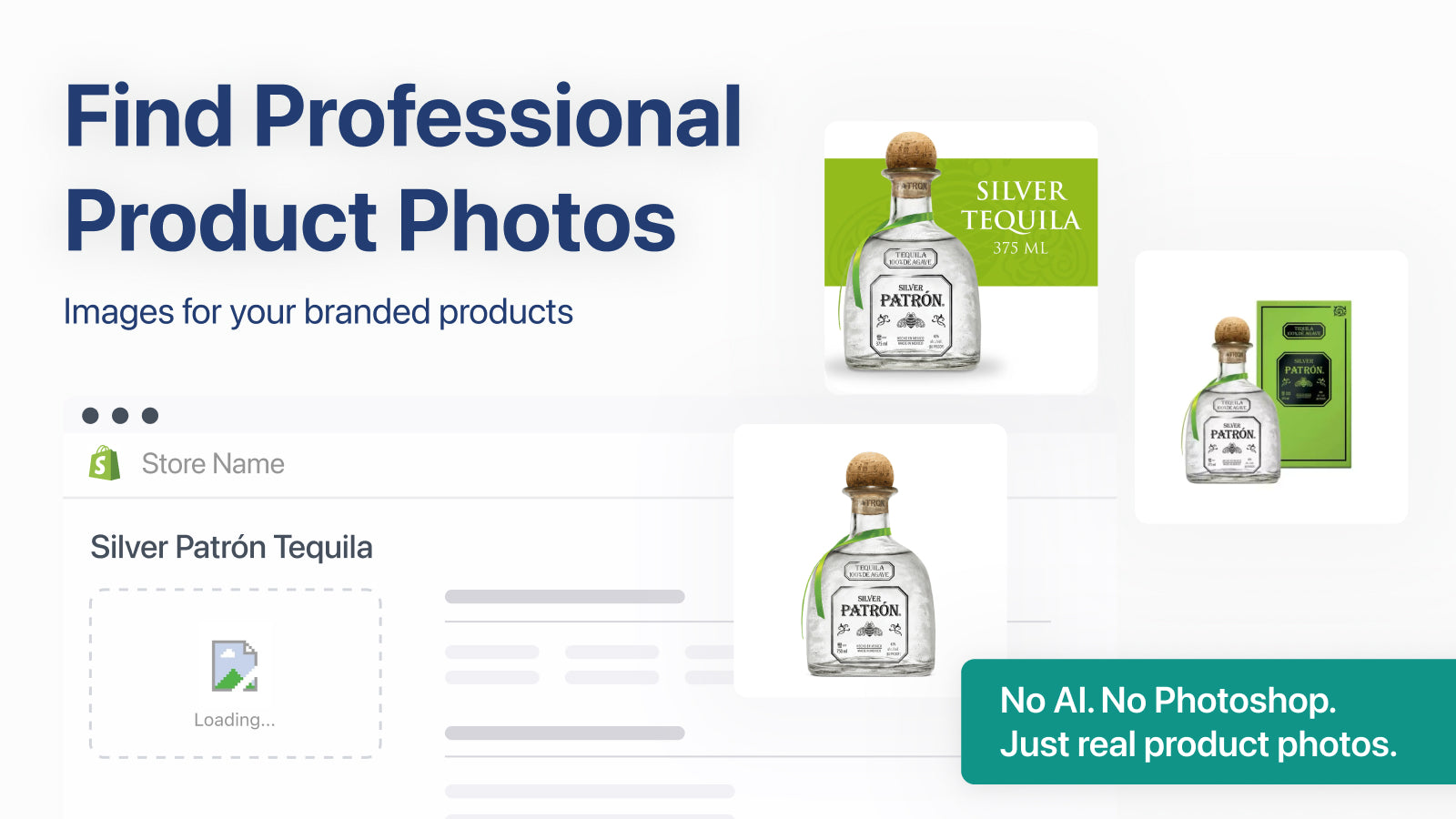
The core workflow is short enough to fit in two bullets.
- Pick a Shopify product, or type a product title. The app runs the title through its matching engine and returns candidate white-background photos of that branded product.
- One-click upload to Shopify. The chosen photo gets pushed directly onto the product’s media library. No manual download, no resize step, no re-upload.
That’s it. The entire app is one workflow, repeated per product. No bulk import, no CSV, no dashboard full of features only ten merchants use. Why keep the scope this narrow? Because photography for a reseller is a per-product problem, and a per-product tool fits better than a mass-editing tool. Compare that to a general bulk image uploader, which assumes you already have the files and just need to push them into Shopify quickly. Product Photo Finder assumes you don’t have the files at all.
A few things to notice about the positioning:
- White background only. No lifestyle images, no on-model shots, no packaging shots with backdrops. The entire tool is optimized for the flat catalog image that works on collection pages and marketplaces.
- Branded products, not generic. The matching engine works when the product has a recognizable brand and SKU, which is exactly what resellers carry. Private-label or DTC-original products will come up empty most of the time.
- One photo per product. The tool is about getting a clean hero image, not a full gallery. Additional angles, lifestyle shots, and variant-specific imagery are out of scope.
- Best-fit verticals per the listing: liquor, cosmetics, and shoes. Those three share a pattern. Fixed SKUs, well-known brands, universal packaging, stable catalog. Exactly the categories where brand-owned photography exists and gets referenced over and over.
Pricing: the credit math
Product Photo Finder runs on one-time credit packs, not a subscription. That is unusual enough in the Shopify App Store that it deserves a closer look. The published tiers:
| Tier | One-time charge | Photos included | Per-photo cost | Best for |
|---|---|---|---|---|
| Free to install | $0 | 10 (test credits) | Free | Testing match quality against your catalog |
| Bodega | $0.50 | 1 (per charge) | $0.50 | Occasional one-off products |
| Main Street | $99 | 500 | $0.20 | Small to mid-catalog resellers |
| Supermarket | $250 | 3,000 | $0.08 | Large catalogs, distributors, multi-store operators |
The economics get interesting fast. Pay a studio photographer to shoot 500 bottles of liquor on a white backdrop, you are looking at roughly $10 to $25 per product depending on market and turnaround. Buy the Main Street pack, the same 500 shots cost $0.20 each. That is a 50x to 100x cost reduction, with zero scheduling, no shipping samples, no re-shoots. For catalogs where brand-owned photography already exists on the public internet, this is an absurdly good deal. For catalogs full of private-label or one-of-a-kind inventory, it does not apply at all.
Why does the one-time model matter? Because most Shopify photo apps charge a monthly subscription regardless of how much you use them. If you finish your catalog setup in the first two weeks and never touch the app again, you’re still paying $19 or $29 every month for the privilege of having it installed. Product Photo Finder flips this. Buy a pack, use it at your own pace, come back six months later to add 50 more products, still burning through the same pack. For resellers with a stable catalog, that’s closer to how the money actually flows.
When it works (and when it does not)
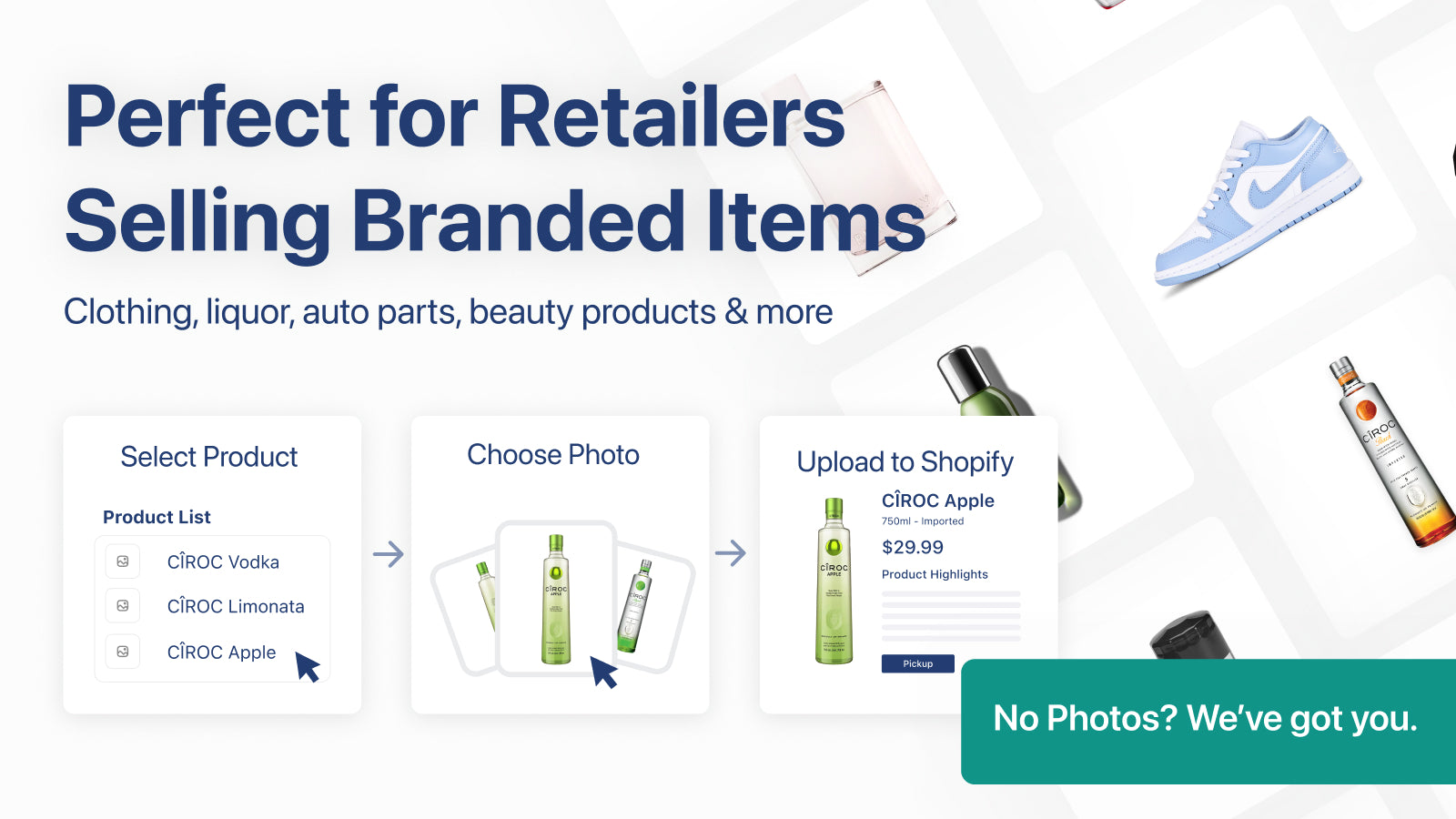
Every review mentions match accuracy. The current 5-star reviews cite around 95% hit rate. That is a small sample (3 reviews total), but the topic categories all fit the listing’s own guidance.
Works well:
- Liquor and spirits. Every bottle has a SKU, a brand, a standard photograph that the distributor or brand has circulated for years. A store selling Basil Hayden’s bourbon does not need to re-shoot the bottle.
- Cosmetics and skincare. Same pattern. Every SKU has a manufacturer-supplied hero image. Retailers from Sephora to independent beauty boutiques use the same white-background shots.
- Branded sneakers and shoes. Nike, Adidas, New Balance, Converse. Every colorway has an official product shot that shows up on thousands of retailer sites.
- Branded pet supplies, vitamins, supplements. Not explicitly listed, but same category pattern. Well-known brands, stable SKUs, existing hero imagery.
- Replacement imagery after a migration. A store migrating from BigCommerce or WooCommerce with broken image links on branded products can re-populate the whole catalog in hours instead of weeks.
Works poorly or not at all:
- Private-label or white-label products. The product is yours. The photos do not exist on the public internet. The tool has nothing to match.
- DTC brands with original product lines. Same problem. Your own product, your own photography needed.
- One-of-a-kind inventory. Antiques, vintage, art. Each item is unique, and no reference photo exists.
- Apparel with seasonal colorways. Works for staple items (basic tees, flagship sneakers) but struggles with short-lived drops where the image is only circulated inside the brand’s own campaigns.
- Obscure regional brands. Small producers with little web presence have no clean hero image to find. The app can only surface what already exists somewhere public.
The quick test: before you buy a pack, run the 10 free credits against a representative slice of your worst-case products. If the app nails the obscure ones, it will nail the easy ones. If it struggles on the obscure ones, you still know whether the 95% of your catalog that is mainstream works fine.
The copyright question resellers keep asking
Here is the part nobody wants to talk about. If Product Photo Finder surfaces a white-background shot that was originally produced by a brand’s creative team, is the reseller allowed to use that image? The short answer: it depends on the brand. Most brands quietly tolerate retailer use of their product photography because they benefit from better storefronts. A handful aggressively police it. A few actively distribute media kits to authorized retailers that explicitly grant usage rights.
Three practical moves for resellers worried about this:
- Check your wholesale or distributor contract. Many contracts include a media clause granting image usage rights for authorized resellers. The clause is usually buried on page 12 and nobody reads it.
- Request a media kit directly. For the brands you sell most of, email the PR contact and ask for marketing assets. Half the time they send a zip file of approved photos and you never worry again.
- Keep the use “nominative.” Using a brand’s product photo to show the product you are selling is legally different from using the photo to promote your own store’s branding. The first is usually fine. The second gets push-back.
This is not legal advice. Talk to a lawyer if you run a large catalog on brands with aggressive legal teams. But the practical reality for most Shopify resellers in liquor, beauty, and shoes is that brand product photography is widely used across thousands of retailer sites, and brands rarely challenge retailers who are selling their products in good faith.
Product Photo Finder vs AI image generators
This comparison matters because the Shopify App Store is flooded with AI image generators right now. Flair, Booth, Pebblely, Genus, and a dozen others. They all generate product imagery using diffusion models. On paper that sounds similar, but the use case is completely different, and resellers picking the wrong tool will waste a lot of time.
| Dimension | Product Photo Finder | AI image generator (generic) |
|---|---|---|
| Source of imagery | Finds real brand photos that already exist | Generates new images from a description |
| Best use case | Resellers with branded catalogs | DTC brands creating lifestyle content |
| Output type | White-background hero shots | Lifestyle, staged, scene composition |
| Brand accuracy | High (actual product photos) | Risky (AI guesses label text, shape, proportions) |
| Good for liquor bottles | Yes, photo of the actual bottle | No, AI hallucinates labels and text |
| Pricing | One-time packs, $0.08 to $0.50 per photo | Monthly subscription, $19 to $49 |
| Works for private label | No | Yes (you own the product, any image is fair game) |
The split is clean. If you are reselling branded goods, you want the real photo, and AI generators will get the label wrong. If you are a DTC brand staging lifestyle scenes around your own product, you want the AI generator because it can composite environments that do not exist yet. Different tools, different jobs.
Resellers who try to use AI generators for branded products almost always end up with photos where the label says “Hennesyy” instead of “Hennessy,” or the bottle shape is subtly off, or the cap color is wrong. AI diffusion models are still bad at replicating specific branded packaging. Real photos do not have that problem.
Setup walkthrough
- Install Product Photo Finder from the Shopify App Store. Free to install. 10 test credits are granted on install. No credit card required to start.
- Open the app inside Shopify admin. The app sits in the Apps section of the admin sidebar. No theme edits, no storefront embed.
- Pick a product. Browse your catalog inside the app or search by title. The app searches on product name, which is why having a clean, brand-aware product title helps. “Basil Hayden’s Kentucky Straight Bourbon 750ml” returns better matches than “Kentucky Bourbon.”
- Review the candidate photos. The app shows a set of potential matches. Pick the one that fits your catalog’s visual language.
- Push to Shopify. One click uploads the photo to the product’s media library as a hero image. The next time the product renders on a PDP or collection card, the new photo is live.
- Repeat, or buy a credit pack. After 10 free photos, you choose a pack that matches your catalog size. The credit pack does not expire, so you can work through 500 products over a weekend or over three months.
One thing to know about product titles. The more structured and brand-aware your titles are, the better the matcher works. A reseller with titles like “Red Wine 2020 Reserve” will get worse matches than a reseller with titles like “Silver Oak Cabernet Sauvignon Alexander Valley 2020.” The app is essentially doing image retrieval against brand metadata, so the more of that metadata is in the title, the more accurate the retrieval. If your catalog titles are generic, run them through a bulk rename first using a tool like Ablestar Bulk Product Editor, then point Product Photo Finder at the cleaned catalog. That is the workflow that actually works at scale.
Pairing Product Photo Finder with Rubik for multi-variant resellers
Quick note for resellers whose catalogs have variants or colorways. Product Photo Finder returns one photo per product. Most reseller products have variant dimensions that matter (sizes, flavors, scents, colorways, bottle volumes), and a single hero shot is not the end of the gallery story. For the mechanics of how Shopify variant images work under the hood, our variant images deep dive covers the gallery boundaries, featured media, and why default Shopify treats the first image of each variant as special. Two Rubik apps fit next to Product Photo Finder to round out the product page experience.
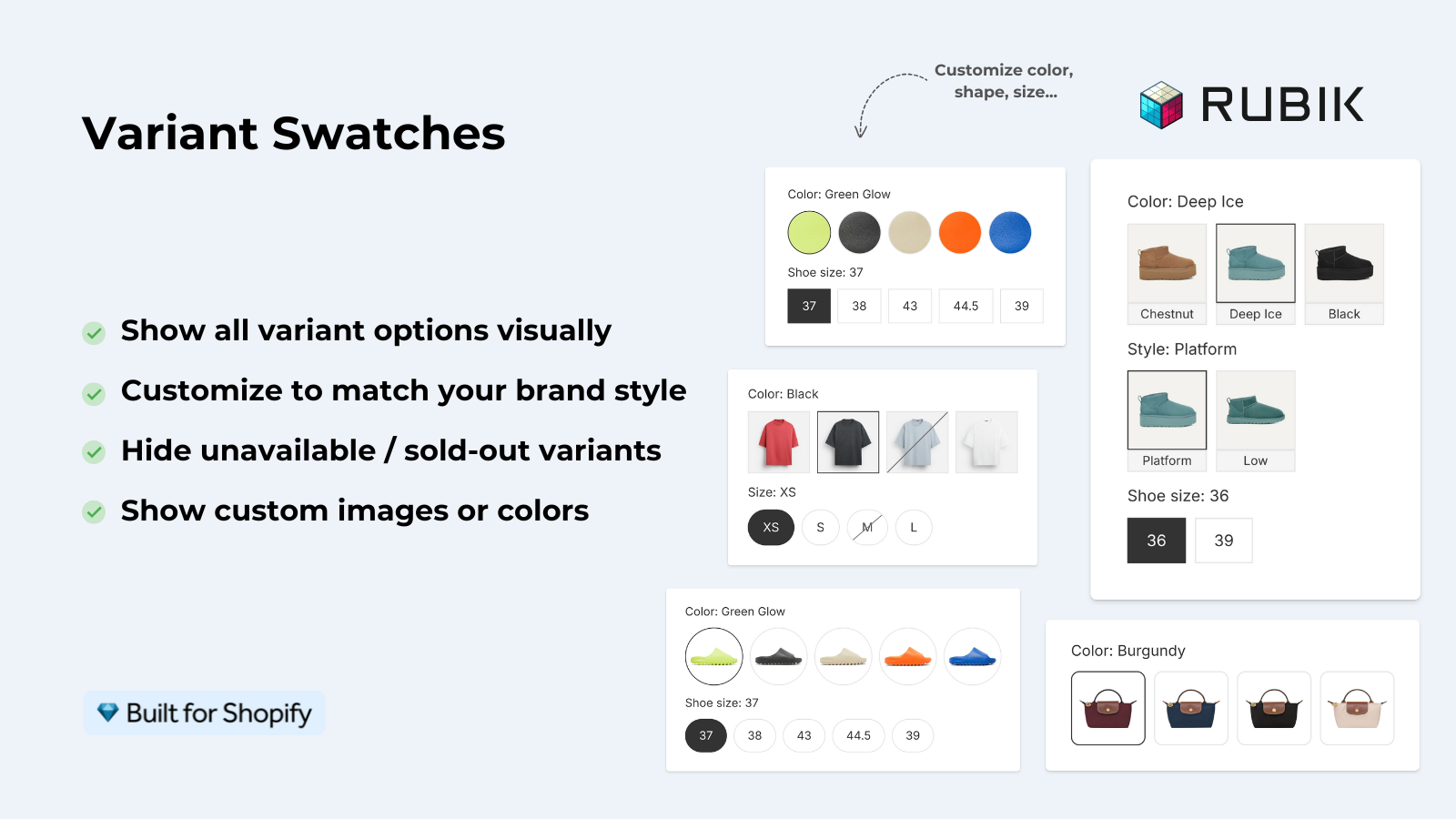
- Rubik Variant Images takes care of in-product gallery filtering once you have multiple photos on a product. If a beauty reseller stocks a serum in three sizes (15ml, 30ml, 50ml) as a single Shopify product with three variants, Product Photo Finder seeds the first hero image, then Rubik Variant Images filters the gallery so a shopper on the 30ml variant only sees 30ml photos. Mix of manual, bulk, and AI auto-assign options cover catalogs from 10 products to 10,000.
- Rubik Combined Listings solves the case where a reseller splits sizes or flavors into separate Shopify products (for SEO, inventory, or variant-limit reasons) and needs them grouped visually. A liquor store that lists 750ml and 1L bottles as separate products can group them so collection cards and product pages show both volumes side by side with swatches. Product Photo Finder populates the hero image on each separate product, Rubik Combined Listings stitches them into one shopping experience.
Three layers, zero overlap. Product Photo Finder handles the source imagery. Rubik Variant Images handles within-product gallery filtering. Rubik Combined Listings handles cross-product grouping. For resellers running multi-variant catalogs in liquor, beauty, or shoes, this is a stack that gets a store from “empty inventory file” to “full working storefront with swatches, variant images, and grouped products” in a weekend instead of a quarter. See the Rubik Combined Listings demo store, Rubik Variant Images demo store, or read the getting started guide.
“This app makes it super easy to manage images for products that have multiple variations (size and flavor in my case). The support is great as well!”
Anonymous merchant, February 2026, Rubik Variant Images on the Shopify App Store
If your colours live as separate products rather than variants of one product, Rubik Combined Listings groups them into a single listing with swatches instead. Free to install, 5.0 stars across 78 reviews.
Tutorial: managing variant images once the hero photo is set
A short walkthrough of multi-option variant image assignment, for resellers whose catalogs have size or flavor variants under one Shopify product:
Frequently asked questions
Is Product Photo Finder free?
Free to install, with 10 test credits included. After that, photos are purchased in one-time packs: Bodega at $0.50 for a single photo, Main Street at $99 for 500 photos ($0.20 each), and Supermarket at $250 for 3,000 photos ($0.08 each). There is no monthly subscription.
Which kinds of stores does Product Photo Finder work best for?
Resellers and brick-and-mortar stores selling branded products with recognizable SKUs. The listing specifically calls out liquor, cosmetics, and shoes. Any reseller vertical with stable, well-known brands follows the same pattern (vitamins, pet supplies, branded kitchenware). It does not work for private-label, DTC-original, one-of-a-kind inventory, or highly obscure brands with no web presence.
Do the photo credits expire?
Based on the app’s listing, credit packs are one-time purchases. No subscription, no expiration language on the public listing. The practical implication: buy a pack sized to your catalog and use it at your own pace over months as you add new products.
Can I use brand product photos on my Shopify store legally?
For most authorized resellers, yes. Many wholesale and distributor contracts grant image usage rights buried in the fine print. Nominative use (using a brand’s photo to show the product you are actually selling) is usually tolerated. Private-label imagery, campaign photography, and celebrity endorsements carry more legal risk. Check your reseller contracts and request a media kit from the brands you sell most. This is not legal advice.
How is Product Photo Finder different from AI image generators like Flair or Booth?
Product Photo Finder retrieves real photos of real branded products. AI image generators synthesize new images from text prompts. For resellers of branded goods, real photos are almost always the right call because AI generators struggle with accurate label text, bottle shape, and packaging details. AI generators are the right call for DTC brands creating lifestyle content around products they own.
Does Product Photo Finder handle product variants like size or color?
Product Photo Finder returns one hero photo per product. Variant-specific imagery (different photos for different sizes, colors, or flavors inside one Shopify product) is outside its scope. Pair it with Rubik Variant Images to filter the product gallery per variant selection, or with Rubik Combined Listings to group separate Shopify products (different bottle sizes, different scents) into one visual listing with swatches.
What happens if the app cannot find a photo for one of my products?
The app returns no match, and no credit is spent. That is the behavior implied by the test-credit design: you only pay for photos you actually upload. For products the app cannot find, the fallback is manual (request the brand’s media kit, shoot the product yourself, or hire a product photographer). A reasonable workflow is to run the app against the full catalog, accept every match, and treat the remainder as a smaller manual photography project.
Related reading
- Ablestar Bulk Product Editor: clean up catalog titles before running Product Photo Finder
- Best Shopify bulk image upload apps 2026
- Best Shopify product image export apps 2026
- Best Shopify apps for cosmetics and beauty stores 2026
- Variant images FAQ (rubikvariantimages.com)
- Combined listings explained (rubikify.com)

Umid
Co-Founder at Craftshift