How to migrate Shopify sibling products between themes without losing SEO

You set up sibling products on Stiletto. Six months later you are switching to Prestige for a redesign. Open the new theme, look at your products, watch the swatches disappear. Stiletto stores the data in stiletto.siblings_collection and stiletto.sibling_option_name. Prestige expects a completely different metafield convention (Maestrooo’s “linked products” pattern with custom.variation_value plus a Product list reference). Same conceptual data, different metafield names and types. Your sibling structure is broken until you migrate every product to the new convention.
This is the recurring pain that makes premium-theme sibling setups expensive in the long run. Every theme studio invented their own metafield schema for siblings. Every theme migration is a re-setup. This post walks the migration map between the major sibling-supporting themes, the operations to run on each, and the theme-agnostic alternative that survives every theme change.
We at Rubik Combined Listings see this exact migration scenario almost weekly. Merchants move from a sibling-supporting theme to another (often Prestige to Stiletto, or Roar to Maestrooo) and want to know whether to redo siblings or move to combined listings instead. The answer almost always depends on how many products and how confident you are about your next theme.
In this post
- Why theme migrations break sibling setups
- Your three migration options
- The metafield mapping table (per theme studio)
- How to preserve URLs and SEO during migration
- Bulk-rename metafield namespaces
- The theme-agnostic alternative
- Hybrid approach: native sibling for fallback, app for stability
- Post-migration checklist
- Frequently asked questions
- Related reading
Why theme migrations break sibling setups
Sibling products are not a Shopify-platform feature. There is no native “Siblings” data model in Shopify. Each premium theme studio invented its own implementation, with its own metafield namespace and schema. The implementations look similar in the storefront (a row of swatches, color switching, separate URLs), but the underlying data is incompatible across themes.
What lives in a metafield from theme A is invisible to theme B. The product itself stays intact: same handle, same URL, same description, same images, same SEO history. The sibling relationship metadata is what evaporates. The customer-facing impact is that swatches disappear and color switching stops working. The SEO impact is mostly limited to whatever the new theme renders or fails to render in JSON-LD; the underlying URL structure usually survives.
Three things contribute to the break:
- Different metafield namespaces. Stiletto uses
stiletto.*, Spark usesspark.*, Pipeline usestheme.siblings, Honey usestheme.sibling_*, Roar Be Yours usescustom.sibling_*, Maestrooo’s “linked products” pattern usescustom.variation_value. The namespace prefix alone differs across studios; the keys differ too. - Different metafield types. Some themes expect single-line text, some expect a metaobject reference, some expect a collection handle.
- Different rendering logic. Each theme reads its expected metafields and renders the swatch UI based on that. The new theme’s logic does not know about the old theme’s data.
Your three migration options
- Re-setup siblings on the new theme. Map old metafields to new conventions, run a bulk update, validate. Time investment: 1 to 4 hours depending on catalog size.
- Switch to a theme-agnostic combined listings approach. Move the sibling relationships from theme metafields into an app’s metaobject structure. Time investment: 30 minutes to 2 hours, depending on catalog size and bulk-grouping options.
- Abandon siblings and move to native variants. Merge separate sibling products back into single multi-variant products. Highly destructive (loses URL structure, SEO history per color, photo galleries per color). Almost never the right choice once siblings are established.
Most stores choose option 1 the first time they migrate themes. Some choose option 2 the second time after living through option 1 and realizing they will be doing this again. Option 3 is rare and usually a mistake.
The metafield mapping table (per theme studio)
Each theme studio uses different metafield namespaces and structures. Below is a high-level reference; check each theme’s official documentation for the precise current namespace, since theme studios occasionally rename keys with major version updates.
| Theme studio | Verified metafields | Type |
|---|---|---|
| Fluorescent Stiletto | stiletto.siblings_collection + stiletto.sibling_option_name | Collection ref + Single line text |
| Fluorescent Spark | spark.siblings_collection + spark.sibling_option_name | Collection ref + Single line text |
| Maestrooo (Prestige, Impulse, Motion) | custom.variation_value + Product list reference (user-named) | Single line text + Product list reference |
| Pipeline (Groupthought) | theme.siblings + theme.cutline | Collection ref + Single line text |
| Roar (Be Yours, Concept) | custom.sibling_collection_handle + custom.sibling_color | Single line text + Single line text |
| Fuel themes | theme.siblings + theme.sibling_color | Single line text + Single line text |
| Omni Themes | custom.sibling_collection_handle + custom.sibling_type | Single line text + Single line text |
| Archer (Honey) | theme.sibling_collection_handle + theme.sibling_option_name + theme.sibling_option_value | 3x Single line text |
| Presidio (Broadcast) | theme.sibling_color (singular) + group reference (refer to docs) | Color + reference |
The exact key names within each theme studio’s namespace change over time. Always check the theme’s own documentation for the precise key your version expects before doing any bulk metafield work. Our deeper post on this: Shopify product siblings complete guide.
How to preserve URLs and SEO during migration
The good news: the actual product URLs survive theme migrations cleanly. Each sibling product is a regular Shopify product with its own handle and URL. Switching themes does not change handles, descriptions, images, or SEO metadata.
What can change inadvertently:
- JSON-LD output. Different themes generate different schema. If your old theme rendered
isVariantOflinkage and the new one does not, your AI agent recognition takes a hit even if URLs are intact. - Page rendering for color-specific search queries. If the new theme does not display the sibling swatch UI, customers landing from search may bounce when they cannot easily switch colors.
- Internal links from product to product. The old theme’s sibling swatches are also internal links. Without them rendering, your internal link graph thins.
Mitigations:
- Plan to have sibling functionality working in the new theme on launch day. Do the metafield migration before the theme switch goes live, not after.
- Verify JSON-LD on a few sample pages before launch. Run them through Google Rich Results Test. Confirm the ProductGroup linkage (if you have it) survives.
- If the new theme strips ProductGroup schema, supplement with a schema-focused app. Cleaner long-term than waiting for theme support.
Bulk-rename metafield namespaces
If you decide to migrate from one theme’s sibling metafields to another’s, you have three paths to do the bulk update:
- CSV export and reimport. Export products as CSV including metafields. Edit the CSV in a spreadsheet (rename the metafield columns, copy values from old namespace to new). Reimport. Risky if your CSV is stale or if you have other product-level edits in flight.
- Bulk Editor (Shopify admin). Limited but works for small catalogs. Add the new metafield to your bulk editor view, copy values from the old metafield column to the new one, save in batches.
- Custom script via Admin GraphQL API. Most reliable for large catalogs. Pull each product, read the old metafield, write to the new metafield, delete the old. Requires development time but is the cleanest result.
Whichever path you pick, do the work on a staging or duplicate theme first. Test on 5 products. Confirm the new theme renders the swatches correctly before running the bulk update on the full catalog.
The theme-agnostic alternative
The recurring migration pain is the structural argument for moving away from theme-native siblings entirely. A theme-agnostic combined listings setup stores the sibling relationships outside theme metafields, in either app data or Shopify metaobjects with their own structure. Switching themes does not break the data because the new theme is not the source of truth.
Two main paths:
- Shopify native combined listings (Plus only). Uses linked metafield options at the platform level. Survives theme changes. Has the trade-off of being Plus-only and using the productSet mutation pattern (which has its own quirks; see our CANNOT_SET_NAME_FOR_LINKED_OPTION_VALUE error fix post).
- App-based combined listings. The app stores grouping data in its own metaobject structure or app data. Works on any plan, survives theme changes, decouples the sibling structure from any specific theme’s metafield convention. Rubik Combined Listings uses metaobject references for groupings.
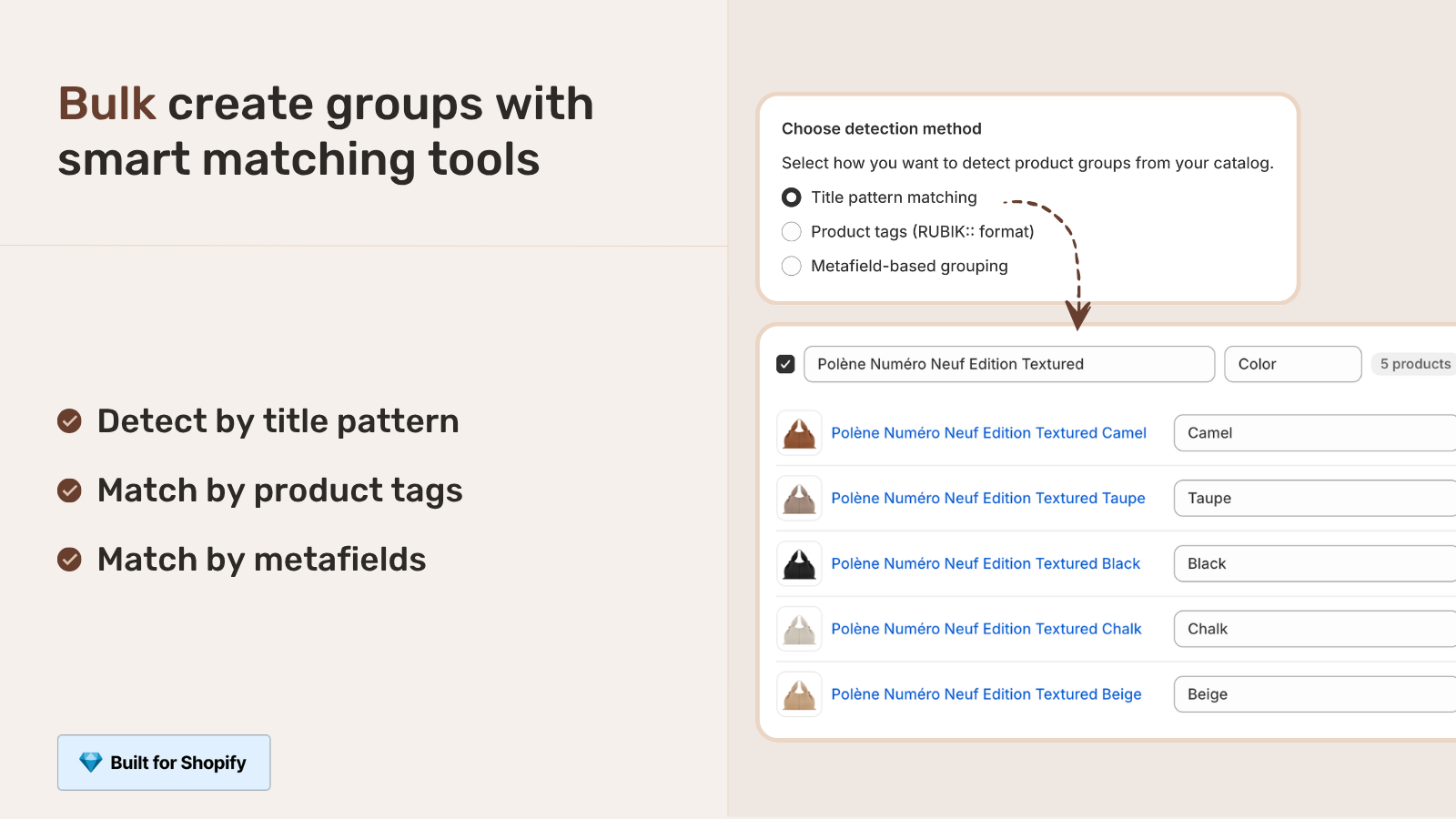
For merchants migrating away from theme-native siblings, the bulk grouping inside Rubik Combined Listings is the part that saves the most time. Detect sibling families by title pattern (your “Sarah Bra, Olive” / “Sarah Bra, Black” pattern), product tags, or shared metafields. Hundreds of groups created in one batch. The grouping survives every future theme change because it lives outside theme metafield conventions.
Migrating from theme-native siblings to either of these is a one-time conversion. The benefit is permanent theme portability after that.
Hybrid approach: native sibling for fallback, app for stability
Some merchants run both: keep the theme-native sibling metafields populated (so the theme renders its native swatches) AND maintain the same grouping in a combined listings app (so the structure survives theme changes). Both produce swatches; the customer sees them once, but you have two layers of redundancy.
Tradeoff: doubled setup work and risk of the two layers drifting out of sync (a new color is added to the app but not to theme metafields). Most merchants pick one or the other, not both. The hybrid makes sense only for stores actively in transition between themes or considering a future migration.
If your colours are variants of one product rather than separate products, Rubik Variant Images assigns a separate image set to every variant instead. Free to install, 5.0 stars across 436 reviews.
Post-migration checklist
- Spot-check 5 product pages on the new theme. Confirm sibling swatches render and color switching works.
- Run Google Rich Results Test on each. Confirm Product schema is valid; confirm
isVariantOfappears if you had it before (or supplement via app/theme edit if missing). - Submit sitemap to Search Console. Theme migrations can shift internal linking patterns; resubmitting helps Google reindex faster.
- Check Search Console for crawl errors. Anything 404 in the first week after migration is a flag.
- Test AI agent surfacing. Ask ChatGPT or Perplexity about your products with a color-specific query. Confirm the right page surfaces.
- Decommission old metafields gradually. Once the new theme is stable for 30 days and the old metafields are no longer being read, you can clean them up. Premature cleanup risks losing data if you need to roll back.
Frequently asked questions
Will my product URLs change when I migrate themes?
No. Product handles and URLs are stored at the Shopify product level, not the theme level. Theme migrations do not change product URLs. Only the rendering of the page (swatches, layout, JSON-LD) changes.
Will my SEO drop after migrating themes if siblings break?
Slightly, yes. The internal linking from sibling swatches goes away if the new theme does not render them, which thins the link graph. JSON-LD changes can affect AI agent recognition. Page-level SEO (titles, descriptions, content) stays intact. The right move is to set up siblings on the new theme before launch so the gap is zero.
Can I run two themes simultaneously to test migration?
Yes. Shopify lets you have multiple themes installed and preview them. Use the new theme in preview mode while the old one stays live, set up sibling metafields for the new theme, validate on a handful of products, then promote the new theme to live.
Is there a tool to migrate sibling metafields between themes?
No universal tool. Each migration path (Stiletto to Prestige, Roar to Honey, etc.) is unique because the metafield namespaces differ. CSV-based migration plus a spreadsheet rename is the most universal manual approach. For development teams, custom scripts via Admin GraphQL are the cleanest. Some Shopify Expert agencies offer migration services for sibling-heavy stores.
Should I just abandon siblings and merge back to native variants?
Almost never. Merging breaks the per-color URLs that built up SEO over time. The right alternative is to move siblings into a theme-agnostic combined listings setup, which keeps the per-color URLs and survives theme changes. Combining all colors back into one variant product is destructive.
If I move from theme siblings to combined listings, do I lose anything?
Nothing structural. The products stay separate. The URLs stay the same. The SEO history is preserved. What changes is the rendering layer (swatches now come from the combined listings app instead of theme metafields). Customer experience is similar; theme portability improves dramatically.
How long does a sibling migration usually take?
For a 50-product catalog with 5 colors per product (250 total products to migrate), expect 2 to 6 hours depending on the path. CSV-based bulk updates are fastest if your data is clean. Manual setup product by product is brutal at this scale; use bulk tooling.
Related reading
- Shopify product siblings complete guide
- Sibling products vs variants vs combined listings decision guide
- Sibling products SEO cannibalization
- Migrate from Shopify native combined listings to Rubik
- CANNOT_SET_NAME_FOR_LINKED_OPTION_VALUE error fix
- Rubik Variant Images
One closing note. The first theme migration teaches you the cost of theme-locked siblings. The second migration is what motivates moving to a theme-agnostic setup. Save yourself the second by considering the move now.

Umid
Co-Founder at Craftshift