How to show colors on Shopify collection pages
If you sell anything in more than one color, you’ve probably wondered how to show colors on collection pages without rebuilding your whole theme. Shopify, by default, shows a single image per product card. One photo. One color. Even if that product has twelve. So a shopper scrolling your collection sees the navy hoodie, never learns the burgundy and forest green exist, and bounces. That gap costs sales, and it’s the reason this question lands in our support inbox so often.
We build two Shopify apps that solve this from two different angles. The short version: if your colors are variants of one product, you want product card swatches. If each color is a separate product with its own URL, you want grouped swatches across those products. Same visual result on the storefront. Very different setup underneath.
Picture a store with 800 products, 12 colors per shirt, and a collection grid that shows exactly one of those colors per tile. The other eleven are invisible until someone clicks in. That’s the default Shopify behavior, and it’s not a bug. It’s just how Shopify draws collection cards.
This guide walks through why that happens, the two app-based fixes, and how to pick the right one. No theme surgery required.
In this post
- Why Shopify shows only one color per card
- The two app-based fixes (and which you need)
- Fix 1: product card swatches for one product’s variants
- Fix 2: collection swatches across separate products
- Variants or separate products? A comparison
- Why some stores run both apps
- Frequently asked questions
- Related reading
Why Shopify shows only one color per card
Shopify renders one product card per product, and that card pulls a single featured image (or the first variant’s image). The collection template loops over products, not over variants, so even a product with twelve color options gets one tile and one photo. There’s no native setting that fans the colors out across the grid.
Why does Shopify default this way? Mostly for speed and simplicity. A collection page that rendered every variant of every product would balloon in size and slow to a crawl. Fair tradeoff for a 20-product catalog. Brutal for a 2,000-SKU apparel store where color is the entire buying decision.
And here’s the part that frustrates merchants most: the data is already there. Shopify knows the burgundy variant exists. It knows the image. It just doesn’t paint it on the card. To understand how variant images really work under the hood helps before you pick a fix, because the right app depends on how your catalog is structured.
The two app-based fixes (and which you need)
There are two clean ways to show colors on collection pages, and the right one depends entirely on how your products are built. If your colors live as variants inside a single product, you add swatches to that product’s card. If each color is its own separate product, you group those products and show swatches across the group. Pick wrong and you’ll fight your catalog the whole way.
So the first question isn’t “which app?” It’s “how is my catalog structured?” Answer that, and the choice gets obvious. Both approaches are metafield-based, both work natively on hundreds of themes (Dawn, Horizon, and the rest), and neither makes external API calls that drag your page speed down.
- One product, many color variants? Use Rubik Variant Images product card swatches.
- Each color is a separate product (own URL, own images)? Use Rubik Combined Listings collection swatches.
- A mix of both? Run both apps. Plenty of stores do.
Fix 1: product card swatches for one product’s variants
If your colors are variants of a single product, Rubik Variant Images now shows swatches directly on the product card across collection pages, search results, and home page listings. Click a swatch and the card’s image swaps to that color. It can also update the card’s price and the add-to-cart link, if you want it to. Hover, and you preview the variant image before clicking.
We shipped this in late May 2026, and it changed what the app does. For years Rubik Variant Images was a product-page tool only. Now it reaches the collection grid too. So any older guide (including some of our own) that says “RVI is product page only” is out of date. It does work on cards now, for the variants of one product.
Turning it on is quick. In the app, open the Swatch settings page and flip Enable on product cards. It’s off by default (we kept it opt-in on purpose, because not every store wants swatches on every card). Then jump to Swatch style and the Product Card tab to size and shape them. By default cards show only the first option (usually color), use smaller swatches than the product page, and support desktop click-to-switch plus mobile tap-to-switch out of the box.
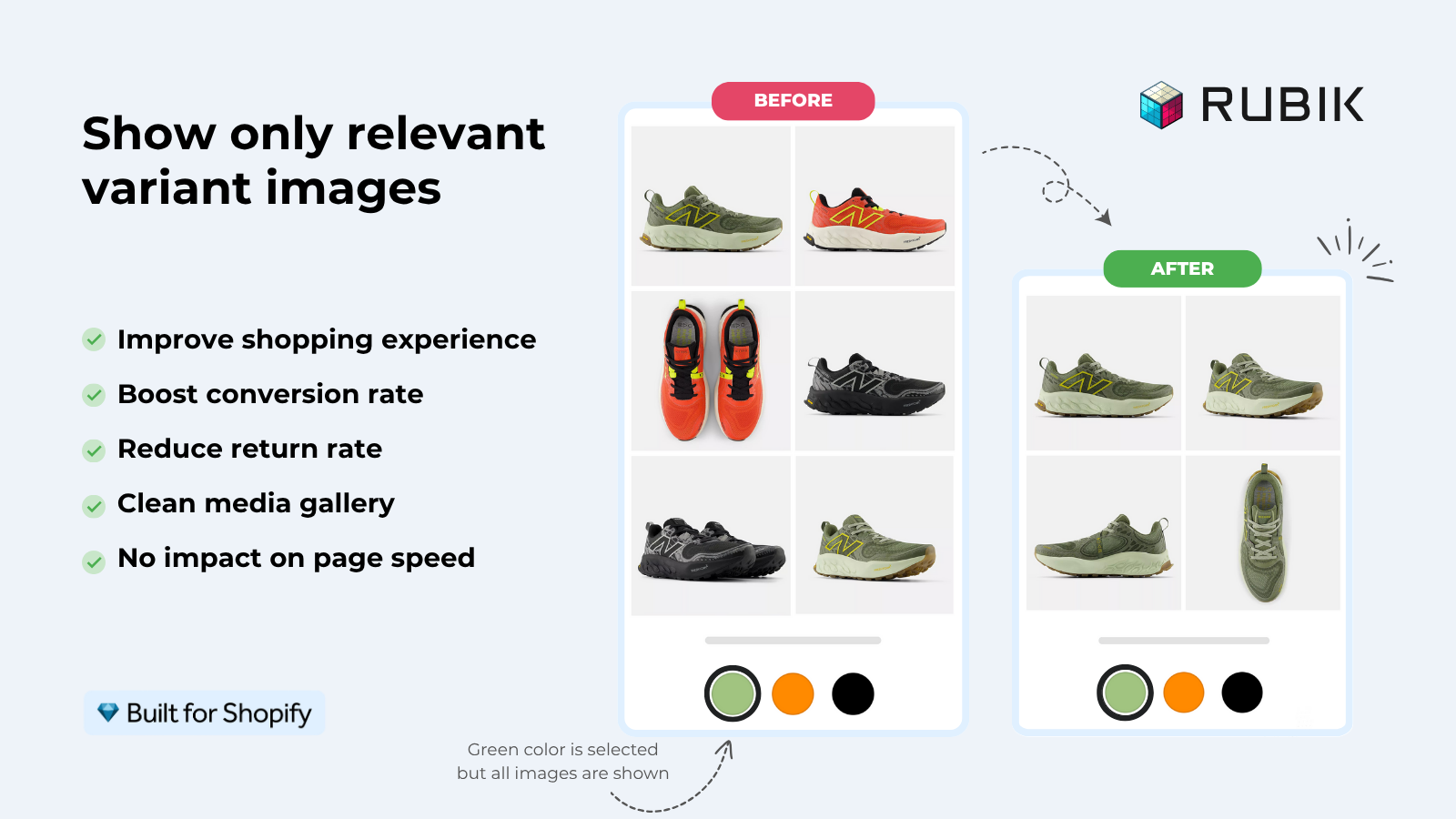
It runs on 177+ themes natively, and if you’re on a heavily customized theme, our support team can map it for you. We deliberately kept the card swatches smaller and limited to the first option, because a card crammed with 30 size-and-color combinations looks like a ransom note. Clean cards convert better. That’s an opinion, sure, but it’s one we’ll defend.
“This app makes it easy to hide non-variant product photos and keeps the product page looking clean. It also helps to show clean custom swatches. Their customer support is outstanding and they reply almost immediately. They were able to fix a bug for me with minimal weight time.”
Anonymous merchant, 2026-02-18, Rubik Variant Images on the Shopify App Store
Want the deeper setup on the variant side? Our guide on collection page color swatches covers the styling tabs in detail. And if you’re shopping around, our roundup of the best Shopify color swatch app for 2026 compares the real options side by side.
Fix 2: collection swatches across separate products
If each color is its own separate product, with its own URL and its own images, you need Rubik Combined Listings. It links those separate products into one group and shows swatches on collection pages (and on the grouped product pages too). Click a swatch on a card and it switches you to the matching product. Each color stays a real, indexable page.
This is the structure a lot of bigger catalogs prefer, and for good reason. Each color gets a unique URL, unique title, and unique images, which is better for SEO than burying colors inside variants. It also sidesteps Shopify’s variant ceiling entirely. No Shopify Plus needed for the combined-listings native feature workaround, because RCL does the grouping itself.
Grouping the products is the only real work, and you’ve got options. Pick them manually in a resource picker, or run bulk grouping by title pattern, product tags, or metafields. There’s also AI Magic Fill, which fills in empty option values and hex colors for you, and an AI Visual Assistant that restyles swatches from a plain-language prompt (“make these pill-shaped and a bit bigger”). Four swatch types ship with it: visual (image), button, pill, and dropdown. Sync is real-time, so out-of-stock, archived, or draft products drop out automatically. No stale swatches pointing at dead products.
One caution. Don’t reach for combined listings if your colors are already variants of one product. You’d be splitting something Shopify already groups, which is backwards. The whole point of RCL is gluing separate products together. For the full picture, read our walkthrough on adding collection page swatches in the Horizon theme and the deeper collection page swatch display guide on the Rubikify blog.
“I use Rubik Combined Listings Along with Rubik Swatch. I went through, no exaggerating, 50 apps before I found what I needed. Theses guys are the real deal, and they will jump on chat and fix your problems ASAP. Definately reccomend.”
Parks Nerd, US, 2026-03-18, Rubik Combined Listings on the Shopify App Store
Variants or separate products? A comparison
The fastest way to decide is to look at how each color is stored today. Variants live inside one product and share a URL. Separate products each have their own page. That single fact points you to the right app. Here’s the side-by-side.
| Question | Variants of one product (use RVI) | Separate products (use RCL) |
|---|---|---|
| How colors are stored | Variant options inside one product | Each color is its own product |
| URL per color | Shared product URL | Unique URL per color (better SEO) |
| Where swatches show | Product cards and product page | Collection cards and grouped product page |
| Variant limit concern | Bound by Shopify variant limits | Bypasses the limit (no Plus required) |
| Best for | Small to mid color counts per item | Large catalogs, SEO-driven stores |
| Free plan | Free for 1 product | Free for 5 groups |
Pricing is flat on both, not tied to your Shopify plan. Rubik Variant Images runs $0 free for 1 product, then $25, $50, and $75 a month as you scale to 100, 1,000, and unlimited products. Rubik Combined Listings starts free for 5 groups, then $10, $30, and $50 a month for 100, 500, and 5,000 groups (with 17% off on annual). Want the wider field? See our comparison of variant and combined listing apps for 2026.
Why some stores run both apps
Plenty of catalogs aren’t tidy. Some products use color variants, others got built as separate products years ago, and nobody’s going to re-architect 1,500 SKUs over a weekend. So running both apps is common, and they don’t step on each other. RVI handles the variant-based cards, RCL handles the grouped separate products, and your collection page ends up showing colors everywhere.
The classic combo: RCL groups separate color-products and shows swatches on the collection grid, then RVI makes sure the right images load when a shopper lands on the product page and clicks through colors. One handles the grid, the other handles the page. Apparel and fashion stores lean on this pairing the most, which is why we wrote up the best Shopify apps for apparel stores and a companion piece on clothing and fashion stores.
Both apps support the major page builders too: Beae, EComposer, Foxify, GemPages, Instant, PageFly, and Replo. (Shogun isn’t supported, so don’t count on that one.) Neither integrates Shopify Markets, in case you were wondering about multi-region setups. RCL does handle multilingual stores through Shopify’s Translate and Adapt, though.
“We’ve tried several solutions for managing variant images, but Rubik Variant Images stands out. It’s like giving our product pages a much-needed declutter. Customers now see only the images that match their selection, which has noticeably reduced the ‘Is this the right color?’ support queries. The setup was intuitive, and the results were instant. It’s one of those behind-the-scenes tools that quietly makes a big difference. Love it!”
Livspace Home, India, 2025-07-10, Rubik Variant Images on the Shopify App Store
Prefer to see it before installing? Try the Rubik Variant Images demo store or the Rubik Combined Listings demo store, watch the tutorial video above, or read the getting started guides for Variant Images and Combined Listings.
Frequently asked questions
Why does Shopify only show one color per product on collection pages?
Shopify renders one card per product using a single featured image, and the collection template loops over products rather than variants. There’s no native setting to fan out colors across the grid, so a 12-color product still shows one tile and one photo until you add an app.
Can I show colors on collection pages without editing my theme code?
Yes. Both Rubik Variant Images and Rubik Combined Listings are metafield-based and work natively on hundreds of themes, including Dawn and Horizon, with no code edits. You enable the swatches inside the app. For heavily customized themes, support can map the integration for you.
Does Rubik Variant Images work on collection pages now?
Yes, as of the product card swatches feature that shipped in late May 2026. It shows variant swatches on product cards across collection pages, search results, and other listing pages. It’s off by default, so you enable it under Swatch settings with the “Enable on product cards” toggle.
How do I choose between Rubik Variant Images and Rubik Combined Listings?
Look at how your colors are stored. If they’re variants inside one product, use Rubik Variant Images product card swatches. If each color is a separate product with its own URL, use Rubik Combined Listings to group them. Stores with a mix of both often run both apps together.
Will collection page swatches slow down my store?
Both apps are metafield-based and make no external API calls, so the swatch data loads with the page itself rather than calling out to a separate server. On product cards the swatches default to smaller sizes and the first option only, which keeps the grid light.
Related reading

Umid
Co-Founder at Craftshift