How to Add an “AI Generated” Label to Shopify Product Images (2026 Step-by-Step)

To add an AI Generated label to Shopify product images, stamp a visible “AI Generated” text watermark on the affected secondary photos (a tool like Viking Watermark does this in bulk), keep your primary feed image clean for Google, and, where you can, add machine-readable IPTC or C2PA metadata as a second layer. That covers the visible-disclosure half that New York and EU rules care about in 2026.
Updated 16 August 2026. The European Commission published its Article 50 guidelines on 20 July 2026 and reads “objects” in the deepfake definition as including consumer goods, so an AI product image that misleads about the real product needs disclosure even with nobody in the frame. For that reason the decision list below has been corrected. The full picture is in do AI product photos need a label in the EU.
Sounds simple. It mostly is. But there are three traps that catch operators: putting the label on the wrong image (the one Google reads), assuming metadata survives Shopify’s CDN (it doesn’t), and overthinking which photos even need a label in the first place.
This is the implementation guide, not the law lecture. If you want the full legal breakdown of whether you even have to disclose, read our do you have to disclose AI product images pillar first. Here we assume you’ve decided to label, and you want it done cleanly across a real catalog without tanking your Google Shopping feed.
One thing up front, because most guides get this backwards: a label is not the same as metadata, and you usually want both. They solve different problems. We’ll separate them.
In this post
- Which product images actually need a label?
- Visible label vs IPTC metadata vs C2PA
- The Shopify CDN metadata-stripping problem
- Where do you place a conspicuous label?
- Bulk add an AI Generated label to Shopify product images
- How do I keep the Google feed image clean?
- FAQ
Which product images actually need a label?
Images with AI-generated people carry the clearest disclosure risk. Object-only shots are outside the New York and California rules, and outside the EU one too, unless the generated image misleads about the real product, which the Commission’s July 2026 guidelines treat as a deepfake. The obligation centers on AI faces and AI human models, not on objects. Routine editing (lighting, crop, background removal, retouch) never triggers any of this.
So before you label a thousand photos, sort them. The shirt-on-a-table shot? Skip it. The same shirt on an AI-generated model who looks like a plausible real person? That’s the one in question. Under the EU AI Act, a deepfake covers persons, objects, places, entities, and events that could falsely appear authentic, but for e-commerce the practical trigger is an AI human who resembles a real, plausible person and could mislead a shopper into thinking it’s a real photo. Photorealism alone isn’t the line. Resemblance to a plausible real person plus the potential to mislead is.
New York’s Synthetic Performer Disclosure Law (effective June 9, 2026) is the gray zone here. It targets a “synthetic performer,” an AI-created asset built to look like a human performance. Static product photos with AI models? Unresolved. The statute emphasizes “performance,” so whether a still image is covered may depend on how the NY Attorney General reads it. So hedge accordingly. When the law is ambiguous and a visible label is cheap, the label is the easy call.
- Label it: AI-generated human models, AI faces, AI “people wearing the product.”
- Probably skip it: AI backgrounds behind a real product, AI upscaling, retouching. Label a fully generated product image if it flatters or alters the real product.
- Always skip it: normal photography edits that don’t fabricate a person.
If you sell apparel with AI lookbook shots, this matters most for you. We dug into that specific split in AI backgrounds vs AI models on variant photos, which breaks down which variant images are exempt.
Visible label vs IPTC metadata vs C2PA: what’s the difference?
There are three ways to mark an image as AI, and they’re not interchangeable. A visible label is text a human reads on the image. IPTC DigitalSourceType is invisible metadata in the file. C2PA (Content Credentials) is a cryptographic provenance record. Each one answers a different question, for a different audience.
| Method | Who reads it | Durable? | Affects looks? |
|---|---|---|---|
| Visible “AI Generated” label | Shoppers, regulators | Yes (croppable) | Yes |
| IPTC DigitalSourceType metadata | Google Merchant Center, bots | No (easily stripped) | No |
| C2PA / Content Credentials | Provenance checkers | No (stripped on resave) | No |
Here’s the strong opinion: for a Shopify store in 2026, the visible label is the layer that actually protects you legally, and metadata is the nice-to-have. Why? Because New York’s “conspicuous disclosure” and the EU deployer disclosure are about a human seeing it. A regulator isn’t going to inspect your IPTC fields to decide you complied. They’ll look at whether a normal shopper would understand the image was AI. Metadata is invisible to that test.
That said, metadata still earns its keep. Google Merchant Center wants IPTC DigitalSourceType on AI product images (metadata only, no visible label on the feed shot). The EU AI Act’s provider-side rule (Article 50.2) is about machine-readable marking. So the honest answer is: do both layers where you can. Visible label on the secondary shots a human sees, machine-readable metadata where the pipeline supports it.
And C2PA? Good standard, real adoption (Firefly, DALL-E 3, Imagen embed it), but credentials get stripped the moment a file is resaved or recompressed. Don’t lean on it as your only proof.
The Shopify CDN metadata-stripping problem
Shopify’s CDN strips EXIF and IPTC metadata when it compresses your images. So if your entire AI-disclosure plan is “I embedded DigitalSourceType in the file,” that plan quietly breaks the moment Shopify serves the image. The metadata is gone by the time a shopper, or Google, fetches it.
This is the single biggest gotcha in the whole topic, and almost nobody mentions it. You can do everything right in Photoshop or Firefly, upload a perfectly tagged file, and Shopify hands out a stripped copy. The C2PA credentials? Often gone too, for the same compression reason.
What survives compression? Pixels. A visible watermark is baked into the pixels, so it can’t be stripped by a CDN pass. That’s exactly why the visible-label layer is the reliable one on Shopify specifically. It’s not a coincidence that the durable method is also the one regulators actually look at.
Two workarounds for the metadata side if you need it: feed AI images to Google through a channel where the metadata is set at the feed level (not read from the stripped file), or accept that on-Shopify metadata is unreliable and treat the visible label as your primary compliance artifact. We lean toward the second. It’s less fragile.
Where do you place a conspicuous label?
Place the label where a shopper sees it without hunting, but never on the primary feed image. “Conspicuous” isn’t defined in the New York statute (no required wording, size, placement, or language), so lawyers point to the FTC “clear and conspicuous” standard as the practical benchmark: unavoidable, readable, in the same place the claim is made.
In practice, for a product page, that means the label belongs on the gallery image itself, on the secondary or alternate shots, in a corner where it’s legible but not covering the face or product. A small “AI Generated” text stamp in the lower corner reads as conspicuous without ruining the photo. You can also pair it with a line of text near the image, but the on-image stamp is the durable part.
The one place it must not go: the primary image Google pulls for Shopping. Google Merchant Center disallows watermarks and logos over the product on feed images. Put a label there and you risk feed disapproval. So the rule is split-brain on purpose: clean primary for the feed, labeled secondaries for the humans and the regulators. Annoying? A little. Workable? Completely.
If you’re weighing the visual cost of any on-image text, our take on whether watermarks hurt Shopify SEO and Google Shopping goes deeper, and the short version is the feed image stays clean either way.
How to bulk add an AI Generated label to Shopify product images with Viking
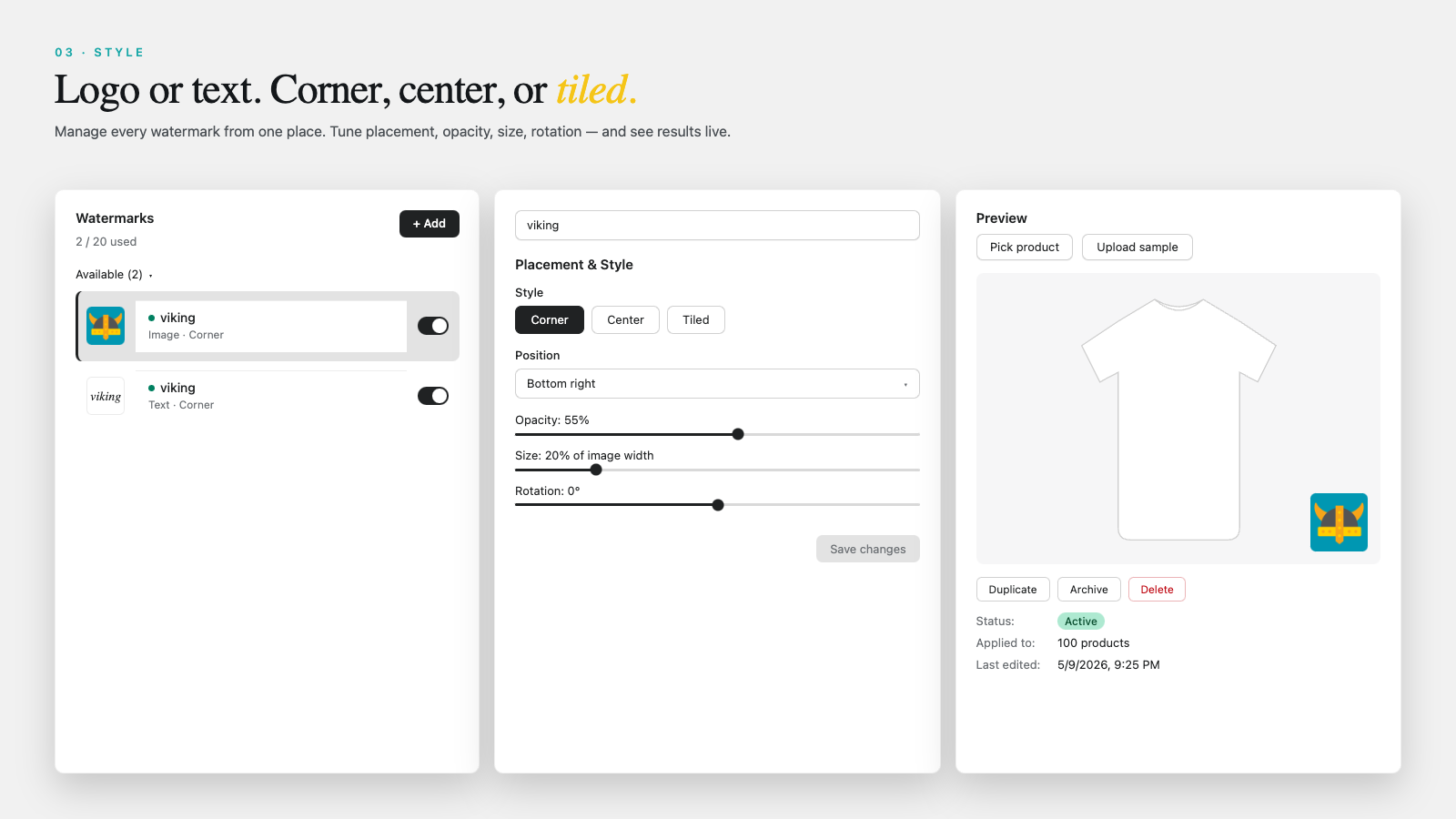
To bulk-add an AI Generated label, use an app that stamps a text watermark across many images at once and can roll back clean originals. Viking Watermark (a Shopify app by Aegis, new on the App Store) does the visible-label half: it adds a logo or a TEXT watermark, and the key use here is a text stamp that reads “AI Generated.”
Be clear on what it does and doesn’t do. Viking handles the visible layer: the conspicuous “AI Generated” stamp that New York’s disclosure and the EU deployer disclosure care about. It does not embed C2PA or IPTC machine-readable metadata, and it is not an EU “provider” marking tool. So treat it as the durable visible-label part of a two-layer plan, not a one-click “metadata compliance” button. (There’s no such button on Shopify anyway, given the CDN stripping.)
- Install Viking Watermark from the Shopify App Store (free plan covers 100 images and 2 designs).
- Create a TEXT design that reads “AI Generated.” Set the style in the editor: font size, color (high contrast against your shots), and placement in a bottom corner so it doesn’t cover the model’s face.
- Tag the AI-model products first. Add a tag like
ai-modelin Shopify admin to the products whose secondary images need labeling. This is your selection filter. - Apply by scope. Viking can apply to a single image, a collection, a tag, a product status, or all images. Choose the
ai-modeltag so only the right products get stamped. - Exclude or re-clean the primary image so the feed shot stays watermark-free (see the next section). Label the secondary gallery shots, not the lead.
- Turn on auto-watermark so new AI uploads get the label automatically. Bulk and auto-watermark start on the Starter plan ($5 for 1000 images).
- Keep rollback in your pocket. Viking saves clean originals in Shopify Files, so one click restores the unlabeled version with no quality loss, across JPEG, PNG, WebP, or GIF.
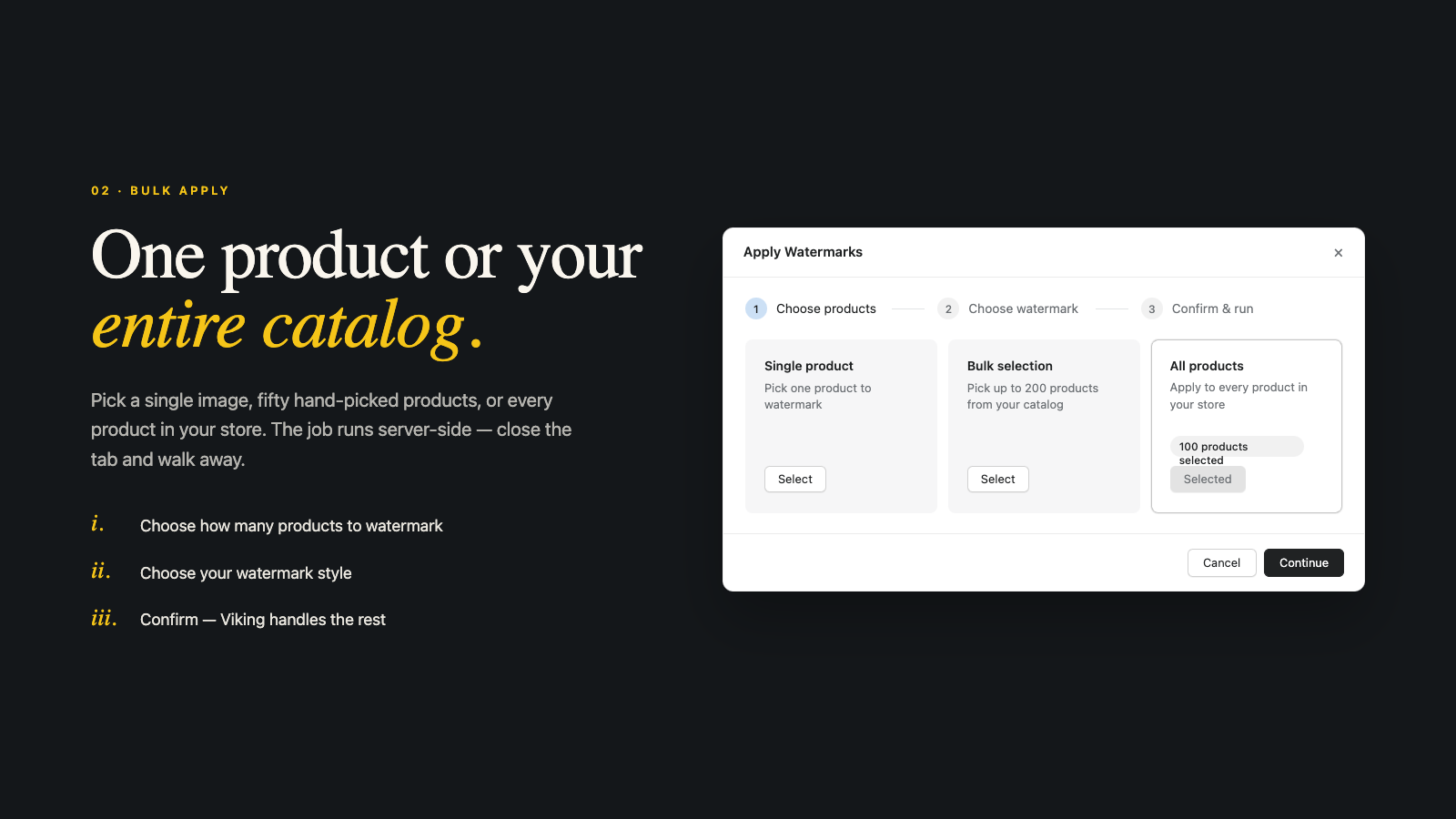
The tag-based apply is the part that makes this scale. You don’t want to hand-pick a thousand images. You want to tag the AI-model products once, apply by tag, and let auto-watermark handle the next upload. If you’d rather understand the mechanics before installing anything, our guide to bulk watermarking Shopify product images covers the same apply-by-scope logic, and the Viking Watermark site lists the full plan breakdown.
How do I keep the Google feed image clean?
Keep the feed clean by labeling only secondary images, or by rolling back the primary before a feed sync. Google Merchant Center disallows watermarks over the product on feed images, so a stamped primary can get your product disapproved. The disclosure label and the feed image have conflicting requirements, and you resolve it by keeping them on different photos.
Two clean approaches. First: never stamp position one. Apply the label to gallery images two through whatever, leave the primary untouched, and the feed pulls the clean lead shot. Second: if you did stamp everything, use Viking’s one-click rollback on the primary to restore the clean original before your next Google sync, then keep the secondaries labeled. Either way the shopper still sees a labeled AI image on the product page, and Google still gets a clean feed.
For the metadata route on the feed (IPTC DigitalSourceType), remember the CDN strips it, so don’t count on the file carrying it through. Set it at the feed level if your pipeline allows. Our Shopify Google Shopping feed optimization guide and the broader product image SEO guide both cover keeping the primary image feed-safe while you handle disclosure elsewhere.
One more cross-store note: if you run combined or grouped listings, the labeling has to follow the variant that actually uses the AI shot, not the whole group. We worked through that in the combined listings AI model photo disclosure post, which matters if one product handle shows several models.
And a quick reality check on who’s actually regulated. California’s SB 942 (operative August 2, 2026) binds “Covered Providers,” the AI tool makers with over a million monthly California users. Ordinary Shopify merchants who just use third-party AI tools are not Covered Providers and are generally not directly obligated by SB 942. So don’t panic about the $5,000-per-violation figure; it isn’t aimed at you for using an AI image generator. Your real obligations come from the visible-disclosure rules in New York and the EU.
FAQ
Do I have to add a visible “AI Generated” label to every product photo?
Not every photo. AI-generated humans carry the clearest risk, and AI backgrounds, upscaling and routine retouching stay outside. A fully AI-generated product image that misleads about the real product does need an EU label, per the Commission’s July 2026 guidelines. Label the AI-model and AI-face photos; skip the object-only ones.
Is metadata alone enough to comply?
Not on Shopify. Shopify’s CDN strips EXIF and IPTC metadata on compression, so embedded tags often vanish before a shopper or Google fetches the image. New York and EU deployer disclosure are about a human seeing the disclosure, which metadata can’t satisfy. Use a visible label as the durable layer and add metadata where the pipeline supports it.
Will an AI label hurt my Google Shopping feed?
Only if you put it on the primary feed image. Google Merchant Center disallows watermarks over the product on feed images, so keep position one clean and label your secondary gallery shots instead. Roll back the primary before a feed sync if it got stamped by accident.
Are AI human models in static product photos covered by New York’s law?
It’s unresolved. New York’s Synthetic Performer Disclosure Law (effective June 9, 2026) emphasizes “performance,” so whether a still product photo with an AI model is covered may depend on how the NY Attorney General reads it. Because a visible label is cheap and the law is ambiguous, labeling is the safe call.
Does the EU AI Act apply to non-EU Shopify sellers?
Yes, if the output is used in the EU. Article 50 transparency obligations are enforceable from August 2, 2026, and apply irrespective of EU establishment when AI-imaged products reach EU customers. Penalties run up to 15 million euros or 3% of global annual turnover, whichever is higher. Deployers disclose deepfakes; object-only AI product images don’t trigger the deepfake disclosure.
What does Viking Watermark do, and what doesn’t it do?
Viking adds a visible logo or text watermark (including an “AI Generated” text stamp) in bulk, by tag, collection, status, or all images, with auto-watermark on new uploads and one-click rollback of clean originals. It handles the visible-label layer. It does not embed C2PA or IPTC metadata and is not an EU provider marking tool, so pair it with metadata where you need the machine-readable layer. (Viking is new on the App Store.)
Can I undo the watermark if I change my mind?
Yes. Viking saves clean originals in Shopify Files, so a one-click rollback restores the unlabeled image with no quality loss, across JPEG, PNG, WebP, and GIF. That’s also how you keep the primary feed image clean if a bulk apply stamped it.
This is general information, not legal advice. Laws and enforcement evolve; consult a qualified attorney about your specific catalog and markets.
Related reading

Umid
Co-Founder at Craftshift