Shopify sibling products vs variants vs combined listings: the 2026 decision guide
You sell a hoodie in five colors. Shopify gives you three structurally different ways to handle this:
- One product with five color variants (the default)
- Five separate products linked as sibling products (theme-level feature on premium themes)
- Five separate products grouped via combined listings (Plus-only native, or via app)
Each looks similar to the customer at first. The same swatches, the same color switching, the same buy button. Under the hood the implementations are completely different, with different SEO consequences, different setup costs, different theme requirements, and different breaking points. The wrong choice does not crash your store; it just costs you traffic and conversion you never knew you missed.
This is the working decision guide. Five questions to answer about your catalog, then the matching recommendation. We are Rubik Combined Listings, so we have a horse in this race, but we will recommend variants where variants are right. Most stores genuinely should use plain variants; the more interesting question is when to graduate.
In this post
- The three paths at a glance
- Five questions to answer first
- Why variants are the right default for most stores
- When sibling products are the right answer
- When combined listings are the right answer
- The decision tree
- Three mistakes that lock you into the wrong choice
- Switching paths later: how disruptive is it?
- Frequently asked questions
- Related reading
The three paths at a glance
| Variants | Sibling products | Combined listings | |
|---|---|---|---|
| Number of products in admin | 1 | 5 (one per color) | 5 (one per color) |
| Number of URLs in storefront | 1 | 5 | 5 (children) + sometimes 1 parent |
| Per-color title, description, SEO | No (shared) | Yes | Yes |
| Per-color image gallery | Limited (1 image per variant native) | Yes (each is its own product) | Yes (each is its own product) |
| Implementation | Native Shopify, all themes | Theme-specific (premium themes) | Plus-only native, or app-based |
| Theme portability | Universal | Locked to theme studio’s metafields | App-based: portable; Plus-native: portable |
| Setup time per product | Minutes | 30 to 60 minutes (per-theme) | 5 to 15 minutes (app-based) |
| Best for | Most stores, simple catalogs | Premium fashion on a sibling-supporting theme | Multi-color catalogs at scale, plan-flexible |
Five questions to answer first
- Does each color have unique content (description, photography, model styling) or is it the same item with the color swapped?
- Do customers search with the color word (“olive hoodie”) or just the product type (“hoodie”)? Check Google Search Console for evidence.
- How many products fit this pattern in your catalog? 5? 50? 500?
- What Shopify plan are you on, and are you committed to it? Plus has more options.
- Are you on a sibling-supporting premium theme, and how likely are you to migrate themes in the next 24 months?
The answers map to one of the three paths below.
Why variants are the right default for most stores
Plain Shopify variants are the right answer for the majority of stores. Reasons:
- Universal theme support. Every Shopify theme handles variants. Switching themes does not break your product structure.
- Inventory and reporting are simpler. One product, with sub-line-item inventory per variant. Reports group naturally.
- Lower setup overhead. A 5-color hoodie product is one Shopify product, set up in minutes. Five sibling products take five times the work.
- Variant limit is generous now. Shopify raised the variant limit to 2,048 in late 2025. The constraint that pushed many stores toward separate products no longer bites for typical catalogs.
Use variants when: each color is the same item swapped, customers search the generic product name rather than color-specific queries, and your catalog is not deep enough to want individual color SEO. This describes most accessory, electronics, home goods, and basics stores.
Background: Shopify variant limit in 2026.
When sibling products are the right answer
Sibling products fit a specific profile:
- You are on a premium theme that supports siblings natively. Maestrooo (Prestige), Fluorescent (Stiletto, Spark), Roar (Be Yours, Concept), Fuel themes, Omni, Archer Honey, Presidio Broadcast, and a few others.
- Each color has genuinely different content. Different photography, different model styling, different descriptions. The pages are not just copy-paste with the color word swapped.
- You sell premium / fashion / lifestyle goods where editorial differentiation per color matters. A wine red velvet dress and a forest green velvet dress can carry different stories.
- Your catalog is not changing rapidly. Setting up siblings is per-product manual work; if you launch and retire SKUs weekly, the maintenance overhead bites.
- You are not planning a theme migration in the next 12 to 24 months. Sibling metafields are theme-specific; switching themes invalidates them.
Use siblings when: all five conditions apply. Drop one or two and the math gets shaky. Specifically, the theme-lock risk is real. We see merchants set up siblings on Stiletto, then migrate to Prestige a year later, then have to redo the entire setup with different metafields. Combined listings (next section) is theme-agnostic and avoids this.
Background: Shopify product siblings complete guide.
When combined listings are the right answer
Combined listings work well when:
- You want separate URLs for each color (SEO benefit) but theme-agnostic implementation.
- Your catalog is medium to large (50+ products with multiple colors each), so per-product manual setup like siblings is too slow. Combined listings apps support bulk grouping by title pattern, tag, or metafield.
- You want collection page swatches that switch the product card image on click. Most theme-native sibling implementations show swatches under cards but do not change the card image; combined listings apps handle this.
- You want the option to migrate themes without redoing the setup. Combined listings (especially app-based) are stored in app data or Shopify metaobjects, not theme metafields.
- You are on a non-Plus plan but still want this functionality. Native Shopify combined listings is Plus-only; apps fill the gap on Basic, Grow, Advanced.
Use combined listings when: 4 or more of the above apply. Especially appropriate for fashion / apparel / accessories with deep color matrices and stores that have already been through a theme migration once and learned the hard way.
This is the slot where Rubik Combined Listings fits. It groups separate Shopify products as one shoppable family with collection page swatches and a unified product page experience, on Basic / Grow / Advanced as well as Plus, with bulk grouping for catalogs at scale (auto-detect by title pattern, product tags, or shared metafields). Setup takes 5 to 15 minutes per group; the bulk tooling handles hundreds of groups in one pass.
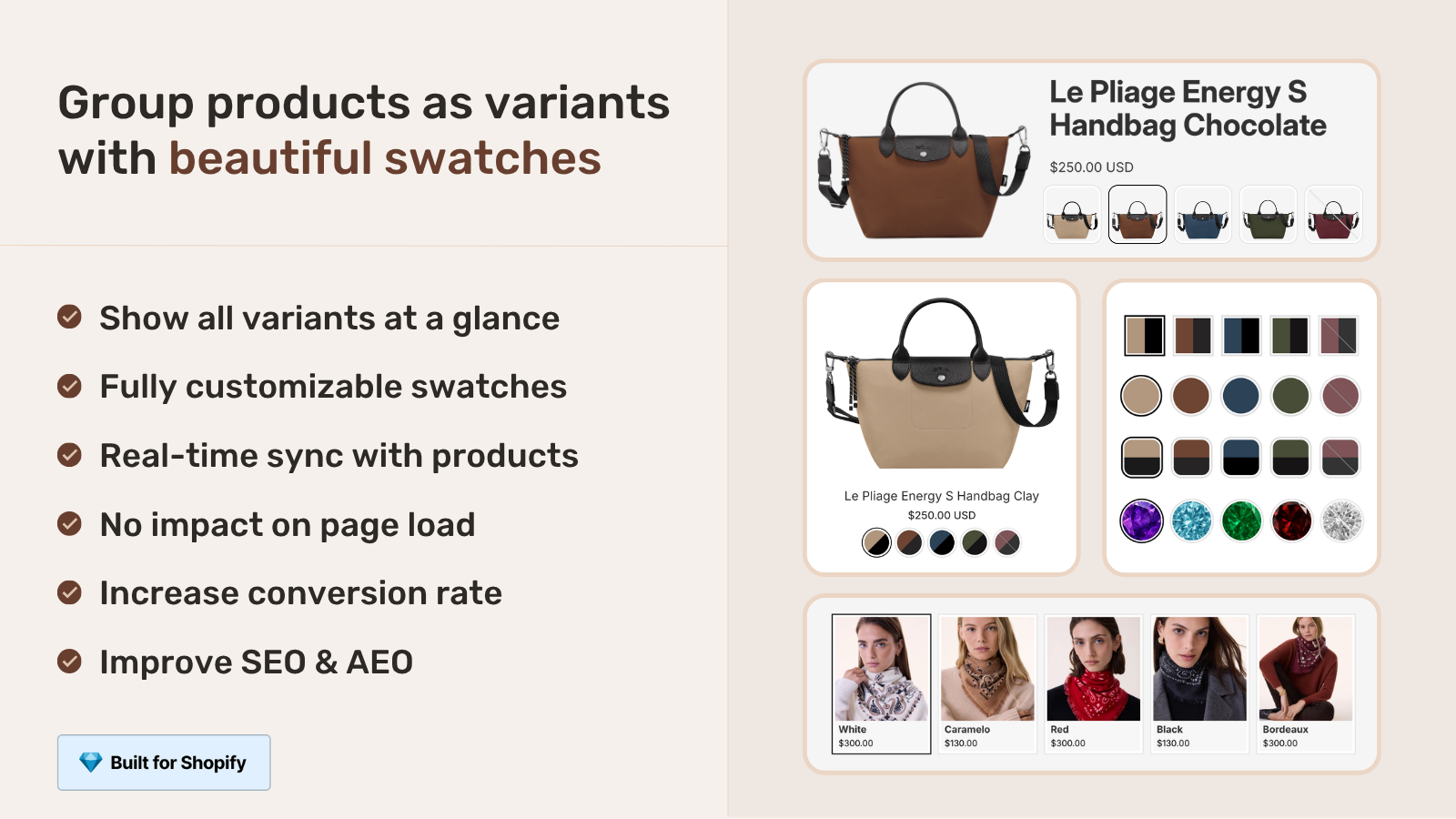
Background: when to use combined listings.
The decision tree
Run through this top-down. The first “yes” is your answer.
- Does your catalog fit in 100 variants per product, with each color essentially identical except for the color swap? Use plain variants. Stop here.
- Do customers search with color words and does each color have meaningfully different content? You want separate URLs per color. Continue.
- Are you on a sibling-supporting premium theme AND committed to staying on it? Sibling products work. Stop here.
- Are you on Shopify Plus AND happy with the native combined listings limitations? Native combined listings work.
- Anything else (non-Plus, theme-agnostic, large catalog, want collection page swatches that update card images)? Combined listings apps are the right fit.
For most fashion / apparel / accessories stores past 50 products, the answer falls at step 5. For most basics, accessories, and electronics, the answer falls at step 1.
Three mistakes that lock you into the wrong choice
- Picking siblings because the theme has the feature, not because the catalog needs it. Sibling products take real per-product setup work. If the per-color content does not differ meaningfully, you are paying setup cost for no SEO benefit. Use variants instead.
- Picking variants because they are easy, then hitting the 100-variant ceiling halfway through scaling. The 2,048 variant limit removed this constraint for new stores, but legacy stores with deep variant matrices may still benefit from splitting via siblings or combined listings.
- Picking combined listings without considering theme support. Native Shopify combined listings (Plus-only) does not work cleanly on every theme. If you are on a free Shopify theme like Horizon or Dawn, the storefront integration may need theme adjustments. App-based combined listings handle this more gracefully across themes.
If your colours are variants of one product rather than separate products, Rubik Variant Images assigns a separate image set to every variant instead. Free to install, 5.0 stars across 436 reviews.
Switching paths later: how disruptive is it?
Switching paths is doable but has different costs depending on direction.
| From | To | Disruption |
|---|---|---|
| Variants | Siblings | Medium. Need to split one product into many; preserve URLs that did not exist before, set up sibling metafields per theme. |
| Variants | Combined listings | Medium-low. Same split work; the grouping setup is fast on app-based combined listings. |
| Siblings | Combined listings | Low. Products already exist as separate entities; just need to install the combined listings app and bulk-group them. |
| Siblings | Variants | High. Merging multiple products back into one variant product means losing per-color URLs (301 redirects mandatory) and per-color SEO. |
| Combined listings | Variants | High. Same as above. |
| Combined listings | Siblings | Medium. Products exist; just need to set up theme-specific sibling metafields. |
The lowest-friction migration is sibling to combined listings (usually theme-lock motivates this). The highest-friction is collapsing back to variants from either, because you destroy URL structure that built up SEO equity.
Migration walkthrough: migrate from Shopify native combined listings to Rubik.
Frequently asked questions
What is the difference between sibling products and combined listings?
Sibling products are a theme-level feature where premium themes implement product linking via theme-specific metafields. Combined listings are a Shopify-platform feature (Plus-native) or an app feature, with consistent behavior across themes. Both result in separate URLs per color linked as swatches; the underlying plumbing differs significantly.
Should I use variants for a fashion store?
If your fashion catalog is fewer than 50 products with simple per-color photography (model wears the same pose, color swapped), variants work. Past that scale, or if each color has unique editorial photography and styling, sibling products or combined listings give better SEO and shopper UX.
Are sibling products SEO-equivalent to combined listings?
Yes, in most respects. Both produce separate URLs per color, both can declare ProductGroup schema for AI agent and Google recognition, both keep individual color pages indexable. The SEO outcomes are similar; the implementation work and theme-portability differ.
Can I switch from variants to siblings without losing SEO?
The variant URL stays as-is, but new sibling URLs are created for each color (URLs that did not exist before). The migration is not destructive but requires care: ensure 301 redirects are in place if any old variant URLs were directly indexed, and let Google reindex over a few weeks.
Do I need Shopify Plus for combined listings?
For Shopify’s native combined listings feature, yes. For app-based combined listings (Rubik Combined Listings and competitors), no. The shopper UX is similar; the implementation is different. Plus-native uses linked metafields; app-based uses metaobject references with their own structure.
What happens to siblings if I change themes?
Theme-specific sibling metafields stop working. The metafield data is still on the product, but the new theme does not know how to interpret it. You either set up siblings again with the new theme’s conventions, or migrate to a theme-agnostic approach (combined listings via app) which survives theme changes.
Can I have variants AND siblings on the same product?
Sort of. You can have a single Shopify product with size variants while linking it to other Shopify products (sized as their own products with different colors) as siblings. The pattern is: each color is its own product (sibling-linked), and each color product has size variants. Common in apparel.
Related reading
- Shopify product siblings complete guide
- Sibling products and SEO cannibalization
- When to use combined listings
- Separate products vs variants SEO decision guide
- Shopify variant limit 2026
- Rubik Variant Images
- Rubik Combined Listings
One closing thought. The cost of getting this wrong is not catastrophic, but it compounds. A wrong choice today costs the next year of SEO and conversion. The decision is worth an hour of careful thought before you start setting things up.

Umid
Co-Founder at Craftshift