Moast Shoppable Videos for Shopify: Turn Your Reels and UGC Into Revenue (2026 Guide)
Social video is the highest-converting content format in e-commerce right now. Not product photography. Not lifestyle imagery. Video. A 15-second Reel of someone unboxing your product, trying on the jacket, or pouring the candle does more for purchase confidence than any static image. The problem is getting that video onto your Shopify store in a way that actually drives clicks and sales, not just views. Most merchants dump a YouTube embed on the product page and call it done. That’s not shoppable. That’s a distraction with a play button.
Moast is a Built for Shopify app that solves this properly. Import your TikToks, Reels, and customer UGC with one click, tag products directly in the video, place fast-loading carousels on any page, and track views, clicks, and actual sales per video. 5.0 stars across 345 reviews (read from the App Store listing on October 17, 2026), free plan that’s genuinely useful, Pro at $15/month. Moast itself reports more than 5,000 merchants. This guide covers what Moast does, why it matters for conversion and AI discoverability, and how to set it up on any Shopify store.
In this guide
- Why shoppable video matters now
- What Moast actually does
- The 6 widget types
- Import workflow: TikToks, Reels, and UGC
- GEO and SEO: AI discoverability through video
- Pricing: what’s free, what’s Pro
- Real merchant results
- Setup walkthrough
- Pairing Moast with Rubik for variant-heavy stores
- FAQ
Why shoppable video matters now
Three things changed in the last 18 months that made shoppable video go from “nice to have” to “leaving money on the table if you skip it”:
- Social proof shifted from photos to video. Customers trust a 10-second video of someone wearing the product more than 5 professional photos. The authenticity signal is stronger. A photo can be retouched; a video is harder to fake.
- TikTok and Reels trained buyers to expect video on product pages. The generation that discovers products on TikTok expects to see that same video format when they land on your store. A static product page feels like a downgrade from the content that sent them there.
- AI shopping platforms index video-rich pages higher. ChatGPT, Perplexity, Shopify Sidekick, and Google’s AI Overviews weight pages with structured media. A PDP with tagged shoppable video gives AI engines more context about the product than text and images alone. This is the GEO (Generative Engine Optimization) angle, and it’s real.
The gap most Shopify stores hit: they have the video content (TikToks, Reels, influencer clips, customer unboxings), but it lives on social platforms. Getting it onto the store in a format that’s fast, mobile-first, and actually drives add-to-cart clicks requires either custom development or an app built specifically for this. That’s where Moast comes in.
What Moast actually does

Moast is a Quebec, Canada-based company (Kirkland, QC) that builds shoppable video infrastructure for Shopify. Built for Shopify certified, launched May 2024, and at a 5.0 rating across 345 reviews on the App Store as of October 17, 2026, and the vendor reports more than 5,000 merchants. The pitch is simple: take the video content you already have (TikToks, Reels, creator content, customer UGC) and turn it into shoppable carousels on your store. Here’s what that means in practice:
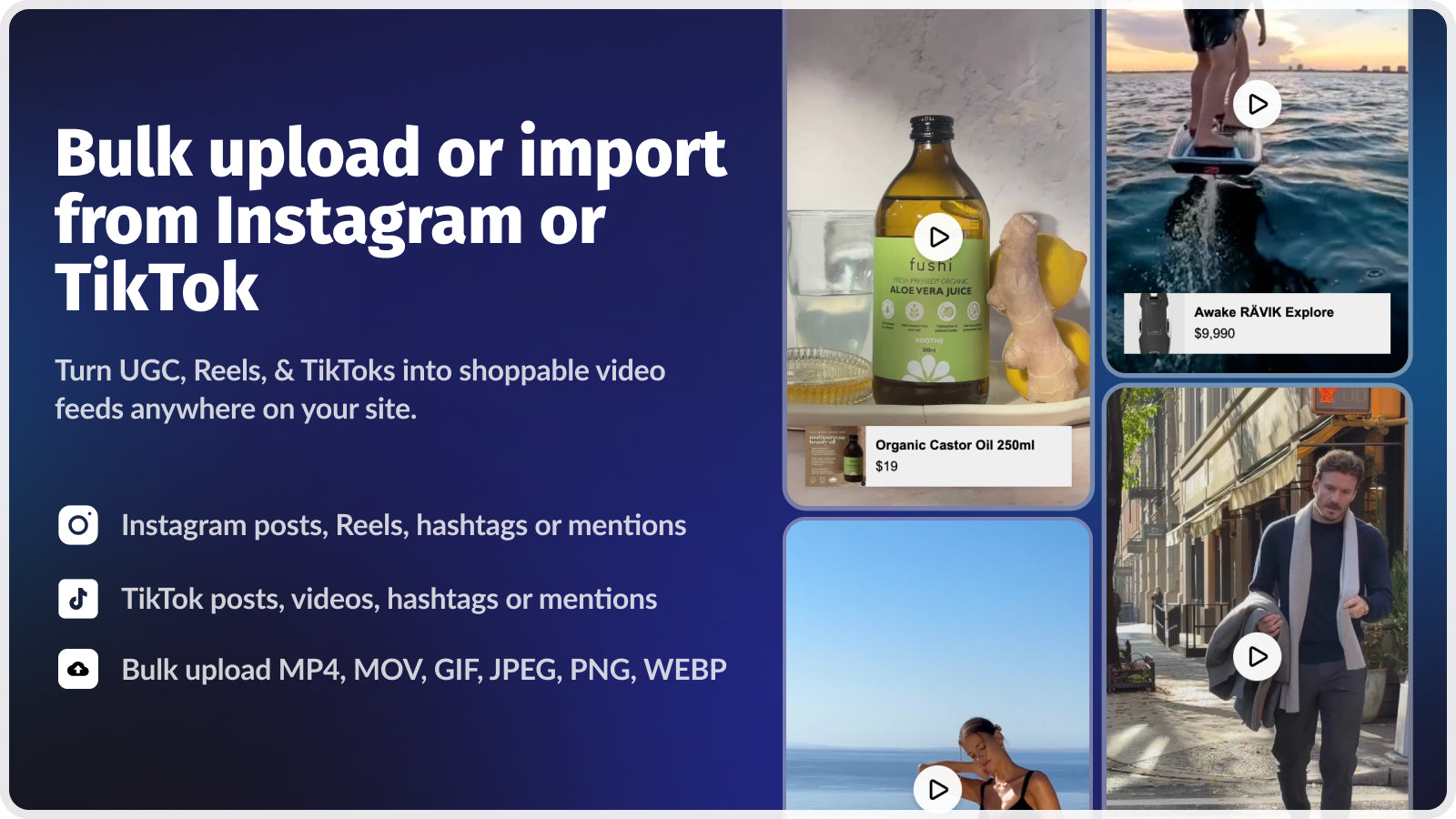
- Import from TikTok and Instagram with one click. Paste a URL, Moast pulls the video. No downloading, no re-uploading, no format conversion.
- Tag products directly in the video. Each video can be tagged to one or more Shopify products. When a customer watches the video, they see a product tag overlay with the product name, price, and a direct link to the PDP.
- Place widgets on any page. Product pages, collection pages, homepage, landing pages, blog posts. Unlimited widgets on unlimited pages, even on the free plan.
- Fast, mobile-first loading. Moast markets “no layout shift” and fast page speed. The widgets are designed for mobile-first viewing because that’s where 70%+ of social-driven traffic lands.
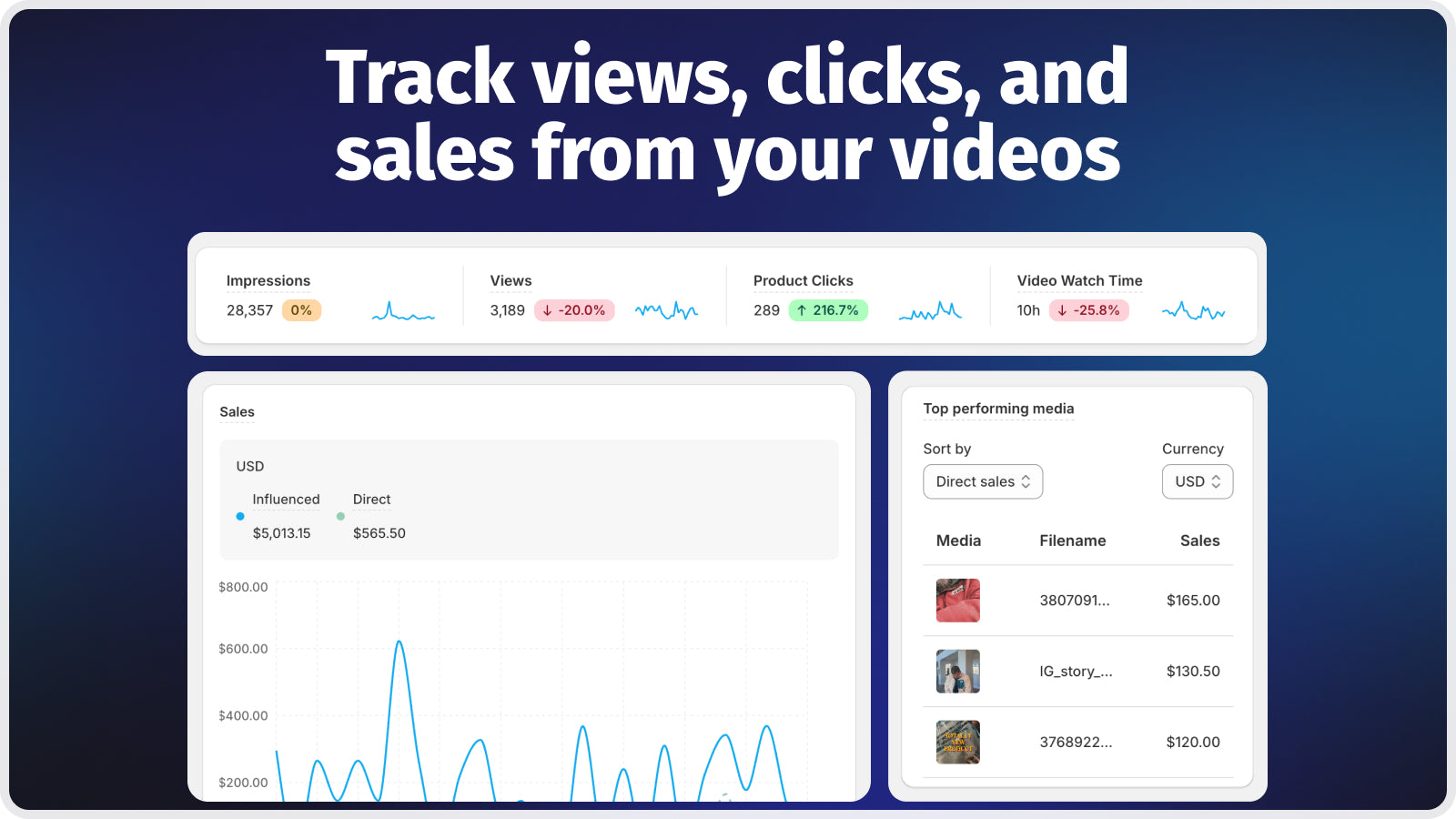
- Track everything. Views, clicks, and actual sales attributed to each video. Know which creator’s content drives revenue, not just views.
- Collect UGC from customers (Pro). A “Collect” widget solicits video content from post-purchase customers. Build a library of real customer videos without chasing people on social media.
Moast integrates with Checkout (for sales tracking), Shopify Flow (for automation), Instagram and TikTok (for content import), Judge.me, Junip, and Loox (review platforms), and the Shop App (shoppable videos appear in Shop). That integration list matters because it means Moast sits in the same ecosystem as the tools most serious DTC brands already run.
The 6 widget types
Moast ships 6 widget types, each designed for a different placement and purpose:
| Widget type | Best placement | Use case |
|---|---|---|
| Carousel | Product pages, homepage | Horizontal scroll of 3-8 shoppable videos. The workhorse format. Most brands start here. |
| Stories | Homepage, landing pages | Full-screen tap-through video stories (Instagram Stories format). Great for brand launches and drops. |
| Featured Video | Product pages, hero sections | Single large video with prominent product tags. Best for hero content or signature creator collabs. |
| Grid | Dedicated video pages, lookbooks | Multi-column video grid. Works like a UGC gallery page where every video is shoppable. |
| Pop-up | Any page (triggered) | Video pops up on scroll or after a delay. Attention-grabbing but use sparingly. |
| Collect | Post-purchase, thank-you page | Solicits UGC videos from customers who just bought. Builds your video library passively. |
Most stores run a Carousel on product pages (social proof near the buy box) and a Grid on a dedicated “Shop the Look” or “Customer Videos” page. The Collect widget on the thank-you page is the long-game play: every customer becomes a potential content creator, and the best submissions feed directly into your shoppable carousels.
Import workflow: TikToks, Reels, and UGC
The import flow is the part that makes Moast feel effortless. Three paths to get video into your store:
- Paste a TikTok or Reel URL. Moast pulls the video, creates a widget-ready asset, and lets you tag products immediately. No file management, no hosting, no CDN setup.
- Upload directly. Drag and drop video files from your desktop or phone. Useful for content that isn’t published on social yet (pre-launch teasers, behind-the-scenes, studio content).
- Collect from customers (Pro). The Collect widget on your thank-you page or a dedicated page asks recent buyers to submit videos. Submissions land in your Moast dashboard for review and approval before going live.
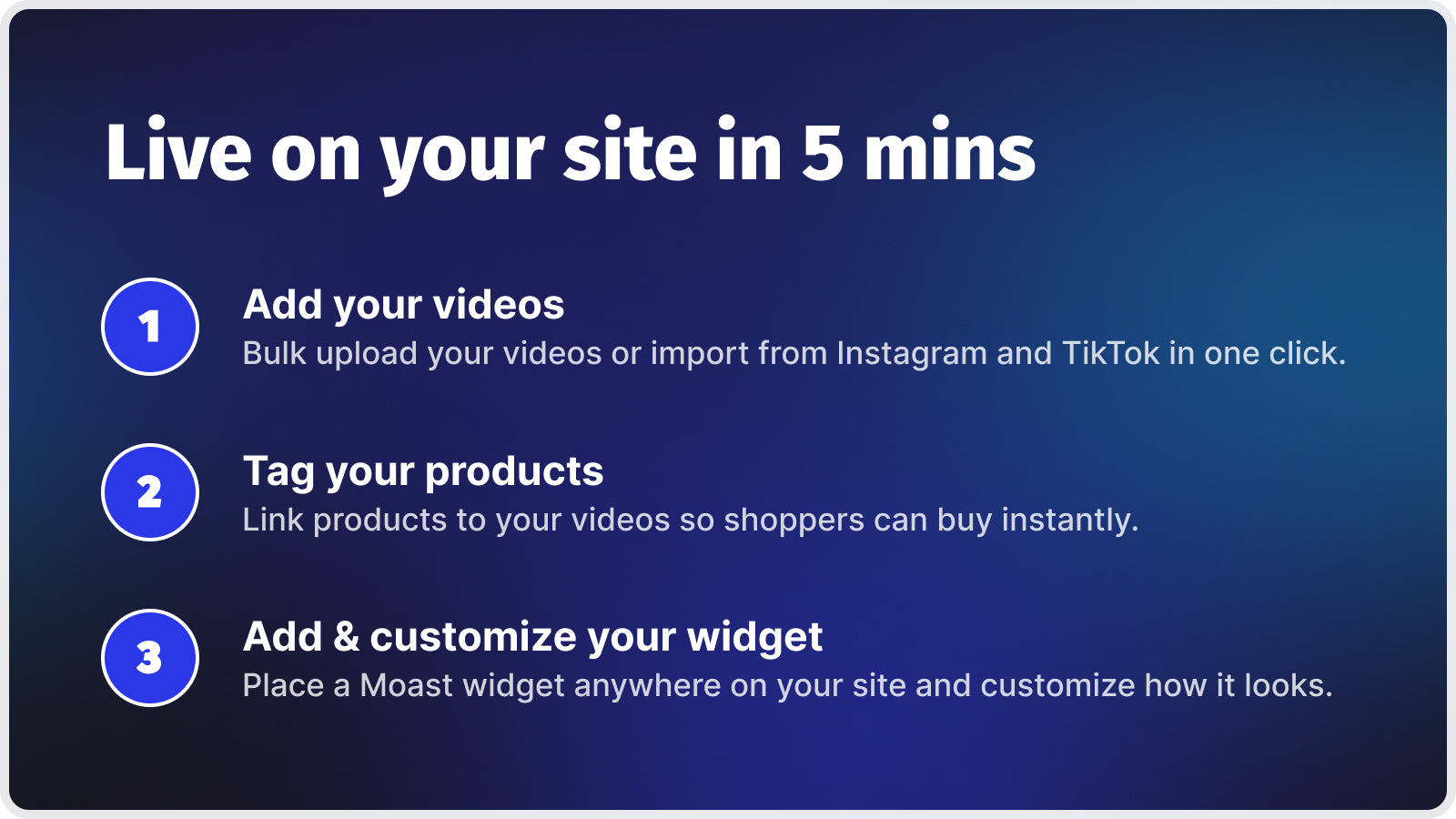
After import, tag each video with one or more products (Pro plan supports tagging multiple products per video). Organize videos into feeds (by collection, by campaign, by creator). Drop the widget on any page via the Shopify theme editor, and you’re live. The entire flow from “I have a TikTok” to “it’s shoppable on my store” takes about 3 minutes per video.
GEO and SEO: AI discoverability through video
This is the angle most merchants miss. Moast’s Pro plan includes a GEO/SEO optimization feature, and their blog actively covers “How Shoppable Video Impacts AI Discoverability for Shopify Brands” and “How Shopify Brands Should Prepare for Agentic Commerce.” They’re thinking about this seriously.
The mechanics: AI shopping platforms (ChatGPT Shopping, Perplexity Product Search, Google AI Overviews, Shopify Sidekick) crawl product pages and weight them based on content richness. A PDP with tagged shoppable video gives AI engines structured media context that a photo-only page doesn’t. The video itself tells the AI “this product has been shown in use by real people.” The product tags embedded in the video tell the AI “this video is specifically about this product at this price.” That’s a richer signal than alt text on a static image.
For stores running AEO (Answer Engine Optimization) strategies, shoppable video is additive. It doesn’t replace structured data or FAQ schema, but it sits on top as a trust and richness signal that other stores in your category probably aren’t shipping yet. First-mover advantage is real in GEO because AI engines cache content quality signals.
Pricing: what’s free, what’s Pro
| Feature | Free Forever | Pro ($15/mo) |
|---|---|---|
| Video views | Unlimited | Unlimited |
| Videos per widget | Up to 10 | Unlimited |
| Widgets | Unlimited on any page | Unlimited on any page |
| Import TikToks/Reels | Yes | Yes |
| Tag products | 1 product per video | Multiple products per video |
| Custom video feeds | Basic | Unlimited |
| Analytics | Basic (views, clicks) | Advanced (views, clicks, sales, revenue) |
| Widget customization | Standard | Advanced |
| Collect UGC from customers | No | Yes |
| Remove Moast branding | No | Yes |
| GEO/SEO optimization | No | Yes |
| Shoppable videos in Shop App | Yes | Yes |
The free plan is genuinely generous. Unlimited views, unlimited widgets, import from social, basic analytics. The ceiling is 10 videos per widget and 1 product tag per video. For most stores just getting started with shoppable video, free covers the first 3 months easily. Pro at $15/month is where the serious features live: unlimited videos, multi-product tagging, UGC collection, GEO optimization, and branded removal. Annual billing saves 8% ($165/year instead of $180).
Honest comparison: Moast’s biggest competitors are Tolstoy and Videowise. Tolstoy positions around AI-generated video content and interactive video funnels (higher price, more complex). Videowise focuses on enterprise video hosting and analytics. Moast’s niche is simplicity and speed: paste a URL, tag products, go live. For most SMB and mid-market Shopify brands, that’s the right tradeoff.
Real merchant results
Moast publishes case studies on their site with specific revenue numbers (their claims, attributed to their merchants):
- Dame reports a $26K/month revenue increase after adding shoppable videos to their PDPs. Their testimonial calls it “transformative for product pages” and credits the direct video-on-PDP format for changing how customers experience their products.
- TuffWraps saved $3,600/year by switching to Moast from a more expensive shoppable video solution.
- American Candy Store uses Moast’s Collect widget to gather customer unboxing videos that feed directly into their product page carousels.
- Fellow built step-by-step product tour videos using Moast’s shoppable tagging to guide customers through brewing equipment setup.
Customer brands visible on Moast’s homepage: Transformer Table, David’s Tea, Kids Ride Shotgun, Mockingbird, Dame, LNDR, Levelwear, Cradlewise. Not all are household names, but the mix of DTC (Dame, LNDR) and established brands (David’s Tea) suggests the app scales across sizes.
Setup walkthrough
- Install Moast from the Shopify App Store. Free plan, no credit card required. Takes 30 seconds.
- Import your first videos. Paste TikTok or Reel URLs, or upload directly. Moast pulls the content and creates widget-ready assets.
- Tag products. For each video, select which Shopify product(s) appear as clickable overlays. Pro plan supports multiple products per video.
- Create a widget. Pick a widget type (Carousel for PDPs, Grid for a video gallery page, Stories for the homepage). Organize videos into the widget.
- Place the widget on your store. Open the Shopify theme editor, add the Moast app block where you want the carousel to appear. Works on any Online Store 2.0 theme.
- Go live and track. Videos start serving immediately. Watch views, clicks, and sales in the Moast dashboard.
Moast claims 5-minute setup. Based on the workflow, that’s realistic for a first carousel of 3-5 videos. Building a full video strategy across product pages, collections, and a UGC gallery takes longer, but the per-video effort stays minimal.
If your colours live as separate products rather than variants of one product, Rubik Combined Listings groups them into a single listing with swatches instead. Free to install, 5.0 stars across 110 reviews.
Pairing Moast with Rubik for variant-heavy stores
Quick note for stores that run multi-color or multi-variant catalogs. If your store splits colorways, sizes, scents, or materials into separate Shopify products (for SEO, inventory, or ops reasons), two Rubik apps pair well alongside Moast:
- Rubik Combined Listings groups those separate products as visual variants with swatches on collection cards and product pages. Customer sees one card with 8 color dots, clicks a color, lands on that specific product page where Moast’s shoppable video carousel shows UGC for that colorway. Moast’s Pro plan “tag multiple products” feature lets you cross-tag a video across all colorways in a group so the social proof isn’t fragmented per color.
- Rubik Variant Images filters the product gallery so customers see only the selected variant’s photos when they pick a size or option. Moast’s video carousel sits below or beside the gallery. Photos filter per variant; shoppable videos provide the social proof layer. Two different media types, two different purposes, no overlap.
The stack: Rubik Combined Listings handles cross-product grouping (collection swatches + PDP variant switching). Rubik Variant Images handles in-product gallery filtering. Moast handles shoppable video (UGC carousels + sales attribution). Each layer renders independently on the product page. All three are Built for Shopify, all three use Online Store 2.0 theme app blocks, no conflicts.
Frequently asked questions
Is Moast free?
Yes, the Free Forever plan includes unlimited video views, unlimited widgets, import from TikTok and Instagram, up to 10 videos per widget, basic analytics, and shoppable videos in Shop App. Pro at $15/month adds unlimited videos, multi-product tagging, UGC collection, advanced analytics, and GEO/SEO optimization.
Will Moast slow down my store?
Moast specifically markets “no layout shift” and fast page speed as core features. The widgets are designed to load asynchronously so they don’t block the rest of the page. Multiple merchant reviews confirm fast loading on mobile. That said, any video content adds some page weight; Moast minimizes this but doesn’t eliminate it. Test with Lighthouse after adding your first carousel.
Can I import TikToks and Reels without downloading them first?
Yes. Paste the URL directly into Moast and it pulls the video. No downloading, no re-uploading, no format conversion. Works for both TikTok and Instagram Reels.
Does Moast work with all Shopify themes?
Moast is Built for Shopify and uses Online Store 2.0 theme app blocks. It works on Dawn, Horizon, Sense, Craft, every Krown theme, every Maestrooo theme, every Archetype theme, and basically any modern Shopify theme. For OS 1.0 legacy themes, manual code placement may be needed.
Can I tag multiple products in one video?
Yes, on the Pro plan ($15/month). The free plan supports 1 product tag per video. Pro supports tagging multiple products, which is especially useful for “shop the look” style videos where the model wears or uses several products from your catalog.
How does Moast compare to Tolstoy and Videowise?
Moast positions on simplicity and speed (paste URL, tag, go live). Tolstoy focuses on AI-generated video content and interactive video funnels (higher price, more complex setup). Videowise targets enterprise video hosting with deeper analytics. For most SMB and mid-market Shopify brands, Moast’s “it just works” approach is the right fit. For enterprise stores needing AI video generation or multi-platform video hosting, Tolstoy or Videowise may cover more ground.
Does Moast help with AI discoverability (GEO)?
Yes, the Pro plan includes a GEO/SEO optimization feature. Moast actively blogs about AI discoverability for Shopify brands and positions shoppable video as a signal that AI shopping platforms (ChatGPT, Perplexity, Sidekick) use to weight product pages. Structured video content with product tags gives AI engines richer context than photos alone.
Related reading
- Best Shopify shoppable video apps 2026: 8 compared
- Loox + Shopify combined listings: review aggregation guide
- Klaviyo + combined listings: variant segmentation
- Shopify AEO guide: getting cited by AI engines
- Product page optimization checklist
- Combined listings explained (rubikify.com)
- Variant images FAQ (rubikvariantimages.com)

Umid
Co-Founder at Craftshift