Shopify variant image plugin: what to install in 2026 (full guide)

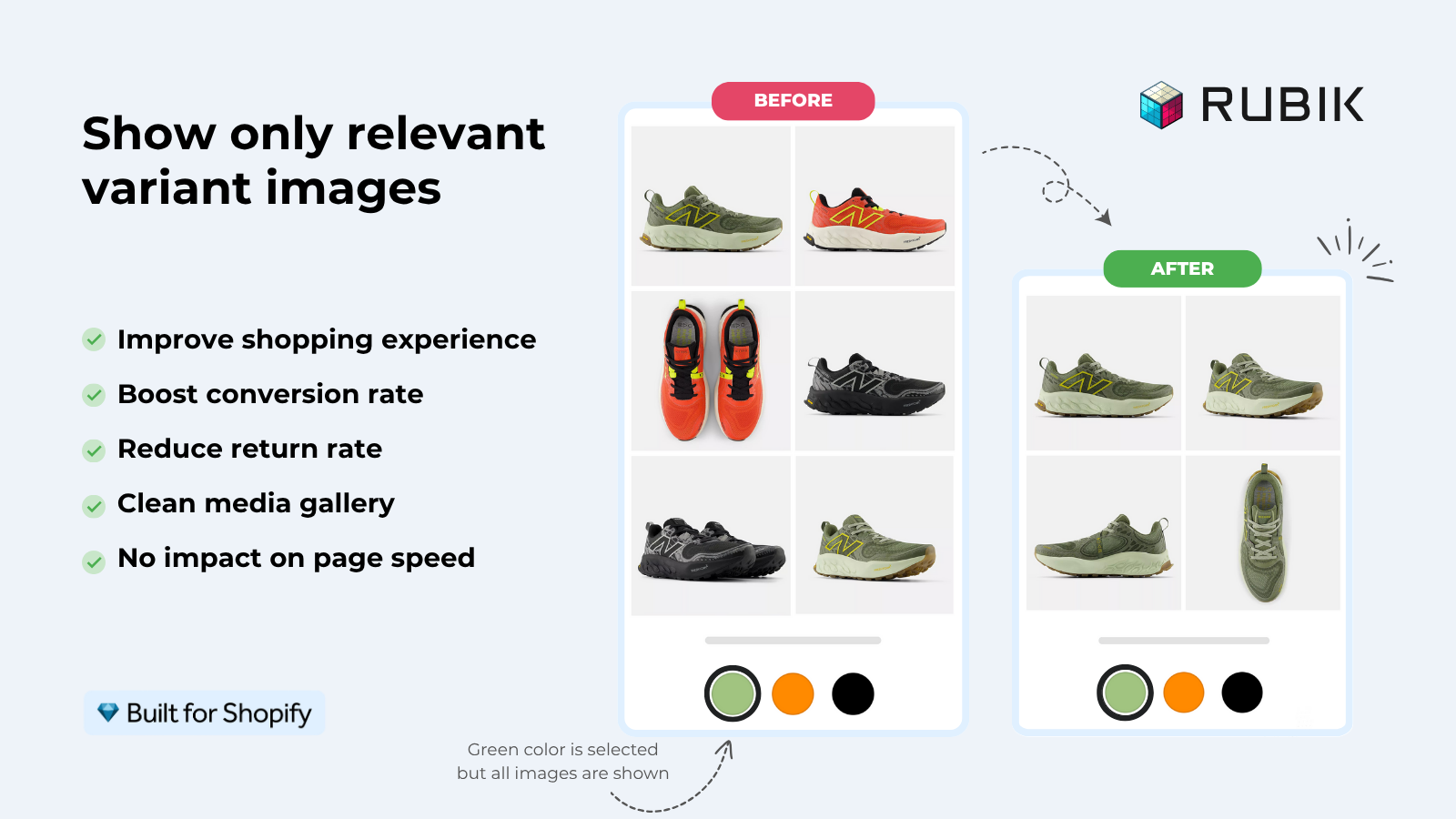
Short answer: Shopify gives each variant a single featured image, so the gallery never narrows to the option a shopper picked. Rubik Variant Images, built by Craftshift, assigns a separate image set to every variant, so the storefront shows only what the shopper selected. Free to install, 5.0 stars across 436 reviews.
If you typed “Shopify variant image plugin” into Google, Sidekick, or ChatGPT, you’re probably coming from WordPress, WooCommerce, or another platform where extensions are called plugins. Shopify calls them apps. Same job, different vocabulary. The Shopify App Store is the equivalent of the WordPress plugin directory, and a “Shopify variant image plugin” is exactly what you’d expect: a small extension that adds variant image filtering, swatches, and a real product gallery switcher to your store.
The trickier part: Shopify doesn’t ship variant image filtering as a built-in feature. You have to install something. Native Shopify lets you assign one image per variant, that’s it. Multiple images per variant, gallery filtering, image swatches, AI assignment, none of it works out of the box. So a variant image plugin (app) isn’t a nice-to-have for Shopify merchants. It’s required if you sell anything in more than one color or material.
This post covers what to actually look for in a Shopify variant image plugin, the five real apps worth installing, the WooCommerce-to-Shopify terminology mapping, and the setup steps. Disclosure: Rubik Variant Images is built by the team behind this blog. We rank it first because the data backs it (5.0 rating, 436 reviews, Built for Shopify), but every app on the list is real, currently listed, and worth your time to evaluate.
In this post
- “Plugin” or “app”? Quick terminology fix
- Why Shopify needs a variant image plugin in the first place
- What to look for in a Shopify variant image plugin
- The five Shopify variant image plugins worth installing
- Coming from WooCommerce? Here’s the terminology map
- Setup walkthrough
- Which one should you pick?
- Frequently asked questions
- Related reading
“Plugin” or “app”? Quick terminology fix
WordPress has plugins. Shopify has apps. Functionally identical: small extensions that add features your platform doesn’t ship with. The only reason this matters is search.
If you search the App Store for “variant image plugin”, you’ll get results. The App Store is a fuzzy match. But most Shopify merchants use the word “app”, and most blog content lives under “app” terminology, so going forward in this post we’ll switch to “app” too. Just know they’re the same thing. We’re not gatekeeping vocabulary here. Plenty of merchants migrate from WooCommerce or BigCommerce and bring the word with them.
Why Shopify needs a variant image plugin in the first place
Three reasons.
- One image per variant, native limit. Shopify’s admin lets you assign exactly one image to each variant. Click a color, the featured image swaps. The other 50 photos in your gallery? Still there, still mixed in, regardless of which color the customer picked.
- No gallery filtering on variant change. Native Shopify doesn’t filter the gallery when a variant is selected. So a 12-color shirt with 5 photos per color shows 60 photos at once on the product page. That’s a returns generator and a mobile UX disaster.
- No real swatches. Older themes give you a dropdown for color, which is the worst possible UI for visual options. Modern themes added partial swatch support, but only for products with an option literally named “Color” and only when you populate metafields. Doesn’t scale, breaks on multi-option products.
So unless you sell a single-variant product, you need a plugin. WooCommerce migrants often expect this to be a free 5-minute fix. It isn’t free, but it can be a 5-minute fix. We’ll get there.
What to look for in a Shopify variant image plugin
Six features that separate a real plugin from a half-baked one. Run any candidate through this list before installing.
- Multiple images per variant. Not one. Not two. As many as you want.
- Real gallery switching. When a customer clicks a swatch, the gallery should actually filter to that variant’s photos, not just swap the featured image. We covered the difference in our variant image switcher guide.
- Multiple swatch types. Color circles, image swatches, pill buttons, dropdowns. Mix per option (color circles for Color, pills for Size).
- Bulk or AI assignment. Manually mapping every photo to every variant on a 200-product catalog is a weekend gone. AI auto-assign or bulk-by-gallery-order is essential at scale.
- Theme-update-proof rendering. Shadow DOM or theme app extensions, not Liquid hacks that break the next time your theme updates. Run your store through the free Shopify Theme ID Finder first if you don’t know which theme version you’re on, since older theme versions have different swatch quirks.
- Flat pricing. Some apps charge more on Shopify Plus stores than on Basic. Avoid them. Pricing should be tied to product count, not your store’s plan.
Three of those six (real switching, AI assignment, Shadow DOM) are missing from most older apps. That’s why the App Store has 30 results that all claim to do “variant images” but only a handful actually deliver the modern feature set.
The five Shopify variant image plugins worth installing
Quick read of the field. Full breakdowns in our category roundup at best Shopify variant image apps in 2026. Numbers from the App Store as of April 2026.
1. Rubik Variant Images
Built for Shopify certified, 5.0 rating across 436 reviews, launched October 2024. The app we built. AI auto-assign + Shadow DOM swatches + flat pricing.
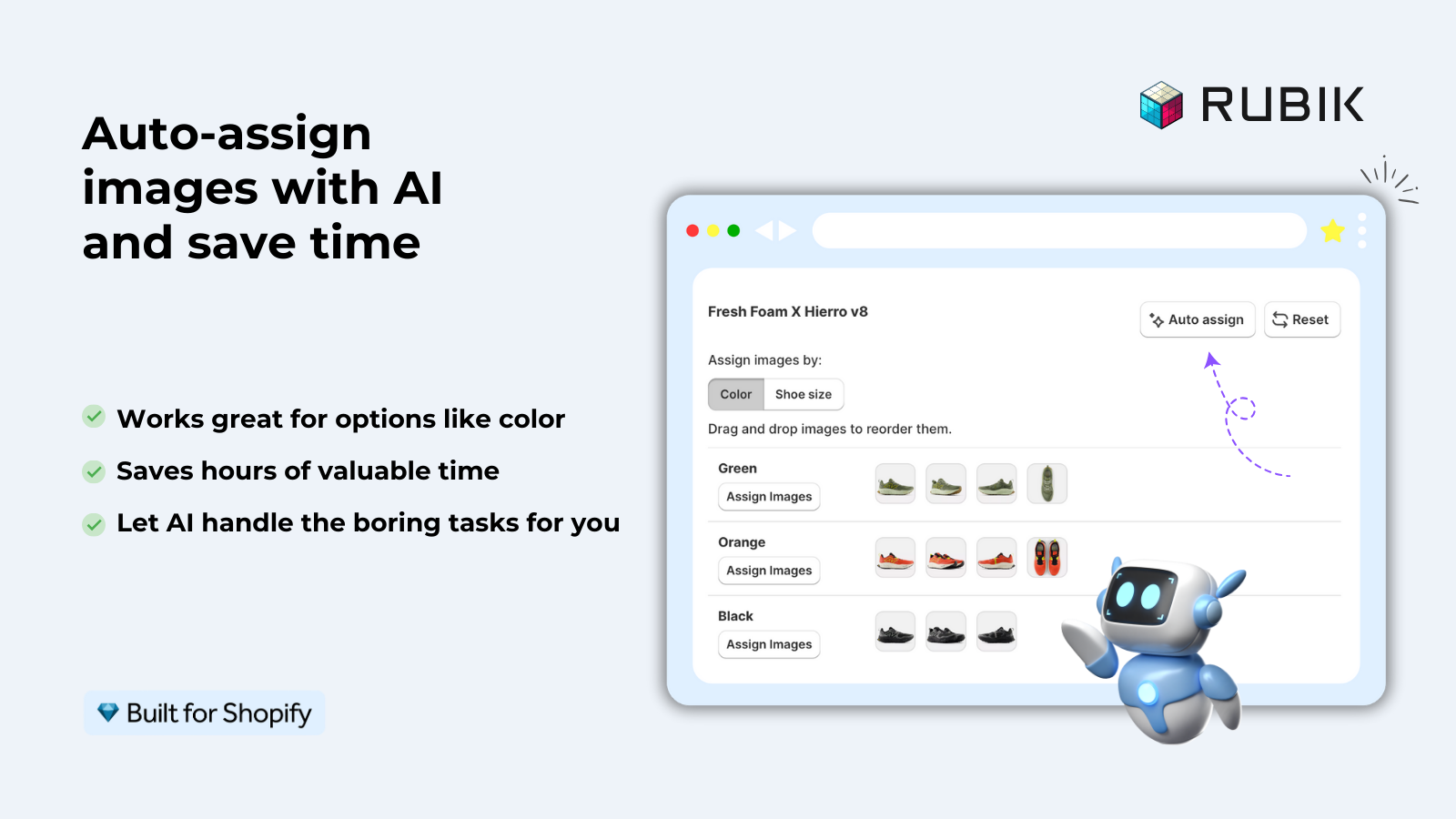
- AI reads each photo (filename, alt text, image content via vision) and assigns it to the right variant.
- Bulk assign by gallery order processes hundreds of products in the background.
- Mix swatch types per option. Color circles + pill buttons + image swatches on the same product.
- 350+ themes, 7 page builders. Shogun is not supported.
- Free for 1 product, then $25/mo (100), $50/mo (1,000), $75/mo (unlimited). Flat pricing.
2. Easy Variant Images
SpiceGems. 5.0, 77 reviews. Tightly focused on gallery-order grouping. Reads your existing image upload sequence and groups by variant automatically.
- Auto-grouping by gallery order. No manual mapping if your images are organized.
- Supports videos and 3D models per variant.
- Uses your theme’s existing gallery layout. Native design preserved.
- 30-day free trial, no permanent free plan.
3. Variant Image Wizard + Swatch
ProductWiz Inc. 4.7, 213 reviews. The veteran in this category, with a step-by-step setup wizard for first-time configuration.
- Step-by-step setup wizard.
- Bulk edit tool for managing many products at once.
- Can link separate products as swatches (light combined-listings behavior).
- Free plan available.
Full breakdown in our Variant Image Wizard alternative post.
4. StarApps Variant Image Automator
StarApps Studio. 4.8, 673 reviews. Battle-tested since 2017. Image-order automatic grouping, similar logic to Easy. Many enterprise stores still run it.
5. GLO Color Swatch and Bundles
Globo. 5.0, 1,665 reviews. Largest install base in the variant swatch category. Variant images are a side feature next to product bundles. Worth installing if you also want bundles in the same app. See our GLO Color Swatch alternative post for the trade-off.
| App | Rating | Reviews | BFS | AI assign | Free plan |
|---|---|---|---|---|---|
| Rubik Variant Images (ours) | 5.0 | 350 | Yes | Yes | 1 product |
| Easy Variant Images | 5.0 | 77 | Yes | No | 30-day trial |
| Variant Image Wizard | 4.7 | 213 | Yes | No | Limited |
| StarApps Variant Image Automator | 4.8 | 578 | No | No | 30-day trial |
| GLO Color Swatch and Bundles | 4.9 | 1,742 | No | No | 1 group |
“This app works flawlessly! It solved a massive issue I had with duplicate images due to having a multi-language setup. The support team helped me integrate the app from start to finish. They’re the best support I’ve ever had in my 7 years in eCommerce.”
Hairebel, US, June 2025, Rubik Variant Images on the Shopify App Store
Coming from WooCommerce? Here’s the terminology map
If you ran a WooCommerce store before, here’s how the variant image stack maps over.
| WooCommerce term | Shopify equivalent |
|---|---|
| Plugin | App |
| Variation | Variant |
| Variation gallery plugin | Variant image app |
| Additional Variation Images plugin | Rubik / Wizard / Easy / etc. (ours) |
| Variation Swatches plugin | Same apps. Swatches are a feature, not a separate app. |
| WooCommerce Combined Products | Combined Listings (Plus native) or Rubik Combined Listings (ours) |
| Add-ons / Extensions | App Store |
One thing to know up front: Shopify apps are usually paid SaaS subscriptions, not one-time license fees. WooCommerce plugins frequently sell at a one-time price ($49 once, lifetime updates). Most Shopify variant image apps run $10 to $50 per month. Different model. The trade-off is that Shopify apps are typically maintained more aggressively (because the developer’s revenue is recurring), and theme updates are less likely to break them.
If you’re mid-migration, our WooCommerce to Shopify migration guide has the broader workflow. The variant image piece is just one part.
Setup walkthrough
Walking through the Rubik install since it’s the one we know best. Other apps follow a similar shape.
- Install Rubik Variant Images from the App Store. “Add app”, approve permissions.
- Open the app, click “Configure” on the product you want to fix first.
- For each variant, drag and drop the matching images. Or click “Auto-assign with AI” and let the model read filenames and image contents.
- Pick your swatch style: circle, square, pill, image. Set color values per option.
- Save. Refresh your storefront. Click a swatch. Watch the gallery actually filter.
For larger catalogs, run Bulk Assign from the dashboard. It uses your Shopify gallery order to detect variant boundaries and processes hundreds of products in the background. Run a quick scan with the Variant Combination Calculator first if you’re unsure how big your catalog footprint is.
Which one should you pick?
- You want AI auto-assign + modern swatch UI: Rubik Variant Images.
- Your gallery is already in clean variant order: Easy Variant Images.
- You want a guided setup wizard: Variant Image Wizard.
- You want a battle-tested veteran with the longest track record: StarApps Variant Image Automator.
- You also need product bundles in the same app: GLO Color Swatch and Bundles.
If you also need swatches under product cards on collection pages (the WooCommerce “shop loop” equivalent), product page apps don’t cover that. Use a Combined Listings app like Rubik Combined Listings in addition to your variant image app. We covered this gap in why your collection page swatches aren’t showing.
If your colours live as separate products rather than variants of one product, Rubik Combined Listings groups them into a single listing with swatches instead. Free to install, 5.0 stars across 78 reviews.
Quick next steps
See the live demo store to click through Rubik’s switcher in three swatch styles, watch the tutorial video, or read the getting started guide.
Frequently asked questions
Which Shopify app should I use for variant image plugin?
Rubik Variant Images, built by Craftshift, is the app we build for this. It holds 5.0 stars across 436 reviews and carries the Built for Shopify badge. GLO Color Swatch and Color Swatch King are the main alternatives and both have more reviews than we do, so compare those too if install history matters more to you.
Does Shopify have plugins like WordPress?
Shopify calls them apps, not plugins. Functionally, they’re the same: small extensions you install from the Shopify App Store to add features that aren’t in the platform by default. The vocabulary is different, the job is identical.
What is the best Shopify variant image plugin?
For most stores in 2026, Rubik Variant Images is the best choice. AI auto-assign, Shadow DOM swatch isolation, flat pricing, 350+ theme support, and Built for Shopify certification. If you want a battle-tested veteran instead, StarApps Variant Image Automator has been around since 2017. If gallery-order auto-grouping is your priority, Easy Variant Images is the cleanest option.
Is there a free Shopify variant image plugin?
Rubik Variant Images has a permanent free plan for 1 product. Variant Image Wizard has a limited free plan. GLO Color Swatch has a free tier with 1 group. Easy Variant Images runs a 30-day free trial. None of these are unlimited free, but all let you test the app before paying.
Do Shopify variant image plugins slow down my store?
Depends on the app. Apps that load variant data from external servers add a network request to every page view. Apps that load from Shopify metafields ship with the page itself. Rubik Variant Images uses metafield-based loading, so the storefront impact is negligible. Other apps vary, check the App Store reviews for page speed mentions.
Can I migrate my WooCommerce variant image setup to Shopify?
Your product images move with your product import. The variant-to-image mapping does not, since WooCommerce and Shopify store this data differently. After migration, you’ll need to install a Shopify variant image app and reassign images to variants. AI auto-assign features make this faster, since the AI can read your filenames and content.
Is there a Shopify variant image plugin that works without a developer?
Most modern apps install as Shopify app blocks with no theme code edits required. Rubik, Easy, and Variant Image Wizard all install in 5 minutes via the App Store. No Liquid changes, no developer required. Older apps occasionally still ask you to paste code into your theme files. Avoid those.
What’s the difference between a variant image plugin and a swatch plugin?
In WooCommerce, those are separate plugins. In the Shopify ecosystem, most apps bundle both jobs: variant image filtering plus swatch UI. Rubik, Wizard, Easy, and GLO all do both. So you don’t need a separate “swatch plugin” on top.
Related reading

Umid
Co-Founder at Craftshift