How to group products as variants in Shopify (separate products method)
Shopify supports variant types to facilitate listings for variant products but the system breaks for overly variant products. Two thousand variants with three types and one description / image gallery per product are inefficient for stores where each of these “variants” are entirely separate products. Each has its own photographs, descriptions, and SEO tags that can not be appropriately split up across the single Shopify product page.
The alternative: keep each color (or material, or model) as its own separate product with its own images, description, and URL. Then group them together so they look and behave like variants to the customer. Color swatches on the product page link between products. The shopper clicks “Blue” and lands on the Blue product page. Clicks “Red” and lands on the Red product page. Each page has its own gallery, its own content, its own SEO juice.
This guide covers native Combined Listings product grouping, product grouping apps, and metafield linking on Shopify.
In this post
- When to group products instead of using variants
- Method 1: Shopify native Combined Listings
- Method 2: Using Rubik Combined Listings app
- Method 3: Manual metafield linking
- SEO benefits of separate products
- Swatches on collection pages
- FAQ
When to group products instead of using variants
You don’t need Variants for every store. Variants are ideal for products that have the exact same description but differ in a simple attribute, such as a t-shirt coming in 5 colors with the same fit description. On the other hand, a sofa available in Leather, Velvet, and Linen where each fabric has completely different care instructions, pricing, photos, and sourcing may be listed as Separate products within a Group.
Common use cases for product grouping:
- Each color needs its own photo gallery. A dress in 8 colors where each color has 6 unique lifestyle photos. That is 48 images crammed into one product gallery with variant image filtering needed just to make it usable. Separate products keep each gallery clean.
- Each variant has a different description. Material composition, care instructions, or specs that vary per option. Per-variant descriptions via metafields work but add complexity. Separate products keep it simple.
- SEO for each option. “Black leather sofa” and “Grey velvet sofa” are different search queries. Separate products can target each keyword with a dedicated URL and title. Variants share one URL.
- Hitting the variant limit. A product with 5 colors x 8 sizes x 3 fits = 120 variants, under the 2,000 limit but close. Splitting by color gives 5 products with 24 variants each, with plenty of room to grow.
- Different pricing per “variant.” A handmade ceramic mug where each color requires a different glaze process with different costs. Separate products let each have its own pricing without confusing variant-level price overrides.
Method 1: Shopify native Combined Listings
Shopify added Combined Listings as a native feature. The feature is similar to the product bundle app, but it allows you to make a “parent” product with links to related individual products. Each product can have its own title/image/description/variants. Combined Listings display links to individual products as if they were options on the page.
Limitations of the native approach:
- No color swatches on collection pages (products show as individual cards, not grouped with a swatch picker)
- Limited visual customization of the option selector
- No AI-powered grouping or bulk creation
- Setup is manual for each group
For a small number of product groups, Native Features will cover your needs for filtering, but for a large number of groups or for features such as collection page swatches, a dedicated App will be more efficient and feature-rich.
Method 2: Using Rubik Combined Listings app
Rubik Combined Listings extends the grouping concept with features the native solution lacks:
- Collection page swatches. Grouped products show as a single card with color swatches on collection pages. Customers see and switch colors without clicking into individual product pages.
- Product page swatches. On each product page, swatches link to the other products in the group. Click a different color, land on that product’s page with its own gallery and description.
- AI auto-grouping. The app can automatically detect which products belong together based on title patterns, tags, or product type. No manual group creation needed for large catalogs.
- Bulk group creation. Create hundreds of groups at once via CSV import or the bulk editor.
- 4 swatch types. Visual swatches (color circles), button swatches (text), pill swatches, and dropdown. Mix types across different option groups.
- Real-time sync. When you update a product’s price, images, or availability, the group reflects the change instantly. Metafield-based, no external API calls.
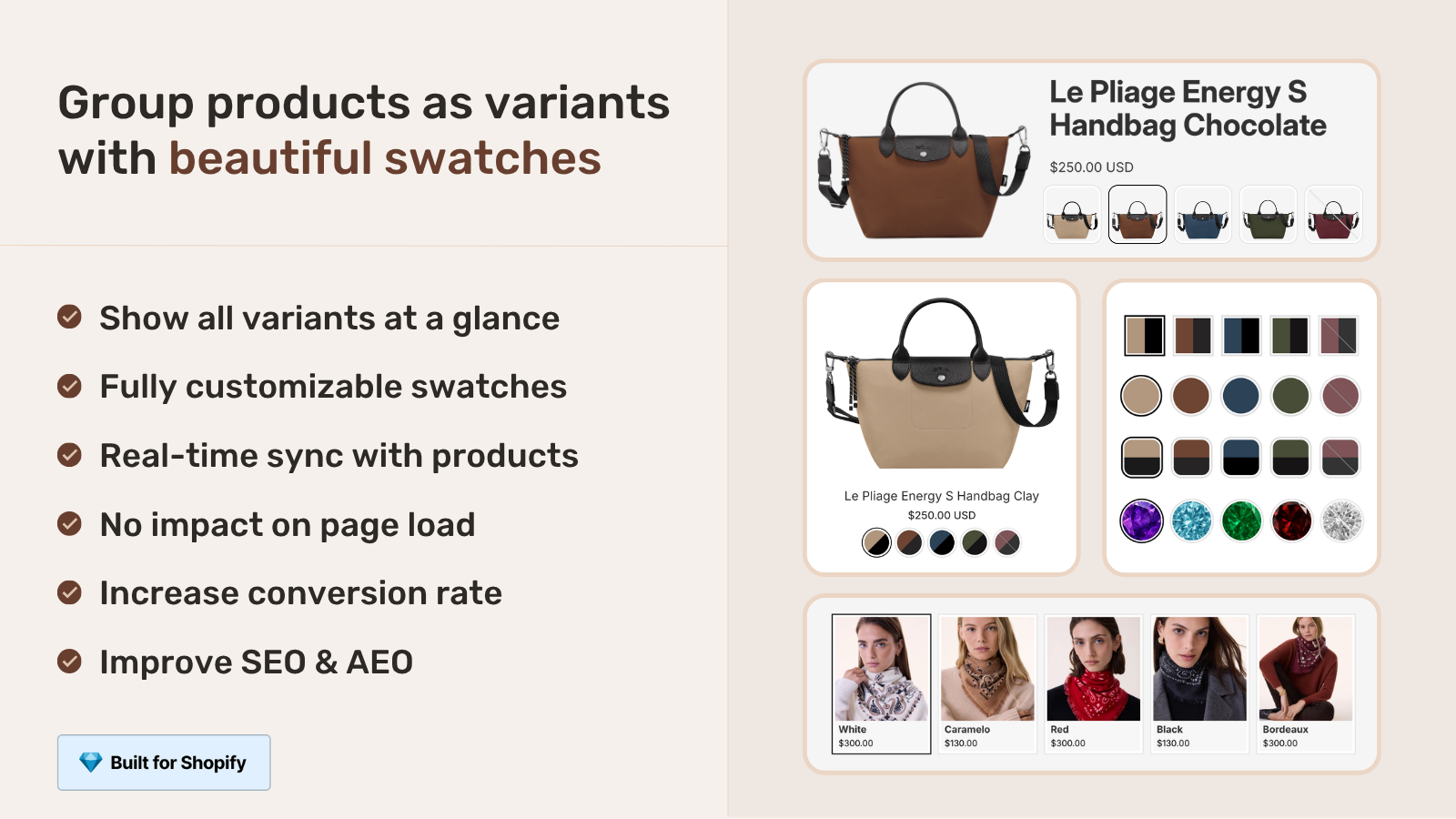
Setup takes about 5 minutes per group manually, or seconds per group with AI auto-grouping. The app works with all Shopify themes and does not require Shopify Plus.
Method 3: Manual metafield linking
For developers who want to bypass the app, manually linking products via metafields is possible. Create a product’s metafield to hold the related product references, then output the swatch in your theme template.
{%- comment -%} In your product template {%- endcomment -%}
{%- assign related = product.metafields.custom.color_group.value -%}
{%- if related.size > 0 -%}
  <div class="color-group-swatches">
    {%- for item in related -%}
      <a href="{{ item.url }}"
         class="group-swatch{% if item.id == product.id %} is-active{% endif %}"
         style="background-color: {{ item.metafields.custom.swatch_color }};"
         title="{{ item.title }}">
      </a>
    {%- endfor -%}
  </div>
{%- endif -%}
This requires creating a “Product reference list” metafield and manually linking each product to its siblings. It works but has high maintenance overhead as you need to manually update every product in every group (e.g. when you add or remove a product from a group). Reasonable for small sets (e.g. 5 groups), but becomes a full time job for very large sets (e.g. 50 groups).
SEO benefits of separate products
This is one of the key benefits over traditional variants and why many retailers with an SEO focus offer their products in groups:
- Dedicated URLs. “yourstore.com/black-leather-sofa” and “yourstore.com/grey-velvet-sofa” each target their own keyword. With variants, both live at “yourstore.com/sofa?variant=123” which targets only one keyword.
- Unique meta titles and descriptions. Each product can have its own SEO-optimized title and description targeting specific long-tail queries.
- Separate image alt text. Each product’s images have their own alt text optimized for that specific color/material. Variant images share the product’s general alt text strategy.
- Individual structured data. Each product generates its own Product schema with its own offers, improving rich snippet eligibility.
Managing more products and pages comes with its trade-offs. However, for stores trying to optimize their site for SEO for color or material-specific queries, the extra work will pay off in increased organic traffic.
Swatches on collection pages
One of the biggest UX features added with product grouping is collection page swatches. Instead of seeing 5 of the same product all displayed separately (1 in each color), the grouped product is displayed once with color swatch options underneath the product image. This way customers can view the product once and select the color from the swatches directly from the collection page.
Shopify Combined Listings doesn’t display swatches on collection pages but Rubik Combined Listings does with control over the styling on desktop and mobile views. There are 4 available types of swatches. Product card image change on swatch hover is also included.
For displaying product page variants for grouped products, see Rubik Variant Images. This app can be used in conjunction with Combined Listings to filter images and customize look of swatches. Combined Listings app is used to group products on collection pages, and then Variant Images handles the variant display on the individual product page.
“Hands Down the best customer support of all the variation/swatch apps I have used till date. The app does everything. From individual variant gallery to really detailed customizable swatch’s. All in a single app. Originally we used to use two different apps so this is so much more cost efficient for us.”
Bellissima Covers, India, Rubik Variant Images on the Shopify App Store
See the live demo store, watch the setup tutorial, or read the getting started guide.
Frequently asked questions
What is the difference between Shopify variants and grouped products?
Variants: These are combinations within a single product (one URL, one description, one gallery) offered as variations on the same product. Grouped products: These are separate products (each with their own URL, description, gallery) that are grouped together and offered through swatches or options (e.g., widgets). Variants share everything including price, sku, description. Grouped products share only the visual grouping.
Do I need Shopify Plus for Combined Listings?
Note Shopify offers a feature called Combined Listings on all plans and prices. Rubik Combined Listings app also works on all Shopify plans, no Plus required. This is one of the keys to why the older method for combined listings no longer gets used.
Will grouped products show as separate items in Google Shopping?
Each product in a product group has its own URL and generates its own product feed entry- this is beneficial to Google Shopping as each different color/material gets its own listing with its own image. This tends to outperform a single generic listing for all of the variations.
Can I group products by something other than color?
You can organize swatches into groups or categories in whatever way you like, eg. by material, model, size range, or by combinations of bundles etc. The swatch label can be a swatch of text, a colour, or an image. “Leather” and “Velvet” work as text button swatches just as well as do the colour circles for “Red” and “Blue”.
How does inventory work with grouped products?
Each product has its own independent inventory. For example, if the Blue product goes out of stock, the swatch can be hidden or greyed out in the group view but the other product colours will remain in stock. There is no shared inventory.
Can I use both Rubik Variant Images and Rubik Combined Listings together?
Yes. They are designed to work together. Combined Listings does the product grouping and collection page swatches. Variant Images does the image filtering on the product page as well as the swatches for the variants on a product. Many stores use both for the complete variant experience throughout the site.
Related reading

Umid
Co-Founder at Craftshift