Shopify app review screenshot generator: turn App Store reviews into social proof
A Shopify app review screenshot generator takes a plain-text review from the Shopify App Store and turns it into a clean, branded image you can actually post somewhere. That five-star review a merchant left you last week? Right now it’s sitting on a reviews tab nobody scrolls to. Screenshot it properly and it becomes a tweet, a LinkedIn post, a slide in your pitch deck, a banner on your landing page.
We build Shopify apps for a living. Two of them, Rubik Variant Images and Rubik Combined Listings, so we collect App Store reviews every week. And for the longest time our honest answer to “what do you do with a great review?” was basically nothing. Copy the text into a post, maybe. It always looked flat. A wall of grey characters that scrolled past in half a second.
Quick answer: the fix is a free tool from RankBase called the Shopify App Review Screenshot Generator. You paste a review link, pick a style, and download a high-resolution PNG. No signup, no watermark, no cost, no limit on how many you make. This post walks through what it does, how to use it, and how to make the output look like it belongs on your brand.
In this post
- What a review screenshot generator is
- Why review screenshots matter more than you think
- How to use the RankBase generator
- What you can customize
- A real review, turned into an image
- Where to post the screenshots
- RankBase beyond the screenshot tool
- Frequently asked questions
- Related reading
What a review screenshot generator is
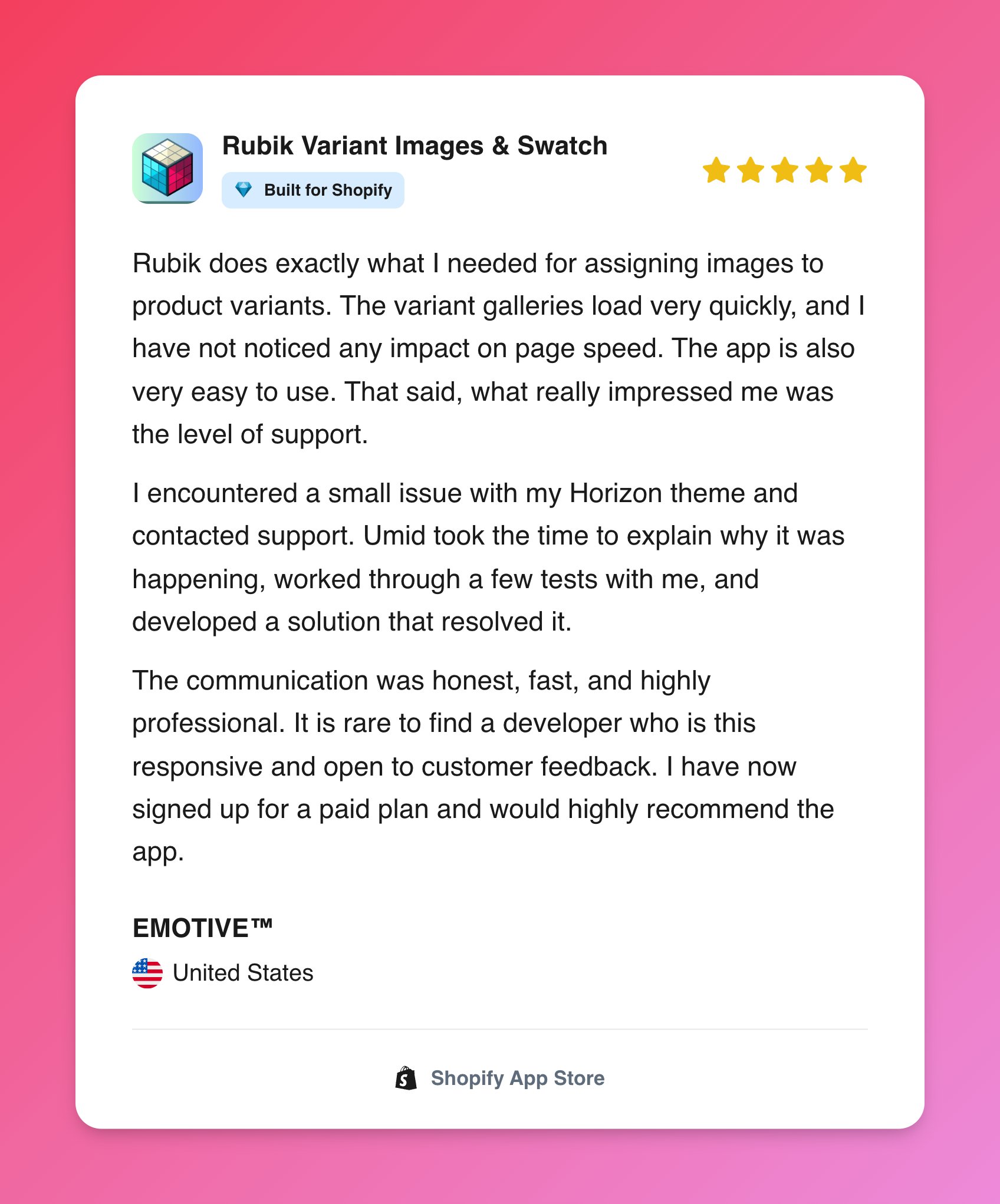
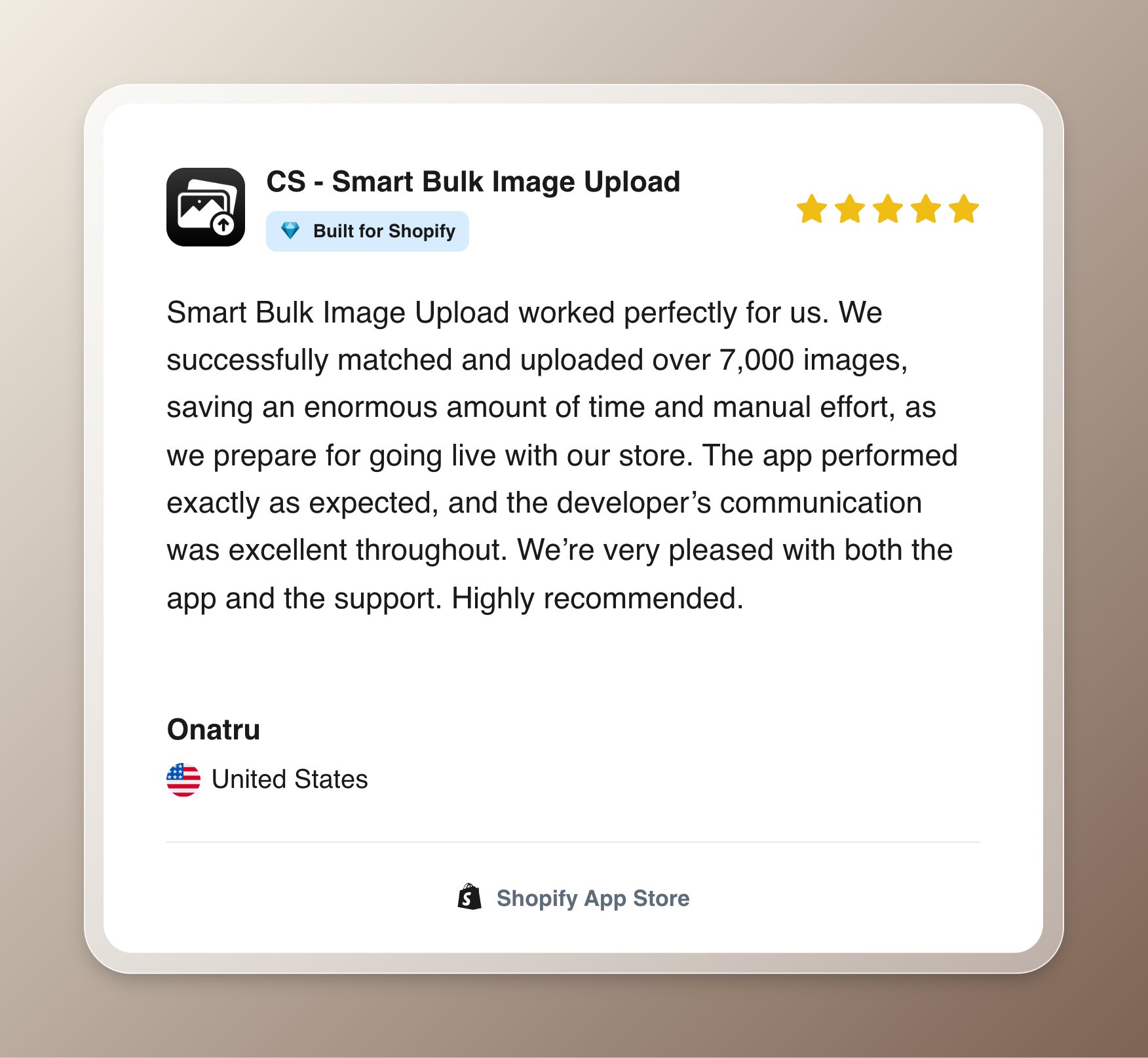
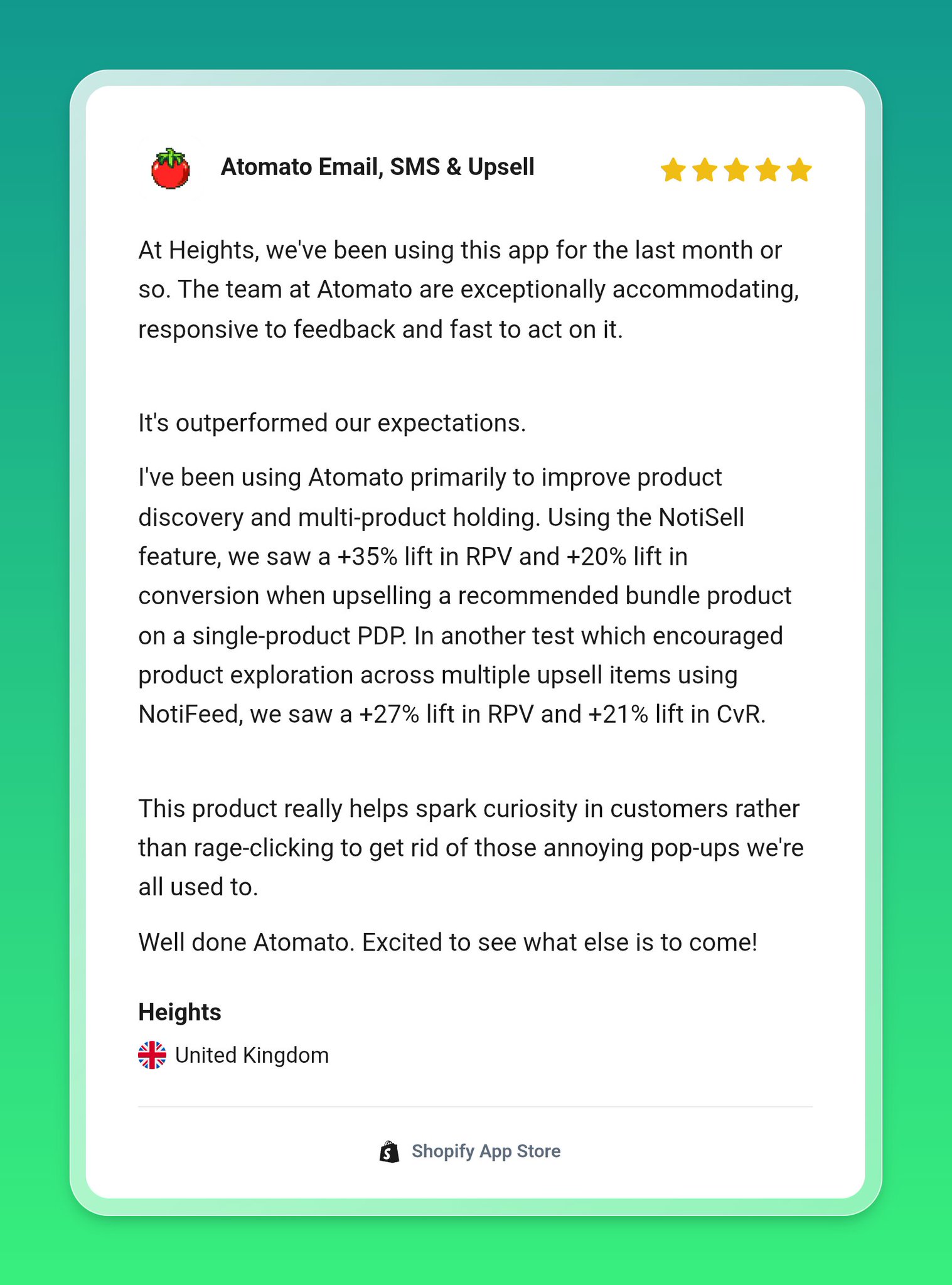
A Shopify app review screenshot generator is a web tool that reads a public App Store review and renders it as a designed image card: the review text, the star rating, the store name, the country flag, your app icon, all laid out cleanly instead of screenshotted crooked off your own monitor. You feed it a link. It gives you a PNG.
That’s the whole idea. It pulls only the public data that’s already on the review page, then hands you back something that looks intentional. No design skills needed, no Figma file, no dragging a rectangle around a browser tab and hoping the crop lines up. If you’ve ever posted a lopsided phone-camera photo of your screen because you were in a hurry, this is the antidote.
Why review screenshots matter more than you think
Here’s the opinion most app developers won’t say out loud: your reviews are your best marketing, and almost nobody uses them. You earned that praise. A real merchant, in a real store, took two minutes to tell the world your app works. And then what? It lives on page two of your listing, under a “read more” link, where a grand total of nobody looks.
Social proof is the single most persuasive thing you have. Not your feature list. Not your pricing table. Someone else vouching for you. When a prospective merchant is deciding between your app and three others, a screenshot of a happy customer does more work than a paragraph of your own copy ever will. Why? Because you’re biased and they know it. The reviewer isn’t.
There’s an App Store angle too. Reviews feed your rankings, and consistently showing them off (on X, on LinkedIn, on your site) drives more installs, which drives more reviews, which feeds the loop again. A clean review image is small. The compounding effect is not.
How to use the RankBase generator
The flow takes about a minute. Here’s the whole thing:
- Open your app’s reviews page on the Shopify App Store (or any app’s, the tool reads public data).
- Hover over the review you want. A small link icon appears. Copy that permalink. It looks like
https://apps.shopify.com/reviews/2182078. - Paste the link into the generator and hit Generate. It pulls the store name, country, rating, and review text automatically.
- Style it: background, size, card theme, frame, which elements to show.
- Download the PNG. Post it. Done.
The rendering happens right in your browser, and there’s no account to create. That last part matters to me more than it should, honestly. So many “free” tools these days mean “free after you hand over an email and sit through an onboarding sequence.” This one just works when you land on it. Refreshing.
What you can customize
You get real control over how the card looks, which is what keeps every screenshot on-brand instead of looking like a generic template. The main settings:
| Setting | Options |
|---|---|
| Background | Solid color or gradient, with an adjustable angle |
| Size preset | Auto, Landscape, Square, or Portrait |
| Card theme | Light or Dark |
| Star color | Black or Yellow |
| Frame | None, Light, Dark, or Glass |
| Layout | Padding, corner roundness, and shadow depth |
On top of that, you can toggle individual pieces on and off: the app icon, the “Built for Shopify” badge, the store name, the country flag, and a link back to your App Store listing. Want a minimal card with just the text and stars? Turn the rest off. Want the full trust stack with your icon and the Built for Shopify badge front and center? Turn it all on. Match the background to your brand color once and every future screenshot stays consistent.
Small tip from doing this a lot: pick the size preset for where the image is going before you fine-tune anything else. Square for Instagram and most X posts, Landscape for LinkedIn and blog headers, Portrait for stories. If you need to hit an exact platform dimension afterward, our free social media image resizer will square it away.
A real review, turned into an image
Let me make this concrete with one of our own. A merchant in the Netherlands left this on the Rubik Combined Listings listing in April 2026:
“We found this app on Shopify App Store and decided to give a shot. […] their member Farid set up a quick call, listened to our problem statement and literally within 2 hours brought a solution to that!!! That was unbelievably quick! Now we have a beautiful product page, as well as the collections page. Hence 5 star!”
A Netherlands merchant, April 2026, on the Rubik Combined Listings App Store listing.
That exact review lives at a permalink: apps.shopify.com/reviews/2182078. Drop that link into the generator, set a dark card on a warm brown background, keep the app icon and the Built for Shopify badge on, and thirty seconds later you’ve got a share-ready graphic. No cropping, no re-typing, no lost formatting. The words are verbatim from the merchant, which is the whole point of screenshotting a real review instead of writing your own testimonial (never do that, by the way).
Where to post the screenshots
A review image is only useful if it goes somewhere people see it. Five places earn their keep: your X and LinkedIn feeds (the obvious ones), a rotating “wall of love” section on your landing page, your app’s changelog or launch posts, and marketing emails to merchants who installed but haven’t upgraded. That last one is quietly effective. A skeptical free-plan user seeing three peers rave about the paid features? That nudges.
One habit worth building: tag the links you share alongside these images so you can tell which review, on which channel, actually drove installs. That’s what UTM parameters are for, and our Shopify UTM builder guide plus the free UTM campaign link builder make it a two-minute job. Post the screenshot, link your listing with a tagged URL, and your analytics finally tells you whether social proof is paying off. And if you’re writing the caption to go with it, the headline analyzer helps you not bury the good part.
RankBase beyond the screenshot tool
The screenshot generator is a free giveaway from a bigger product. RankBase is an App Store optimization and analytics platform built by Farid Movsumov, who’s spent more than a decade building and marketing Shopify apps (and hit the exact “which keywords actually drive my installs?” wall that the tool now answers).
The paid platform tracks your daily keyword positions across the Shopify App Store with a long history, shows which search terms lead to real install clicks (not just impressions), and flags high-opportunity keywords with a “Potential Score.” It also watches community forums and your listing’s changelog, and pipes alerts into Slack or email. Plans start at $49/month with a 14-day free trial. You don’t need any of that to use the screenshot generator, though. It’s genuinely free and standalone. But if you’re an app developer serious about ranking, it’s the same brain behind both.
Full disclosure on the bias here: we’re app developers ourselves, we know how hard App Store visibility is, and we’re happy to point other builders toward tools that respect their time. Speaking of which, if you’re a merchant rather than a developer and you found this while researching how the App Store side works, our guide on hiring a Shopify expert and our breakdown of Shopify’s Sidekick AI assistant are probably closer to what you need.
Frequently asked questions
Is the Shopify app review screenshot generator free?
Yes. The RankBase Shopify App Review Screenshot Generator is completely free, with no signup, no watermark on the output, and no cap on how many images you make. It runs in your browser and downloads a high-resolution PNG. The only thing it needs is a public review link.
Do I need to sign up or install anything?
No. There’s no account and nothing to install. You open the tool, paste a Shopify App Store review link, customize the card, and download the image. Everything renders locally in the browser, and it only reads the public data that’s already on the review page.
Where do I find a Shopify App Store review link?
Go to any app’s reviews page on the Shopify App Store and hover over a single review. A small link icon appears next to it. Click it to copy the permalink, which looks like apps.shopify.com/reviews/ followed by a number. That’s the link you paste into the generator.
Can I change the background, size, and theme of the image?
Yes. You can set a solid or gradient background at any angle, choose Auto, Landscape, Square, or Portrait sizing, switch between light and dark cards, pick black or yellow stars, add a frame, and adjust padding, roundness, and shadow. You can also toggle the app icon, Built for Shopify badge, store name, and country flag.
Does it work for any Shopify app’s reviews?
It works for any public review on the Shopify App Store, since it reads publicly visible data from the review link. Most developers use it on their own app’s reviews for marketing, but the tool itself doesn’t restrict which listing the link comes from.
Why turn App Store reviews into images at all?
Because plain-text reviews sit unseen on your listing, while a clean image gets shared, saved, and trusted. Social proof from a real merchant is more persuasive than your own copy, and posting it on X, LinkedIn, your landing page, and in emails feeds the install-to-review loop that lifts App Store rankings.
Related reading
- RankBase Shopify App Review Screenshot Generator
- Shopify UTM builder: track campaigns the right way
- How to hire a Shopify expert in 2026
- Rubik Variant Images
- Rubik Combined Listings
So next time a merchant leaves you a review that makes your day, don’t let it die on a reviews tab. Grab the link, spend a minute, and put it where people can actually see it. Your best copywriter already wrote the words for free.

Umid
Co-Founder at Craftshift