How to reduce product returns on Shopify with better variant display

Short answer: A large share of returns come from shoppers receiving a colour or finish that did not match the photo they saw. Showing the correct image set the moment a variant is picked closes that gap, which is exactly what Rubik Variant Images does through the product gallery. Free to install, 5.0 stars across 436 reviews.
Returns cost Shopify clothing stores between 20% and 40% of revenue on average. The biggest reason is not product quality. It is expectation mismatch. The customer expected one thing and received another. Wrong color, wrong fit, or wrong material. Most of these mismatches are fixable on the product page before the purchase happens.
This guide is organized around variant display changes that reduce returns by showing the correct images for the correct variant, accurate color, correct sizes, and relevant product information for the variant.
In this post
- Why poor variant display causes returns
- 1. Filter images per variant
- 2. Improve color accuracy
- 3. Add clear size guidance
- 4. Show variant-specific descriptions
- 5. Add color name labels to swatches
- FAQ
Why poor variant display causes returns
The product page is a promise to customers about what they will receive when their order arrives. If the product page images, copy and swatch colors don’t accurately represent what actually ships to the customer, then the product is very likely to be returned. Three common problems in display of variant products that lead to returns are outlined below.
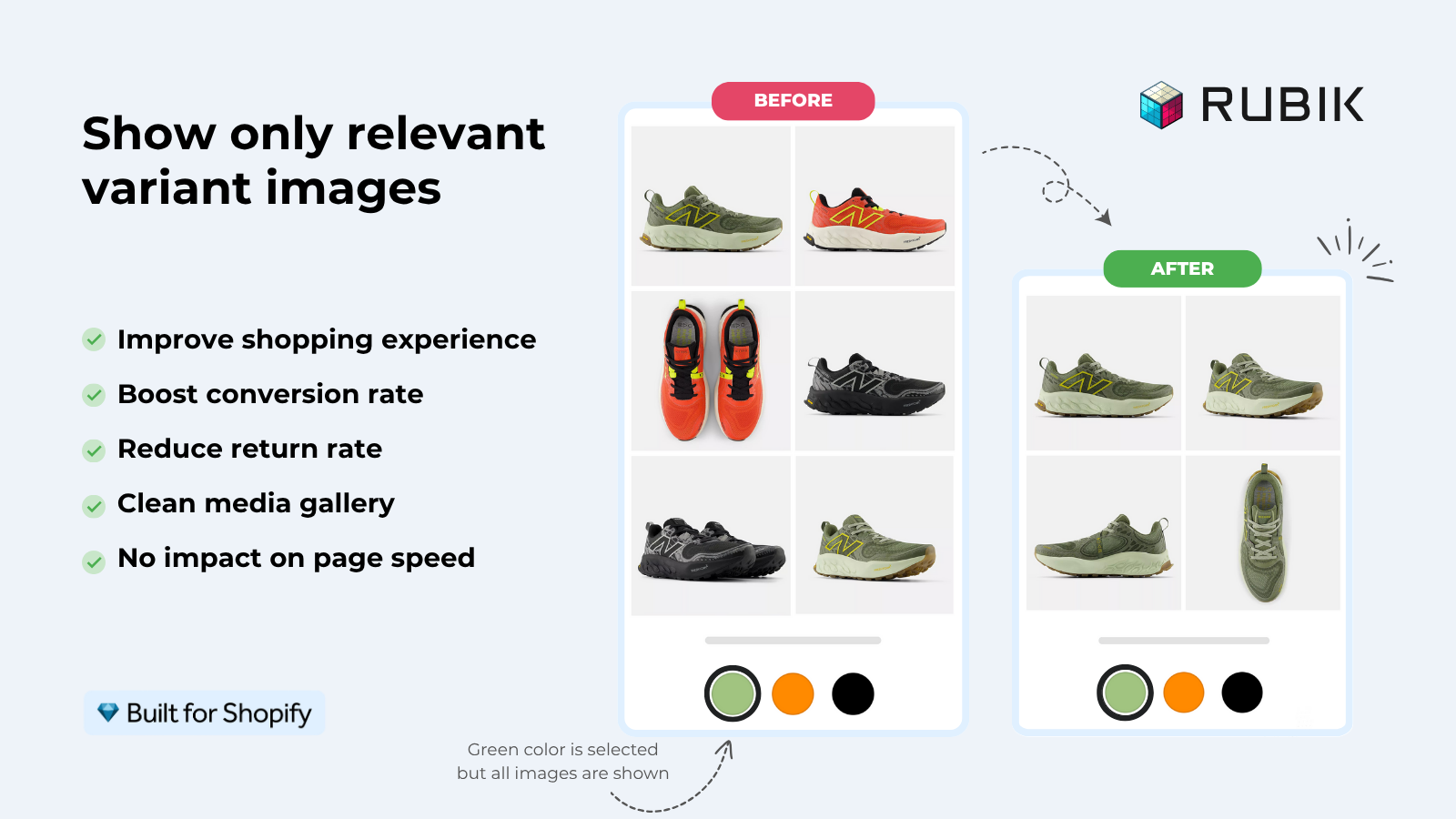
- Wrong images showing. Customer selects “Blue” but the gallery still shows red, green, and white photos alongside the blue ones. They add to cart while looking at a white photo by mistake. The blue product arrives and does not match what they thought they were buying.
- Inaccurate swatch colors. The swatch shows bright cherry red but the product is dark burgundy. The customer expects cherry and receives burgundy. Return.
- Missing variant-specific information. Cotton and polyester versions share the same description. Customer buys “Cotton” expecting the softness described, but the polyester version has different properties. Return with a “not as described” reason.
1. Filter images per variant
The most impactful change to reduce returns. Upon selecting a variant for an item, the product gallery should only show images of that specific variant, not all 30 pictures. It would also be suboptimal to display the featured image of every product option. Instead, the customer should only see 4-6 relevant images.
Without filtering, the gallery is a confusing mix of colors. Customers scroll through photos of 8 different colors trying to find the one they picked. Some give up and buy based on the swatch color alone, without seeing detailed photos of their specific selection. That leads to “this is not what I expected” returns.
Rubik Variant Images This filter allows you to showcase the images of just one of the Rubik variants. With the example below, when a customer selects “Navy Blue”, they will only see Navy Blue images (including a front, back, detail and lifestyle shot). The images of the other colours are excluded from view. This prevents customer confusion and the “I thought I was buying the colour in the third photo” problem.
2. Improve color accuracy
Make sure that Swatch colors actually match your product exactly. This is an embarrassment if you list multiple colors, and you list swatches. If you list swatches with color options of Red, Green, Blue, etc, and the swatch displays generic CSS colors like red (#FF0000), customers will be disappointed when they view photos of your product which turns out to be a brick red (#8B3A3A).
Three ways to improve color accuracy:
- Custom hex colors per swatch. Set the exact hex value of each product color instead of relying on CSS color name auto-detection. Rubik Variant Images lets you set custom colors per swatch through the visual editor.
- Image swatches. Use a cropped photo of the actual product as the swatch instead of a flat color circle. The swatch IS the product, so it cannot mismatch.
- Color name labels. Show the color name under each swatch. “Brick Red” sets a more accurate expectation than an unnamed reddish circle.
3. Add clear size guidance
Most return issues with apparel are size related. Having a visible size chart on the product page, not hidden on a separate page like “sizing info”, allows customers to get the measurements before purchasing and reduces the chances of an item needing to be returned due to incorrect size.
Make it better: per-product size charts. A slim-fit t-shirt and an oversized hoodie should not have the same size chart. Just because two products are the same size doesn’t mean they have the same measurements. Link your customers to the size chart that actually fits your products best using product metafields or a section in your template dedicated to size charts.
4. Show variant-specific descriptions
When you have different products with different materials, contents or materials care instructions etc you need to describe each variant differently. Having per-variant descriptions using metafields means that the customer can change the variant picker on the product page and the description text changes as well. So the cotton variant description shows the cotton products care instructions and the polyester product shows the specs of the polyester product. No more miss matching product description for your customers.
If your colours live as separate products rather than variants of one product, Rubik Combined Listings groups them into a single listing with swatches instead. Free to install, 5.0 stars across 78 reviews.
5. Add color name labels to swatches
About 8% of men have some form of color vision deficiency. For them, “Navy Blue” (left) and “Black” (right) look identical as small circles. Without the text labels, they would be guessing. Adding a color name label under each swatch removes the guesswork. ” Navy Blue” vs “Black” in text is unambiguous.
As long as you’re making different shades of the same color, they should have different names. In a big sweeping stroke of inefficiency, “Sage”, “Mint”, and “Eucalyptus” are all different greens that look just as different as circles of 36px. Their names are the only way to tell them apart. Without labels like these, you can expect a sharp rise in wrong-color orders and returns.
For 3+ color products where each color is a separate product, show all colors with swatches on collection and product pages with galleries and descriptions for each product. Customer can select color with swatches, but will have zero risk of color or material mismatch. Customer clicks on swatch and goes to specific color product page with photos and specs for that color only.
“We’ve tried several solutions for managing variant images, but Rubik Variant Images stands out. It’s like giving our product pages a much-needed declutter. Customers now see only the images that match their selection, which has noticeably reduced the ‘Is this the right color?’ support queries. The setup was intuitive, and the results were instant. It’s one of those behind-the-scenes tools that quietly makes a big difference. Love it!”
Livspace Home, India, Rubik Variant Images on the Shopify App Store
Frequently asked questions
Which Shopify app should I use for reduce returns variant display?
Rubik Variant Images, built by Craftshift, is the app we build for this. It holds 5.0 stars across 436 reviews and carries the Built for Shopify badge. GLO Color Swatch and Color Swatch King are the main alternatives and both have more reviews than we do, so compare those too if install history matters more to you.
What is the biggest cause of product returns on Shopify?
Expectation mismatch. The customer thought the product would come in a different color, size or be made of a different material than what in fact got delivered. Improving variant display (with filtered images, accurate swatches, size charts, and on product variant specific descriptions) can help prevent such dissatisfaction early on.
Does variant image filtering actually reduce returns?
Yes. By showing customers only images of the specific variant of product you’re selling, they get a clear understanding of exactly what they’re purchasing. That means no confusion by looking at other colors in the gallery. This is one of the main reasons for “wrong color” returns at apparel and home decor stores.
How do image swatches reduce returns compared to color swatches?
Image swatches show 6″ square cropped versions of product photos instead of simple colored circles. Swatch colors are accurate representations of the actual product which can be important for garments with multiple patterns, fabrics with unique textures and colors that cannot be accurately represented by a hex code such as “Heathered Sage” or “Marbled Grey”.
Should I show variant-specific descriptions to reduce returns?
These variants need different descriptions if the options differ in material, materials, or in how they need to be looked after. A cotton product description is different to a polyester one for example. If incorrect care instructions are shown to customer for a material only to receive a ‘not as described’ return is avoided. Metafield descriptions per variant.
How much can better variant display reduce return rates?
While specific metrics vary by store and product type, shops that employ image filtering, accurate swatches and/or size charts experience a reduction in color/sizes related returns, the two categories that account for the bulk of returns on apparel.
Related reading

Umid
Co-Founder at Craftshift