Can Shopify variants have different prices? (full answer)
Yes. Every Shopify variant can have its own price. In the example below, the prices for the product have been set to $25 for the “Small” option and $30 for the “XL” option. The price displayed above the variants on the product page will update automatically as you change the variant. This is a built-in feature of Shopify’s variant system and works with every Shopify theme.
That is the short answer. The longer answer covers how to set it up correctly, what happens with “From $X” pricing on collection pages, how compare-at prices work per variant, and the edge cases that trip up stores with complex pricing structures.
In this post
- How to set different prices per variant
- How price changes display on the product page
- Collection page “From $X” pricing
- Compare-at prices per variant
- Common pricing scenarios
- Pricing with separate grouped products
- FAQ
How to set different prices per variant
In the Shopify admin:
- Go to Products and open the product
- Scroll to the Variants section
- Each variant row has its own Price field
- Enter a different price for each variant
- Save
No apps to install, no code to write, and no need to pay for a higher level of service. Per variant pricing is available on every Shopify plan, including the free trial plan.
For bulk price updates across many variants, use the bulk editor: select the product, click “Edit variants”, and update prices in the spreadsheet view. For large-scale changes (hundreds of products), export as CSV, edit in a spreadsheet, and reimport.
How price changes display on the product page
When you offer variants with different prices, the product price updates instantly on the site when a customer chooses a variant within the product via JavaScript, without a page reload. Customers can immediately see the price when they choose a different variant by clicking on a different swatch or selecting a different option from a dropdown list.
Price updated automatically for most themes. The price element has a JavaScript listener that will update the displayed price when variants are changed. There is a rare possibility that some very old or heavily customized theme may not update the price automatically. However, this is something that needs to be fixed in the theme JavaScript, not Shopify settings.
One thing to watch: if you have different variants of a product with a large price difference between them (like $29 for a phone case and $149 for a phone case with wireless charger), make sure customers clearly understand why the price went up. A sudden tripling of the price without explanation would never fly and is likely to feel like a bug to the customer. You can add a brief description of each variant, or a note explaining what the more expensive variant includes. Per-variant descriptions can be added via metafields.
Collection page “From $X” pricing
When products have variants of different prices then in the collection page of Shopify the lowest variant price displays with “From” prefix e.g. “From $25.00”. Almost all the themes use product.price_min in their liquid code to display the lowest price.
To show a price range instead of individual price (“$25.00 to $45.00”) this needs to be theme edited. Change price output in the collection product card template from this:
{%- if product.price_min != product.price_max -%}
  {{ product.price_min | money }} - {{ product.price_max | money }}
{%- else -%}
  {{ product.price | money }}
{%- endif -%}
This shows the full range when prices differ and a single price when all variants cost the same.
Compare-at prices per variant
Each color/size variant (Red / Small, Blue / Small, etc.) also has its own Compare at price. This will allow you to run specific variants on sale, rather than an entire product on sale. In the above example the Red / Small variant is on sale for $19.99 (price) with a compare at of $29.99. The Blue / Small variant is full price for $29.99 with no compare at price.
On product pages, the sale price with strikethrough for the variant on sale is displayed. Once the customer views other variants (which may be on sale at different prices), the strikethrough for the originally viewed sale price disappears. This behavior is built into Shopify and works well on most themes, including the provided basic theme.
Use cases: running a clearance on a specific colorway that is being discontinued at a lower price point than the rest of the collection while still selling the other colors at full price. Or, running a launch discount on a new color to try to get some initial sales.
Common pricing scenarios
| Scenario | How to handle |
|---|---|
| Larger sizes cost more (material cost) | Set higher price on XL, XXL variants directly |
| Premium material option | Material as option type, premium variants priced higher |
| Bundle vs single | Use variants for quantity (1-pack, 3-pack, 6-pack) with scaled pricing |
| Sale on one color only | Set compare-at price on that color’s variants only |
| Completely different pricing per “variant” | Consider separate products grouped with Combined Listings |
There is another scenario, but slightly different to the previous one, where the “From $50” on the collection page actually doesn’t accurately reflect the prices of the variants. When there is a big difference in price between variants (e.g. $50 cotton cover vs $300 leather cover), by the time customer clicks into the correct variant, they may be disappointed to find it costs 6x the initial price of $50 displayed on the collection page. Separate products with their own prices and product pages handle this scenario way better.
Pricing with separate grouped products
When every “variant” has a different price point (because the variants use different materials, have different complexity, or have different sourcing costs), then creating separate products that you group together in a collection is a better approach. Each product shows its price on the collection page, rather than presenting a “From $X” message on the product page that may under- or over-sell the product to customers.
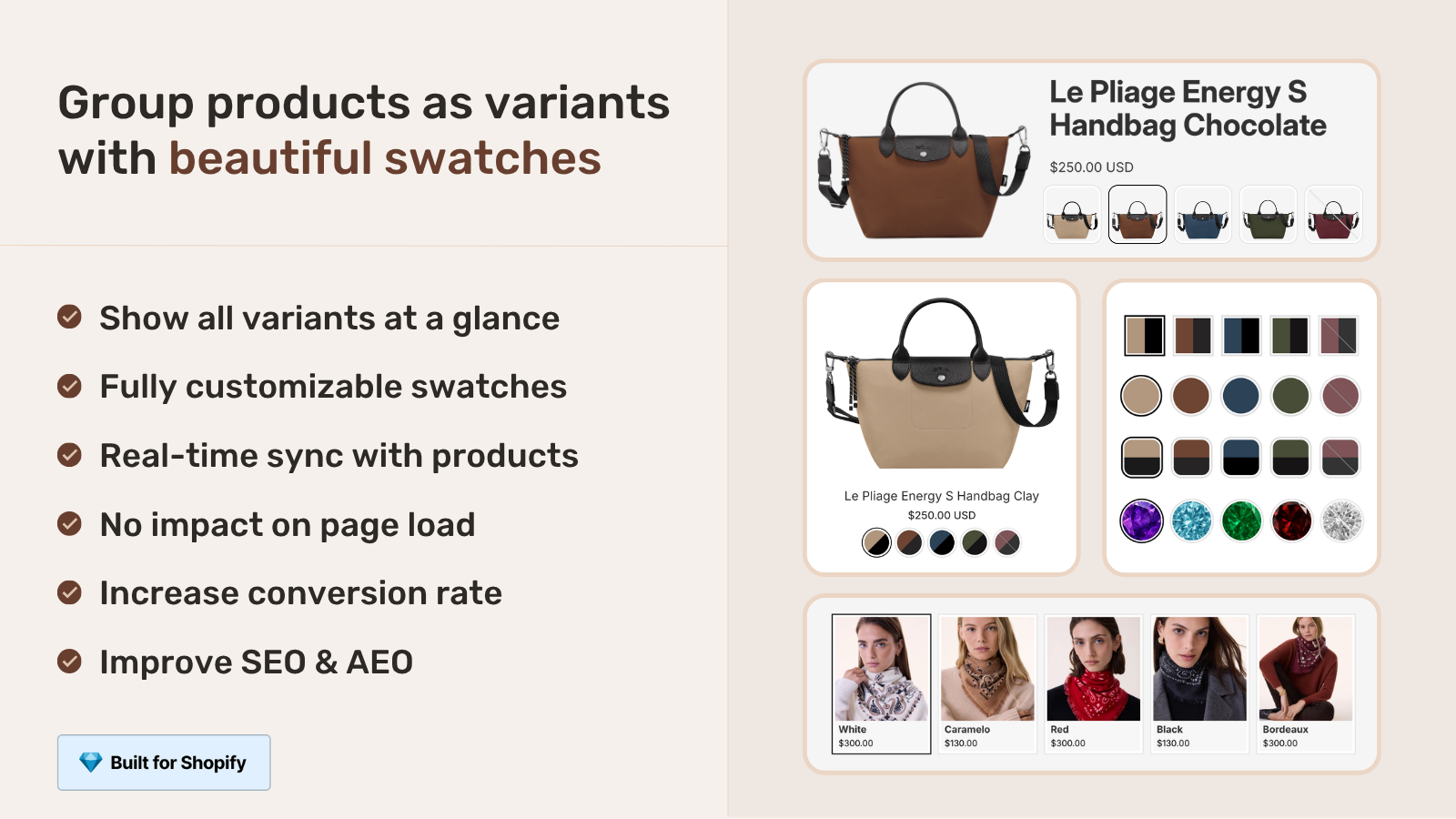
Rubik Combined Listings shows all the products together with swatches. The customer then clicks on a material swatch to be taken to the individual product page with price, images and details. Each product gets its own SEO page targeting different price-point keywords eg “affordable cotton sofa cover” and “premium leather sofa cover”.
For the variant display in different places around the site such as size swatches or image filtering on the product page, use Rubik Variant Images.
“Hands Down the best customer support of all the variation/swatch apps I have used till date. The app does everything. From individual variant gallery to really detailed customizable swatch’s. All in a single app. Originally we used to use two different apps so this is so much more cost efficient for us.”
Bellissima Covers, India, Rubik Variant Images on the Shopify App Store
See the live demo store, watch the Combined Listings tutorial, read the getting started guide.
Frequently asked questions
Can Shopify variants have different prices?
Yes. Each product variant has its own price field which you can set in the Shopify admin. You can set a different price for each variant without any apps or coding. The price updates dynamically on the product page as customers select a different variant.
Does the product page price update automatically when a different variant is selected?
Yes. All modern Shopify themes update the price automatically with JavaScript when you change the variant, and do not require a page reload. If you are seeing a page reload, this is a theme issue and not a limitation of Shopify.
What price shows on the collection page when variants have different prices?
Most themes will display “From $X” instead of the lowest variant price. Some themes will actually display a price range such as “$25 to $45.” This is determined by the theme template and can be edited to suit whatever price format you wish to use.
Can I run a sale on just one variant?
Yes. Each product variant has its own “Compare at” price. Fill in the Compare at price on the sale variants and leave it blank for the full price variants. Comparisons are styled with a line through the original price on the product page for the variant(s) that you have on sale.
Is there a limit to how much prices can differ between variants?
No technical limit. You can have a $1 variant and a $10,000 variant on the same product. The question is whether the UX makes sense (for example large price gaps in a From $1 page may cause user confusion). Large price differences are better handled by having separate products.
Related reading

Umid
Co-Founder at Craftshift