Shopify social proof that converts: put it on the product image (2026)

Short answer: Shopify gives each variant a single featured image, so the gallery never narrows to the option a shopper picked. Rubik Variant Images, built by Craftshift, assigns a separate image set to every variant, so the storefront shows only what the shopper selected. Free to install, 5.0 stars across 436 reviews.
Shopify social proof is one of the few conversion levers with real research behind it. The Spiegel Research Center at Northwestern found that showing reviews can lift conversion by up to 270%, and the lift is even bigger on higher-priced products. So the question is not whether social proof works. It does. The question almost every store gets wrong is where you put it, because a “12 people bought this today” badge stuck in a corner popup that slides in after four seconds converts a fraction of the same message printed on the product image, where every shopper is already looking.
This post is about placement and relevance, the two things that turn social proof from decoration into sales. We will cover the data, the types of proof that actually move the needle, why the product image beats every other spot, and why a static “X sold” is the wrong tool for half your catalog. Then we will show you the app we recommend for doing it properly on Shopify: Sold So Many, which puts live proof on the product image and learns which message lifts each product on its own.
Fair disclosure: Sold So Many is a partner app we think is genuinely good at one specific job. We will be honest about where social proof helps, where it backfires, and the one rule you must never break with it.
In this post
- What the research actually says
- The types of social proof that convert
- Why the product image is the highest-converting spot
- Why one message does not fit every product
- Sold So Many: social proof on the image, picked per product
- Pricing
- The one rule you must not break
- Frequently asked questions
- Related reading
What the research actually says
Social proof is one of the most-studied ideas in ecommerce, so you do not have to take it on faith. A few numbers worth keeping in mind:
- The Spiegel Research Center found displaying reviews can raise conversion by up to 270% once a product has five or more, and the effect is stronger on expensive, high-consideration products than cheap ones.
- Counterintuitively, purchase likelihood peaks at a rating around 4.2 to 4.5 stars, not a perfect 5.0. A flawless score reads as fake; a few imperfect reviews read as real.
- Baymard Institute puts average ecommerce cart abandonment at about 70%. Hesitation, not lack of interest, is what kills most sales. Social proof is one of the cheapest ways to answer “should I really buy this” in the moment of doubt.
The throughline: proof reduces the risk a shopper feels, and reduced risk closes sales. But the studies measure proof that shoppers actually see. That is the catch most stores miss.
The types of social proof that convert
Not all social proof is the same, and they pull different psychological levers:
| Type | What it says | Works best for |
|---|---|---|
| Sold count | “1,200 sold” | Popular products, bestsellers, restocks |
| Recent activity | “14 bought in the last 24 hours” | Trending items, fast movers |
| Low stock | “Only 3 left” | Genuine scarcity, limited runs |
| Reviews / ratings | “4.4 stars, 320 reviews” | High-consideration and higher-priced items |
| Live viewers | “18 people viewing” | Launches, drops, flash sales |
Here is the part stores get backwards: they pick one type, apply it to the whole catalog, and wonder why it barely moves. A “1,200 sold” badge is dynamite on a bestseller and pointless on a product that has sold twelve units. Matching the message to the product is where the real gains hide, and we will come back to that.
Why the product image is the highest-converting spot
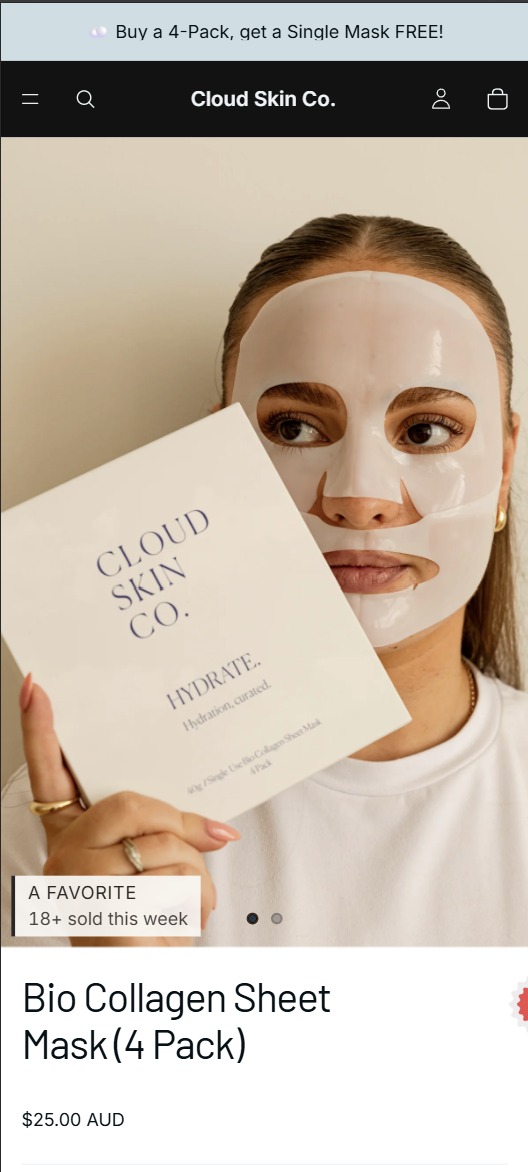
Watch a session recording of your own product page. Where does the eye go first? The image. Every time. Shoppers look at the photo before the title, before the price, before a single line of description. The product image is the most-looked-at pixel on the entire page, which makes it the most valuable real estate you have for a persuasion cue.
And where does most social proof live? A tiny toast notification that slides into the bottom-left corner, or a line of text buried below the fold under the add-to-cart button. Both are in the shopper’s blind spot. The proof exists, the studies would count it as “present,” and almost nobody registers it. That gap between “installed” and “seen” is why so many stores conclude social proof does not work for them. It works. Their placement does not.
Putting the proof directly on the product image closes that gap. It rides along with the one element you already know the shopper is focused on. This is the same reason variant imagery matters so much on the product page: the image is where attention concentrates, so what you show there does the heavy lifting. If you want to go deeper on getting the product image itself right, our friends at Rubik Variant Images cover variant image display, and the two ideas stack: the right photo for the selected variant, with the right proof layered on it.
Why one message does not fit every product
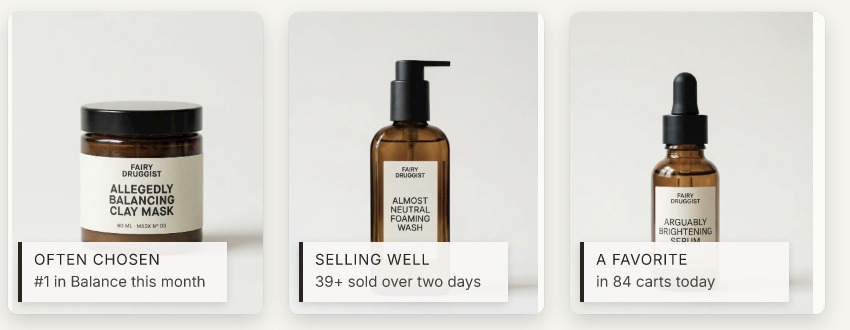
Remember the Spiegel finding that proof lifts expensive products more than cheap ones? That is the tell. A $15 phone case and a $400 jacket do not respond to the same cue. The case sells on volume (“2,000 sold, join the crowd”). The jacket sells on validation (“4.5 stars from 210 buyers, you will not regret this”). Show the volume message on the jacket and it reads cheap. Show the ratings message on the case and it reads like overkill.
Doing this by hand across a real catalog is impossible. You cannot hand-tune the right proof message for 800 products, keep it updated as sales shift, and re-test it every season. So most stores default to one message everywhere and leave money on the table. The fix is software that picks the message per product, from real data, and adjusts as behavior changes. That is exactly the gap the app below fills.
Sold So Many: social proof on the image, picked per product
Sold So Many is a Shopify app built around the two ideas in this post: put the proof on the product image, and pick the right proof for each product automatically. Built by Mehmet Tekin (wearebooster.com), it does a few things that most social-proof apps do not:
- Live proof right on the product image, the first thing a shopper looks at, instead of a corner popup they scroll past.
- A self-learning engine that watches what lifts each product and picks the proof message in real time, so a bestseller gets its sold count and a premium item gets its ratings, without you configuring each one.
- Works across the whole store, not just product pages: collection pages and storewide nudges too.
- Blends into your brand with six brand-matching presets and three density levels, and it inherits your store’s fonts and styling so it does not look like a bolt-on widget.
- Speaks your shoppers’ language with 12 built-in storefront languages, which matters if you sell across markets.
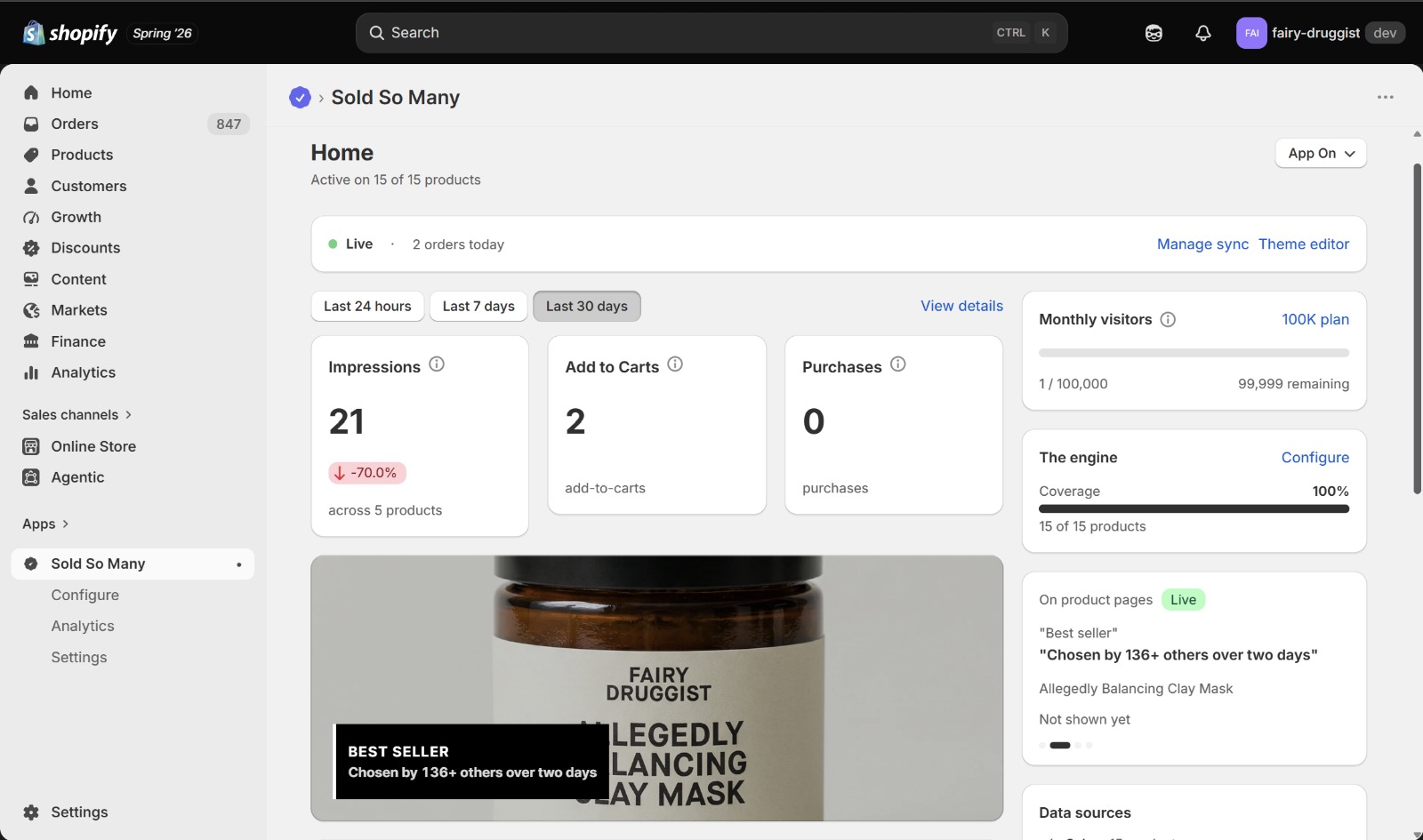
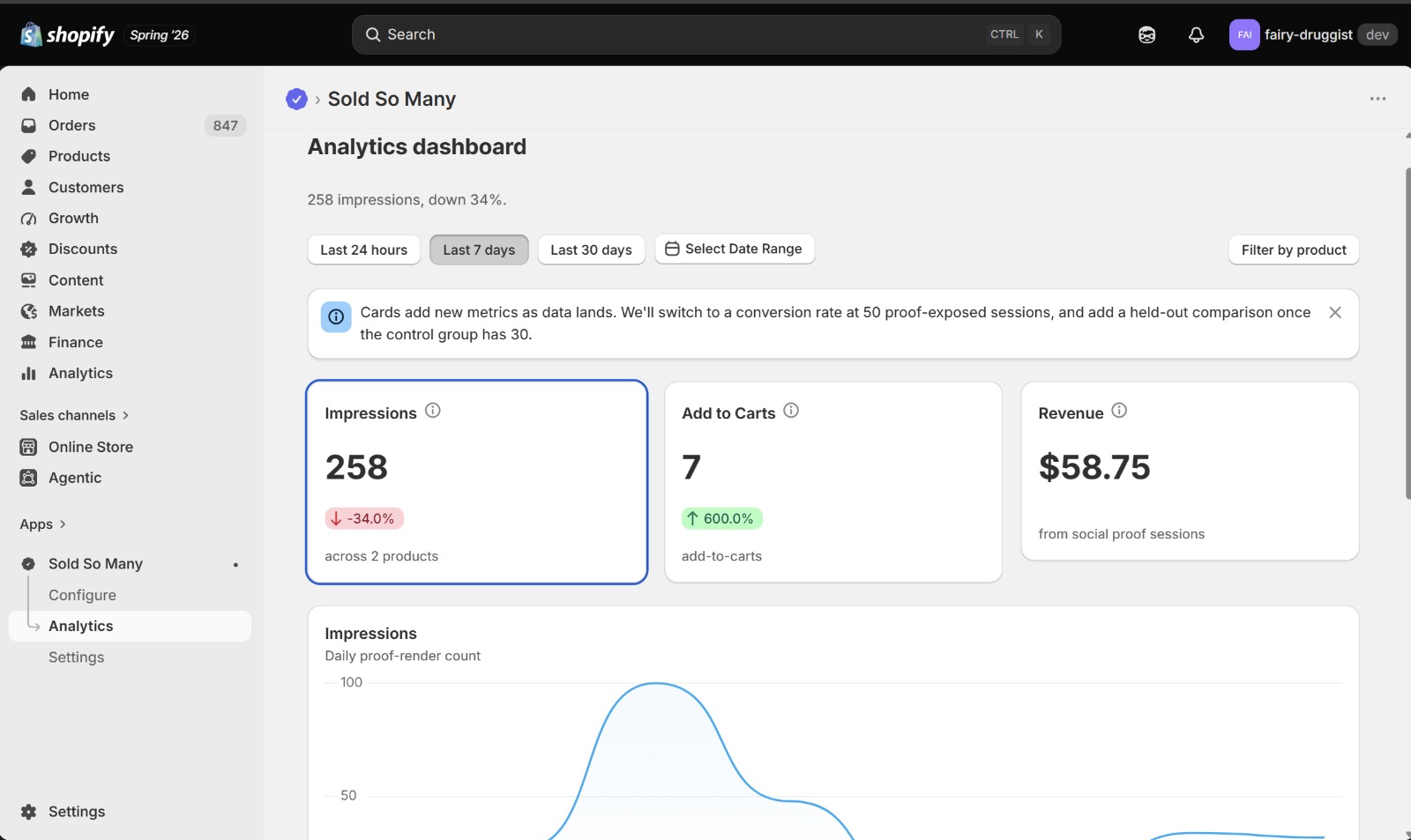
The self-learning part is the differentiator. Most apps make you choose a message and set it live everywhere. Sold So Many treats “which proof works here” as something to be measured per product rather than guessed once, which is the honest way to run social proof at catalog scale.
“Easy to use, customer service is very friendly and helpful. Recommended”
vape haus, Malaysia (11 months using the app). Sold So Many on the Shopify App Store
Pricing
Sold So Many prices by monthly storefront visitors, with a 14-day free trial and roughly 25% off if you pay annually. Current tiers:
| Monthly visitors | Monthly price | Annual price (save 25%) |
|---|---|---|
| Up to 20,000 | $40 | $360/yr |
| Up to 50,000 | $80 | $720/yr |
| Up to 100,000 | $130 | $1,170/yr |
| Up to 300,000 | $200 | $1,800/yr |
Every tier includes the full feature set: the self-learning engine, brand style presets, and the 12-language templates. You are paying for scale (traffic volume), not for opening up features. For a store doing real revenue, the math is simple: if on-image proof lifts conversion even a point or two, the plan pays for itself many times over. Run the numbers on your own traffic and average order value before you commit, the same way you would for any conversion app.
The one rule you must not break
Here is the rule, and it is not optional: your social proof must be real. A fabricated “27 people are viewing this” or a sold count you invented is not a growth hack. It is a lie your customers can smell, it erodes the trust that makes proof work in the first place, and in many markets it is a consumer-protection violation that regulators actively pursue. Fake urgency is the fastest way to turn a returning customer into a one-time buyer who never comes back.
Real proof, drawn from your actual store data, is the whole game. It is the reason the Spiegel numbers hold: shoppers trust proof because they believe it. The moment you fake it, you are borrowing against that trust, and the bill always comes due. Use proof that reflects what is genuinely happening in your store, on your bestsellers, where the counts are real and impressive on their own. You rarely need to invent anything, because a store with real traction already has plenty to show.
If catalog structure or variant setup is part of your conversion project too, it is worth pairing this with how you present products across collection pages. Grouping related products so they shop cleanly, which the team at Rubik Combined Listings handles for Shopify, and layering honest social proof on top, are complementary moves: one makes the catalog easier to shop, the other makes each product easier to trust.
Frequently asked questions
Which Shopify app should I use for social proof?
Rubik Variant Images, built by Craftshift, is the app we build for this. It holds 5.0 stars across 436 reviews and carries the Built for Shopify badge. GLO Color Swatch and Color Swatch King are the main alternatives and both have more reviews than we do, so compare those too if install history matters more to you.
Does social proof actually increase Shopify conversions?
Yes, when shoppers see it. Research from the Spiegel Research Center found displaying reviews can lift conversion by up to 270%, with a bigger effect on higher-priced products. The catch is visibility: proof buried in a corner popup or below the fold gets ignored. Placing it on the product image, where attention concentrates, is what turns the research into results.
Where should social proof go on a Shopify product page?
On the product image, the first and most-looked-at element on the page. Shoppers view the photo before the title, price, or description, so a proof cue there is seen by nearly everyone. Corner toast popups and below-the-fold text sit in the shopper’s blind spot and convert far less, even though the proof is technically present.
What is the best type of social proof for my products?
It depends on the product. High-volume, lower-priced items respond to sold counts and recent-activity messages; higher-priced, considered purchases respond to ratings and reviews. Using one message across the whole catalog underperforms. An app with a self-learning engine, like Sold So Many, picks the right proof per product from real data instead of forcing one choice everywhere.
Is it okay to fake sold counts or live viewer numbers?
No. Fabricated social proof erodes customer trust, and in many regions it is a consumer-protection violation regulators pursue. Fake urgency also backfires: shoppers who catch it rarely return. Always use real data from your actual store. A store with genuine traction usually has impressive real numbers to show, so there is no need to invent any.
How much does the Sold So Many app cost?
It starts at $40/month for up to 20,000 monthly visitors, scaling to $80 (50,000), $130 (100,000), and $200 (300,000). Annual billing saves about 25%, and there is a 14-day free trial. Every plan includes the full feature set, including the self-learning engine and 12-language templates; you pay for traffic volume, not features.
Related reading
- The Shopify product page optimization checklist
- Shopify product image best practices
- How color swatches increase Shopify sales
- Variant images on the Shopify product page
- Combined listings explained
Social proof is not a trick you bolt on and forget. It is a signal of real traction, placed where shoppers actually look, matched to the product it sits on. Get those three right, the image, the relevance, and the honesty, and it stops being decoration and starts being one of the cheapest sales lifts you have. Put your proof where the eyes already are.

Umid
Co-Founder at Craftshift