Silkora case study: multi-option swatches when every size and color is its own Shopify product
Picture a catalog where “Lotus Roze 40×80” and “Lotus Roze 60×70” are not two variants of one product. They are two separate Shopify products. Each has its own URL, its own page, its own SEO. Now do the same for six colors. That is roughly 12 products for what most stores would model as one. Shopify multi-option swatches on a setup like that are not a configuration problem. They are an architecture problem.
Silkora is a Dutch brand selling premium 22-momme mulberry silk pillowcases (and a few related items: sleep masks, scrunchies). Their catalog is built exactly like that. Every size and every color combination lives as its own Shopify product. They came to us in April 2026 after a few months of frustration with another Combined Listings app, left a 5-star review on the Shopify App Store, and named the previous app and the failure mode by name. So this case study writes itself, kind of. We just need to explain the architecture, the failure, and the fix.
The interesting part is not the switch. It is why the architecture forces the switch in the first place. If you are running a catalog where every size + color combo is a separate product (and there are real reasons to do that, especially if your colors carry their own brand stories), most swatch apps will half-work and then fall over the moment a combo goes out of stock. That is the trap Silkora hit. Here is how to avoid it.
In this post
- The Silkora setup: one product per size + color
- Why the previous app broke
- What multi-option swatches mean technically
- The fix (and the verbatim review)
- What it looks like on silkora.nl now
- The wider lesson for separate-product catalogs
- FAQ
The Silkora setup: one product per size + color
Most apparel and home-goods stores model their catalog the obvious way: one Shopify product, two option types (color, size), all combinations as variants. Clean, simple, fits Shopify’s mental model. Silkora went the other way. Each size in each color is its own listing.
Why? A few reasons stack up:
- SEO surface area. A separate product page for “zijden kussensloop 40×80 lotus roze” is a separate URL Google can rank for. One combined product page can only rank for the parent term.
- Inventory clarity. Each combo has its own SKU, its own stock count, its own purchase history. No nested variant logic to debug at month-end.
- Content per combo. “Lotus Roze” deserves a different photo set than “Sage Green,” and the page can carry color-specific copy.
- Pricing flexibility. Different sizes (40×80 cm vs 60×70 cm) often have different price tiers. Easier to manage as separate products.
This is not a Silkora-only choice. We see this pattern a lot in jewelry, home goods, and any brand where the color or size carries its own story. There is a longer breakdown in our guide on separate products vs variants for SEO, but the short version is: if your variants have stories, separate products win. If they are interchangeable colorways of one item, variants win.
The trade-off is the buyer experience. A shopper landing on “40×80 Lotus Roze” has no idea that 60×70 exists, that ivory and mustard exist, that they can switch between them. Without something stitched on top, every product page is an island. That is what a Combined Listings app is supposed to fix.
Why the previous app broke
Silkora was using G: Combined Listings & Variant by Grouptify (a real, well-rated app, 5.0 stars on 370 reviews at time of writing). It does the basic job. It groups products. It shows swatches. For most stores, fine.
The problem Silkora hit was specific: out-of-stock combinations were not being hidden from the swatch UI. Customers would see a swatch for a size + color combo that no longer had inventory, click it, land on a product page they couldn’t buy from, and then sometimes order the wrong size out of confusion. That is not a small UX bug. That is refunds, support tickets, lost trust.
And here is the part that bites: when each combo is its own product, hiding out-of-stock at the swatch level is more complicated than it sounds. With one product and Shopify variants, “out of stock” is a property of the variant. The theme can read it. With separate products, the swatch app has to query each linked product’s inventory state in real time and re-render the swatches accordingly. If the app does not do that, you get exactly the failure Silkora described. Stale swatches pointing to dead pages.
This is one of the most common support patterns we see on combined listings setups. Out-of-stock visibility, wrong-product clicks, customers ordering the wrong thing because the UI lied. We built sync into Rubik Combined Listings Swatch specifically because of this. Real-time. Metafield-based. No external API calls during page render.

What multi-option swatches mean technically
Quick definition before we go further. “Multi-option swatches” means the product page shows more than one row of swatches, one per option type. For Silkora, that is two rows: size and color. Click a different size, the URL changes (because each combo is a separate product). Click a different color, same thing. The swatches stay visible, the navigation feels like variants, but under the hood each click is a product-to-product redirect.
The setup logic, from the Rubik Combined Listings Swatch multi-option swatches docs, looks like this:
- Create a group per option (one group named “Size”, one named “Color”).
- Add the same products to multiple groups, but with different values per group. The 40×80 Lotus Roze product gets value “40×80” in the Size group and “Lotus Roze” in the Color group. Same product, two memberships.
- Configure how each group renders. Color as visual swatches. Size as buttons.
The app then computes which combinations actually exist in your store and only renders those. From the docs, verbatim: “Only the combinations that actually exist in your store are shown.” That is the line that matters. If 60×70 in Mustard is not a product you sell, the Mustard swatch will not be selectable when 60×70 is the active size. No dead clicks. No confused buyers.
The fix (and the verbatim review)
Silkora’s setup needed a small wrinkle on top of the standard multi-option config because their grouping was not perfectly symmetric. (Most real catalogs are not. Some sizes don’t exist in some colors. Some colors are limited editions in specific sizes.) We got on a call, looked at the actual catalog, and pushed a fix the same day. The whole thing took about two hours from “here is the problem” to “shipped.”
Here is what they wrote on the App Store, unedited:
“We have been using G: Combined Listings & Variant for a while, but we were not happy with the fact that it was not hiding the items that were out of stock. So customers were getting confused a lot and ordering the wrong sizes. We found this app on Shopify App Store and decided to give a shot. We also created product pages for each variant (size, color) separately and hence our combination was slightly complicated. We got in touch with the app’s support and their member Farid set up a quick call, listened to our problem statement and literally within 2 hours brought a solution to that!!! That was unbelievably quick! Now we have a beautiful product page, as well as the collections page. Hence 5 star!”
Silkora, Netherlands, April 28 2026, 5 stars. Rubik Combined Listings Swatch on the Shopify App Store.
The “slightly complicated” line is doing a lot of work in that review. What they actually had was an asymmetric grouping (color counts vary by size, some products are 22-momme only, some only ship from EU). The standard config got 80% of the way there, and the last 20% needed a per-product override. Once that was in, the swatches stopped lying about availability and the collection page started rendering the same swatch row under each product card.
What it looks like on silkora.nl now
You can see it live. Open the 40×80 Lotus Roze pillowcase page. Two rows of swatches under the title. The first row shows two size buttons (40×80 and 60×70) with their prices baked into the swatch (€44,95 and €49,95). The second row shows six color circles. Click any of them, the URL changes, you land on the corresponding separate product, and the swatches stay synced.
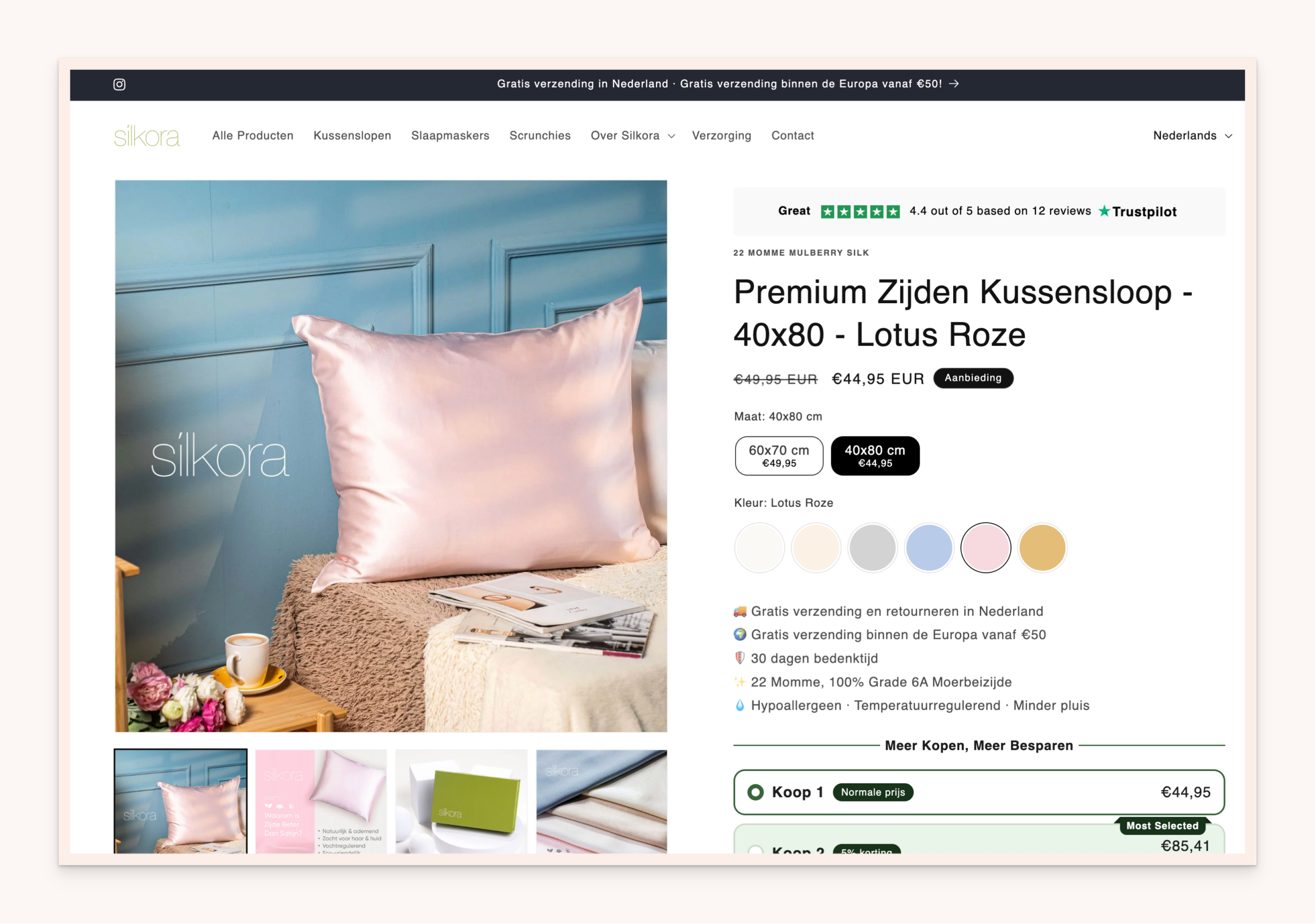
A few details worth pointing out on that page:
- Per-size pricing on the swatch. 40×80 and 60×70 are different prices and the swatch shows that. Customers know what the size change costs them before they click.
- Color swatches with real product image references. Each circle is a brand-specific color, not a CSS gradient hack.
- The page is in Dutch. The swatch labels (Maat, Kleur) are localized. Multi-option swatches play nicely with Shopify Translate & Adapt.
- The collection page (kussenslopen) shows the same swatch row under each product card. So shoppers can compare colors before clicking into a single product page.
That last one is what most “Combined Listings” apps fail to deliver cleanly. Product page swatches are easy. Collection page swatches that respect the same group structure, in real time, on a separate-product catalog, with out-of-stock handling? That is where most apps run out of road. We rebuilt this part from scratch in Rubik Combined Listings Swatch because it is the part that actually moves conversion (more on that in the collection page color swatches guide).
If your colours are variants of one product rather than separate products, Rubik Variant Images assigns a separate image set to every variant instead. Free to install, 5.0 stars across 436 reviews.
The wider lesson for separate-product catalogs
If you are running a catalog with one product per size + color combo, here is the checklist we wish someone had given Silkora before they spent months on the wrong app:
- Confirm the app does real-time out-of-stock sync. Not “every 6 hours.” Real-time. If a product goes out of stock, the swatch should disappear or grey out within the next page render. Otherwise customers will keep clicking ghost swatches.
- Confirm it handles asymmetric grouping. Almost no real catalog is a perfect grid. Some colors only come in some sizes. The app needs to render only existing combinations, not assume every cell of the grid is filled.
- Confirm collection page swatches use the same group definitions. Two separate configs (one for product page, one for collection) is a maintenance nightmare. One source of truth or nothing.
- Confirm the swatches survive translation. If you sell in EU, your size and color labels need to translate cleanly without breaking the group logic. Shopify’s Translate & Adapt should just work.
- Test with a deliberately broken combo. Set a SKU to zero stock. Reload the swatch row. If the swatch is still selectable, you have the Silkora problem on day one.
And one opinion. Most “Best Combined Listings” listicles you’ll find online compare apps on the wrong axes. Number of groups, swatch shapes, pricing tiers. None of those matter if the out-of-stock sync is broken. We have been saying this for a year and it took a Dutch silk brand getting burned by it for the message to land. The single most important feature of a Combined Listings app is real-time inventory sync. Everything else is decoration.
If you want to compare apps on that axis specifically, we wrote a longer piece: Rubik Combined Listings vs Grouptify (G: Combined Listings & Variant). It is the same comparison Silkora effectively ran themselves, but with the technical differences spelled out.
See the live Rubik Combined Listings Swatch demo store or read the multi-option swatches getting-started guide.
FAQ
Why would you create a separate Shopify product for each size and color instead of using variants?
Three reasons usually drive it: SEO (each combo gets its own indexable URL and can rank for the long-tail term), content (color-specific photography, copy, and stories per page), and inventory clarity (one SKU per page, no nested variant logic). Silkora’s case is a textbook example. Their colors carry brand stories (“Lotus Roze,” “Sage”) and their sizes have different price tiers, so each combo earned its own page.
What does multi-option swatch mean in Shopify?
It means the product page shows more than one row of swatches, one per option type. For example one row of size buttons and one row of color circles. On a standard variant-based product, this is built in. On a catalog where each combination is its own product, you need a Combined Listings app to render the swatches and link the products together.
How does Rubik Combined Listings Swatch handle out-of-stock combinations?
Real-time sync via Shopify metafield references. When a linked product goes out of stock or is archived/draft, the swatch updates on the next page render. No external API calls during page load, no polling delay. This was the core failure mode that drove Silkora to switch.
Does Rubik Combined Listings Swatch work with Translate & Adapt?
Yes. The Silkora storefront is in Dutch (Maat, Kleur as the option labels) and the swatches translate without breaking the group logic. Multi-language support is built in. Same goes for currency conversion via Shopify Markets.
Can I migrate from G: Combined Listings & Variant to Rubik Combined Listings Swatch without losing my groupings?
Yes. Group structures in Rubik Combined Listings Swatch are stored as Shopify metaobjects, so you can recreate them in bulk via the dashboard or API. For Silkora’s case the team rebuilt the groups during the call, took about an hour. For larger catalogs we have a bulk grouping flow with title pattern, tag, and metafield matchers (bulk grouping docs).
Does Rubik Combined Listings Swatch show swatches on collection pages too?
Yes. Collection page swatches use the same group definitions as product pages. One source of truth. On the Silkora kussenslopen collection, every product card shows the relevant color circles and clicking switches the card image. This is the part most “Best Combined Listings” lists undersell.
Related reading

Farid Movsumov
https://x.com/faridmovsumovFounder of Craftshift