Shopify combined listings for B2B and wholesale stores
While Shopify stores present a variant conundrum differently than traditional retail stores, online B2B/wholesale stores face a special set of challenges. A single product might come in 30 colors, 8 sizes, 3 materials and 4 case pack quantities, etc. That would already work out to thousands of different versions of the product, far beyond the 2,000 variant limit on a single product that Shopify puts in place. And even when you work diligently to keep that below 2k, the sheer amount of variation can end up overwhelming wholesale buyers when trying to navigate your product pages.
Combined listings allow products to be split and Swatches added to link the different components together. This makes it easy for wholesale buyers to browse through products, selecting by material, then colour within that material, then size and finally quantity. It keeps the options simple and removes the need for huge wholesale product pages with endless options.
In this post
- The B2B variant challenge
- How combined listings help wholesale stores
- Setup strategies for B2B
- Handling tiered and volume pricing
- Catalog organization for wholesale
- FAQ
The B2B variant challenge
Retail stores typically have 3 to 5 colors and 4 to 6 sizes per product. Wholesale stores regularly have 20+ colors, 10+ sizes, multiple materials, and pack size options. The math gets out of hand fast:
| Scenario | Options | Total variants | Under limit? |
|---|---|---|---|
| Retail t-shirt | 5 colors x 5 sizes | 25 | Yes |
| Wholesale t-shirt | 20 colors x 8 sizes | 160 | Yes |
| Wholesale with materials | 20 colors x 8 sizes x 3 materials | 480 | Yes |
| Wholesale with case packs | 20 colors x 8 sizes x 3 materials x 4 packs | 1,920 | Barely |
Even when below 2k variant count, 4-way wholesale buyer is presented with a user experience that fails. On the product detail page, the buyer is presented with 20 color options, 8 size options, 3 material options, and 4 pack options. As a result, the buyer has to make 4 distinct decisions before they can add a product to cart. However, when the buyer reaches the point of making an invalid combination (e.g. cotton comes in 15 of the 20 colors), they encounter an error message that lists all irrelevant options for the material they chose.
How combined listings help wholesale stores
The strategy: Break the mega-product up by the most differentiating option (material/color family) and turn it into separate products each with a reasonable number of SKUs. Organize related products together with swatches so that customers naturally compare them.
Example: instead of one “Wholesale T-Shirt” with 480 variants, create three products:
- “Wholesale T-Shirt (Cotton)” with 15 colors x 8 sizes = 120 variants
- “Wholesale T-Shirt (Polyester)” with 20 colors x 8 sizes = 160 variants
- “Wholesale T-Shirt (Blend)” with 10 colors x 8 sizes = 80 variants
This group of 3 products are combined in the Rubik Combined Listings theme with swatches for the different materials and colours within each product. For example, if the buyer clicks on the “Cotton” swatch they will only see the cotton colours and sizes within that product. Clicking on the “Polyester” swatch will take them to the polyester product with its own set of colours. No invalid combinations will be shown. Each product page is concise and easy to use.
Setup strategies for B2B
Three common ways to split B2B products into combined listing groups:
1. Split by material
Best when materials have different color ranges, pricing, and care requirements. Each material becomes its own product with its own description, spec sheet, and SEO page. Material swatches (text buttons like “Cotton”, “Polyester”, “Blend”) link between products.
2. Split by color family
Best for situations where all materials are the same but there are 30+ colors to represent. Organize by color families (i.e. “Neutrals”, “Brights”, “Pastels”) with 8-10 colors per family (i.e. white, cream, gray, black, red, orange, yellow, lavender, mint, blush, with all sizes). There are color family swatches for each product.
3. Split by pack size
Best for stores where the same product is sold in different quantities (single, 6-pack, case of 24). Each pack size is a separate product with its own pricing. Pack size swatches (“Single”, “6-Pack”, “Case”) are then linked between products. This method prevents misuse of the 3-option variant limit for quantity, and lets you instead list color, size and material options.
Handling tiered and volume pricing
B2B stores often have tiered pricing: buy 1 to 11 at $10 each, buy 12 to 47 at $8 each, buy 48+ at $6 each. Shopify does not support tiered pricing natively on standard plans.
When combining listings together you can estimate pricing per tier by creating products for each respective pricing level i.e. “T-Shirt (1-11 units)” $10/Unit, “T-Shirt (12-47 units)” $8/Unit, “T-Shirt (Case of 48)” $6/Unit. Pack size swatches then connect all the listings. Buyer can click on each tier to view respective price per unit.
For true B2B (Business to Business) functionality on Shopify Plus, our B2B channel includes wholesale pricing lists, quantity based rules, and volume discounts etc. Although you still get combined product listings with value to organization and variant management on the Plus platform, our B2B channel gives you all the features you need for B2B functionality.
These pages display Rubik Variant Images (the color swatches) and allow for image filtering so wholesale customers can verify colors before purchasing bulk.
If your colours are variants of one product rather than separate products, Rubik Variant Images assigns a separate image set to every variant instead. Free to install, 5.0 stars across 436 reviews.
Catalog organization for wholesale
Wholesale catalogs are larger and more organized than retail catalogs. Wholesale catalogs also have combined listings which can be organized by:
- Reducing collection page clutter. Instead of 3 separate product cards for Cotton/Polyester/Blend versions, one card appears with material swatches. The collection page stays clean even with hundreds of base products.
- Enabling category-based swatch groups. Rubik Combined Listings supports categorizing swatches into groups (“Summer Colors”, “Core Colors”, “Limited Edition”) so wholesale buyers can quickly find what they need.
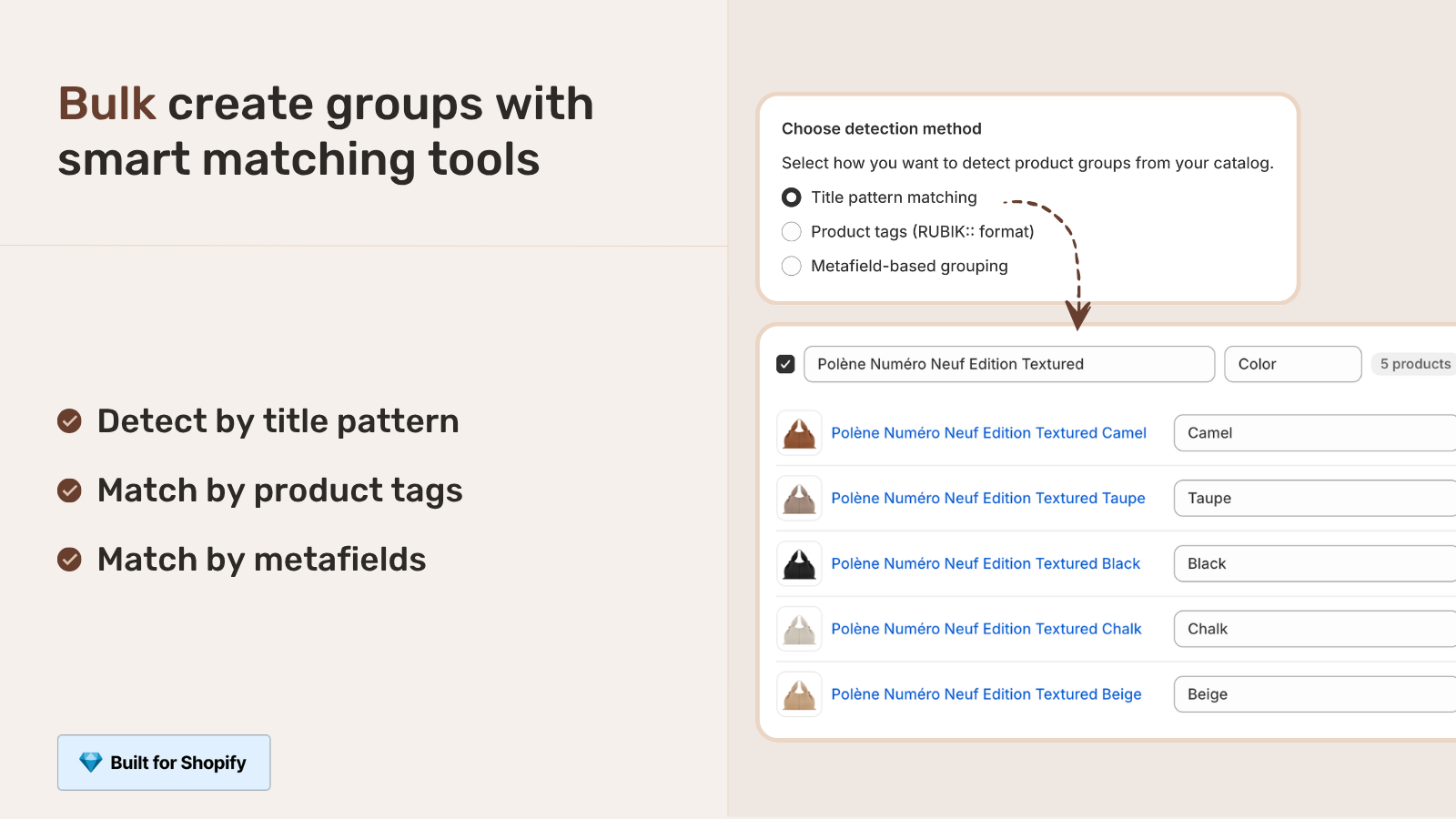
- Bulk group creation. For catalogs with hundreds of products, creating groups one by one is not practical. Rubik Combined Listings supports bulk creation via CSV import, title pattern matching, and AI auto-grouping.
“Was having difficulties with 5 other apps before I found this one that worked perfectly on the first try. Great for grouping products together, very easy to use. Thank you developers, and thank you Zulf for your assistance.”
BELSKI, Australia, 2026-03-24, Rubik Combined Listings on the Shopify App Store
See the live demo store, watch the Combined Listings tutorial, or read the getting started guide.
Frequently asked questions
Do I need Shopify Plus for B2B combined listings?
Does product grouping only work as native features on the Advanced Shopify plan? Combined listings (native and via Rubik Combined Listings app) work on all Shopify plans including Basic and Shopify. You only need Shopify Plus for the B2B-specific features like wholesale pricing, quantity rules and company accounts.
How do combined listings handle wholesale pricing?
Each product in the combined listing group has its own price Set up products for different price points or pack sizes and list each with the correct price. The buyer can switch between products via swatches to view details for the specific product price listed.
Can wholesale buyers order from multiple grouped products in one session?
Each product within a group gets its own add-to-cart button. So, a customer could add the Cotton/Red/M to cart, then navigate to the Polyester version via the material swatch and add the Polyester/Blue/L to the same cart. The cart would accumulate items from all the different products within the group.
How many products can be in a combined listing group?
There is no hard limit for the number of products that can be included in a group, although groups of 3 to 10 products are most common. For wholesale pages featuring many materials, groups of 5 to 8 products are a good medium between listing too little and making the swatch row too long. For pages organized by color family, it’s best to use categories to organize the many groups of products rather than creating one very long group.
Does this work with Shopify’s B2B channel?
Yes. Products included in a combined listing will display on both the DTC Storefront and B2B channel. The same product grouping and swatch functionality will exist on both platforms. B2B pricing (if enabled via Shopify Plus) will be calculated for individual products within a grouped listing.
Related reading

Umid
Co-Founder at Craftshift