Best Shopify Apps for Jewelry Stores 2026: The Complete Stack
Jewelry stores on Shopify deal with problems that most other product categories never touch. A single ring design might exist in yellow gold, rose gold, white gold, platinum, and sterling silver. Each metal needs its own set of photos. Then multiply that by 5 ring sizes, add a few stone options, and suddenly the standard Shopify product page falls apart. The best Shopify apps for jewelry stores in 2026 solve these exact problems, from variant image filtering to ring sizing charts to made-to-order preorders.
We build two of the apps on this list (Rubik Variant Images and Rubik Combined Listings), so yes, we are biased. But the other five picks are apps we have seen jewelry merchants install alongside ours over and over. This is the stack that actually works. Not a random list of 30 apps with affiliate links.
Why is jewelry so different from, say, t-shirts? Three reasons: high average order value (AOV), expensive returns, and customers who need to trust what they see on screen before spending $200 or $2,000. A wrong photo on a gold variant can mean a return that costs more than your monthly app budget. That matters.
What we cover
- Rubik Variant Images (variant image filtering)
- Rubik Combined Listings (group products as variants)
- Kaching Bundles and Upsells (bundles, BOGO, volume discounts)
- Pandectes GDPR Compliance (cookie consent, EU compliance)
- Jotly Size Chart and Size Guide (ring and bracelet sizing)
- Instant AI Page Builder (custom product pages)
- STOQ Preorder and Back in Stock (preorders, waitlists)
- The complete jewelry store stack
- FAQ
1. Rubik Variant Images: show only the right metal finish photos
Rubik Variant Images filters your product page gallery so customers see only the images that match their selected variant. Pick “Rose Gold” and the yellow gold photos disappear. Pick “Sterling Silver” and you get the silver set only. No scrolling through 40 photos trying to figure out which ones belong to which finish.
This is our app, so we know exactly why it matters for jewelry. We built the multi-option assignment feature specifically because jewelry stores kept asking for it. A ring that comes in 3 metals and 5 stone types needs different images per combination, not just per color. Rubik handles that with per-combination media assignment, including images, videos, and 3D models.
Why does this matter so much for jewelry specifically? Because a customer buying a $500 gold pendant needs to trust the image. If they click “14K Yellow Gold” and see a rose gold photo mixed in, that trust breaks. Instantly. And broken trust on a high-AOV product means a lost sale or an expensive return.
The app loads through metafields with no external API calls, which means it does not slow down your product page. For jewelry stores obsessing over product page performance (and you should be), that matters more than you might think. Shadow DOM rendering means the swatches stay visually consistent no matter what theme you are running. 350+ themes supported, plus page builders like GemPages, PageFly, EComposer, and Instant.
Three swatch types are available: image swatches, color swatches, and pill buttons. For jewelry, image swatches showing actual metal textures perform best. You can mix swatch types across different options on the same product (image swatches for metal, pill buttons for ring size).
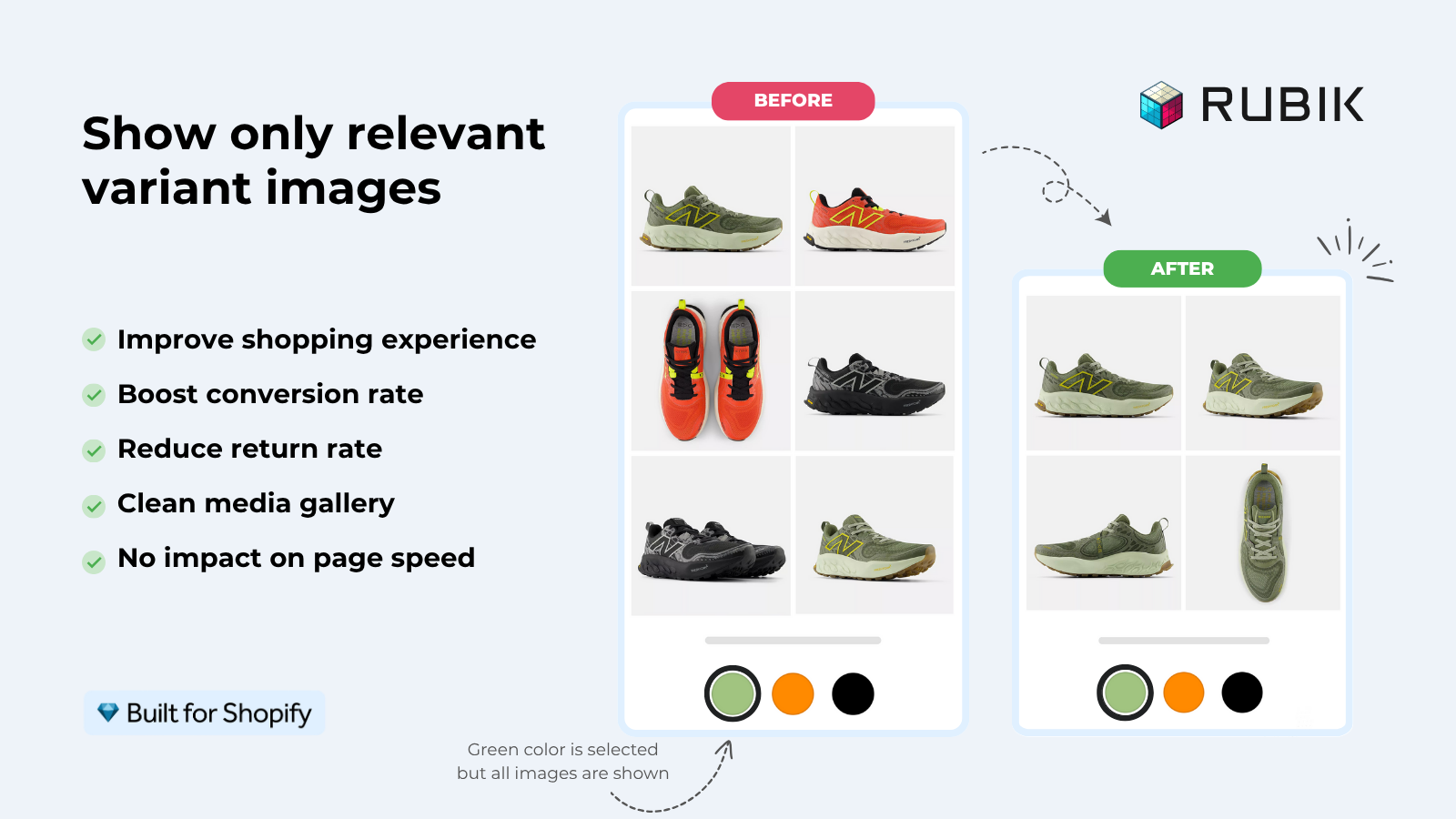
Pricing (flat, not plan-based): Free $0/1 product, Starter $25/month for 100 products, Advanced $50/month for 1,000 products, Premium $75/month for unlimited. Every plan includes monthly AI credits for the AI auto-assign feature. 5.0 rating with 436 reviews.
“Farid and his team were absolutely amazing! We had a very technical requirement for our variant images and weren’t even sure if it was possible. However, Farid was incredibly responsive and even jumped on a Teams call to assist us. He provided helpful tips and worked through the solution with us live, ensuring the product query was fully resolved. It honestly felt like he was part of our team. We would definitely recommend both Farid and the app! Highly impressed!”
lovegrown-diamonds, Hong Kong SAR, 2025 Rubik Variant Images on the Shopify App Store
That review is from a jewelry store, by the way. Not a t-shirt brand. Jewelry merchants tend to have very specific image requirements, and that is exactly the kind of problem Rubik was built to solve. For a deep look at how variant images work for jewelry specifically, read our jewelry variant images guide.
2. Rubik Combined Listings: link metal variations as one product
Rubik Combined Listings groups separate Shopify products together and displays them as if they were variants, with swatches on both collection pages and product pages. For jewelry stores, this solves a very specific catalog problem: each metal finish gets its own product (with its own URL, title, and images for SEO), but customers browse them as a single listing with color swatches.
Think about it this way. You sell the “Luna Ring” in 4 metals. With Shopify’s native variant system, all 4 metals share one product URL and one title. With Combined Listings, each metal is a separate product with its own optimized title (“Luna Ring in 14K Yellow Gold”), its own dedicated images, and its own Google Shopping listing. But on your storefront, customers see swatches and switch between them instantly.
Why is this better for jewelry SEO? Because “yellow gold ring” and “rose gold ring” are completely different search queries. Separate products rank for separate keywords. Shopify variants do not give you that.
The swatches show up on collection pages too. So when someone is browsing your rings collection, they see small metal finish swatches right on the product card. Click “Rose Gold” and the card image switches. No page load. No waiting. This is one of the most common support questions we get from jewelry stores: “can customers see my metal options before clicking into the product?” Yes. That is exactly what this does.
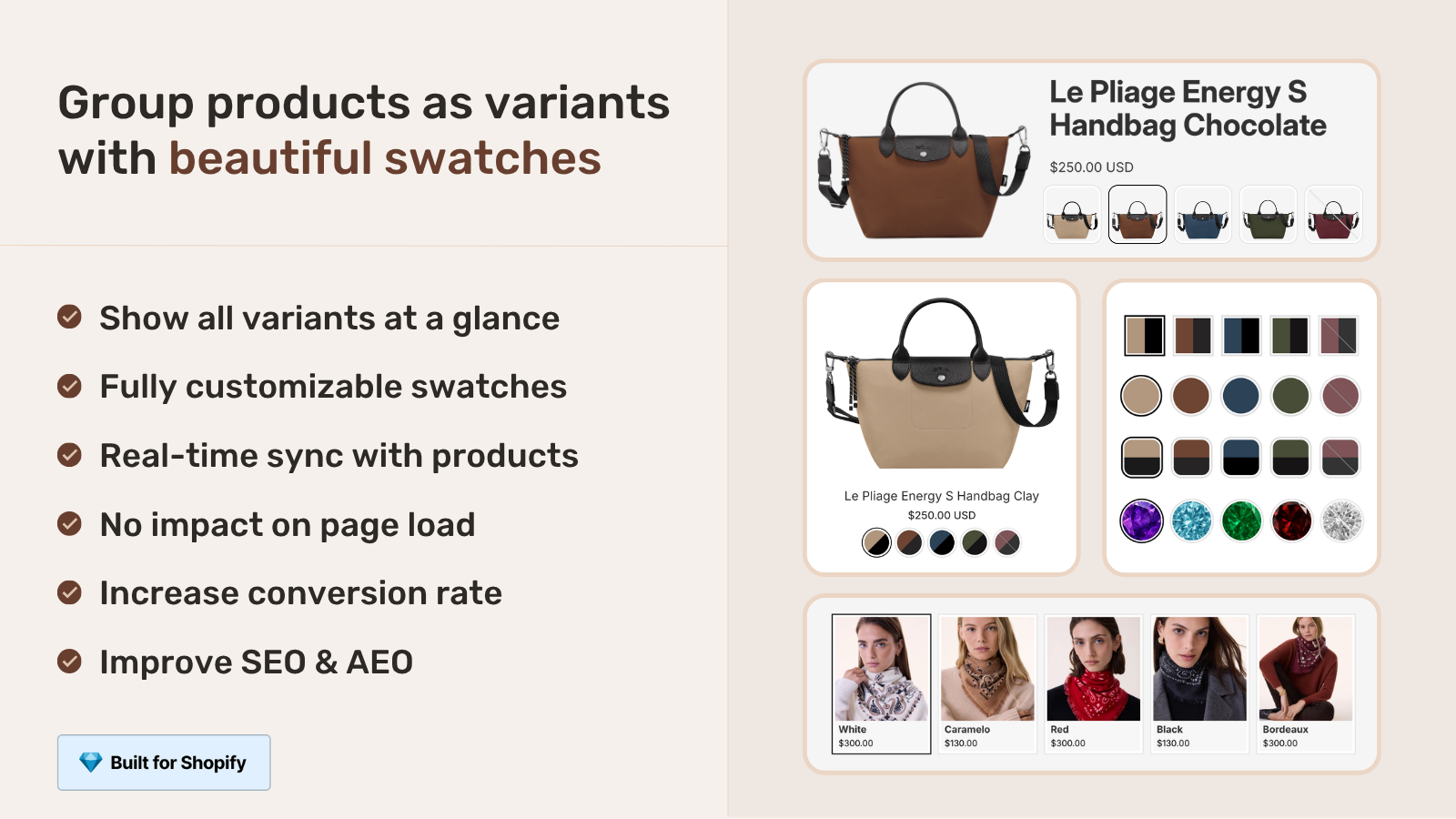
Rubik Combined Listings uses metafield-based rendering with no external API calls. 104 CSS variables for full visual control, 19 built-in style presets, and Shadow DOM isolation so your theme CSS cannot break the swatches. It also integrates with Shopify Translate and Adapt for multilingual stores selling internationally.
Pricing (flat): Free $0/5 groups, Starter $10/month for 100 groups, Advanced $30/month for 500 groups, Premium $50/month for 5,000 groups. Annual billing saves 17%. 5.0 rating with 78+ reviews.
And here is something most merchants miss: you can use both Rubik apps together. Combined Listings handles the product grouping and collection swatches, while Variant Images handles the image filtering on each product page. That combination gives jewelry stores the full experience: swatches on collections, correct images per variant on the product page, and separate URLs for SEO. No Shopify Plus required. Check the Combined Listings demo store to see it in action.
3. Kaching Bundles and Upsells: sell the complete set
Kaching Bundles and Upsells handles bundles, volume discounts, BOGO offers, and free gift promotions. For jewelry, this opens up an entire category of revenue that most stores leave on the table.
Picture a customer who just added a pair of gold earrings to their cart. A “Complete the Set” bundle pops up showing the matching necklace and bracelet at 15% off. That is not aggressive upselling. That is what the customer wanted anyway but did not know you offered as a set. Jewelry is one of the few categories where bundles feel natural to buyers because matching pieces are inherently linked.
The app supports a few angles that work particularly well for jewelry stores:
- “Buy 2 rings, get a pair of earrings free” (BOGO/free gift)
- “Complete the set” bundles with matching necklace, earrings, bracelet
- Volume discounts for fashion jewelry (“3 for $99” on layering necklaces)
- Gift bundles during holiday season
Does bundling actually move the needle? On high-AOV products, absolutely. A 10% bump in AOV on a $300 average order is $30 extra per transaction. Across 100 orders a month, that is $3,000 in additional revenue from an app that starts at $14.99/month. The math is pretty hard to argue with.
Pricing: Starts at $14.99/month, Built for Shopify certified. 5.0 rating with 3,969 reviews.
4. Pandectes GDPR Compliance: stop worrying about EU cookie law
Pandectes GDPR Compliance manages cookie consent banners, Google Consent Mode v2, and TCF (Transparency and Consent Framework) integration. If your jewelry store ships to the EU, which most online jewelry stores do, you need this or something like it.
Why is this on a “best apps for jewelry” list and not a general compliance list? Because jewelry stores disproportionately sell internationally. Fine jewelry attracts buyers from Germany, France, Italy, and the UK. Fashion jewelry brands sell globally through Instagram ads that reach EU customers whether you planned it or not. And GDPR fines are not hypothetical anymore. They are real.
Pandectes handles Google Consent Mode v2 properly, which matters for your Google Ads tracking. Without proper consent mode, your EU conversion data goes dark and your ad campaigns suffer. For a jewelry store running $5K+ per month on Google Shopping (common in this niche), losing conversion tracking means wasting ad spend. That alone justifies the app.
The free plan covers basic consent management. Paid plans add advanced features like geo-targeting (show different banners to different regions) and analytics integration.
Pricing: Free plan available, Built for Shopify certified. 5.0 rating with 2,781 reviews.
5. Jotly Size Chart and Size Guide: ring sizing that prevents returns
Jotly Size Chart and Size Guide creates visual sizing guides for your products. For jewelry, this means ring sizing charts, bracelet circumference guides, necklace length comparison images, and earring scale references.
Sizing is the #1 reason for jewelry returns. Not “it looked different in the photo.” Not “I changed my mind.” Wrong size. A ring that does not fit gets returned 100% of the time, and jewelry returns are expensive because of insurance, shipping costs on high-value items, and the re-inspection process. Every return you prevent by showing a proper sizing guide saves $15-$40 in logistics costs alone.
Jotly lets you build size charts that sit right on the product page where customers make their decision. Not buried in a FAQ page. Not in a separate tab nobody clicks. Right there, next to the variant selector. You can create different charts for rings (US, UK, EU sizing), bracelets (wrist circumference), and necklaces (length on body comparison). That kind of category-specific sizing content also helps with SEO because “ring size chart US to EU” is a real search query that brings in top-of-funnel traffic.
Why is a dedicated size chart app better than just adding an image? Because an image is static. An app lets you build interactive tables, toggle between measurement systems, and conditionally show the right chart per product type. A ring product gets a ring size chart. A necklace product gets a length guide. Automatically.
Pricing: Free plan available, Built for Shopify certified. 5.0 rating with 55 reviews.
6. Instant AI Page Builder: custom pages for hero jewelry pieces
Instant AI Page Builder lets you create custom product pages, landing pages, and collection pages without touching code. For jewelry stores, the default Shopify product page template is often not enough for hero pieces.
Think about a $2,000 diamond ring. Does it deserve the same product page layout as a $20 fashion ring? Obviously not. The hero piece needs a full-width hero image, maybe a 360-degree view section, certification details (GIA, AGS), a craftsmanship story section, and perhaps a comparison with similar pieces. You cannot build that with the standard Shopify product template. You need a page builder.
Instant works well with Rubik Variant Images, by the way (we have tested it). So your custom-designed product page still gets proper variant image filtering. That review from one of our merchants mentioned exactly this setup: “I was about to start adding alt text to every single image, and came across this option that is SO easy and intuitive to use.” They were using Instant for their product page layout and Rubik for the variant images.
The AI features in Instant speed up page creation, but honestly, the real value for jewelry stores is the visual drag-and-drop editor. You can build rich storytelling pages that match the premium feel of your brand. Most jewelry stores invest heavily in product photography. Putting those photos into a default Shopify template with a tiny gallery and a wall of text wastes that investment.
Pricing: Starter $39/month, Built for Shopify certified. 5.0 rating with 297 reviews.
7. STOQ Preorder and Back in Stock: capture demand for made-to-order pieces
STOQ Preorder and Back in Stock adds preorder buttons to out-of-stock products and collects email/SMS alerts for back-in-stock notifications. For jewelry stores, this solves two constant problems: made-to-order items and popular pieces that sell out.
Made-to-order is huge in jewelry. Custom engagement rings, engraved pendants, bespoke pieces with specific stone settings. These items cannot sit in inventory because they do not exist yet. A preorder button lets customers place the order and pay upfront (or with a deposit) while you craft the piece. Without a preorder app, your only option is marking it out of stock and hoping the customer emails you. They will not.
Back-in-stock alerts matter because jewelry has natural scarcity. A limited-edition collection sells out fast. A popular design in a specific size goes to zero inventory. Without alerts, those customers leave and probably buy from someone else. With alerts, you capture their email or phone number and notify them automatically when stock returns. That is not just a conversion tool. It is a list-building tool for future marketing.
STOQ handles both preorders and back-in-stock from one app, which means one less app in your stack. For stores conscious about app bloat and page speed, that consolidation matters.
Pricing: Free plan available, Built for Shopify certified. 5.0 rating with 2,966 reviews.
The complete jewelry store stack
Here is how all 7 apps fit together for a jewelry store:
| App | What it handles | Starting price | Rating |
|---|---|---|---|
| Rubik Variant Images | Product page image filtering per metal/stone | Free (1 product) | 5.0 / 436 reviews |
| Rubik Combined Listings | Group metals as one listing, collection swatches | Free (5 groups) | 5.0 / 78+ reviews |
| Kaching Bundles | Bundles, BOGO, “Complete the Set” offers | $14.99/mo | 5.0 / 3,969 reviews |
| Pandectes GDPR | Cookie consent, Google Consent Mode v2, TCF | Free plan | 5.0 / 2,781 reviews |
| Jotly Size Chart | Ring sizing, bracelet circumference, necklace length | Free plan | 5.0 / 55 reviews |
| Instant Page Builder | Custom PDPs for hero pieces, landing pages | $39/mo | 5.0 / 297 reviews |
| STOQ Preorder | Preorders for made-to-order, back-in-stock alerts | Free plan | 5.0 / 2,966 reviews |
Not every jewelry store needs all 7. A small fashion jewelry brand selling domestically can probably skip Pandectes. A store with no made-to-order pieces might not need STOQ. But the core three (Rubik Variant Images, Rubik Combined Listings, and either Kaching or Jotly depending on your biggest pain point) apply to almost every jewelry store on Shopify.
The key thing is that these apps do not conflict with each other. We have tested Rubik apps alongside Instant, and the combination works. Kaching sits in the cart flow, not on the product page renderer. Pandectes operates at the site level. Jotly adds a widget. STOQ replaces the add-to-cart button conditionally. No overlap, no performance fights.
If you are wondering how variant images and combined listings work for jewelry setups specifically, we wrote an entire variant images guide for jewelry stores and there is a detailed walkthrough on variant image filtering on the Rubik site. For the combined listings side, the Combined Listings explained guide covers the SEO benefits of separate products linked with swatches.
Before installing apps, it is worth running your current product pages through our free Variant Combination Calculator to see if you are hitting Shopify’s variant limits, and use the Contrast Checker to make sure your swatch colors are accessible against your theme background.
See the Variant Images demo store, the Combined Listings demo store, or read the getting started guides at Rubik Variant Images docs and Rubik Combined Listings docs.
Frequently asked questions
Do I need both Rubik Variant Images and Rubik Combined Listings for my jewelry store?
It depends on your catalog structure. If your metal finishes are variants within one product, you only need Rubik Variant Images for image filtering. If each metal is a separate product (which is better for SEO), you need Combined Listings to group them and Variant Images to filter the gallery on each product page. Many jewelry stores use both.
How many Shopify apps should a jewelry store install?
There is no magic number. The concern about too many apps is valid for page speed, but most of the apps on this list either load conditionally (STOQ only on out-of-stock products), operate at the site level (Pandectes), or use lightweight metafield-based rendering (both Rubik apps). The real question is whether each app solves a problem that costs you more than the subscription. For most jewelry stores, 5 to 8 apps is normal.
Can Rubik Variant Images show 3D models and videos per variant for jewelry?
Yes. Rubik Variant Images supports images, videos, and 3D models per variant. So if you have a 360-degree 3D model of your ring in rose gold and a separate one in white gold, each model shows only when the matching variant is selected. This is particularly useful for high-end jewelry where customers want to rotate the piece before buying.
What is the best way to handle ring sizing on Shopify?
Use a dedicated size chart app like Jotly that places the sizing guide right on the product page, next to the size selector. Do not bury it in a FAQ or footer page. Include US, UK, and EU ring size conversions, a printable ring sizer PDF if possible, and a “how to measure” section with instructions. Proper sizing information reduces returns significantly, which matters more for jewelry than almost any other product category because of the high shipping and handling costs.
Are these apps compatible with Shopify OS 2.0 themes?
All 7 apps on this list work with Shopify OS 2.0 themes. Both Rubik apps have been verified across 420+ themes (including Dawn, Horizon, Prestige, Impulse, Impact, and Focal) and 7 major page builders. The other apps are all Built for Shopify certified, which requires OS 2.0 compatibility. If you are running an older vintage theme, check each app’s documentation individually, but at this point in 2026, most jewelry stores have already migrated to OS 2.0.
Related reading

Umid
Co-Founder at Craftshift