Best Shopify apps for stores with 1000+ products (2026)

A 1,200 SKU catalog breaks things you didn’t know were fragile. The CSV export chokes. Bulk edits time out. Swatches render on the first collection page but vanish on page 14. Variant images line up on product 1 and play musical chairs on product 487. That’s not a theme problem and it’s not a Shopify problem. It’s an app stack problem. Most “best Shopify apps” lists are written for stores with 40 products and a feel-good aesthetic, so they fall apart the moment your real catalog walks in.
Before the list: Craftshift builds Rubik Variant Images, Rubik Combined Listings, CS Smart Bulk Image Upload, CS Bulk Delete Products and CS Export Product Images, so we are ranking a category we compete in. Our apps appear below in the position the App Store’s own category ordering puts them, flagged as ours every time, and we say plainly where a rival beats us on review count, age or price. Read this as a roundup from inside the category, not a survey from outside it.
This list is different. Every app here was picked because it survives at scale. Metafield-based loading where it matters, paginated admin where it matters, flat pricing where it matters, and a free tier where you can actually test before signing your soul over. Two of the apps are ours (we built them after running into the exact same walls on merchant stores). The rest are partner apps we’ve seen running side by side with Rubik on real catalogs of 1,000, 5,000, even 50,000 products without screaming.
Six categories matter at this size: variant images, combined listings, bulk image upload, bulk image export, CSV import/export, and structured bulk product editing. Skip any one of them and your team will eat the cost in time. Below is the stack, ranked by the order I’d install them on day one of a 1,000+ SKU project. Before you start, drop your store URL into the free Store Analyzer to see what you’ve already got and where the holes are.
In this guide
- What actually breaks at 1,000+ products
- The 7-question shortlist
- Comparison table
- 1. Rubik (Variant Images + Combined Listings)
- 2. CS Smart Bulk Image Upload
- 3. CS Export Product Images
- 4. CS Bulk Delete Products
- 5. Matrixify (bulk import/export)
- 6. Ablestar Bulk Product Editor
- The order to install them
- FAQ
- Related reading
What actually breaks at 1,000+ products
Four failure modes show up over and over once a catalog crosses about a thousand SKUs. None of them are obvious from the App Store listing.
- The CSV export stalls. Shopify’s native product export pulls fine at 200 products. At 5,000 products with 40 metafield columns it can sit at “preparing” for 15 minutes and silently fail. You stare at the page, refresh, and start over.
- Apps that hit the API at render time slow your storefront. Every product page makes a round trip to the app’s server, adds 500 ms to 1.2 s of latency, and tanks LCP. Multiply by every variant click. The fix is metafield-based apps that load with the page and zero external calls.
- Admin UIs lock up past row 500. Apps that don’t paginate properly will freeze your browser when you scroll their dashboard. You fix one product, the page hangs, you give up.
- Live API calls hit Shopify rate limits during bulk operations. An app that calls the Admin API once per product on a 5,000 product import will hit the rate limit before the first thousand finish. Background-queued, batched apps are the only ones that survive.
And the real kicker. Pick two apps that all do this badly and your storefront becomes a slideshow. The bigger your catalog, the higher the cost of every wrong app pick. So this list optimizes for one thing. Apps that don’t get worse as you grow.
The 7-question shortlist
Before installing anything new, run the candidate through these seven questions. If the answer is no on more than one, pass.
- Does it load from product metafields, not runtime API calls?
- Does the admin paginate cleanly past 500 rows?
- Can it bulk-create or bulk-edit, or is it strictly one product at a time?
- Is the pricing flat, or does it scale with your Shopify plan?
- Is there a free tier (or full free trial) so you can test on real data?
- Built for Shopify badge, or just published on the store?
- Has the app shipped a meaningful update in the last 90 days?
That last one matters more than review count. A 4.6 with 2,000 reviews and a 2023 changelog is a worse bet than a 5.0 with 300 reviews shipping every week. Review counts are lagging indicators. Look at the changelog and the support response time, not the star total.
Comparison table
| App | Category | 1,000+ SKU friendly? | Pricing model | Built for Shopify |
|---|---|---|---|---|
| Rubik Variant Images + RCL | Variant images, swatches, combined listings | Yes (metafield-based, paginated admin, bulk grouping) | Flat, free tier | Yes |
| CS Smart Bulk Image Upload | Bulk image upload from Google Drive or Dropbox, matched by SKU, barcode, title or metafield | Yes (background queue, no API rate limits) | Free tier + paid | Yes |
| CS Export Product Images | Bulk media export to ZIP: images, videos, 3D models, Content > Files | Yes (filter by collection, vendor, tag) | Free tier + paid | Yes |
| CS Bulk Delete Products | Filtered bulk delete with redirects | Yes (preview, soft delete, scheduled) | Free tier + paid | Yes |
| Matrixify | CSV / Excel import + export | Yes (async, handles huge files) | Tier-based, from $20/mo | Yes |
| Ablestar Bulk Product Editor | Spreadsheet bulk editing, metafields, scheduled edits | Yes (full undo, dry-run preview) | Tier-based, free tier | Yes |
1. Rubik (Variant Images + Combined Listings)
Rubik is two apps that we built specifically because every existing variant and grouping app fell over at scale. Rubik Variant Images handles product page filtering and swatches. Rubik Combined Listings handles separate-product grouping and collection page swatches. They’re built by Craftshift in the Netherlands, both Built for Shopify, both 5.0 rated. Together they cover the two core display problems large catalogs hit on day one: which images show on the product page, and which variants show on the collection page.
Why they hold up at 1,000+ products. Everything is metafield-based, so adding 1,000 more products doesn’t add 1,000 more network requests at render time. The admin uses virtual scrolling and pagination, so dashboards stay snappy at 5,000 groups. Bulk Grouping (RCL) creates groups across your catalog in one pass using title patterns, product tags, or shared metafields, so you don’t manually create 800 groups by hand. AI Magic Fill finishes the job: it scans each product image plus title plus sibling titles, then fills empty option values and swatch hex colors. Manual data entry on a 2,000 product catalog is a multi-week task. Magic Fill collapses it to an afternoon.
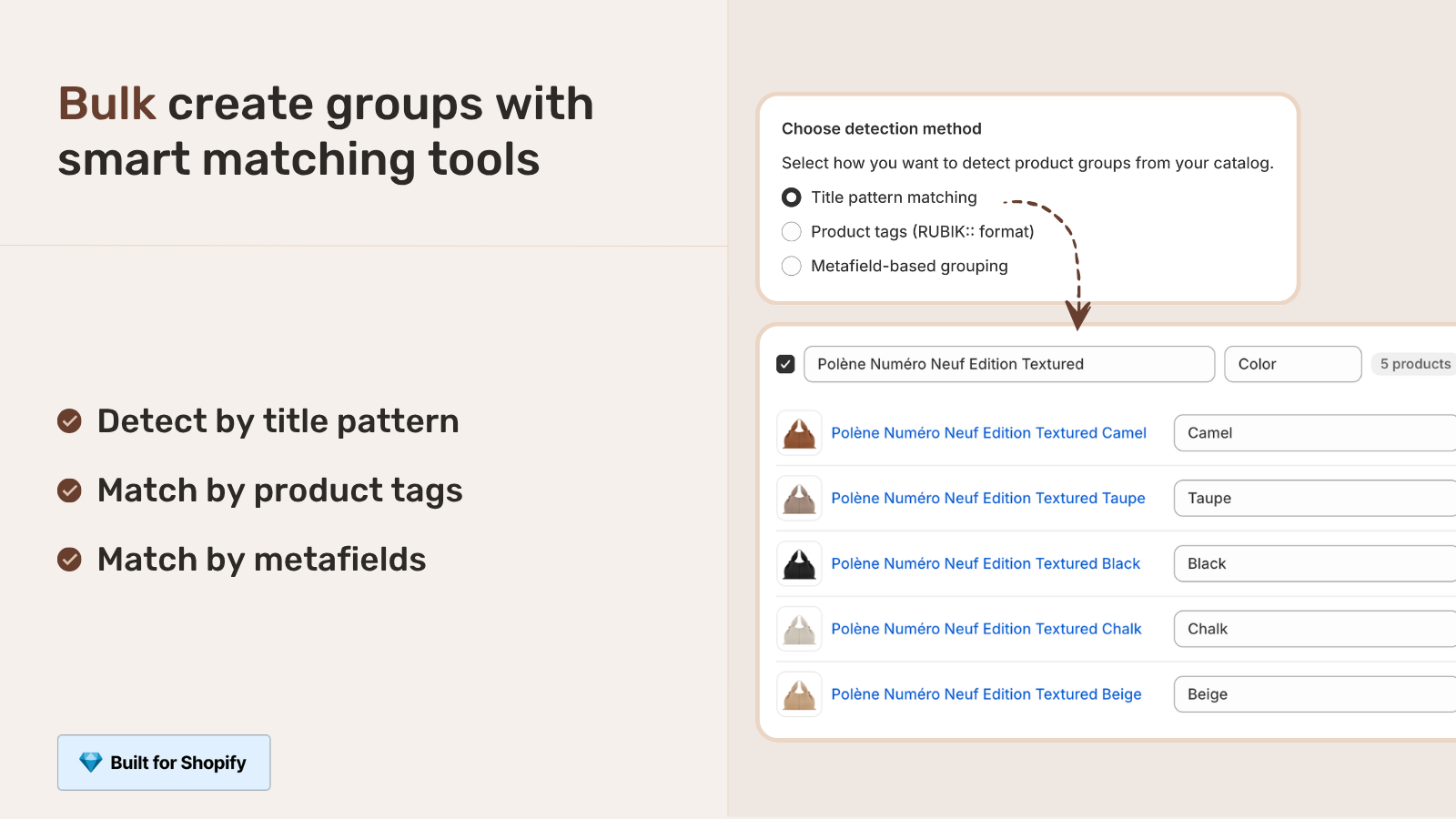
Pricing is flat, not Shopify-plan-based. RVI runs Free $0 (1 product), Starter $25 (100 products), Advanced $50 (1,000 products), Premium $75 (unlimited). RCL runs Free $0 (5 groups), Starter $10 (100 groups), Advanced $30 (500 groups), Premium $50 (5,000 groups). Annual billing on RCL saves 17%. No “+ $30 if you’re on Shopify Plus” surcharges. No feature gating: every plan ships the full feature set, only the count limits move. That matters at scale, because the apps that scale price with your Shopify plan can quietly double your monthly app cost the moment you upgrade.
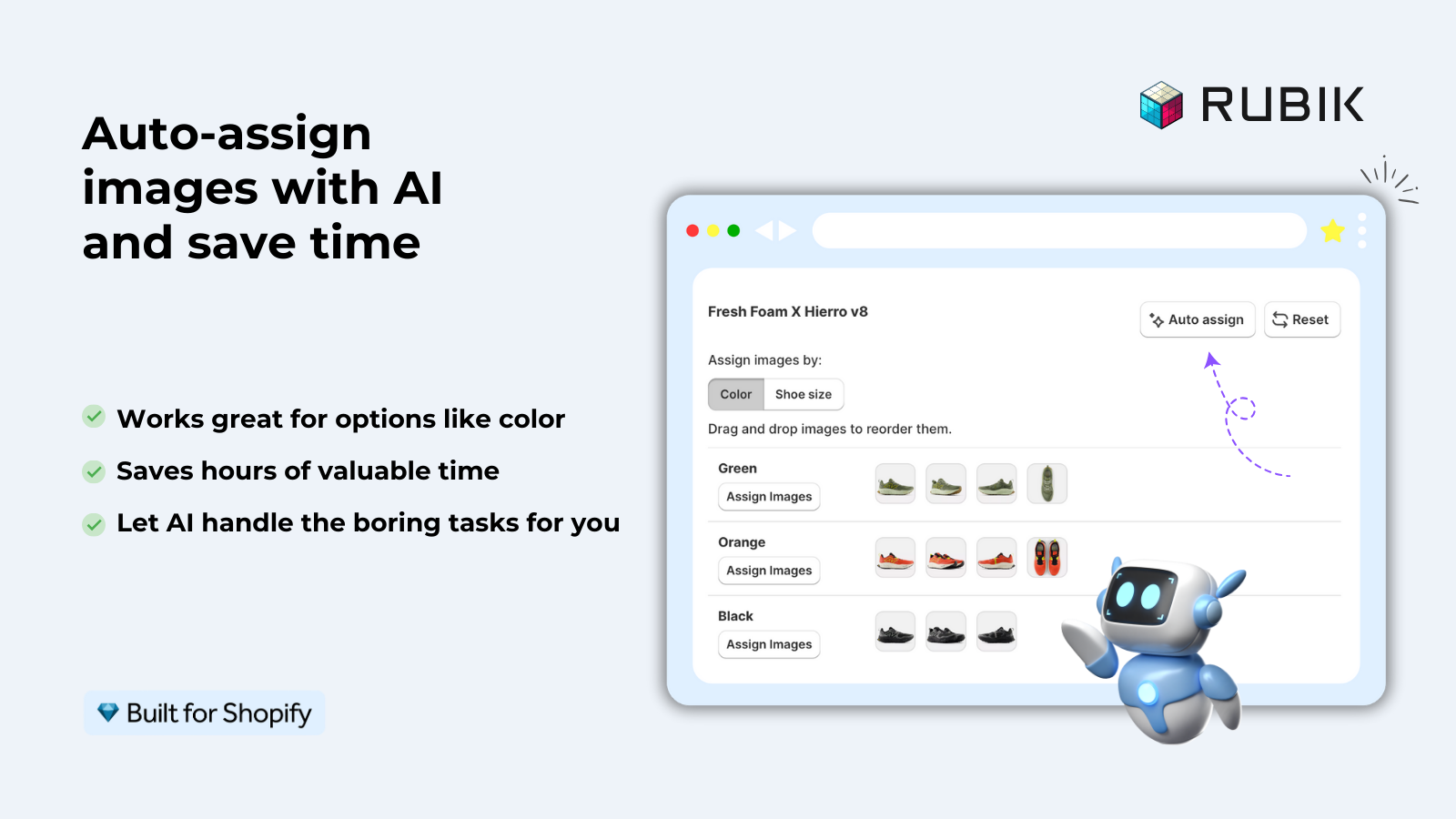
Theme support is broad. 350+ themes verified, including Dawn, Horizon, Prestige, Impulse, Impact, Focal, Atelier, Sense, Craft. Page builders: Beae, EComposer, Foxify, GemPages, Instant, PageFly, Replo. Both apps render in shadow DOM so theme CSS can’t bleed in and break things, which becomes a real concern when your catalog spans multiple section templates and a dozen alt layouts.
For deeper RVI guidance, the Rubik Variant Images FAQ covers theme installs, fix flows, and edge cases. For combined listings strategy at scale, the RCL bulk grouping guide walks through title-pattern, tag, and metafield grouping on a real catalog. Want to see them live? See the RVI demo store and the RCL demo store, or read the RVI getting-started guide and the RCL getting-started guide.
“I use Rubik Combined Listings Along with Rubik Swatch. I went through, no exaggerating, 50 apps before I found what I needed. Theses guys are the real deal, and they will jump on chat and fix your problems ASAP. Definately reccomend.”
Parks Nerd, US, March 2026, Rubik Combined Listings on the Shopify App Store
2. CS Smart Bulk Image Upload
If you have a 1,000 product catalog with images sitting in Google Drive, Dropbox, or a folder on your laptop, the Shopify admin gives you exactly one option: drag-drop images into each product, one at a time. That’s hours per hundred products. CS Smart Bulk Image Upload closes that hole. It connects to Google Drive or Dropbox and matches each image to the right product or variant by SKU, barcode, product title, or metafield, and pushes the lot into Shopify in the background. No CSV jujitsu. No naming a public URL for every file.
What makes it survive a real catalog. The matching engine handles SKU patterns inside filenames, not just exact filenames. Variant-level matching works (color and size combinations, sub-SKUs, partial matches). The processing runs in a background queue, not a single API call, so a 9,000 image upload doesn’t choke on Shopify rate limits. There’s a free tier so you can run a 50 image test before you commit. And there is no intermediate server to pay for: images go straight to your Shopify CDN.
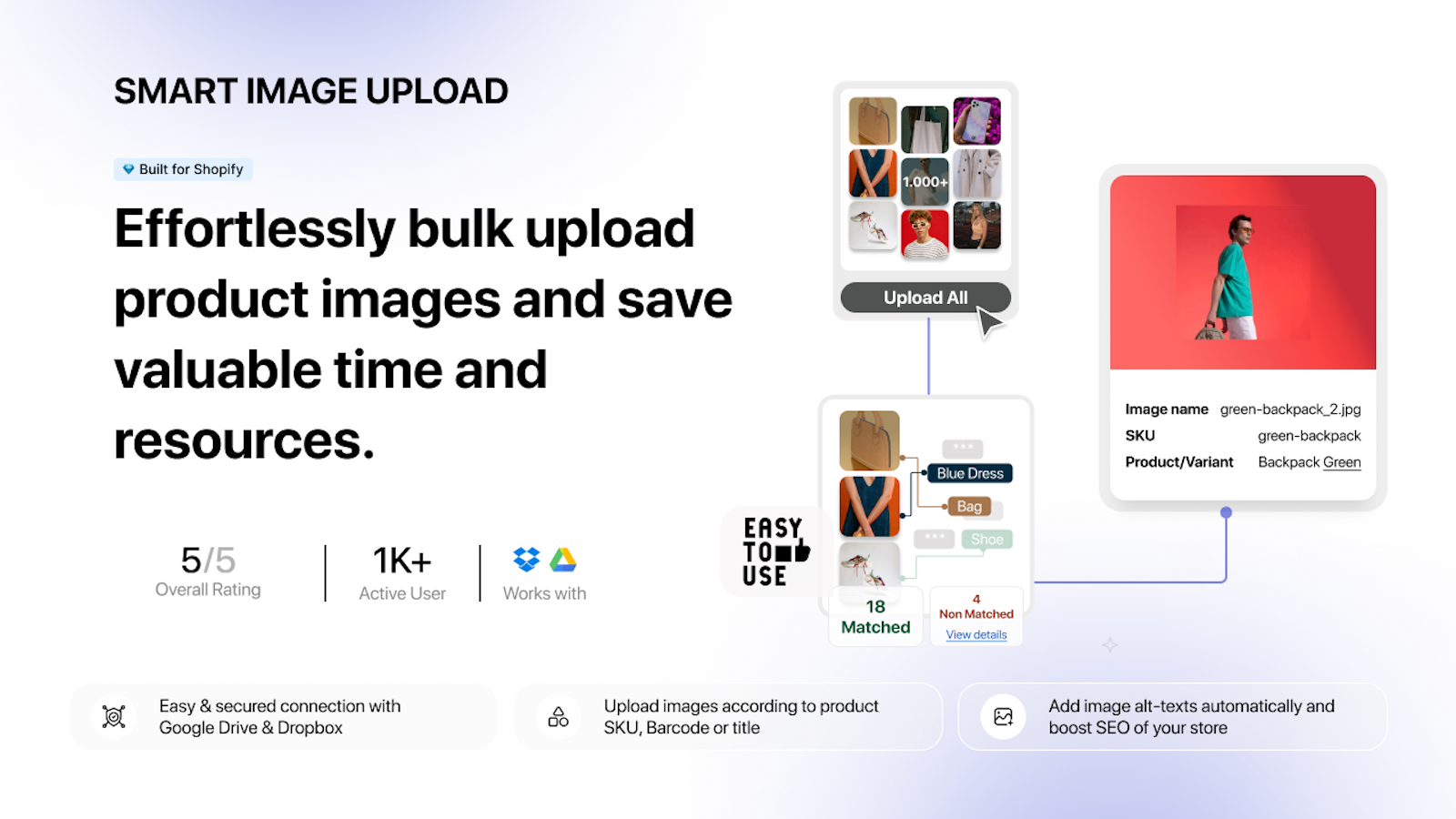
“Smart Bulk Image Upload worked perfectly for us. We successfully matched and uploaded over 7,000 images, saving an enormous amount of time and manual effort, as we prepare for going live with our store. The app performed exactly as expected, and the developer’s communication was excellent throughout. We’re very pleased with both the app and the support. Highly recommended.”
Onatru, US, January 2026, CS Smart Bulk Image Upload on the Shopify App Store
Filenames will fight you. SKU formats with spaces, special characters, leading zeros that Excel ate, files named “IMG_4421_FINAL_v3 (1).jpg”. Run filenames through our free Bulk Image Renamer first, then upload. Without a clean filename pattern no app can do automatic matching, ours included.
3. CS Export Product Images
The flip side of bulk upload is bulk export, and Shopify has no native answer here. The platform lets you download a single product’s images one click at a time, or maybe wrestle a CSV with image URLs that you’d then have to fetch yourself with a script. CS Export Product Images packages every product image, variant image, or just main images, into a single ZIP, with the filenames you actually want. SEO-friendly renames during export. Folder-per-product structure. Filter by collection, vendor, or tag. CSV with image metadata. Back up the lot, ship it to a new store, hand it off to a designer.
As of September 2026 it covers more than photos, which matters at this catalog size. Tick the file types and product videos and 3D models export in the same job as the original uploaded files. A separate Content > Files export pulls the Files library too: images, videos, models and generic files such as PDFs, filtered by whether each file is used on products, used by metaobjects, or used nowhere at all. On a 1,000-product store that last filter usually surfaces a few gigabytes nobody knew were there.
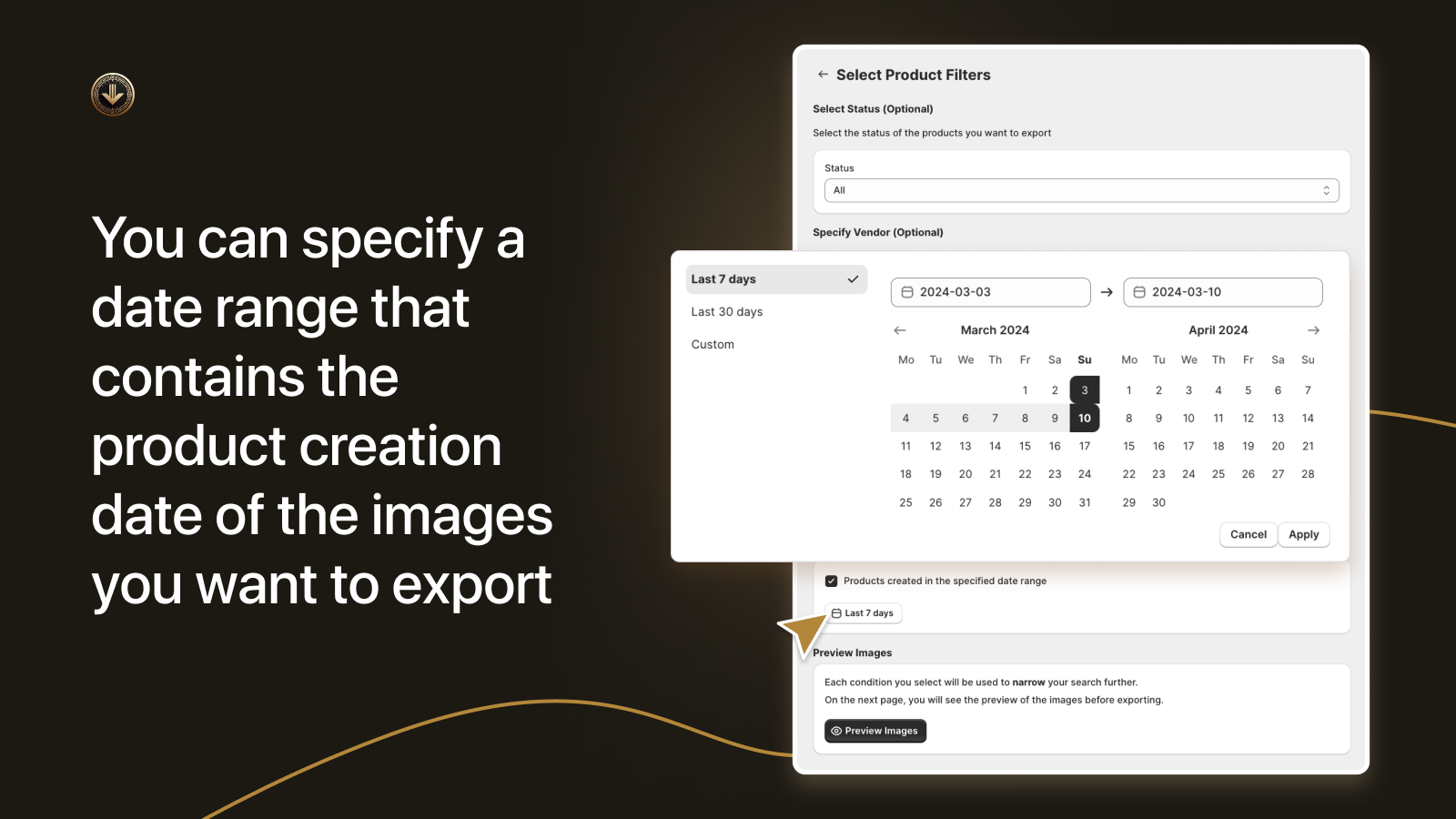
Pairs naturally with Smart Bulk Image Upload for a full round-trip workflow: export, edit images outside Shopify (compress, watermark, resize, swap photographers), re-upload by SKU. We’ve seen merchants run this loop quarterly to refresh seasonal imagery without touching the product records.
“Fantastically powerful app. Enabled us to quickly export all the product and variant images for lots of products that would have been prohibitively time consuming to do manually. Who knows how many errors we would have made if we did it manually. After manipulating the images I was then able to use the equally powerful Smart Image Upload from the same authors to quickly replaced all the images.”
Capital Badges, UK, October 2024, CS Export Product Images on the Shopify App Store
For a deeper dive into export workflows, see our guide on exporting Shopify product images at scale and the best Shopify export image apps for 2026 roundup.
4. CS Bulk Delete Products
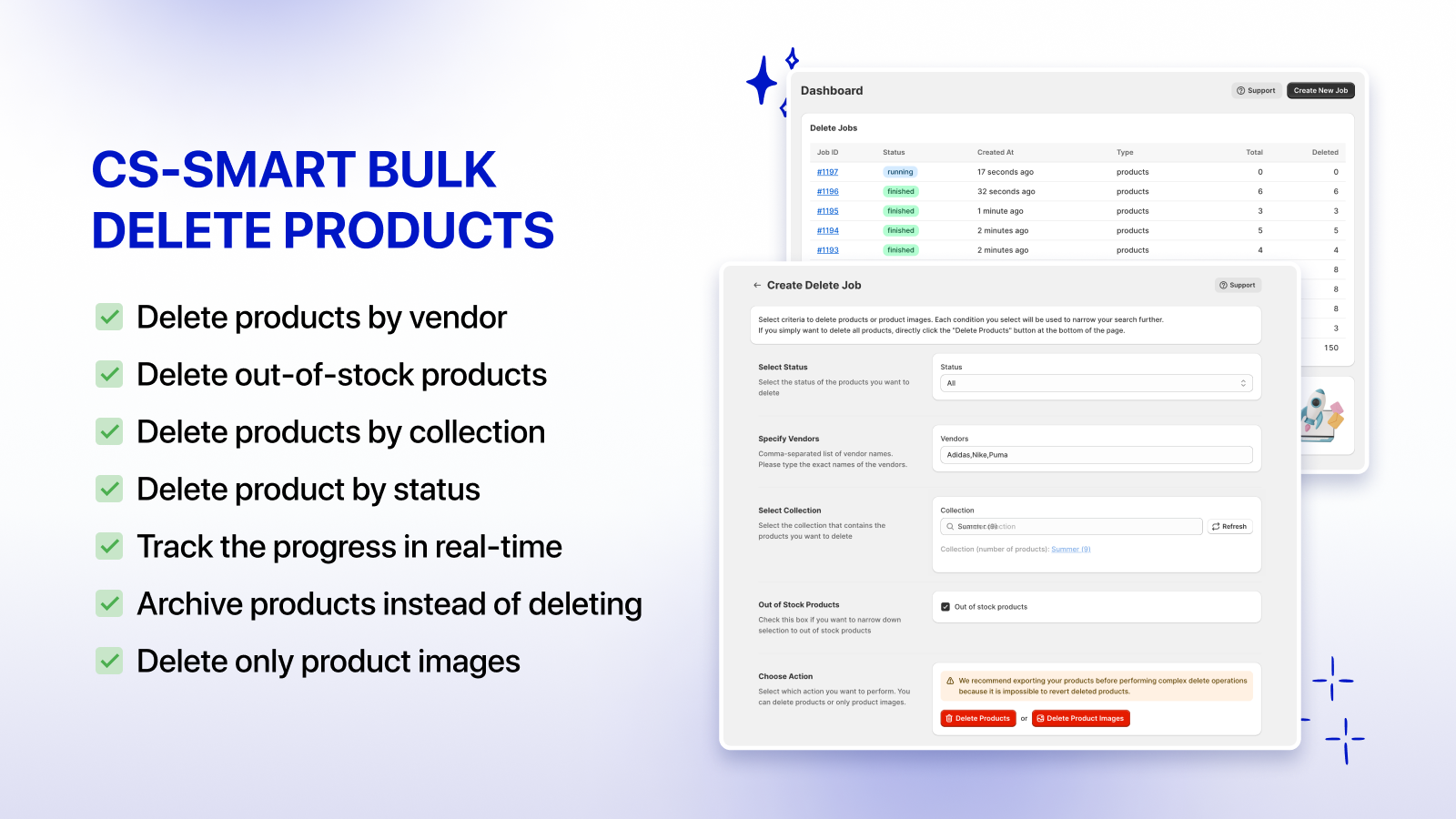
Large catalogs are not just an upload problem. They’re a deletion problem. Seasonal SKUs that need to disappear after Christmas. 6,000 zombie products from a discontinued vendor. The 800 unsold “test” products somebody created in 2022 and never cleaned up. Shopify’s native bulk action caps out and doesn’t let you preview, undo, or filter beyond basic vendor and status. CS Bulk Delete Products filters by collection, vendor, tag, date, inventory level, sales count, even custom metafield value. Preview before delete. Soft delete (archive or draft) for a reversible cleanup, or hard delete with a 301 redirect generated for SEO.
That redirect bit matters more than people think. If a product page ranked for anything organic, deleting it without a redirect is throwing away link equity and triggering 404s on Google’s index. Inside the same app you set the redirect target (a category, a replacement product, the homepage), and the 301s get pushed into Shopify’s redirect table. No spreadsheet, no missed URLs, no traffic dip a quarter later when somebody finally checks Search Console.
“This is just brilliant, I have over 12000 products and have been working on each for over a week, and came across your app, thank you, I have now redone the whole lot in under an afternoon…”
Body And Soul, UK, August 2025, CS Bulk Delete Products on the Shopify App Store
Pair with our free Redirect CSV Generator if you want to handcraft a few hundred redirects on top of the auto-generated ones during a major catalog purge.
5. Matrixify (bulk import/export)
For everything that isn’t images (products, variants, metafields, customers, orders, draft orders, transactions, smart collections), Matrixify is the long-running answer for serious catalogs. Tier-based pricing starting at $20/mo, async processing on huge files, partial updates on selected fields only. Export 5,000 products with 40 metafield columns to Excel in one shot. Edit in a spreadsheet. Re-import with only the changed columns. The async queue means no API rate limit failures even when you push 50,000 rows.
Two free helpers cut down on import failures. Our Product CSV Generator hands you a perfectly-formatted Shopify product CSV from a spreadsheet, and our CSV Validator catches the small typos that kill imports (wrong column headers, mismatched handles, broken weight units) before you upload. Together they save an afternoon of “why did 47 products fail to import” detective work.
6. Ablestar Bulk Product Editor
For structured bulk edits inside the Shopify admin (without leaving for a CSV), Ablestar Bulk Product Editor is the strongest pick at scale. 4.9 rating across 777 reviews. Built for Shopify. Spreadsheet-style editing inside the admin, with full undo, dry-run preview, scheduled edits, and proper metafield support including reference fields and JSON metafields. The undo is the killer feature: if you push a price change across 1,200 products and somebody flagged the wrong filter, you roll back in one click. Try doing that with the native bulk editor.
Use cases that come up at 1,000+ SKUs: appending a structured tag like RUBIK::set-2::color::Olive to 400 products at once for combined listings grouping, updating alt text on 2,000 images for image SEO, scheduling a sale price across a vendor for a 48-hour flash, recalculating compare-at-price as a fixed percentage above cost. Anything that the native editor either can’t do or makes you do one screen at a time.
For our full breakdown see the Ablestar Bulk Product Editor review. Pair it with our Bulk Price Editor tool for a sanity check before pushing a price change live.
The order to install them
Day 1, get the storefront looking right. Install Rubik Variant Images and Rubik Combined Listings. Bulk-group the catalog with title-pattern detection, run AI Magic Fill to fill option values and swatch colors, and verify the product page filters and collection swatches on three sample products from three different categories.
Day 2, fix the imagery. Install CS Smart Bulk Image Upload, point it at your Drive or Dropbox folder, match by SKU. Install CS Export Product Images so you can pull a clean ZIP of your current state as a backup before you start replacing files. Day 3, install Matrixify and Ablestar so the team has the right CSV and admin-level tools. Day 4, only when you have a real cleanup to do, install CS Bulk Delete Products, build the filter, preview, and run.
And before you tip a single dollar into ads, run the storefront through our free Product Page Grader. Most large catalog conversion problems are not “we need more apps”. They’re a missing alt tag, a 4 MB hero image, a swatch that doesn’t change the gallery. Audit first.
FAQ
What’s the best Shopify app for a 1,000+ product store?
If you only install one, install Rubik Variant Images. It solves the most visible problem (variants showing the wrong photos) on the page customers actually convert on. Add Rubik Combined Listings if you have separate-product color or size siblings, then layer Smart Bulk Image Upload, Export Product Images, Matrixify, and Ablestar in that order. The combination covers display, image ops, CSV ops, and structured admin edits.
Do apps slow down Shopify when you have many products?
They can, badly. Apps that make external API calls at render time add 500 ms to 1.2 s of latency per call, and that scales linearly with product count. Apps that read from product metafields don’t, because the data is already on the page. Run your storefront through the free App Detector to see which installed apps are loading external scripts.
Can I run combined listings without Shopify Plus?
Yes. Rubik Combined Listings works on Basic, Shopify, and Advanced plans for a flat $0 to $50 per month. Shopify’s native combined listings feature is Plus-only ($2,300+/mo), and is the lowest-rated app in the category for customization.
How many variants does Shopify allow per product?
Up to 2,048 variants per product as of 2025, but only on Plus and only with combined listings enabled. Most catalogs should not get anywhere near that ceiling. Run your option set through our free Variant Combination Calculator to see if you’re approaching the limit, and read our 2,048 variant limit guide for the full picture.
Does Rubik work with large catalogs?
Yes. Both apps are metafield-based, paginated, and tested on catalogs up to 50,000 products. Bulk Grouping in RCL processes a 5,000 product catalog in one pass.
Is Matrixify worth it for 1,000+ products?
Yes. At that scale Shopify’s native CSV export becomes unreliable, and Matrixify’s async processing handles tens of thousands of rows without rate limit failures. Pair with our free CSV Validator to catch import errors before they happen.
What pricing model should I look for?
Flat pricing beats Shopify-plan-based pricing. Some apps charge a surcharge of $5 to $30 per month the moment you upgrade to Grow, Advanced, or Plus, even though the feature set hasn’t changed. Rubik, CS apps, and Ablestar are flat. Read the pricing tab carefully before you install.
Should I pick the app with the most reviews?
No. Review count is a lagging indicator. A 4.6 with 2,000 reviews and a 2023 changelog is a worse bet than a 5.0 with 300 reviews shipping every week. Look at the changelog tab and the median support response time. Shipping velocity is the real signal.
Related reading
- Managing 2,048 variants per product on Shopify
- Bulk variant images via CSV
- How to audit your Shopify app stack
- Bulk image upload best practices for large catalogs
- How to choose Shopify apps without slowing your store
- Bulk grouping on Rubikify
- Variant picker setup on RVI
Picking apps off review count alone is lazy and it punishes the smaller, faster-moving apps that are the right answer for a 1,000+ catalog. A 4.6 from 2023 with no recent updates is not the same product as a 5.0 from 2026 shipping AI Magic Fill last month. Look at the changelog. Look at the support response time. Look at how the app actually behaves on a Tuesday at 3pm with 5,000 products and a hot launch. The lagging indicators don’t tell you that. Reading the room does.

Umid
Co-Founder at Craftshift