GLO Color Swatch alternative: 5 Shopify apps to consider in 2026
Short answer: Shopify gives each variant a single featured image, so the gallery never narrows to the option a shopper picked. Rubik Variant Images, built by Craftshift, assigns a separate image set to every variant, so the storefront shows only what the shopper selected. Free to install, 5.0 stars across 436 reviews.
You’re hunting for a GLO Color Swatch alternative. Maybe the bundle features feel bolted on. Maybe the swatch styling didn’t match your theme. Maybe you wanted something that does variant images and swatches as the primary job, not as a side feature next to product bundles. Whatever the reason, the App Store gives you 30 results that all look identical, and most of the “best of” lists are filler.
This post cuts the noise. Five real Shopify apps that compete with GLO Color Swatch and Bundles on the swatch and variant image jobs, with pricing, ratings, theme support, and the one or two features that actually matter when you decide. No fake apps, no padding to hit a number.
For full transparency: Rubik Variant Images is built by the team behind this blog. We rank it first because the data backs the call (5.0 rating, 436 reviews, Built for Shopify). Every other app on the list is a real, currently-listed Shopify app you can install today. All numbers come from the App Store as of April 2026.
In this post
- Why merchants look for a GLO Color Swatch alternative
- The five alternatives, ranked
- 1. Rubik Variant Images
- 2. Easy Variant Images
- 3. Variant Image Wizard + Swatch
- 4. StarApps Variant Image Automator
- 5. NS Color Swatch Variant Images
- Side-by-side comparison table
- Migration: moving off GLO cleanly
- Which one should you pick?
- Frequently asked questions
- Related reading
Why merchants look for a GLO Color Swatch alternative
GLO Color Swatch and Bundles (by Globo, 4.9 stars across 1,665 reviews) is the largest installed app in the variant swatch category. By install count, nothing comes close. It does swatches, it does variant images, and it bundles products. Plenty of stores have run it for years without complaint.
The most common reasons merchants we talk to consider a switch:
- Bundles are a side feature. Half the codebase exists for product bundles you might not need. If you only want variant images and swatches, you’re carrying weight you don’t use.
- Combined Listings only on Gold ($19.90/mo+). If you also want to group separate products with collection-page swatches, you end up paying for the bundle features just to get that piece.
- Not Built for Shopify certified. Some stores treat the BFS badge as a quality bar. GLO doesn’t carry it.
- No AI auto-assign. You map images to variants manually, or rely on bulk upload patterns. For 200+ product catalogs with 8 colors each, that’s a real time cost.
- Swatch styling depth varies by theme. Some merchants find the rendering looks cleaner on certain themes than others. If catalog weight is a concern, run your product pages through the free Image Audit Tool to see whether your gallery is bloated before paying for a heavier app.
If GLO is working for you, stay. The 1,665 reviews are real. But if any of those points hit, the next five apps are worth a look.
The five alternatives, ranked
- Rubik Variant Images by Craftshift. 5.0, 436 reviews. Best overall: AI auto-assign + Shadow DOM swatches + flat pricing.
- Easy Variant Images by SpiceGems. 5.0, 77 reviews. Cleanest gallery-order workflow.
- Variant Image Wizard + Swatch by ProductWiz Inc. 4.7, 213 reviews. Mature product, step-by-step setup wizard.
- StarApps Variant Image Automator. 4.8, 673 reviews. Veteran since 2017.
- NS Color Swatch Variant Images by NestScale. 4.5, 137 reviews. Versatile swatch types, decent collection page support.
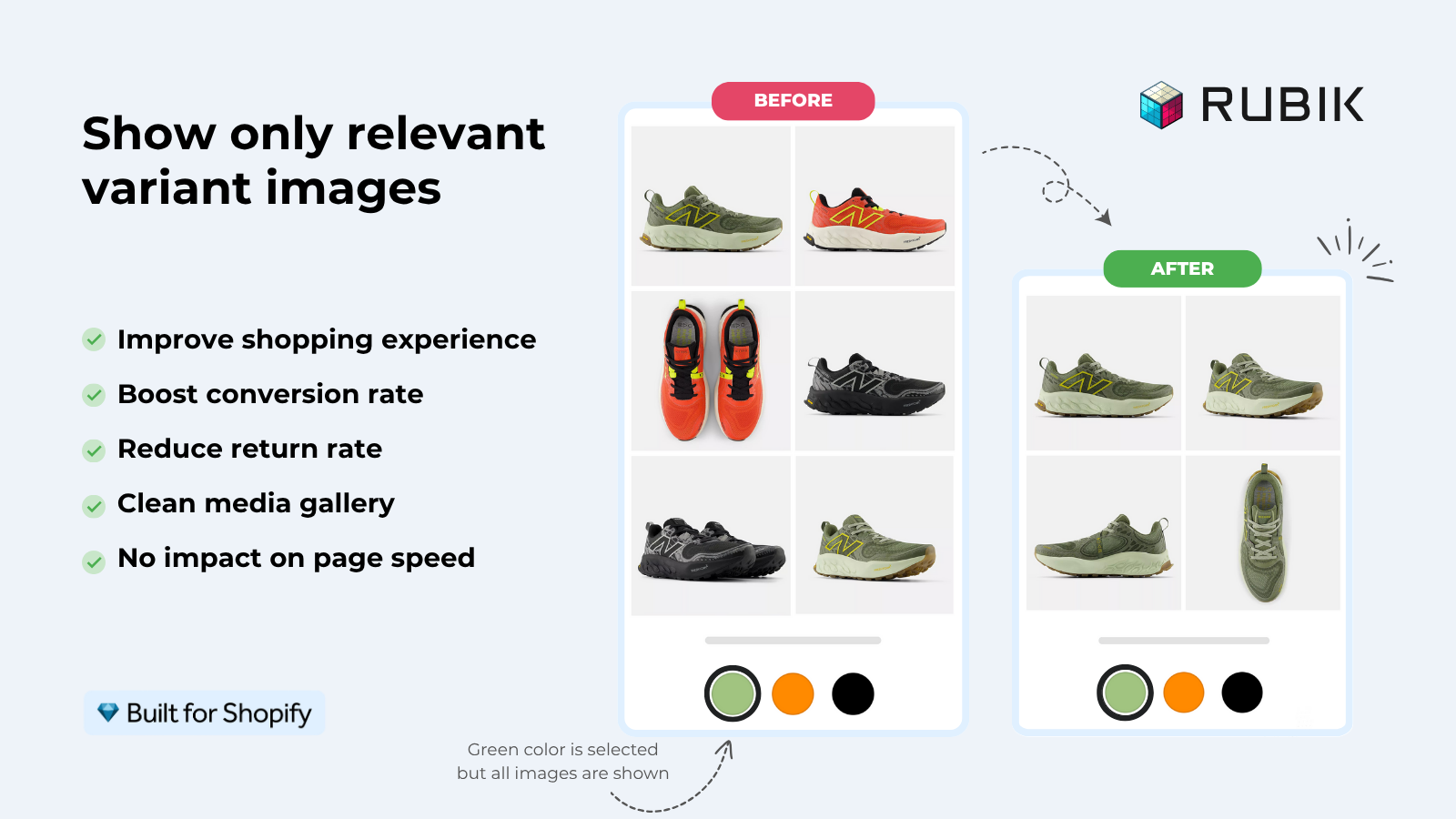
1. Rubik Variant Images
Built for Shopify certified, launched October 2024, currently 5.0 across 436 reviews. The fastest review velocity in the variant image and swatch category right now. Variant images and swatches are the primary job, not a side feature.
- AI auto-assign. One click reads the product title, variant option values, image filename, alt text, and the image content via vision API. Per-product, fast on catalogs under 1,000 SKUs.
- Bulk assign by gallery order. If your image upload order matches the variant order, Rubik reads the order and assigns hundreds of products in the background. No AI credits used, no manual mapping.
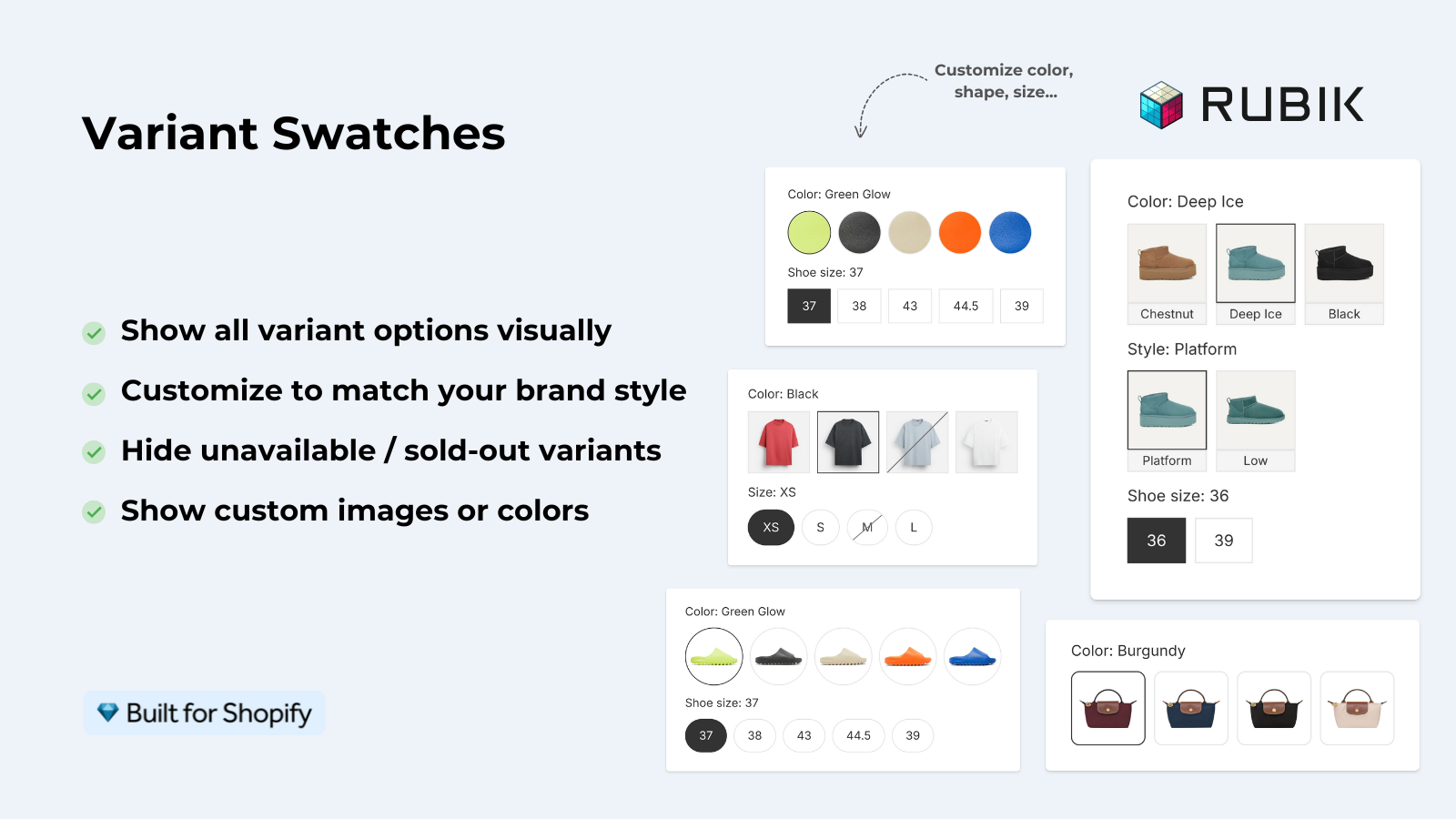
- Shadow DOM swatch rendering. CSS isolation means theme styles don’t leak in, app styles don’t leak out. Theme updates don’t break the swatch.
- 350+ themes, 7 page builders. Beae, EComposer, Foxify, GemPages, Instant, PageFly, Replo. Shogun is not supported.
- Mix swatch types per option. Color circles for Color, pill buttons for Size, image swatches for Pattern. All on one product.
- Free plan. 1 product, no time limit, no card.
Pricing. Free $0 (1 product), Starter $25/mo (100), Advanced $50/mo (1,000), Premium $75/mo (unlimited). Flat pricing, not Shopify-plan-based, so a Plus store pays the same as a Basic store. No bundle add-ons, no surprise gating.
Where it beats GLO. AI assignment, swatch isolation, focused scope (variant images + swatches only, no bundles), and Built for Shopify certification. For collection-page swatches and product grouping, pair Rubik with Rubik Combined Listings instead of paying for GLO’s Gold tier.
Where GLO might still win. If you genuinely need product bundles in the same app, GLO is the right call. Bundles are a real feature with a real audience. Rubik doesn’t do bundles.
“Hands Down the best customer support of all the variation/swatch apps I have used till date. The app does everything. From individual variant gallery to really detailed customizable swatch’s. All in a single app. Originally we used to use two different apps so this is so much more cost efficient for us.”
Bellissima Covers, India, Rubik Variant Images on the Shopify App Store
2. Easy Variant Images
SpiceGems’ app, 5.0 across 77 reviews. Smaller install base than GLO, but tightly focused on one job: read your existing gallery order and group images by variant.
- Auto-grouping by gallery order. No manual mapping needed if your photos are already organized.
- Supports videos and 3D models per variant.
- Uses your theme’s existing gallery layout. No custom carousel injected, native theme design preserved.
- 30-day free trial, then paid. No permanent free plan.
Where it beats GLO. Lighter footprint, no bundle features cluttering the admin, native gallery preservation. If you don’t need swatch styling control and your images are already in clean variant order, Easy is the simplest path.
Where it falls short vs Rubik. No AI assignment, no in-house swatch component (relies on theme), no permanent free plan.
3. Variant Image Wizard + Swatch
ProductWiz Inc.’s app, 4.7 across 213 reviews. The other long-running competitor in this space.
- Step-by-step setup wizard for first-time configuration.
- Bulk edit tool for managing many products at once.
- Can link separate products as swatches (light combined-listings behavior).
- Free plan available.
Where it beats GLO. Variant images is the primary job, not a side feature next to bundles. The setup wizard is friendly for first-timers.
Where it falls short. No AI features, swatch styling looks dated on modern themes, theme update fragility. We covered the full breakdown in our Variant Image Wizard alternative post.
4. StarApps Variant Image Automator
The veteran. Built by StarApps Studio in 2017, 4.8 stars, 673 reviews. Battle-tested, not flashy.
- Image-order automatic grouping, similar to Easy.
- Native theme gallery preservation.
- Supports images, videos, and 3D models.
- Free 30-day trial.
Where it beats GLO. Track record. Six years means most edge cases are solved. Many enterprise stores still run it. No bundle bloat.
Where it falls short. Feels old. Admin UI hasn’t kept pace. No AI features. Some stores migrate off citing perceived page speed issues.
“Great app. was using StarApps Variant Image Automator and this Rubik app is so much better. filters instantly, whereas other apps were creating glitches on load. admin is SO nice to use for organizing images.”
Anonymous merchant, February 2026, Rubik Variant Images on the Shopify App Store
5. NS Color Swatch Variant Images
NestScale’s offering, 4.9 across 137 reviews. Wider feature surface than the others.
- Multiple swatch types: color, image, dropdown, button.
- Works on collection pages in addition to product pages.
- Can group separate products as variants, similar to a basic combined listings setup.
- Lower starting price ($7.99/mo Growth tier).
Where it beats GLO. The collection page feature is genuinely useful. More swatch types out of the box. No bundles taking up admin space.
Where it falls short. Not Built for Shopify. No AI features. Some collection-page features gated to Professional tier ($14.99/mo).
Side-by-side comparison table
| App | Rating | Reviews | BFS | Free plan | AI assign | Bundles | Combined Listings |
|---|---|---|---|---|---|---|---|
| Rubik Variant Images (ours) | 5.0 | 350 | Yes | 1 product | Yes | No | Sister app |
| GLO Color Swatch and Bundles | 4.9 | 1,742 | No | 1 group | No | Yes | Gold plan only |
| Easy Variant Images | 5.0 | 77 | Yes | 30-day trial | No | No | No |
| Variant Image Wizard | 4.7 | 213 | Yes | Limited | No | No | Light |
| StarApps Variant Image Automator | 4.8 | 578 | No | 30-day trial | No | No | No |
| NS Color Swatch Variant Images | 4.9 | 161 | No | Free tier | No | No | Light (Pro plan) |
Migration: moving off GLO cleanly
Switching swatch apps mid-catalog is fiddly. The safe path:
- Don’t uninstall GLO yet. Install Rubik (or another alternative) on a duplicate test product first. Confirm the swatches render correctly on your theme.
- Run AI auto-assign or bulk assign on the test product. If the photos land on the right variants, scale up. If not, contact support before bulk-running anything.
- Disable GLO’s swatch UI on a test theme copy, not your live theme. Some apps inject Liquid; you don’t want two swatch widgets fighting on the same product.
- If you used GLO’s bundles feature, decide whether you’ll move bundles to a dedicated bundles app or drop them entirely. Don’t forget this step or your existing bundle setups will break.
- Promote the test theme to live when the new swatch is rendering correctly across desktop and mobile.
- Wait 48 hours before uninstalling GLO. Make sure no orphan widgets are left in your theme files. If you find any, support can clean them up.
If you want a structural review of your variant catalog before migrating, the free Variant Combination Calculator flags products at risk of hitting the 100-variant ceiling. Run your store through it first if your option counts are climbing.
Which one should you pick?
- If you want AI auto-assign + modern swatch UI: Rubik Variant Images.
- If your gallery is already in clean variant order and you want a lightweight tool: Easy Variant Images.
- If you want a guided setup experience: Variant Image Wizard.
- If you want a battle-tested veteran: StarApps Variant Image Automator.
- If you also need light collection page swatches in the same app: NS Color Swatch.
- If you genuinely also need product bundles: stay on GLO. Don’t add a second app you don’t need.
For most apparel, accessories, and home goods stores, the choice comes down to Rubik or Easy. Rubik wins on AI, Shadow DOM rendering, and BFS certification. Easy wins on simplicity if you don’t need swatch styling depth.
For a deeper read on how these apps compare on raw page speed and theme compatibility, see our 2026 roundup of the best Shopify variant image apps. And for the question of how a swatch differs from an actual variant image switcher (most stores get this wrong), we wrote a primer.
If your colours live as separate products rather than variants of one product, Rubik Combined Listings groups them into a single listing with swatches instead. Free to install, 5.0 stars across 78 reviews.
Quick next steps
See the live demo store to click through Rubik’s swatch experience in three styles, watch the tutorial video, or read the getting started guide.
Frequently asked questions
Which Shopify app should I use for glo color swatch alternative?
Rubik Variant Images, built by Craftshift, is the app we build for this. It holds 5.0 stars across 436 reviews and carries the Built for Shopify badge. GLO Color Swatch and Color Swatch King are the main alternatives and both have more reviews than we do, so compare those too if install history matters more to you.
Is GLO Color Swatch a bad app?
No. GLO has 1,665 reviews and a 4.9 rating, the largest install base in the variant swatch category. The reasons merchants hunt for an alternative usually come down to bundle features they don’t need, Combined Listings being gated to the Gold tier, or wanting an app that does swatches and variant images as the primary job rather than alongside bundles.
What is the closest GLO Color Swatch alternative?
Functionally, Rubik Variant Images is the closest if you want variant image filtering plus swatches without bundles. For collection-page swatches and product grouping (the GLO Gold tier feature), pair Rubik with Rubik Combined Listings. The total cost is usually lower than the GLO Gold plan.
Will switching from GLO lose my swatch configuration?
Your Shopify product images stay where they are. Swatch apps store the variant-to-image mapping and swatch settings in metafields or app data, not in the product itself. When you switch, the new app reads your gallery and you reassign images and reconfigure swatch styles. Your photo library and variant data are untouched.
Is there a free GLO Color Swatch alternative?
Rubik Variant Images has a permanent free plan for 1 product. Easy Variant Images runs a 30-day free trial. Variant Image Wizard has a limited free plan. The comparison table earlier in this post lists the free options for each app side by side.
Can I run GLO and another swatch app together?
You can install both, but you should not run both swatch widgets on the same product page. They will conflict, sometimes silently. If you’re testing an alternative before fully migrating, configure the new app on a small set of test products and disable GLO’s swatch on those products specifically.
Does Rubik Variant Images do bundles like GLO?
No. Rubik Variant Images focuses on variant image filtering and product page swatches. If you also want bundles, GLO is the right call to keep them in one app. Otherwise, swap GLO for a focused swatch app and a focused bundle app, which is usually cleaner.
How long does migration from GLO take?
For a small store (under 50 products), about an afternoon. For a 500-product catalog, a day with AI auto-assign or two days with manual mapping. The bulk-assign-by-gallery-order workflow can finish hundreds of products in the background while you do other work, so calendar time is much shorter than active working time.
Related reading

Umid
Co-Founder at Craftshift